On This Page
Payments Developer Guide
This section describes how to use this guide and where to find further
information.
- Audience and Purpose
- This guide is written for application developers who want to use theREST APIto integrate payment card processing into an order management system.Implementing theCybersourcepayment services requires software development skills. You must write code that uses the API request and response fields to integrate the payment card services into your existing order management system.
- Conventions
- These statements appear in this document:IMPORTANTAnImportantstatement contains information essential to successfully completing a task or learning a concept.WARNINGAWarningcontains information or instructions, which, if not heeded, can result in a security risk, irreversible loss of data, or significant cost in time or revenue or both.
- Related Documentation
- Visit theCybersourcedocumentation hub to find additional processor-specific versions of this guide and additional technical documentation.
- Customer Support
- For support information about any service, visit the Support Center:
Recent Revisions to This Document
26.09.01
- Transaction Timeout Guidance
- Added guidance for transaction timeouts. See Transaction Timeout Guidance.
- Fast Refund
- Added support for fast refunds. See Refund and Fast Refunds.
26.06.01
- Account Name Inquiry
- Updated the feature forVisa Platform Connect. See Account Name Inquiry with a Zero Amount Authorization.
26.05.01
This revision contains only
editorial changes and no technical updates.
26.04.01
Added related reference information (Related to this Page) to applicable topics.
Added Void a Payment.
26.02.01
- Test Cards
- Added Jaywan test card numbers. See Test Card Numbers.
- Account Name Inquiry
- Added this feature to zero amount authorizations. See Account Verification with a Zero Amount Authorization.
- Pre-Authorization
- Added an important note about using strong customer authentication. See Pre-Authorization.
- Updated required fields and examples. See Required Fields for a Pre-Authorization.
- Incremental Authorization
- Updated the description, list of required fields, and examples. See Incremental Authorization.
- Partial Authorization Reversal
- Added partial authorization reversals. See Partial Authorization Reversal.
- Airline Data Processing
- Removed content that is available in theAirline Data Processing Developer Guide. SeeCybersourceDocumentation hub.
- Level II and Level III
- Removed content that is available inLevel II and Level III Processing. SeeLevel II and Level III Processing.
- Credentialed Transactions
- Removed content that is available in theCredentialed Transactions Developer Guide. SeeCybersourceDocumentation hub.
- Token Management Service
- Removed content that is available in the. SeeToken Management ServiceDeveloper Guide.Token Management ServiceDeveloper Guide
26.01.02
This revision contains only editorial changes and no technical
updates.
26.01.01
- Jaywan Card
- Added support for Jaywan cards. See Card Types.
- Credit Authorizations
- Added information about specific card types. See Follow-On Refund and Stand-Alone Credit.
- Card Present Connect | Retail Processing
- Removed content that is available inCard Present Connect | Retail Integration Guide.
- Card Present Connect | Mass Transit Processing
- Removed content that is available inCard Present Connect | Mass Transit Developer Guide.
Visa Platform Connect: Specifications and Conditions for
Resellers/Partners
The following are specifications and conditions that apply to a Reseller/Partner enabling
its merchants through
Cybersource for
. Failure to meet any of the specifications and conditions below is
subject to the liability provisions and indemnification obligations under
Reseller/Partner’s contract with Visa/Cybersource.Visa Platform Connect
(“VPC”)
processing- Before boarding merchants for payment processing on a VPC acquirer’s connection, Reseller/Partner and the VPC acquirer must have a contract or other legal agreement that permits Reseller/Partner to enable its merchants to process payments with the acquirer through the dedicated VPC connection and/or traditional connection with such VPC acquirer.
- Reseller/Partner is responsible for boarding and enabling its merchants in accordance with the terms of the contract or other legal agreement with the relevant VPC acquirer.
- Reseller/Partner acknowledges and agrees that all considerations and fees associated with chargebacks, interchange downgrades, settlement issues, funding delays, and other processing related activities are strictly between Reseller and the relevant VPC acquirer.
- Reseller/Partner acknowledges and agrees that the relevant VPC acquirer is responsible for payment processing issues, including but not limited to, transaction declines by network/issuer, decline rates, and interchange qualification, as may be agreed to or outlined in the contract or other legal agreement between Reseller/Partner and such VPC acquirer.
DISCLAIMER: NEITHER VISA NOR CYBERSOURCE WILL BE RESPONSIBLE OR LIABLE FOR ANY ERRORS OR
OMISSIONS BY THE
Visa Platform Connect
ACQUIRER IN PROCESSING TRANSACTIONS. NEITHER VISA
NOR CYBERSOURCE WILL BE RESPONSIBLE OR LIABLE FOR RESELLER/PARTNER BOARDING MERCHANTS OR
ENABLING MERCHANT PROCESSING IN VIOLATION OF THE TERMS AND CONDITIONS IMPOSED BY THE
RELEVANT Visa Platform Connect
ACQUIRER. Introduction to Payments
This introduction provides the basic information that you need to successfully
process payment transactions. It also provides an overview of the payments industry
and provides workflows for each process.
With
Cybersource
payment services, you can process payment cards
(tokenized or non-tokenized), digital payments such as Apple Pay and Google Pay, and
customer ID transactions. You can process payments across the globe and across
multiple channels with scalability and security. Cybersource
supports a large number of payment cards and offers a wide choice of gateways and
financial institutions, all through one connection.Visit the
Cybersource
documentation hub to find additional processor-specific versions
of this guide and additional technical documentation.Financial Institutions and Payment Networks
Financial institutions and payment networks enable payment services to function. These
entities work together to complete the full payment cycle.
Merchant Financial Institutions (Acquirers)
A merchant financial institution, also known as an
acquirer
, offers accounts to
businesses that accept payments. Before you can accept payments, you must have a merchant
account from an acquirer. Your merchant account must be configured to process card-not-present
or mail-order/telephone-order (MOTO) transactions.Each acquirer has connections to a limited number of payment processors. You
must choose a payment processor that your acquirer supports.
You can expect to pay these fees:
- Discount rates: your acquirer charges a fee and collects a percentage of every transaction. The combination of the fee and the percentage is called thediscount rate. These charges can bebundled(combined into a single charge) orunbundled(charged separately).
- Interchange fees: payment networks, such as Visa or Mastercard, each have a base fee, called theinterchange fee, for each type of transaction. Your acquirer and processor can show you ways to reduce this fee.
- Chargebacks: when cardholders dispute charges, you can incurchargebacks. A chargeback occurs when a charge on a customer’s account is reversed. Your acquirer removes the money from your account and could charge you a fee for processing the chargeback.
Take these precautions to prevent chargebacks:
- Use accurate merchant descriptors so that customers can recognize the transactions on their statements.
- Provide good customer support.
- Ensure rapid problem resolution.
- Maintain a high level of customer satisfaction.
- Minimize fraudulent transactions.
If excessive chargebacks or fraudulent changes occur, these actions might be taken:
- You might be required to change your business processes to reduce the number chargebacks, fraud, or both.
- Your acquiring institution might increase your discount rate.
- Your acquiring institution might revoke your merchant account.
Contact your sales representative for information about products that can help prevent
fraud.
Customer Financial Institutions (Issuers)
A customer financial institution, also known as an
issuer
, provides payment cards to
and underwrites lines of credit for their customers. The issuer provides monthly statements
and collects payments. The issuer must follow the rules of the payment card companies to which
they belong. Payment Networks
Payment networks manage communications between acquirers and issuing banks. They also develop
industry standards, support their brands, and establish fees for acquiring institutions.
Some payment networks, such as Visa and Mastercard, are trade associations that do not issue
cards. Issuers are members of these associations, and they issue cards under license from the
association.
Other networks, such as Discover
and American Express
, issue their own cards. Before you process cards from these
companies, you must sign agreements with them.Payment Processors
Payment processors connect with acquirers. Before you can accept payments, you must
register with
a payment processor
. An acquirer might
require you to use a payment processor with an existing relationship with the
acquirer.
Your payment processor
assigns one or more merchant ID to your business.
These unique codes identify your business during payment transactions.This table lists the processors and corresponding card types that are supported for
payment services.
IMPORTANT
Only the card types explicitly listed here are
supported.
Payment Processor | Supported Card Types | Notes |
|---|---|---|
Visa Platform Connect | Different card types are supported for
each Visa Platform Connect acquirer. See Visa Platform Connect Acquirers. | The Visa Electron card type is
processed the same way that the Visa debit card is processed. Use
card type value 001 (Visa) for Visa Electron.
|
Visa Platform Connect Acquirers
Visa Platform Connect
AcquirersThe following acquirers and card types are supported for
Visa Platform Connect
:Raw Processor Name | Processor Name | Supported Card Types |
|---|---|---|
vdcabsa | Absa Bank on Visa Platform Connect | Visa, Mastercard, JCB, Diners Club |
vdcagbkchina | Agricultural Bank of China (ABC) on
Visa Platform Connect | Visa, Mastercard, American Express, JCB, Diners Club IMPORTANT
Visa Platform Connect cannot process
domestic transactions in China. Visa Platform Connect can
process only cross-border transactions. A crossborder
transaction is a transaction for which the payment card is
issued in another country and accepted by a merchant in
China. |
networkintluae | Ahli United Bank in Bahrain, BLOM Bank,
Network International | Visa, Mastercard, JCB, Diners Club |
vdcaaib | Arab African International Bank (AAIB) on
Visa Platform Connect | Visa, Mastercard, JCB |
vdcacbvietnam | Asia Commercial Bank (ACB) on Visa Platform Connect | Visa, Mastercard, JCB |
vdcasb | Auckland Savings Bank (ASB) on Visa Platform Connect | Visa, Mastercard |
vdcanzbank | Australia and New Zealand Banking Group
Ltd. (ANZ) on Visa Platform Connect | Visa, Mastercard |
vdcaxis | Axis Bank Ltd. of India on Visa Platform Connect | Visa, Mastercard, Diners Club |
vdcbanamex | Banco Nacional de México (Banamex) on
Visa Platform Connect | Visa, Mastercard, American Express, Discover, JCB, Diners Club |
vdcbcosafrabr | Banco Safra on Visa Platform Connect | Visa, Mastercard, American Express |
vdcbbl | Bangkok Bank Ltd. on Visa Platform Connect | Visa, Mastercard, JCB |
vdcbankmuscat | Bank Muscat of Oman on Visa Platform Connect | Visa, Mastercard, American Express, Diners Club |
vdcbay | Bank of Ayudhya (BAY) on Visa Platform Connect | Visa, Mastercard, JCB |
vdcbocmacau | Bank of China in Macau on Visa Platform Connect | Visa, Mastercard |
vdcbocom | Bank of Communications on Visa Platform Connect | Visa, Mastercard |
vdcbksinarmasid | Bank Sinarmas (Omise Ltd.) on Visa Platform Connect | Visa, Mastercard |
vdcbcellao | Banque Pour Le Commerce Exterieur Lao
(BCEL) on Visa Platform Connect | Visa, Mastercard, American Express, JCB |
vdcbarclaysbw | Barclays Bank Botswana on Visa Platform Connect | Visa, Mastercard, American Express |
vdcbarclaysmu | Barclays Bank Mauritius Ltd. on Visa Platform Connect | Visa, Mastercard, American Express |
vdcbarclaysghtzug | Barclays Bank of Ghana Ltd., Barclays Bank
of Tanzania Ltd., and Barclays Bank of Uganda Ltd. on Visa Platform Connect | Visa, Mastercard, American Express |
vdcbarclayske | Barclays Bank of Kenya on Visa Platform Connect | Visa, Mastercard, American Express |
vdcbarclayszm | Barclays Bank of Zambia on Visa Platform Connect | Visa, Mastercard, American Express |
vdcbarclayssc | Barclays Bank Seychelles on Visa Platform Connect | Visa, Mastercard, American Express |
vdcbccardkr | BC Card Co., Ltd. on Visa Platform Connect | Visa, Mastercard, American Express, JCB |
vdccubtw | Cathay United Bank (CUB) on Visa Platform Connect | Visa, Mastercard, JCB |
vdccitihkmo | Citibank Hongkong and Macau on Visa Platform Connect | Visa, Mastercard, Diners Club, JCB |
vdccitimy | Citibank Malaysia on Visa Platform Connect | Visa, Mastercard |
vdccitisg | Citibank Singapore Ltd. on Visa Platform Connect | Visa, Mastercard, JCB |
vdccbq | Commercial Bank of Qatar on Visa Platform Connect | Visa, Mastercard, American Express, JCB, Diners Club |
vdccredimax | CrediMax (Bahrain) on Visa Platform Connect | Visa, Mastercard, American Express, JCB, Diners Club |
vdcctbc | CTBC Bank Ltd. on Visa Platform Connect | Visa, Mastercard, JCB |
vdcfdmsbn | First Data Merchant Solutions in Brunei on
Visa Platform Connect | Visa, Mastercard, JCB |
vdcfdmshk | First Data Merchant Solutions in Hong Kong
on Visa Platform Connect | Visa, Mastercard, JCB |
vdcfdmsmy | First Data Merchant Solutions in Malaysia
on Visa Platform Connect | Visa, Mastercard, JCB |
vdcfdmssg | First Data Merchant Solutions in Singapore
on Visa Platform Connect | Visa, Mastercard, JCB |
vdcfnb | FirstRand Bank on Visa Platform Connect | Visa, Mastercard, American Express, Diners Club |
vdchsbcbank | Global Payments Asia Pacific on Visa Platform Connect | Visa, Mastercard, JCB IMPORTANT
In India, the only supported card types are Visa and Mastercard.
All three card types (Visa, Mastercard, JCB) are supported in
all other countries that Global Payments Asia Pacific
covers. |
vdchabibltd | Habib Bank Ltd. (HBL) on Visa Platform Connect | Visa, Mastercard, American Express, JCB, Diners Club |
vdchdfc | HDFC Bank Ltd. of India on Visa Platform Connect | Visa, Mastercard, Diners Club |
vdcimbank | I&M Bank on Visa Platform Connect | Visa, Mastercard |
vdcicici | ICICI of India on Visa Platform Connect | Visa, Mastercard |
vdckeb | Korea Exchange Bank (KEB) on Visa Platform Connect | Visa, Mastercard, JCB IMPORTANT
Visa Platform Connect cannot process domestic transactions in
Korea. Visa Platform Connect can process only cross-border
transactions. A crossborder transaction is a transaction for
which the payment card is issued in another country and accepted
by a merchant in Korea. |
vdcmashreqbk | Mashreq on Visa Platform Connect | Visa, Mastercard, American Express, JCB, Diners Club |
vdcmaybankmy | Maybank on Visa Platform Connect | Visa, Mastercard, American Express, JCB |
vdcnbad | National Bank of Abu Dhabi (NBAD) on
Visa Platform Connect | Visa, Mastercard, JCB, Diners Club |
vdcnbk | National Bank of Kuwait (NBK) on Visa Platform Connect | Visa, Mastercard, Diners Club |
vdcnacombk | National Commercial Bank on Visa Platform Connect | Visa, Mastercard, mada |
vdcnijo | Network International (NI) Jordan on
Visa Platform Connect | Visa, Mastercard, American Express, JCB, Diners Club |
vdcocbc | Overseas Chinese Banking Corp (OCBC) on
Visa Platform Connect | Visa, Mastercard |
vdcpromerica | Promerica in Honduras and Nicaragua on
Visa Platform Connect | Visa, Mastercard |
vdcbni | PT Bank Negara Indonesia on Visa Platform Connect | Visa, Mastercard |
vdcqnbqa | Qatar National Bank (QNB Group) on Visa Platform Connect | Visa, Mastercard, American Express, JCB, Diners Club |
vdcsacomb | Sacombank on Visa Platform Connect | Visa, Mastercard, JCB |
vdcsmcc | Sumitomo Mitsui Card Co. on Visa Platform Connect | Visa |
vdctaishintw | Taishin Bank Ltd. on Visa Platform Connect | Visa, Mastercard, American Express, JCB |
vdcuob | United Overseas Bank (UOB) in Singapore and
Vietnam on Visa Platform Connect | Visa, Mastercard, JCB |
vdcuobth | United Overseas Bank (UOB) in Thailand on
Visa Platform Connect | Visa, Mastercard |
vdcvantiv | Vantiv on Visa Platform Connect | Visa, Mastercard, American Express, Discover, JCB, Diners
Club |
vdcvietcombk | Vietcombank on Visa Platform Connect | Visa, Mastercard, American Express, JCB, Diners Club |
vdcvietin | VietinBank on Visa Platform Connect | Visa, Mastercard, JCB, Diners Club |
vdctechcomvn | Vietnam Technological and Commercial Joint
Stock Bank (Techcombank) on Visa Platform Connect | Visa, Mastercard, American Express, JCB, Diners Club |
vdcguatemala | Visa Guatemala on Visa Platform Connect | Visa |
vdcvisanetuy | VisaNet Uruguay on Visa Platform Connect | Visa |
vdcwestpac | Westpac on Visa Platform Connect | Visa, Mastercard |
vdcwhb | Wing Hang Bank on Visa Platform Connect | Visa, Mastercard |
vdcwinglung | Wing Lung Bank on Visa Platform Connect | Visa, Mastercard |
Card Types
You can process payments with these kinds of cards:
- Co-badged cards
- Co-branded cards
- Credit cards
- Debit cards
- Prepaid cards
- Private label cards
- Quasi-cash
You can process payments with these card types:
- American Express
- China UnionPay
- Diners Club
- Discover
- Jaywan
- JCB
- Mastercard
- Meeza (Pilot in Egypt only)
- PayPak
- Visa
For a list of supported card types, see Payment Processors.
Co-Badged Cards
Co-badged cards are credit and debit cards that integrate two or more payment networks.
mada Co-Badged Cards
mada is Saudi Arabia's domestic payment network.
These mada co-badged debit cards are supported:
- Visa and mada
- Mastercard and mada
mada co-badged debit cards are processed as follows:
- Only domestic processing is supported in Saudi Arabia.
- Transactions are sent directly to the Saudi Arabia Monetary Authority (SAMA) for processing.
- Payer authentication is supported. Visa Secure is supported for co-badged Visa and mada cards. Mastercard Identity Check is supported for co-badged Mastercard and mada cards.
- For acquirers, the card type is identified as MD.
- In reports, the card type is identified as either Visa or Mastercard.
- Dual-message processing is not supported. Only single-message processing is supported.
Co-Branded Cards
Co-branded cards are credit cards that are branded with a merchant's logo, brand, or other identifier as well as the payment network logo. These cards are not limited for use at the branded merchant and can be used at any merchant that accepts credit cards.
Credit Cards
Cardholders use credit cards to borrow money from issuing banks to pay for goods and services offered by merchants that accept credit cards.
Debit Cards
A debit card is linked to a cardholder's bank account. The funds are taken out of
the customer's bank account, and the transaction is included on the customer's bank account
statement. The customer does not receive a credit card bill as with a regular credit
card.
Prepaid Cards
Prepaid cards enable cardholders to pay for goods and services using money stored directly on
the card.
Private Label Cards
Private label cards are issued by private companies. They enable cardholders to borrow money
to pay for goods exclusively at the issuing company’s stores.
Quasi-Cash
Quasi-cash transactions involve instruments that are directly convertible to cash such as web
wallets, travelers checks, cryptocurrency, and lottery tickets.
Transaction Types
This topic provides information about transaction types that are supported by your processor.
Card-Not-Present Transactions
When a customer provides a card number, but the card and the customer are not physically
present at the merchant's location, the purchase is known as a
card-not-present
transaction
. Typical card-not-present transactions are internet and phone transactions.
Card-not-present transactions pose an additional level of risk to your business because the
customer’s identification cannot be verified. You can reduce that risk by using features such
as the Address Verification System (AVS) and Card Verification Numbers (CVNs). The AVS and
CVNs provide additional protection from fraud by verifying the validity of the customer’s
information and notifying you when discrepancies occur.Card-Present Transactions
When a customer uses a card that is physically present in a retail environment, the purchase
is known as a
card-present transaction
.For information about retail transactions, see
Card Present Connect | Retail Integration
Guide
.For information about mass transit transactions, see
Card Present Connect | Mass Transit Developer
Guide
.Authorizations with Card Verification Numbers
Card verification numbers (CVNs) are a required feature for the authorization
service.
The CVN is printed on a payment card, and only the cardholder can access it. The CVN is
used in card-not-present transactions as a verification feature. Using the CVN helps
reduce the risk of fraud.
CVNs are not included in payment card track data and cannot be obtained from a card
swipe, tap, or dip.
CVNs must not be stored after authorization.
IMPORTANT
In Europe, Visa mandates that you not include a CVN for
mail-order transactions and not record a CVN on any physical format such as a
mail-order form.
CVN Locations and Terminology
For most cards, the CVN is a three-digit number printed on the back of the card, to the
right of the signature field.
For American Express, the CVN is a four-digit number printed on the front of the
card above the card number.
Figure:
CVN Locations
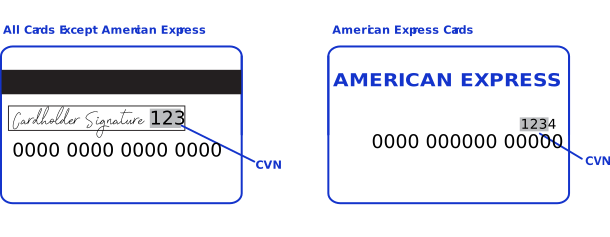
Each payment card company has its own name for the CVN value:
- Mastercard calls it thecard validation code(CVC2).
- Visa calls it thecard verification value(CVV2).
International Transactions
Consider compliance and merchant remittance funding when processing international
transactions.
Compliance
Accepting payments from a country other than your own requires that you observe the
processing rules and practices of the payment systems in that country. This list describes
areas of compliance that are especially important:
- Merchant descriptor requirements—A merchant descriptor communicates merchant information to customers to remind them of the circumstances that triggered a payment. Merchant descriptors reduce the possibility of a chargeback. Accordingly, the merchant descriptor displayed on a customer’s statement should be a close match to the name on your website. It is not good practice to consolidate multiple websites into a single merchant account and use a generic descriptor that more-or-less covers all offerings.
- Excessive chargebacks—To prevent an excessive number of chargebacks, you must maintain good customer support, rapid problem resolution, a high level of customer satisfaction, and transaction management processes that minimize fraudulent transactions. When payment card chargebacks become excessive, you must change business processes to reduce chargebacks. If chargebacks are not reduced to a satisfactory level, your account can be terminated.
Merchant Remittance Funding
You can request that the transaction proceeds be converted to another currency. Currency
conversion uses a foreign exchange rate to calculate the conversion to the requested currency.
The foreign exchange rate might be explicitly stated as a rate or implicitly stated as a
transaction amount. The funded amount and can vary from day to day. The foreign exchange rate
might also include an increase for the foreign exchange risk, sales commissions, and handling
costs.
Payment Services
Various services are involved in processing payments.
These services enable customers to purchase goods and services. They also enable merchants to
receive payments from customer accounts, to provide refunds, and to void transactions.
Authorization
An authorization confirms that a payment card account holds enough funds to pay
for a purchase. Authorizations can be made online or offline.
Online Authorization
Online authorizations provide immediate confirmation of funds availability. The customer's
financial institution also reduces the amount of credit available in the customer's account,
setting aside the authorized funds for the merchant to capture at a later time. Authorizations
for most payment cards are processed online. Typically, it is safe to start fulfilling the
order when you receive an authorization confirmation.
An
An online authorization confirmation
and the subsequent hold on funds expire after a specific length of time. Therefore it is
important to capture funds in a timely manner. The issuing bank sets the expiration time
interval, but most authorizations expire within 5 to
7 days.The issuing bank does not inform
Cybersource
when an authorization
confirmation expires. By default, the authorization information for each transaction remains
in the Cybersource
database for 180 days after the authorization date. To
capture an authorization that expired with the issuing bank, you can resubmit the
authorization request.Offline Authorization
Online transactions require an internet connection. In situations where the internet is not
available, for example, due to an outage, merchants can continue to take credit card payments
using offline transactions. An offline authorization is an authorization request for which you
do not receive an immediate confirmation about the availability of funds.
Offline authorizations have a higher level of risk than online transactions because they do
not confirm funds availability or set aside the funds for later capture. Further, it can take
up to 5 days to receive payment confirmations for offline transactions. To mitigate this risk,
merchants may choose to fulfill orders only after receiving payment confirmation.
Incremental Authorization
Incremental authorizations are useful when a customer adds products and services to a purchase. After a successful initial authorization, you can request subsequent authorizations and request one capture for the initial authorization and the incremental authorizations.
The incremental authorization service is not the same as the incremental authorization scenario for a merchant-initiated transaction.
Scenario for an Incremental Authorization
This sequence is an example of how incremental authorizations work:
- The customer reserves a hotel room for two nights at a cost of 200.00 per night. You request an authorization for 400.00. The authorization request is approved.
- The customer orders dinner through room service the first night. You request an incremental authorization of 50.00 for the dinner.
- The customer decides to stay an extra night. You request an incremental authorization of 200.00 for the additional night.
- The customer uses items from the mini-bar. The cost of the mini-bar items is 50.00. You request an incremental authorization of 50.00.
- When the customer checks out, they sign a receipt for 700.00, which is the total of all costs incurred.
- You request a capture for 700.00.
Pre-Authorization
A pre-authorization enables you to authorize a payment when the final amount is unknown. The system places the funds on hold until you request a follow-up transaction. Pre-authorizations are typically used for lodging, auto rental, e-commerce, and restaurant transactions.
IMPORTANT
Payment Services Directive 2 (PSD2) rules in the European Union (EU) and European Economic Area (EEA) require the initial pre-authorization to use strong customer authentication for merchants or customers in PSD2-applicable countries.
When you have a specific merchant category code (MCC) assigned to your account, you
are allowed to capture up to 20% more than the cumulatively authorized amount on
Visa, Diners Club, Discover, and JCB cards. Contact your account manager to have your
account enabled for this option.
For a pre-authorization:
- The authorization amount is greater than zero.
- Submit the authorization for capture within 30 calendar days of its request.
- When you do not capture the authorization, reverse it.In the US, Canada, Latin America, and Asia Pacific, Mastercard charges an additional fee for a pre-authorization that is not captured and not reversed.In Europe, Russia, Middle East, and Africa, Mastercard charges fees for all pre-authorizations.
- Chargeback protection is in effect for 30 days after the authorization.
Payment Network Token Authorization
You can integrate authorizations with payment network tokens into your existing order
management system. For an incremental authorization, you do not need to include any
payment network tokenization fields in the authorization request because
Cybersource
obtains the payment network tokenization information from the
original authorization request. Authorization Workflow
This image and description show the authorization workflow:

- The customer purchases goods or services from the merchant using a payment card.
- You send an authorization request over secure internet connection toCybersource. When the customer buys a digitally delivered product or service, you can request both the authorization and the capture at the same time. When the customer buys a physically fulfilled product, do not request the capture until you ship the product.
- Cybersourcevalidates the order information then contacts your payment processor and requests authorization.
- The processor sends the transaction to the payment card company, which routes it to the issuing bank for the customer's payment card. Some card companies, including Discoverand American Express, act as their own issuing banks.
- The issuing bank approves or declines the request.
- If funds are available, the issuing bank reserves the amount of the authorization request and returns an authorization approval toCybersource.
- If the issuing bank denies the request, it returns an authorization denial toCybersource.
- Cybersourceruns its own tests then tells you whether the authorization succeeded.
Sale
A sale is a bundled authorization and capture. Some processors and acquirers require a sale
transaction instead of using separate authorization and capture requests. For other processors
and acquirers, you can request a sale instead of a separate authorization and capture when you
provide the goods or services immediately after taking an order.
There are two types of sale processing: dual-message processing and single-message
processing.
Dual-Message Processing
Dual-message processing is a two-step process. The authorization is processed first. If the
authorization is successful, the capture is processed immediately afterward. The response
includes the authorization and the capture information. If the authorization is declined, the
capture is not processed, and the response message includes only the authorization
information.
Partial Authorizations
All debit and prepaid card processors as well as a limited number of credit card processors
support partial authorizations when dual-message processing is in place.
When partial authorization is enabled, the issuing financial institution can approve a
partial amount when the balance on the card is less than the requested amount. When a partial
amount is authorized, the capture is not processed. The merchant can then use a second card to
cover the balance, adjust the total cost, or void the transaction.
Single-Message Processing
Single-message processing treats the
authorization and capture as a single transaction. There are important differences between dual-message processing and single-message
processing:
- Single-message processing treats the request as a full-financial transaction, and with a successful transaction, funds are immediately transferred from the customer account to the merchant account.
- Authorization and capture amounts must be the same.
- Some features cannot be used with single-message processing.
Authorization Reversal
The authorization reversal service releases the hold that an authorization placed on a
customer’s payment card funds.
Each card-issuing financial institution has its own rules for deciding whether an
authorization reversal succeeds or fails. When a reversal fails, contact the card-issuing
financial institution to learn whether there is a different way to reverse the
authorization.
If your processor supports authorization reversal after void (ARAV), you can reverse an
authorization after you void the associated capture. If your processor does not support ARAV,
you can use the authorization reversal service only for an authorization that has not been
captured and settled.
An authorization reversal is a follow-on transaction that uses the request ID returned from
an authorization. The main purpose of a follow-on transaction is to link two transactions. The
request ID links the follow-on transaction to the original transaction. The authorization
request ID is used to look up the customer’s billing and account information in the
Cybersource
database. You are not required to include those fields in the full
authorization reversal request. The original transaction and follow-on transaction are linked
in the database and in the
Business Center
.For processors that support debit cards and prepaid cards, the full
authorization reversal service works for debit cards and prepaid cards in addition to credit
cards.
IMPORTANT
You cannot perform an authorization reversal if a transaction is in a
review state, which can occur if you use a fraud management service. You must reject the
transaction prior to authorization reversal. For more information, see the fraud management
documentation in
the
Business Center
.Automatic Partial Authorization Reversal
Automatic partial authorization reversals are supported for:
- Credit cards
- Debit cards and prepaid cards.
- Quasi-cash.
If the capture amount is less than the authorization amount,
Cybersource
automatically performs a partial authorization reversal before it sends the capture request
to the processor. The results of a successful partial authorization reversal are:- The capture amount matches the new authorization amount at the payment card company.
- The hold on the unused credit card funds might be released. The issuing bank decides whether or not to release the hold on unused funds.Not all issuers act on a request for a partial authorization reversal. Therefore,Cybersourcecannot guarantee that the funds will be released.
Capture
A capture is a follow-on transaction to an authorization. It is used to transfer the
authorized funds from the customer's account to the merchant account. To link the
authorization transaction to the capture transaction, you include a request ID in your capture
request. This request ID is returned to you in the authorization response.
Captures are typically not performed in real time. They are placed in a batch file and sent
to the processor, and the processor settles all of the captures at one time. In most cases,
these batch files are sent and processed outside of the merchant's business hours. It usually
takes 2 to 4 days for the acquiring financial institution to deposit the funds into the
merchant account.
When fulfilling only part of a customer’s order, do not capture the full amount of the authorization. Capture only the cost of the delivered items. When you deliver the remaining items, request a new authorization, and then capture the new authorization.
IMPORTANT
It is not possible to perform a capture if a transaction is in a review state, which can
occur if you use a fraud management service. You must accept the transaction prior to capture.
For more information, see the fraud management documentation in
the
Business Center
.Capture Workflow
The capture workflow begins when you send a request for a capture.
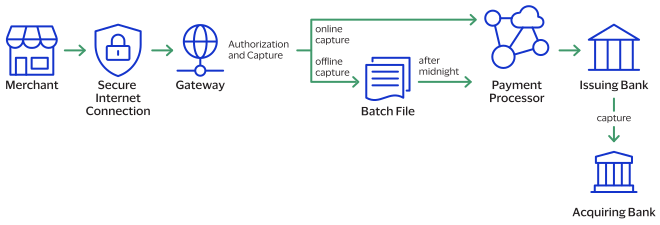
- The merchant sends a request for a capture to theCybersourcegateway.
- For online captures,Cybersourcevalidates the order information then sends an online capture to the payment processor.For offline captures,Cybersourcestores the capture request in a batch file and sends the batch file to the payment processor after midnight.
- The processor validates the request and forwards it to the issuing bank.
- The issuing bank transfers funds to the acquiring bank.
IMPORTANT
The payment processor does not notify
Cybersource
that the money has been transferred. To ensure that all captures
are processed correctly, you should reconcile your capture requests with the capture reports
from your processor.Refund
Refund
Refunds are payment refunds from a merchant to the cardholder after a
cardholder pays for a product or service and that payment is captured by the merchant. When a
refund request is successful, the issuer transfers funds from the merchant bank (acquirer)
account to the customer's account. It typically takes 2 to 4 days for the acquirer to transfer
funds from your merchant account.
There are two types of refunds: a
follow-on refund
that is linked to
an original capture or sale, and a stand-alone credit
that is not linked to an original
capture or sale.WARNING
You should carefully control access to your
refund and
credit services. Do not request this service directly from
your customer interface. Instead, incorporate this service as part of your customer service
process. This process reduces the potential for fraudulent transactions.Follow-on Refund
Follow-on Refund
Refunds, also known as
use the capture
request ID to link the refund to the original transaction. follow-on refunds
,This request ID is returned during the capture request (also known as a
The request ID links the transaction to the customer’s billing and account
information, so you are not required to include those fields in the settlement
) and is used in all subsequent refunds associated with the original
capture.refund
request.When you combine a request for a
refund
with a request for another service, such as the tax calculation service, you
must provide the customer’s billing and account information.Unless otherwise specified,
refunds
must be requested within 180 days of a settlement. You can request multiple
follow-on refunds
against a single
capture or sale transaction as long as the total amount does not exceed the original
purchase amount. To perform multiple follow-on refunds
, use the same request ID in each request.Stand-Alone Credits
Stand-alone credits are not connected to an original transaction. Stand-alone credits do
not have a time restriction, and they can be used to issue refunds more than 180 days after
a transaction settlement.
Fast Refunds
Fast refunds enable near real-time refunds by bypassing batch processing for eligible
transactions. Merchants must be enabled for fast refunds in the
Business Center
during
account configuration.Fast refund processing is only available for Visa cards in India.
You can request multiple refunds against a single capture or sale transaction as long as
the total amount does not exceed the original purchase amount.
Fast refunds appear in the
Business Center
as a regular refund. Ineligible refunds
default to standard refund batch processing. For more information about fast refunds, see Fast Refunds.
Refund and Credit Workflow
This workflow applies to follow-on credits, also known as refunds, and stand-alone credits.
It begins when you send a request for a refund or credit.
Refunds and credits do not happen in real time. All of the credit requests for a day are
typically placed in a file and sent to the processor as a single
batch
transaction. In
most cases, the batch transaction is settled overnight.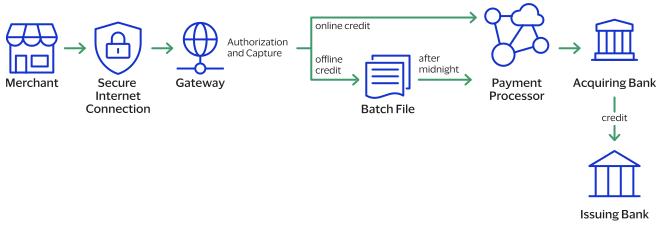
- The merchant sends the refund or credit request toCybersource.
- For online refunds and credits,Cybersourcevalidates the order information then sends the request to the payment processor.For offline refunds and credits,Cybersourcestores the request in a batch file and sends the batch file to the payment processor after midnight.
- The processor validates the request and forwards it to the acquiring bank.
- The acquiring bank transfers funds to the issuing bank.
IMPORTANT
Not all processors support stand-alone credits.
Void
A void cancels a capture or credit request that you submitted to
Cybersource
but has not already been submitted to your processor. Capture and credit requests are usually
submitted to your processor once a day, so your window for successfully voiding a capture or
credit request is small. A void request is declined when the capture or credit request has
already been sent to the processor.After a void is processed, you cannot credit or capture the funds. You must perform a new
transaction to capture or credit the funds. Further, when you void a capture, a hold remains
on the authorized funds. If you are not going to re-capture the authorization,
and if your processor supports authorization reversal after void
(ARAV),
you should request an authorization reversal to release the hold on the unused
funds.A void uses the capture or credit request ID to link the transactions. The authorization
request ID is used to look up the customer’s billing and account information, so there is no
need to include those fields in the void request. You cannot perform a follow-on credit
against a capture that has been voided.
Payment Features
You can apply features to different payment services to enhance the customer payment
processing experience. This section includes an overview of these features:
Debit and Prepaid Card Payments
Debit cards are linked to a cardholder's checking account. The funds are taken out of the
customer's bank account, and the transaction is included on the customer's bank account
statement. The customer does not receive a credit card bill as with a regular credit card.
You can process debit cards using these services:
- Credit card services
- PIN debit services
- Partial authorizations, which are a special feature available for debit cards
- Balance inquiries, which are a special feature available for debit cards
Requirements
In Canada, to process domestic debit transactions on
Visa Platform Connect
with Mastercard, you must contact customer support to have your account configured for
this feature.See Standard Payment Processing for information that shows you
how to use credit card services.
See Debit and Prepaid Card Processing for information that shows
you how to process authorizations that use a debit or prepaid card.
Interchange Optimization
Interchange fees are per-transaction transfer fees charged by your acquirer. The fee
amount is based in part on the transaction amount that the acquirer submits to the
payment network for clearing and settlement. Interchange optimization can help to
reduce these fees for card-present transactions.
See Merchant Financial Institutions (Acquirers) for information about
acquirers.
Payment Cards Supported with Interchange Optimization
- Mastercard
- Visa
Automatic Authorizations
Interchange optimization works by automatically performing additional
authorization transactions for two types of card-not-present scenarios.
- Automatic Authorization Refresh
- If a capture request occurs more than 6 days after the date of the original authorization, the processor automatically obtains a fresh authorization for the capture amount.
- Automatic Partial Authorization Reversal
- If the capture does not need a fresh authorization but the capture amount is less than the authorization amount, the processor automatically performs a partial authorization reversal. The reversal releases the hold on unused credit card funds and ensures that the settlement amount matches the authorization amount.
How Interchange Optimization Transactions are Tracked
To find out when the processor performed automatic authorizations, see the daily processor report.
Limitations
- Interchange optimization does not apply to transactions in which the payment card is present at the merchant's physical place of business.
- Interchange optimization is not supported with incremental authorizations.
Requirement
Contact customer support to enable interchange optimization for your account.
Japanese Payment Options
Japanese payment options (JPO) extend the
Cybersource
payment card processing
features to support payment methods used only in Japan. Japanese issuers, cardholders,
merchants, and acquirers recognize payment methods that clarify the nature of a payment.
JPO provides for more fine-grained identification of one-time payments and installment payments.
You can offer your customers JPO payment methods that they select at the time of purchase.JPO supports these payment methods:
- Single payment
- Bonus payment
- Installment payment
- Revolving payment
- Combination of bonus payment and installment payment
IMPORTANT
Requests with Japanese payment options
are accepted independently of your agreements with acquirers.
When you submit a request with one of these payment options
but do not have the necessary contracts and agreements in place,
an error might not occur until the acquirer processes the settlement file.
For more information about the Japanese payment options,
contact Customer Support of
Cybersource
KK (Japan).See Japanese Payment Options Processing for information that shows you how to process
payments using JPO.
Payment Cards Supported with JPO
JPO is supported for
the Sumitomo Mitsui Card Co. acquirer with transactions that use Visa payment cards
issued in Japan.
Services Supported with JPO
Authorization
service.
Requirements
- You have signed a contract with your acquirer.
- You have contacted your account provider for details about contracts and funding cycles. The funding cycle could differ when using JPO.
- Card holders who want to use JPO have signed a contract with an issuing bank.
- You have confirmed payment option availability with your account provider and card holder before implementing one of these payment options.
Micropayments
Services:
- Authorization
- Capture
- Refund
Micropayments
are payments for less than one unit in the transaction’s currency. Mastercard Bill Payments
In Brazil, you can participate in a Mastercard Bill Payment program. If your account is
enrolled in the program, your customers can use their Mastercard payment cards to make
payments on their outstanding bills.
IMPORTANT
A Mastercard card payment at
the point of sale (POS) when goods or services are purchased is not part of the
Mastercard Bill Payment
program.
When you send an authorization request for a Mastercard Bill Payment, include the API
field that specifies the bill payment type.
See Mastercard Bill Payment Processing for information that shows you how to
process Mastercard Bill Payments.
Limitation
The Mastercard Bill Payment program supports only bills paid in Brazil
using Mastercard payments cards with
Visa Platform Connect
.Requirements
Sign up with Mastercard to participate in their bill payment program.
Mastercard Expert Monitoring Solutions
Mastercard Expert Monitoring Solutions provides a predictive, behavior-based fraud score
in real time during authorizations for card-not-present transactions. The score
indicates the likelihood that the requested transaction is fraudulent and the type of
fraud that is suspected.
To assign the fraud score for a transaction, Mastercard compares the customer’s
transaction data to their transaction behavior history and to a regional
card-not-present fraud detection model. The resulting score is returned in the body of
the response message.
Limitations
This feature is supported on Mastercard Payment cards issued in the US only.
See Mastercard Expert Monitoring Solutions Processing for information that shows you how to
obtain the transaction fraud score determined by Mastercard Expert Monitoring
Solutions.
Requirement
Contact customer support to enable Mastercard Expert Monitoring Solutions for your account.
IMPORTANT
After this feature is enabled for your account, Mastercard returns
a fraud score for all your card-not-present authorization requests for Mastercard payment
cards issued in the US.
Payer Authentication
Payer authentication is run before a transaction is submitted for authorization. Most of
the time payer authentication is bundled with authorization so that after payer
authentication happens, the transaction is automatically submitted for authorization.
Payer authentication and authorization can be configured to occur as separate
operations. This section shows you how to run payer authentication as a separate process
and pass the payer authentication data when seeking authorization for a transaction.
Payer authentication consists of a two-step verification process that adds an extra layer
of fraud protection during the payment process. During transactions, the transaction
device, location, past purchasing habits, and other factors are analyzed for indications
of fraud. This process collects customer data during the transaction from at least two
of these three categories:
- Something you have: A payment card or a payment card number
- Something you know: A password or pin
- Something you are: Facial recognition or fingerprint
Each of these payment card companies has its own payer authentication product:
- American Express: SafeKey
- Discover: ProtectBuy
- JCB: J/Secure
- Mastercard: Identity Check
- Visa: Visa Secure
Payer authentication can be used to satisfy the Strong Customer Authentication (SCA)
requirement of the Payment Services Directive (PSD2). SCA applies to the European
Economic Area (EEA) and the United Kingdom. SCA requires banks to perform additional
checks when customers make payments to confirm their identity.
See Payer Authentication Processing for information about how to
process payments with payer authentication.
Payment Account Reference (PAR)
The PAR is a network-generated reference number that identifies a transaction for which
you provided one of the following:
- Primary account number (PAN)
- Network-generated token for a PAN
This reference number provides a link to the cardholder account and to all transactions
for that account. It is returned in the response message for dual-message transactions
and single-message PIN-debit transactions. The API field for this reference number is
processorInformation.paymentAccountReferenceNumber
.Relaxed Requirements for Address Data and Expiration Date in Payment Transactions
With relaxed requirements for address data and the expiration date, not all standard
payment request fields are required. It is your responsibility to determine whether your
account is enabled to use this feature and which fields are required.
See Relaxed Requirements for Address Data and Expiration Date in a Payment for information about how to process payments
with relaxed requirements for address data and expiration date.
Split Shipment
Split shipments enable you to split an order into multiple shipments with multiple
captures. You can use this feature when a customer orders a product that is not yet
available, or when one or some products are available but not all. You are able to
request multiple partial captures for one authorization, multiple authorizations and one
capture, or an authorization and a sale.
Cybersource
provides the split shipment services for authorizations and
captures. There are three scenarios and actions you can take:- Multiple authorizations—Request more than one authorizations; when the order is placed for the unavailable product and after the product becomes available to ship.
- Multiple partial captures—Request an authorization, and then request multiple partial captures for the amount of the products you ship. When the remaining product becomes available, ship it and request another capture.
- Multiple authorizations with multiple partial captures—Request more than one authorizations and captures when all the products in the order are not available for immediate shipment. After the other products become available, request another authorization, and then a capture when you ship the remaining product.
How Split Shipments Transactions are Linked
All transactions for a split shipment are linked together in the
Business Center
and in reports. When you split an order into multiple shipments
with multiple partial captures, Cybersource
requests the additional
authorizations for you.Obtaining the Status of a System-Generated Authorization
IMPORTANT
A system-generated authorization is not performed in real time.
The response message that you receive indicates that the request was received, not
whether it was approved or declined.
A system-generated authorization can be declined for the same reasons that a regular
authorization can be declined.
Cybersource
recommends you use one of
following methods to obtain the status of the system-generated authorization request
before shipping the product: - Business Center—Use the capture request ID to search for the follow-on capture. The details for all related transactions are displayed on theTransaction Detailspage. It can take a maximum of 6 hours for the status of the system-generated authorization request to be available.
- Transaction Detail API—You must use version 1.3 or later of the report and include the parameterincludeExtendedDetailin your query. It can take a maximum of 6 hours for the status of the system-generated authorization request to be available.
- Transaction Exception Detail Report—Cybersourcerecommends you use this report on a daily basis to identify transactions that were declined.
Additional Authorizations
When you need an additional authorization for an order, you can use the
link-to-request
field to link follow-on authorizations to the
original authorization in addition to the basic fields required for every
authorization request. The follow-on authorization is linked to the original
authorization in the Business Center
and in reports. The captures for these
authorizations are also linked to the original authorization in the Business Center
and in reports.For an additional authorization on a processor that supports merchant-initiated
transactions, the authorization request must include the subsequent authorization
fields that are required for merchant-initiated transactions.
Additional Captures
When you need an additional capture for an order,
Cybersource
performs a system-generated authorization for additional capture requests using the
payment data from the original authorization. The system-generated authorization is
linked to the original authorization in the Business Center
and in reports.
The captures are linked to the authorizations in the Business Center
and in
reports through the request IDs as with any capture. See Authorizing a Sale for a Product Not Yet Available for
guidelines on how to process a payment when a product is not available. See Processing an Authorization and Two Captures for Multiple Products or
Processing Two Authorizations and a Capture for Multiple Products for
guidelines on how to process payments for multiple products.
Token Management Service
The
Token Management Service
(TMS
) enables you to replace personally
identifiable information (PII), such as the primary account numbers (PANs), with
unique tokens. These tokens do not include the PII data, but act as a placeholder
for the personal information that would otherwise need to be shared. By using
tokens, businesses can provide a secure payment experience, reduce the risk of
fraud, and comply with industry consumer security regulations such as PCI-DSS.TMS
links tokens across service providers, payment types, and channels
for sellers, acquirers, and technology partners. TMS
tokenizes, securely stores, and manages the primary account number (PAN), the
payment card expiration date, electronic check
details,
and customer data. TMS
also enables you
to create a network token of a customer's payment card.IMPORTANT
Due to mandates from the Reserve Bank of India, merchants based in India
cannot store PANs. Use network tokens instead.
You can manage sensitive data securely by creating, retrieving, updating, and deleting tokens
through the TMS API.
TMS
simplifies your PCI DSS compliance. TMS
passes tokens
back to you that represent this data. You then store these tokens in your
environment and databases instead of storing customer payment
details.TMS
protects sensitive payment information through tokenization and
secures and manages customer data using these token types:- Customer tokens
- Instrument identifier tokens
- Payment instrument tokens
- Shipping address tokens
TMS
tokens can be used individually, or they can
be associated with one customer token:Figure:
TMS
Token Types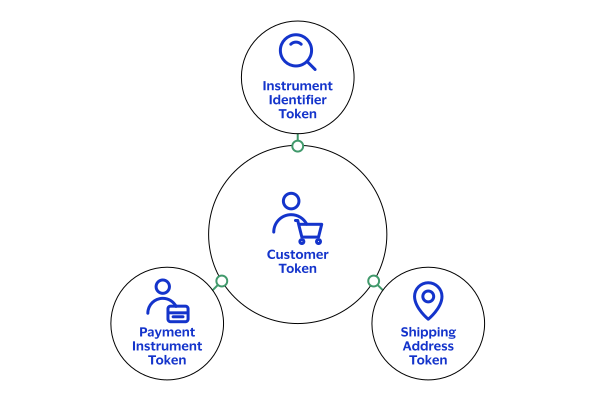
For detailed information about .
TMS
, see Token Management Service
Developer
GuideTesting the Payment Services
To ensure that requests are processed correctly, you must test the basic success and error
conditions for each service you plan to use.
Requirements for Testing
Before you can test, contact customer support to activate the credit
card services and configure your account for testing. You must also contact your processor
to set up your processor account.
IMPORTANT
When building your connection to the
Cybersource
payment gateway, ensure that you have implemented controls to prevent card testing or card
enumeration attacks on your platform. For more information, see the best practices guide.
When we detect suspicious
transaction activity associated with your merchant ID, including a card testing or card
enumeration attack, Cybersource
reserves the right to enable fraud
management tools on your behalf in order to mitigate the attack. The fraud team might also
implement internal controls to mitigate attack activity. These controls block traffic that
is perceived as fraudulent. Additionally, if you are using one of our fraud tools and
experience a significant attack, our internal team might modify or add rules to your
configuration to help prevent the attack and minimize the threat to our infrastructure.
However, any actions taken by Cybersource
would not replace the need for you
to follow industry standard best practices to protect your systems, servers, and
platforms.Follow these requirements when you test your system:
- Use your regular merchant ID.
- Use a real combination for the city, state, and postal code.
- Use a real combination for the area code and telephone number.
- Use a nonexistent account and domain name for the customer’s email address.
- REST API test endpoint:POSThttps://apitest.cybersource.com/pts/v2/payments
Test Card Numbers
Use these payment card numbers to test the authorization, capture, and credit services.
Remove the spaces from the test card numbers when sending them to the test system. Do not use
real payment card numbers. To test card types that are not included in the list, use an
account number that is in the card’s BIN range. For best results, try each test with a
different service request and with different test payment card numbers.
IMPORTANT
The test card numbers that are provided are
formatted with Xs for zeroes in the card number. When testing with these card numbers, remove the spaces and replace each X with a 0 (zero).
- American Express—3782 8224 631X XX5
- Discover—6X11 1111 1111 1117
- Jaywan—669X 1XXX XXXX XXXX
- JCB—3566 1111 1111 1113
- Maestro (International)
- 5X33 9619 89X9 17
- 5868 2416 0825 5333 38
- Maestro (UK Domestic)—the issue number is not required for Maestro (UK Domestic) transactions.
- 6759 4111 XXXX XXX8
- 6759 56XX 45XX 5727 054
- 5641 8211 1116 6669
- Mastercard
- 2222 42XX XXXX 1113
- 2222 63XX XXXX 1125
- 5555 5555 5555 4444
- Visa—4111 1111 1111 1111
Using Amounts to Simulate Errors
You can simulate error messages by requesting authorization, capture, or credit services with specific amounts that trigger the error messages. These triggers work only on the test server, not on the production server.
Each payment processor uses its own error messages.
For more
information, see:
REST API Testing Guide
Test American Express Card Verification
Before using CVN with American Express, it is strongly recommended that you follow these
steps:
- Contact customer support to have your account configured for CVN. Until you do this, you will receive a1in theprocessorInformation.cardVerification.resultCoderesponse field.
- Test your system in production using a small currency amount, such as one currency unit. Instead of using the test account numbers, use a real payment card account number, and send an incorrect CVN in the request for authorization. The card should be refused and the request declined.
Transaction Timeout Guidance
This topic provides guidance for handling scenarios in which a payment request submitted
to
Cybersource
does not return a definitive status because of a timeout
or other communication failure. It focuses on the most common timeout scenarios and
describes the supported mechanisms for determining the final transaction status.This guidance helps you minimize the operational and financial risks associated with an
uncertain transaction status. It addresses two common risks: how to treat an unknown
status as a failed transaction, which can result in false declines, and retrying a
transaction without first validating its status, which can lead to duplicate
authorizations or duplicate charges.
A timeout represents an unknown transaction status, which is not necessarily a
transaction failure.
Related payment services:
Incorrect Timeout Handling Risks
Each payment timeout creates a moment of uncertainty. How your team handles that moment
determines whether it becomes a non-event, a customer complaint, a chargeback, or a lost
sale. This table describes what goes wrong, the customer experience, and your business
risk.
What Goes Wrong | Customer Experience | Business Risk |
|---|---|---|
The timeout is misread as a failure. You retry the transaction
immediately, and it is processed twice. | Customer sees two charges on their statement. | Chargeback, refund cost, trust damage, and potential dispute
fees. |
The timeout is misread as a failure. You present a payment-failed
message, and the customer abandons checkout. | Customer believes the card was declined. The customer tries another
payment method or abandons the purchase. | Lost revenue. The original payment might still be authorized on
the card. |
No unique transaction ID is present. As a result, duplicate detection
fails and multiple authorizations occur. | Multiple holds or charges appear on the same card for one
order. | Disputes, regulatory risk, and manual reconciliation
overhead. |
You configure the client timeout too short. As a result, you drop the
connection and the transaction status is unknown. | A spinner suddenly disappears with no clear result. | Unknown order status, manual intervention, and customer contact
with support. |
IMPORTANT
You must systematically resolve an unknown transaction status before
you take additional payment actions. Each recommendation transforms an uncertain
transaction status into an additional action.
Transaction Flow and Failure Taxonomy
A single payment authorization transaction traverses multiple independent
participants within the payment ecosystem. Each connection point can experience
latency, communication failures, or timeout conditions.
End-to-End Authorization Flow
The transaction passes through these participants:
- Cardholder to Merchant:The cardholder initiates a payment transaction through a website, mobile application, point-of-sale system, or digital wallet.
- Merchant toThe merchant submits the authorization request toCybersource:Cybersourcefor routing and processing.
- Processor routing:Cybersourceforwards the transaction to the appropriate processor.
- Card network routing:The processor routes the request through the applicable payment network.
- Issuer decision:The card issuer evaluates the transaction and returns an authorization decision.
The transaction must follow the same path in reverse to be successful. Any break in
that return path leaves the transaction status unknown to the merchant. This image
shows the end-to-end authorization flow:

These are the reason codes most relevant to timeout handling:
- General system error or server-side failure. The transaction status is unknown. Do not treat as a definitive failure. Perform a status check before any retry or an authorization reversal.ESYSTEM:
- Server-side timeout.ETIMEOUT:Cybersourcereceived the request but could not return a response within the processing window. The transaction status is unknown. Reconcile before retrying.
- Duplicate request declined.DUPLICATE_REQUEST:Cybersourceidentified the authorization as a duplicate of a previous request with the same merchant reference. Do not retry with the same reference, because the original transaction might have succeeded. Perform a status check first.
Timeout Scenarios and Recommended Actions
These are the four distinct timeout scenarios.
Scenario: Request Never Reached Cybersource
Cybersource
- Duplicate risk:none
- Condition:The request never reachedCybersourcebecause of a connection issue. As a result, you received no acknowledgment or response fromCybersource.
- Recommended Action:After a few seconds, perform a transaction status lookup using theclientReferenceInformation.codefield before you resubmit the authorization. If the lookup returns no transaction record, resubmit the original authorization request.
Scenario: Cybersource Internal Failure
Cybersource
Internal Failure- Duplicate risk:low
- Condition:Cybersourcereceives the request but cannot continue processing because a required internal service is timing out, for example Decision Manager, Token Management Service (TMS), Payer Authentication, or internal routing. Because the transaction never progresses into the downstream payment ecosystem,Cybersourcedoes not submit an authorization to the processor, card network, or issuer.Example: Internal Failure ResponseHTTP Status Code:502{ "id": "7871896614436518804807", "submitTimeUtc": "2026-08-20T01:34:21Z", "status": "SERVER_ERROR", "reason": "SERVICE_TIMEOUT", "message": "The request was received, but a service did not finish running in time" }
- Recommended Actions:
- Retry the authorization after a delay of approximately 30 seconds to allow any internal transient issue to resolve.
- If the error persists, place the authorization in a delayed resubmission queue if possible.
- Monitor for recovery by confirming successful processing of subsequent transactions or notification that the service issue is resolved.
- Once recovery is confirmed, resubmit the original authorization request from the delayed resubmission queue.
Scenario: Request Received, Processor Response Took Too Long
- Duplicate risk:high
- Condition:Cybersourceaccepted the request and invoked the authorization request to the processor, but did not get the response within the timeout period. As a result, the transaction might already have been approved even though the final status was not returned to you.Example: Processor Timeout ResponseHTTP Status Code:502{ "id": "7871927193766252604807", "submitTimeUtc": "2026-08-20T02:25:49Z", "status": "SERVER_ERROR", "reason": "SERVER_TIMEOUT", "message": "Error - The request was received but there was a server timeout. This error does not include timeouts between the client and the server." }
- Recommended Actions:
- Retry the authorization.
- For the first transaction since a timeout occurred,Cybersourceproactively initiates an automatic authorization reversal as a protective measure in case the original authorization was approved but the final status could not be confirmed.
- Perform a status lookup using the generated requestidreturned in the first authorization response after some time, and verify the final status of the automatic authorization reversal.
- If the authorization reversal status cannot be confirmed, check with the processor or contactCybersourcecustomer support.
Scenario: Approved, but Confirmation Never Received
- Duplicate risk:highest
- Condition:The authorization was approved, but you did not receive the response because of a connectivity or network issue, or because you use a short timeout window. This is the highest-risk scenario for duplicate charges.
- Recommended Actions:
- If you use a short timeout and plan to retry the authorization, wait up to 60 seconds before you take further action. Perform a transaction status lookup using the originalclientReferenceInformation.codeto determine the status of the original authorization request. If the transaction is found and approved, record the result.
- If you perform a second authorization before verifying the status of the original authorization, you must reverse the original authorization. Use the merchant ID in theclientReferenceInformation.transactionIdfield from the original authorization request to submit an authorization reversal. Alternatively, use merchant reference code in theclientReferenceInformation.codefield in transaction search to get the request ID and process the authorization reversal.Example: Reversal Using the Transaction IDEndpoint: POST /pts/v2/reversals { "clientReferenceInformation": { "transactionId": "987654321" }, "reversalInformation": { "amountDetails": { "totalAmount": "100.00", "currency": "ABC" } } }
Verifying a Transaction Status
There are three methods for determining the accurate status of a transaction before you
act on a timeout.
Transaction Search API
- When a timeout or communication failure occurs, use the REST API transaction search to determine whether the original authorization request was successfully processed.
- Query using the request ID whenever available.
- If the request ID is not available, query using the REST merchant reference codeclientReferenceInformation.codefield.
Transaction Search Best Practices
- Use the minimum date range required to locate a transaction. Avoid broad date-range searches when checking transaction status unless there is a specific business need.
- Do not use transaction search for high-volume or frequent status checks. This can result in rate limiting.
- For ongoing transaction status monitoring, use the payment status API where appropriate.
- Include only the search criteria necessary to identify the transaction.
- When searching for multiple request IDs, use the dedicated request ID filter instead of free-text search fields.
Example: Transaction Search Request
Endpoint: POST /tss/v2/searches
{
  "save": "false",
  "name": "Transaction Recovery Search",
  "timezone": "America/Chicago",
  "query": "clientReferenceInformation.code:{merchant_reference_code} AND submitTimeUtc:[NOW-1HOUR TO NOW/DAY+1DAY]",
  "offset": 0,
  "limit": 100,
  "sort": "id:asc,submitTimeUtc:asc"
}
For the full request and response schema and a list of
supported search fields, see the Transaction Search API
reference.
Business Center
Business Center
Use the
Business Center
when API-based verification is unavailable, or when a timeout
requires closer manual review, for example investigating a customer-reported
duplicate charge.IMPORTANT
Transaction search results might not be available immediately
after a transaction is submitted, because data propagation takes a few
seconds.
- Sign in to theBusiness Centerusing your credentials.
- SelectTransaction Search>Transaction Details.
- Search using the ID returned in theCybersourceresponse for the internal-failure and processor- timeout scenarios. For other scenarios, when there is no response fromCybersource, search using the merchant reference number, known as themerchant reference codein the API.
- Review the returned status, reason code, and timestamp to confirm the actual status.
- Apply the result exactly as an API response would be applied. Record the status, and resubmit only if no record exists.
Figure:
Searching by Request ID for a Failed
Authorization

Figure:
Searching by Request ID for a Failed Authorization and Its Automatic
Authorization Reversal
Searching by request ID returns both the failed authorization and the successful
automatic timeout authorization reversal for the processor timeout scenario.

Figure:
Searching by Merchant Reference
Number
Searching by merchant reference number, when no request ID is available, returns the
successful authorization and
Decision Manager
result.
Automated Payment Status Notifications
The payment events service uses a webhook to publish automated notifications for
transaction statuses to your endpoint. This reduces reliance on the
original synchronous response. This is a safety net that complements, and does not
replace, the transaction status verifications described in this section.
Setup
- Enroll in the payment events service and create a webhook subscription.
- Provide a secure URL that is capable of receiving inbound POST notifications in real time.
- Acknowledge receipt of the notification immediately and process the event data asynchronously.
Behavior
- You submit a transaction and the synchronous response is delayed or lost.
- The transaction completes on theCybersourceside, andCybersourcepublishes the transaction status as a payment event.
- Your webhook endpoint receives the notification, including the transaction ID, merchant reference code, and final transaction status.
- Reconcile the event payload against your own records.
For more information about the webhooks service, see
Webhooks Developer Guide
.Layered Timeout Model
Cybersource
follows a layered timeout model based on a monotonic timeout
hierarchy, where each outer layer waits slightly longer than the layer it depends on.
This ensures that when an inner component times out first, Cybersource
receives a clear timeout response and can take appropriate action. If you reverse the
timeout order, you might abandon a request that is still being processed. This creates
the risk that you incorrectly treat a completed transaction as a failure and retry it.
Cybersource
determines timeout values based on observed production
latency, processor performance characteristics, and operational behavior, and
periodically adjusts them.This table describes each timeout layer, typical wait times, and rationale for the each
time setting.
Layer or Control | Typical Wait Time | Rationale |
|---|---|---|
Merchant to Cybersource | 60 seconds or more | Your timeout should be longer than the Cybersource
processing timeout to ensure that Cybersource can return
a definitive response before you abandon the request. |
Cybersource internal service | 5 to 10 seconds | The Payment Orchestrator uses these timeouts to call internal
services such as Decision Manager and Token Management
Service. |
Cybersource to processor | 30 seconds | Cybersource implements a fail-fast strategy for
processor communications. Cybersource establishes timeout thresholds on a
per-processor basis and evaluates them using processor response
times, timeout rates, transaction volumes, and processor-specific
operational characteristics. This approach aligns with processor
guidance and enables Cybersource to quickly
identify unreachable endpoints while minimizing unnecessary
processing delays. |
Retry and Duplicate Transaction Prevention
Payment timeouts and communication failures can create uncertainty about the status of a
transaction. You might receive a timeout response even though the transaction was
successfully processed by
Cybersource
, the processor, or the issuer. In
these situations, immediately resubmitting the original request can result in duplicate
authorizations, captures, or charges. Implementing retry mechanisms are therefore
essential to balance transaction recovery with duplicate prevention. Before retrying a
payment operation, determine the transaction status whenever possible and apply
controlled retry practices to minimize the risk of duplicate processing.To reduce this risk, use these methods:
- Merchant reference codes to support authorization duplicate detection.
- Transaction IDs to support timeout recovery, transaction lookups, authorization reversals, voids, and reconciliation.
Merchant Reference Code and Duplicate Transaction Detection
For authorization processing,
Cybersource
uses the clientReferenceInformation.code
field that you provided to identify duplicate
authorization requests. A duplicate authorization might be declined with reason code
104
.For the API field description, see API Fields: Merchant Reference Code.
Enabling Block Duplicate Merchant Reference Numbers
Where the capability is supported for your configuration, you can enable your account to
block duplicate merchant reference codes, also known as merchant reference numbers,
rather than submitting a customer support request. This prevents duplicate
authorization requests with the same merchant reference code submitted within 15
minutes of the original authorization.
Follow these configuration steps in the
Business Center
:- Log in to theBusiness Center.
- Go to Template Management or Manage Merchants.
- Locate theBlock Duplicate Merchant Reference Numbersetting.
- SetenableDuplicateMerchantReferenceNumberBlockingtotrue.
- Save and apply the configuration to the merchant profile.
You can also manage this capability programmatically through the
Merchant Boarding API. For more information, see
Merchant Boarding Developer Guide
Transaction ID for Timeout Recovery and Lifecycle Management
The transaction ID in the
clientReferenceInformation.transactionId
field restricts duplicate transaction
processing, locates transactions after a timeout, supports authorization reversal
and void requests, and assists with reconciliation and operational investigations.
Unlike the merchant reference code, which is used primarily for authorization
duplicate detection, the transaction ID remains associated with the transaction
throughout its lifecycle and recovery processes.The transaction ID applies to:
- Authorization
- Credit
- Refund
- Sale
For the API field description, see
Cybersource
API Fields reference:
Transaction ID.IMPORTANT
This capability is broadly available across most payment
processors, except these processors:
- AIBMS
- Barclays
- LloydsTSB Cardnet
- Cielo
- Elavon
- Comercio Latino
- FDC Compass
- FDC Nashville Global
- Fiserv RapidConnect
- HSBC
- Moneris
- Lloyds-OmniPay
- Rede
- Worldpay VAP
Client Retry Backoff
When a request fails because of a temporary network or service issue, avoid immediately
resubmitting the same request multiple times. Instead, space retry attempts with
progressively longer delays between each attempt. This approach helps reduce
pressure on downstream systems during periods of degraded performance, allows them
time to recover, and helps prevent additional load that could worsen the
disruption.
A typical retry backoff strategy includes:
- Initial delay:Wait a short period before the first retry attempt.
- Increasing delays:Increase the wait time between successive retries rather than retrying at a fixed interval.
- Maximum delay:Limit the maximum wait time between retries to avoid excessively long delays.
- Randomized timing (jitter):Introduce small random variations in retry timing to prevent large numbers of clients from retrying simultaneously.
- Retry limits:Cap the number of retry attempts or the overall retry duration before escalating to status validation, reconciliation, or operational review.
Use retry backoff only for transient failures where a subsequent attempt might succeed.
When the status of a payment transaction is unknown, determine the final
transaction status before submitting another payment request.
Reversal Strategy and Recovery Failure Handling
When the status of a payment transaction cannot be fully determined, the objective is to
prevent duplicate charges while ensuring that the final transaction status is accurately
resolved. This happens in two stages: first, choosing and executing the correct recovery
action for the original transaction; second, recognizing that the recovery action itself
is a network operation subject to the same failures, and handling that possibility the
same way.
Select the Correct Recovery Method
Each recovery method applies to a specific point in the transaction lifecycle:
- Authorization reversalreleases an approved authorization that has not yet been captured.
- Voidcancels a transaction that exists but has not yet been submitted for settlement.
- Refundreturns funds for a transaction that has already been captured or settled.
Consider the Transaction Lifecycle
Base your recovery choice on the current transaction lifecycle stage:
- If the transaction is authorized but not captured, an authorization reversal is typically appropriate.
- If the transaction is captured but not yet settled, a void might be supported.
- If the transaction has been settled, a refund is required.
Confirm Transaction Status Before Reversing
Follow these steps before you reverse a transaction:
- Determine whether the original transaction was processed.
- Confirm the current transaction status.
- Execute the appropriate recovery action.
- Verify that the recovery action completed successfully.
Cybersource Automatic Authorization Reversal
Cybersource
Automatic Authorization ReversalFor supported processor integrations,
Cybersource
might automatically
submit an authorization reversal when the authorization status cannot be determined
because of issuer, network, or processor communication failures.IMPORTANT
When a timeout occurs,
Cybersource
designs recovery
mechanisms to preserve Level II and Level III and currency-related transaction data,
reducing the risk of interchange impacts caused by incomplete or lost transaction
attributes. You must include Level II and Level III fields on the original authorization
request so that this data is available in case of an automatic authorization
reversal.When the Status of an Authorization Reversal or Void Request Is Unknown
When the status of a recovery operation is unknown because of a timeout or
communication failure, validate the transaction status using the original
transaction ID and merchant reference code before taking additional action.
This lookup is read-only against
Cybersource
transaction records
and does not require resubmission of the original payment request.Authorization Reversal or Void
Cybersource
permits only one successful authorization reversal or
void per transaction, so a retried request produces one of these results:- IfCybersourceaccepts a retried authorization reversal or void request, it did not successfully process the original authorization or void.
- IfCybersourcerejects a retried authorization reversal or void request because the transaction has already been reversed or voided, it already successfully processed the original authorization reversal or void and correctly prevented the duplicate request.
- In this scenario, no additional authorization reversal or void action is required.
Refund
Refund processing requires additional care to avoid supporting multiple refunds
against the same captured transaction. Consider these points:
- Unlike authorization reversals and voids, a successfully processed refund does not prevent a subsequent refund from being submitted.
- Therefore, when the status of a refund request is unknown, validate the transaction status before submitting another refund.
- Failure to perform a status check might result in an unintended duplicate refund.
- If a duplicate refund is identified before settlement, you might be able to void the refund, subject to processor capabilities and settlement timing.
Reconciliation Sweep
The reconciliation sweep process acts as the final safety net for transactions that
cannot be conclusively resolved through online recovery mechanisms. Reconcile
Cybersource
records against authorization, capture, reversal,
refund, and settlement records using available correlation data such as merchant
reference number, transaction ID, amount, currency, and available payment reference
values.Identify unresolved transactions, duplicate processing activity, and recovery
operations in which the transaction status cannot be confirmed. Based on the
transaction status and processor capabilities, perform one of these actions:
- Initiate an automated late recovery action where permitted.
- Route unresolved cases to an operational review queue for manual investigation and resolution.
Reconciliation provides the final confirmation of transaction status and serves as
the last line of defense against unresolved duplicates, failed recovery actions,
and communication failures.
Recommended Approach
Cybersource
recommends pairing bounded, status-checked retries with
an automated reconciliation sweep against settlement. This combination catches lost
authorization s without requiring manual intervention. Retrying alone, without a
reconciliation process behind it, leaves genuinely charged but unresolved cases
unaddressed.Preventing Queue Cascades and System Overload
Correct handling of individual transaction timeouts is only part of a resilient
payment architecture. Under sustained latency or downstream service degradation,
requests can accumulate across multiple layers.
Cybersource Controls
Cybersource
ControlsCybersource
protects its system stability with bounded queues and
connection pools, circuit breakers that pause traffic to a struggling downstream
dependency and resume it only after recovery, and load shedding that returns
HTTP 429
or HTTP 503
with
Retry-After
guidance rather than accepting more work than it
can handle. Each response indicates whether an operation is safe to retry, and
Cybersource
is set up to avoid a request to hold a processing
resource beyond its allocated timeout.Your Controls
Apply these controls on your side:
- Implement bounded queues and connection pools for all payment traffic.
- Use circuit breakers to protect your applications fromCybersourceslowdowns.
- RespectRetry-Afterand other retry guidance.
- Apply exponential backoff with jitter to all retry operations.
- Cap concurrent in-flight requests during degraded operating conditions.
- Move recovery workflows to asynchronous processing queues rather than user-facing request threads.
Avoiding the Asymmetric Recovery Trap
Apply these safeguards:
- Rate limit recovery operations.
- Control retry traffic independently from new transaction traffic.
- Bound background recovery queue throughput.
- Prioritize correctness over speed in recovery processing.
IMPORTANT
The objective is not to retry failed transactions indefinitely.
The objective is to maintain system stability while enabling safe recovery through
controlled retries, reconciliation, and recovery workflows.
Exception Handling Recommendations
These tables provide detailed, transaction-type-specific guidance for handling
exceptions, timeouts, and recovery scenarios during authorization, capture,
authorization reversal or void, and credit or refund processing. They are operational
reference material intended for engineering, support, and operations teams who are
resolving live exceptions.
Scenario | Expected Behavior | Recommended Actions |
|---|---|---|
The authorization request never reaches Cybersource
because of a network, Domain Name System (DNS), or Transport Layer
Security (TLS) failure. | No transaction record is created at Cybersource . No downstream authorization is
submitted. | Confirm that the failure is client-side. Wait for connectivity.
Perform a status lookup to confirm no record exists. Retry safely using
the same transaction ID. |
A Cybersource internal dependency fails (Decision Manager , Token Management Service , or payer
authentication). | A hard decline is returned immediately. The transaction never
reaches the processor, network, or issuer. | No status check is needed, because the transaction status is known.
Verify the failed dependency, then resubmit with the same transaction
ID. |
A timeout occurs before the processor, network, or issuer
responds. | Cybersource returns 151 or
ETIMEOUT . The status is unknown. An automatic
authorization reversal might be triggered. | Do not retry immediately. Wait for the Cybersource processing window. Perform a status lookup
through the transaction search API. Reconcile if
unresolved. |
The authorization is approved by the issuer, but the response is
lost. | The authorization exists and is valid on the card, but you never
received confirmation. The status is already known and approved. No
automatic authorization reversal condition applies here because
automatic authorization reversal addresses the case where the status is
unknown to Cybersource . | Do not resubmit. Perform a status lookup using the original
transaction ID. Record the result after you confirm it. |
The authorization is declined by the issuer, but the response is
lost. | No charge exists. This is a safe end-state, but you are
unaware. | Perform a status lookup to confirm the decline. Once confirmed,
it is safe to request an alternate payment method. |
You submitted a duplicate authorization before the original is
resolved. | Two authorizations might exist on the card
simultaneously. | Verify the duplicate transaction using a transaction ID or merchant
reference code match. Reverse the duplicate transaction, never the
original. |
The automatic authorization reversal confirmation is lost. | The reversal might have succeeded or failed at the processor. The
status is unknown to Cybersource and you. | Apply the recovery pattern described earlier in this topic: validate
the transaction status on the reversal itself, then submit the
transaction for reconciliation to determine its final status. |
Scenario | Expected Behavior | Recommended Actions |
|---|---|---|
The capture request never reaches Cybersource . | No capture record is created. The authorization remains open or
uncaptured. | Confirm the client-side failure. Perform a status lookup. If no
record exists, retry with the same transaction ID. |
The capture times out downstream. | The settlement status is unknown. The authorization might or
might not have been captured. | Do not retry immediately. Perform a status lookup. Confirm using
the settlement report if still unresolved. Reconcile. |
The capture succeeds, but confirmation is lost. | Funds are captured. Only the response is missing. | A status lookup confirms the captured state. Record the result. No
retry or authorization reversal is needed. |
The capture fails because the authorization expired or the amount
mismatched, and the response is lost. | A real decline occurred, but you see only a timeout. | A status lookup reveals the true decline reason. Address the
root cause before you resubmit. |
The authorization is approved, but the capture timed out. | This is an ambiguous state. The authorization is valid, but the
capture status is unconfirmed. | Treat as approved but unsettled. It might settle or reverse
depending on the downstream status. Verify using the settlement
report, then choose retry-capture or reverse-authorization. |
The capture is retried without a status check. | There is a risk of duplicate capture, or double billing, on the
customer's card. | Always perform a status check before you retry. If a duplicate
occurs, refund or void only the later capture. |
The capture succeeds, but the settlement report shows a later
discrepancy. | The settlement record is different from the status you
expected. | Route to the reconciliation sweep. Match on the merchant ID,
amount, currency, and card reference. |
Scenario | Expected Behavior | Recommended Actions |
|---|---|---|
The reversal or void request never reaches Cybersource . | No reversal record is created. The original authorization
remains active and open. | Confirm that the failure is client-side. Perform a status lookup on
the reversal. If no record exists, resubmit the reversal using the same
transaction IDs. |
The reversal times out downstream (processor, network, or
issuer). | The status of the reversal is unknown. The original
authorization might or might not have been released. | Do not retry immediately. Perform a status lookup through the
transaction search API on the reversal itself. Reconcile, if
unresolved. |
The reversal succeeds, but confirmation is lost. | The authorization was successfully released. Only the response
is missing. | A status lookup confirms the release. Record the result. No
further action is needed. |
The reversal fails because you already captured or settled the
transaction, or the authorization expired, and the response is
lost. | The reversal was rejected outright, a real decline of the reversal
itself, but you see only a timeout. | A status lookup reveals the true rejection reason. If the
transaction has since settled, use refund or credit instead of a
reversal. |
You retry the reversal without a status check. | There is a risk of a duplicate reversal attempt against the same
authorization. | Always perform a status check before you retry. |
An automatic authorization reversal is already in progress when you
submitted a manual reversal. | Two reversal attempts, one automatic and one manual, might race
against the same authorization. | Confirm the automatic authorization reversal status before you submit a manual
reversal. Avoid duplicate reversal attempts on the same
authorization. |
You cannot confirm the reversal status after the recovery
window. | This is a genuinely unresolved state, with a risk that the
authorization remains held on the cardholder's account
indefinitely. | Submit the transaction for reconciliation to determine its final
status. If still unresolved, route to a manual operational
review. |
Scenario | Expected Behavior | Recommended Actions |
|---|---|---|
The refund request never reaches Cybersource . | No refund record is created. The settled transaction remains
unrefunded. | Confirm that the failure is client-side. Perform a status lookup. If
no record exists, retry the refund using the same transaction
ID. |
The refund times out downstream. | The refund status is unknown. It is unclear whether funds were
returned to the cardholder. | Do not retry immediately. Perform a status lookup. Confirm using
the settlement report if unresolved. Reconcile. |
The refund succeeds, but confirmation is lost. | Funds were returned. Only the response is missing. | A status lookup confirms the refunded state. Record the result.
No further refund is needed. |
The refund fails because it was already refunded or the amount
exceeds the captured amount, and the response is lost. | A real decline occurred, such as a duplicate or over-limit refund
attempt, but you see only a timeout. | A status lookup reveals the true decline reason before you
attempt any further recovery action. |
The refund is retried without a status check. | There is a risk of a duplicate refund, with funds returned to
the cardholder twice. | Always perform a status check before you retry, using the same
refund reference. |
Your Integration Responsibilities
This checklist defines your responsibilities for timeout handling. Use it as a
verification checklist during implementation reviews, quality assurance sign-off, and
go-live assessments:
- Set the client read timeout to 60 seconds or more, allowing sufficient time forCybersourceto return a definitive response before you terminate the request.
- Assign a unique merchant reference code in theclientReferenceInformation.codefield to each transaction and use that reference consistently for transaction processing, status validation, recovery activities, and reconciliation to support end-to-end traceability.
- On an unknown status, use the transaction search API and reporting or reconciliation data to determine the final transaction status before submitting another payment request. Avoid immediate resubmission and apply controlled retries with increased delays between attempts. Honor theRetry-Afterreason code and other retry guidance provided byCybersource.
- When a duplicate is identified, reverse the duplicate, not the original. Select void versus refund based on the current transaction lifecycle state. Confirm the charge exists before reversing.
- Implement appropriate resiliency controls, such as bounded concurrency, request throttling, circuit breakers, or asynchronous recovery processing, to prevent recovery activities from affecting customer-facing transaction flows.
- Treat reason codes151,ETIMEOUT, and267(deferred or pending timeout) as unknown, never as a definite failure or a definite success.
Best Practices
Always verify the transaction status through the Transaction Search API or the Business
Center before you retry, reverse, or communicate the transaction status to the customer.
If you identify duplicate transactions, apply an authorization reversal to the duplicate
transaction.
- Timeout events can occur because different participants in the payment ecosystem use different timeout values.
- Do not resubmit a transaction after a timeout without first searching or assessing the potential cause.
- Perform a transaction search to determine the actual status.
- Based on the search results, reverse duplicate transactions if you identify multiple successful transactions, and take no action if the transaction was completed successfully and no duplicate exists.
Standard Payment Processing
This section shows you how to process various authorization, capture, credit, and sales
transactions.
Basic Authorization
This section provides the information you need in order to process a basic
authorization.
All supported card types can process authorizations.
Endpoint
Production:
POST
https://api.cybersource.com
/pts/v2/paymentsTest:
POST
https://apitest.cybersource.com
/pts/v2/paymentsDeclined Authorization
If an authorization is declined, you can use response categories to help you decide whether
to retry or block a declined transaction. These response fields provide additional
information:
- paymentInsightsInformation.responseInsights.category
- paymentInsightsInformation.responseInsights.categoryCode
Category codes have possible values (such as
01
) each of which corresponds to a
category that contains a description. You cannot retry this category code and category:
- 01 ISSUER_WILL_NEVER_APPROVE
- 02 ISSUER_CANNOT_APPROVE_AT_THIS_TIME
- 03 ISSUER_CANNOT_APPROVE_WITH_THESE_DETAILS: Data quality issue. Revalidate data prior to retrying the transaction.
- 04 GENERIC_ERROR
- 97 PAYMENT_INSIGHTS_INTERNAL_ERROR
- 98 OTHERS
- 99 PAYMENT_INSIGHTS_RESPONSE_CATEGORY_MATCH_NOT_FOUND
Required Fields for Processing a Basic Authorization
IMPORTANT
When relaxed requirements for address data and the expiration date are being used,
not all fields in this list are required. It is your responsibility to determine
whether your account is enabled to use this feature and which fields are required.
For details about relaxed requirements, see Relaxed Requirements for Address Data and Expiration Date in a Payment.
- paymentInformation.card.type
Country-Specific Required Fields for Processing a Basic Authorization
Use these country-specific required fields to process a basic authorization.
Argentina
- Required for Mastercard transactions.
- Required in Argentina when the time zone is not included in your account. Otherwise, this field is optional.
Brazil
- Required for combo card transactions.
- Required for combo card line-of-credit and prepaid-card transactions.
Chile
- Required for Mastercard transactions.
Egypt
- Required for Meeza transactions. Set the value to067.
- Required for Meeza transactions. Set the value toEG.
Paraguay
- Required for Mastercard transactions.
Saudi Arabia
- Required only for merchants in Saudi Arabia.
Taiwan
- Required only for merchants in Taiwan.
REST Example: Processing a Basic Authorization
Request
{
    "orderInformation": {
        "billTo": {
            "country": "US",
            "lastName": "Kim",
            "address1": "201 S. Division St.",
            "postalCode": "48104-2201",
            "locality": "Ann Arbor",
            "administrativeArea": "MI",
            "firstName": "Kyong-Jin",
            "email": "test@cybs.com"
        },
        "amountDetails": {
            "totalAmount": "100.00",
            "currency": "usd"
        }
    },
    "paymentInformation": {
        "card": {
            "expirationYear": "2031",
            "number": "4111111111111111",
            "expirationMonth": "12",
            "type": "001"
        }
    }
}
Response to a Successful Request
{
  "_links" : {
    "authReversal" : {
      "method" : "POST",
      "href" : "/pts/v2/payments/6461731521426399003473/reversals"
    },
    "self" : {
      "method" : "GET",
      "href" : "/pts/v2/payments/6461731521426399003473"
    },
    "capture" : {
      "method" : "POST",
      "href" : "/pts/v2/payments/6461731521426399003473/captures"
    }
  },
  "clientReferenceInformation" : {
    "code" : "1646173152047"
  },
  "id" : "6461731521426399003473",
  "orderInformation" : {
    "amountDetails" : {
      "authorizedAmount" : "100.00",
      "currency" : "usd"
    }
  },
  "paymentAccountInformation" : {
    "card" : {
      "type" : "001"
    }
  },
  "paymentInformation" : {
    "tokenizedCard" : {
      "type" : "001"
    },
    "card" : {
      "type" : "001"
    }
  },
 "paymentInsightsInformation" : {
    "responseInsights" : {
      "categoryCode" : "01"
    }
  },
  "processorInformation" : {
    "systemTraceAuditNumber" : "862481",
    "approvalCode" : "831000",
    "merchantAdvice" : {
      "code" : "01",
      "codeRaw" : "M001"
    },
    "responseDetails" : "ABC",
    "networkTransactionId" : "016153570198200",
    "consumerAuthenticationResponse" : {
      "code" : "2",
      "codeRaw" : "2"
    },
    "transactionId" : "016153570198200",
    "responseCode" : "00",
    "avs" : {
      "code" : "Y",
      "codeRaw" : "Y"
    }
  },
  "reconciliationId" : "6461731521426399003473",
  "status" : "AUTHORIZED",
  "submitTimeUtc" : "2022-03-01T22:19:12Z"
}
Response to a Declined Request
{ "clientReferenceInformation": { "code": "TC50171_3" }, "errorInformation": { "reason": "PROCESSOR_ERROR", "message": "Invalid account" }, "id": "6583553837826789303954","paymentInsightsInformation": { "responseInsights": { "categoryCode": "01", "category": "ISSUER_WILL_NEVER_APPROVE" } },"pointOfSaleInformation": { "amexCapnData": "1009S0600100" }, "processorInformation": { "systemTraceAuditNumber": "004544", "merchantNumber": "1231231222", "networkTransactionId": "431736869536459", "transactionId": "431736869536459", "responseCode": "111", "avs": { "code": "Y", "codeRaw": "Y" } }, "status": "DECLINED" }
Authorization with Line Items
This section shows you how to process an authorization with line items.
The main difference between a basic authorization and an authorization that includes
line items is that the
orderInformation.amountDetails.totalAmount
field, which is included in a basic
authorization, is substituted with one or more line items that are included in a
.lineItem[]
arrayFields Specific to this Use Case
These
fields
are required for each line item that you use:- orderInformation.lineItems[].unitPrice
- orderInformation.lineItems[].quantity
- orderInformation.lineItems[].productCode
- orderInformation.lineItems[].productSku
- Optional whenitem_#_productCodeis set todefault,shipping_only,handling_only, orshipping_and_handling
- orderInformation.lineItems[].productName
- Optional whenitem_#_productCodeis set todefault,shipping_only,handling_only, orshipping_and_handling
At a minimum, you must include the
orderInformation.lineItems[].unitPrice
field in order to include a line
item in an authorization. When this field is the only field included in the
authorization, the system sets:- orderInformation.lineItems[].productCode:default
- orderInformation.lineItems[].quantity:1
For example, these three line items are valid.
"orderInformation": {
  "lineItems": [
    {
      "unitPrice": "10.00"
    },
    {
      "unitPrice": "5.99",
      "quantity": "3",
      "productCode": "shipping_only"
    },
    {
      "unitPrice": "29.99",
      "quantity": "3",
      "productCode": "electronic_good",
      "productSku": "12384569",
      "productName": "receiver"
    }
  ]
}
Endpoint
Production:
POST
https://api.cybersource.com
/pts/v2/paymentsTest:
POST
https://apitest.cybersource.com
/pts/v2/paymentsRequired Fields for Processing an Authorization with Line Items
IMPORTANT
When relaxed requirements for address data and the expiration date are being used,
not all fields in this list are required. It is your responsibility to determine
whether your account is enabled to use this feature and which fields are required.
For details about relaxed requirements, see Relaxed Requirements for Address Data and Expiration Date in a Payment.
Country-Specific Required Fields for Processing an Authorization with Line Items
Use these country-specific required fields to process a process an authorization with line
items.
Argentina
- merchantInformation.taxId
- Required for Mastercard transactions.
- merchantInformation.transactionLocalDateTime
- Required in Argentina when the time zone is not included in your account. Otherwise, this field is optional.
Brazil
- paymentInformation.card.sourceAccountType
- Required for combo card transactions.
- paymentInformation.card.sourceAccountTypeDetails
- Required for combo card line-of-credit and prepaid-card transactions.
Chile
- merchantInformation.taxId
- Required for Mastercard transactions.
Paraguay
- merchantInformation.taxId
- Required for Mastercard transactions.
Saudi Arabia
- processingInformation.authorizationOptions.transactionMode
- Required only for merchants in Saudi Arabia.
REST Example: Processing an Authorization with Line
Items
Request
{
  "currencyConversion": {
    "indicator": "Y"
  },
  "paymentInformation": {
    "card": {
      "number": "4111111111111111",
      "expirationMonth": "12",
      "expirationYear": "2031"
    }
  },
  "orderInformation": {
    "amountDetails": {
      "currency": "USD",
      "exchangeRate": ".91",
      "originalAmount": "107.33",
      "originalCurrency": "eur"
    },
    "billTo": {
      "firstName": "John",
      "lastName": "Doe",
      "address1": "1 Market St",
      "locality": "san francisco",
      "administrativeArea": "CA",
      "postalCode": "94105",
      "country": "US",
      "email": "test@cybs.com"
    },
    "lineItems": [
      {
        "unitPrice": "10.00"
      },
      {
        "unitPrice": "5.99",
        "quantity": "3",
        "productCode": "shipping_only"
      },
      {
        "unitPrice": "29.99",
        "quantity": "3",
        "productCode": "electronic_good",
        "productSku": "12384569",
        "productName": "receiver"
      }
    ]
  }
}
Response to a Successful Request
{
  "_links": {
    "authReversal": {
      "method": "POST",
      "href": "/pts/v2/payments/6482385519226028804003/reversals"
    },
    "self": {
      "method": "GET",
      "href": "/pts/v2/payments/6482385519226028804003"
    },
    "capture": {
      "method": "POST",
      "href": "/pts/v2/payments/6482385519226028804003/captures"
    }
  },
  "clientReferenceInformation": {
    "code": "1648238551902"
  },
  "id": "6482385519226028804003",
  "orderInformation": {
    "amountDetails": {
      "authorizedAmount": "117.94",
      "currency": "USD"
    }
  },
  "paymentAccountInformation": {
    "card": {
      "type": "001"
    }
  },
  "paymentInformation": {
    "tokenizedCard": {
      "type": "001"
    },
    "card": {
      "type": "001"
    }
  },
  "processorInformation": {
    "systemTraceAuditNumber": "191521",
    "approvalCode": "831000",
    "merchantAdvice": {
      "code": "01",
      "codeRaw": "M001"
    },
    "responseDetails": "ABC",
    "networkTransactionId": "016153570198200",
    "consumerAuthenticationResponse": {
      "code": "2",
      "codeRaw": "2"
    },
    "transactionId": "016153570198200",
    "responseCode": "00",
    "avs": {
      "code": "Y",
      "codeRaw": "Y"
    }
  },
  "reconciliationId": "6482385519226028804003",
  "status": "AUTHORIZED",
  "submitTimeUtc": "2022-03-25T20:02:32Z"
}
Authorization with Payment Network Tokens
This section shows you how to successfully process an authorization with payment network
tokens.
IMPORTANT
Due to mandates from the Reserve Bank of India,
merchants based in India cannot store personal account numbers (PAN). Use network tokens
instead. For more information on network tokens, see the Network Tokenization section of
the
Token Management Service
Guide.Endpoint
Production:
POST
https://api.cybersource.com
/pts/v2/paymentsTest:
POST
https://apitest.cybersource.com
/pts/v2/paymentsRequired Fields for Authorizations with Payment Network Tokens
IMPORTANT
When relaxed requirements for address data and the expiration date are being used,
not all fields in this list are required. It is your responsibility to determine
whether your account is enabled to use this feature and which fields are required.
For details about relaxed requirements, see Relaxed Requirements for Address Data and Expiration Date in a Payment.
- orderInformation.amountDetails.currency
- orderInformation.amountDetails.totalAmount
- orderInformation.billTo.address1
- orderInformation.billTo.email
- orderInformation.billTo.firstName
- orderInformation.billTo.lastName
- paymentinformation.tokenizedCard.cryptogram
- paymentinformation.tokenizedCard.expirationMonth
- paymentinformation.tokenizedCard.expirationYear
- paymentInformation.tokenizedCard.transactionType
Optional Fields for Authorizations with Payment Network Tokens
You can use these optional fields to include additional information when processing
an authorization with a payment network token.
- clientReferenceInformation.code
- consumerAuthenticationInformation.cavv
- For 3-D Secure in-app transactions for Visaand JCB, set this field to the 3-D Secure cryptogram. Otherwise, set to the network token cryptogram.
- consumerAuthenticationInformation. ucafAuthenticationData
- For Mastercard requests using 3-D Secure, set this field to the Identity Check cryptogram.
- consumerAuthenticationInformation. ucafCollectionIndicator
- For Mastercard requests using 3-D Secure, set the value to2.
- orderInformation.amountDetails.currency
- orderInformation.amountDetails.totalAmount
- orderInformation.billTo.address1
- orderInformation.billTo.country
- orderInformation.billTo.email
- orderInformation.billTo.firstName
- orderInformation.billTo.lastName
- orderInformation.billTo.locality
- orderInformation.billTo.postalCode
- Required only for transactions in the US and Canada.
- orderInformation.billTo.administrativeArea
- Required only for transactions in the US and Canada.
- processingInformation.commerceIndicator
- paymentInformation.tokenizedCard.cardType
- It is strongly recommended that you send the card type even if it is optional for your processor. Omitting the card type can cause the transaction to be processed with the wrong card type.
- paymentInformation.tokenizedCard.cryptogram
- paymentInformation.tokenizedCard.expirationMonth
- Set to the token expiration month that you received from the token service provider.
- paymentInformation.tokenizedCard.expirationYear
- Set to the token expiration year that you received from the token service provider.
- paymentInformation.tokenizedCard.number
- Set to the token value that you received from the token service provider.
- paymentInformation.tokenizedCard.requestorId
- Required onVisa Platform Connect
- paymentInformation.tokenizedCard.transactionType
REST Example: Authorizations with Payment Network
Tokens
Request
{
  "orderInformation" : {
    "billTo": {
        "country": "US",
        "lastName": "Kim",
        "address1": "201 S. Division St.",
        "postalCode": "48104-2201",
        "locality": "Ann Arbor",
        "administrativeArea": "MI",
        "firstName": "Kyong-Jin",
        "email": "test@cybs.com"
        },
    "amountDetails" : {
      "totalAmount" : "100",
      "currency" : "USD"
    }
  },
    "paymentInformation" : {
    "tokenizedCard" : {
      "expirationYear" : "2031",
      "number" : "CARD_NUMBER",
      "expirationMonth" : "12",
      "transactionType" : "1",
      "cryptogram" : "qE5juRwDzAUFBAkEHuWW9PiBkWv="
    }
  }
}
Response to a Successful Request
{
    "_links": {
        "authReversal": {
            "method": "POST",
            "href": "/pts/v2/payments/6838294805206235603954/reversals"
        },
        "self": {
            "method": "GET",
            "href": "/pts/v2/payments/6838294805206235603954"
        },
        "capture": {
            "method": "POST",
            "href": "/pts/v2/payments/6838294805206235603954/captures"
        }
    },
    "clientReferenceInformation": {
        "code": "1683829480593"
    },
    "id": "6838294805206235603954",
    "orderInformation": {
        "amountDetails": {
            "authorizedAmount": "100.00",
            "currency": "USD"
        }
    },
    "paymentAccountInformation": {
        "card": {
            "type": "001"
        }
    },
    "paymentInformation": {
        "tokenizedCard": {
            "type": "001"
        },
        "card": {
            "type": "001"
        }
    },
    "pointOfSaleInformation": {
        "terminalId": "111111"
    },
    "processorInformation": {
        "approvalCode": "888888",
        "networkTransactionId": "123456789619999",
        "transactionId": "123456789619999",
        "responseCode": "100",
        "avs": {
            "code": "1"
        }
    },
    "reconciliationId": "60332034UHI9PRJ0",
    "status": "AUTHORIZED",
    "submitTimeUtc": "2023-05-11T18:24:40Z"
}
Authorization with a Card Verification Number
This section shows you how to process an authorization with a Card Verification Number
(CVN).
CVN Results
The response includes a raw response code and a mapped response code:
- The raw response code is the value returned by the processor. This value is returned in theprocessorInformation.cardVerification.resultCodeRawfield. Use this value only for debugging purposes; do not use it to determine the card verification response.
- The mapped response code is the pre-defined value that corresponds to the raw response code. This value is returned in theprocessorInformation.cardVerification.resultCodefield.
Even when the CVN does not match the expected value, the issuing bank might still authorize the transaction. You will receive a CVN decline, but you can still capture the transaction because it has been authorized by the bank. However, you must review the order to ensure that it is legitimate.
Settling authorizations that fail the CVN check might have an impact on the fees charged by your bank. Contact your bank for details about how card verification management might affect your discount rate.
When a CVN decline is received for the authorization in a sale request, the capture request is not processed unless you set the
processingInformation.authorizationOptions.ignoreCvResult
field to true
.- CVN Results for American Express
- A value of1in theprocessorInformation.cardVerification.resultCodefield indicates that your account is not configured to use card verification. Contact customer support to have your account enabled for this feature.
- CVN Results for Discover
- When the CVN does not match, Discover refuses the card and the request is declined. The reply message does not include theprocessorInformation.cardVerification.resultCodefield, which indicates that the CVN failed.
- CVN Results for Visa and Mastercard
- A CVN code ofDorNcauses the request to be declined with a reason code value of230. You can still capture the transaction, but you must review the order to ensure that it is legitimate.Cybersource, not the issuer, assigns the CVN decline to the authorization. You can capture any authorization that has a valid authorization code from the issuer, even when the request receives a CVN decline.When the issuer does not authorize the transaction and the CVN does not match, the request is declined because the card is refused. You cannot capture the transaction.
Endpoint
Production:
POST
https://api.cybersource.com
/pts/v2/paymentsTest:
POST
https://apitest.cybersource.com
/pts/v2/paymentsRequired Fields for Processing an Authorization with a Card Verification Number
IMPORTANT
When relaxed requirements for address data and the expiration date are being used,
not all fields in this list are required. It is your responsibility to determine
whether your account is enabled to use this feature and which fields are required.
For details about relaxed requirements, see Relaxed Requirements for Address Data and Expiration Date in a Payment.
Optional Fields for Processing an Authorization with a Card Verification Number
You can use these optional fields to include additional information when processing
an authorization with a card verification number.
REST Example: Processing an Authorization with a Card Verification Number
Request
{
    "paymentInformation": {
        "card": {
        "number": "CARD_NUMBER",
        "expirationMonth": "12",
        "expirationYear": "2031",
        "type": "001",
        "securityCode": "999"
        }
    },
    "orderInformation": {
        "amountDetails": {
        "totalAmount": "49.95",
        "currency": "USD"
    },
     "billTo": {
        "firstName": "John",
        "lastName": "Doe",
        "address1": "1295 Charleston Rd.",
        "locality": "Mountain View",
        "administrativeArea": "CA",
        "postalCode": "94043",
        "country": "US",
        "email": "jdoe@example.com",
        "phoneNumber": "650-965-6000"
        }
    }
}
Response to a Successful Request
{
    "_links": {
        "authReversal": {
            "method": "POST",
            "href": "/pts/v2/payments/6554147587216874903954/reversals"
        },
        "self": {
            "method": "GET",
            "href": "/pts/v2/payments/6554147587216874903954"
        },
        "capture": {
            "method": "POST",
            "href": "/pts/v2/payments/6554147587216874903954/captures"
        }
    },
    "clientReferenceInformation": {
        "code": "1655414758839"
    },
    "id": "6554147587216874903954",
    "orderInformation": {
        "amountDetails": {
            "authorizedAmount": "49.95",
            "currency": "USD"
        }
    },
    "paymentAccountInformation": {
        "card": {
            "type": "001"
        }
    },
    "paymentInformation": {
        "tokenizedCard": {
            "type": "001"
        },
        "card": {
            "type": "001"
        }
    },
    "pointOfSaleInformation": {
        "terminalId": "111111"
    },
    "processorInformation": {
        "paymentAccountReferenceNumber": "1234A1B2C3D4E5F6G7H8J9K0L1M2N3",
        "approvalCode": "888888",
        "networkTransactionId": "123456789619999",
        "transactionId": "123456789619999",
        "responseCode": "100",
        "avs": {
            "code": "X",
            "codeRaw": "I1"
        }
    },
    "reconciliationId": "67546603C43Z6JWN",
    "status": "AUTHORIZED",
    "submitTimeUtc": "2022-06-16T21:25:58Z"
}
Marketplace Authorization with Foreign Retailers
Visa Platform Connect
requires marketplaces to identify foreign retail
transactions when the marketplace and issuer are in the European Economic Area (EEA),
the U.K., and Gibraltar and the retailer is in a different country. For marketplace
transactions, the marketplace is the merchant and the retailer is the sub-merchant.
Marketplace foreign retail transactions are identified in the Business Center
on the transactions details page. IMPORTANT
This feature is intended for captures. You can include this information in an authorization, but this is not the preferred method. The capture request data overrides the authorization
request data.
Fields Specific to this Use Case
These fields are required for this use case:
- aggregatorInformation.subMerchant.country
- Set this value to the retailer country.
- merchantInformation.merchantDescriptor.country
- Set this value to the marketplace country.
Endpoint
Production:
POST
https://api.cybersource.com
/pts/v2/paymentsTest:
POST
https://apitest.cybersource.com
/pts/v2/paymentsRequired Fields for Processing a Marketplace Authorization with a Foreign Retailer
IMPORTANT
When relaxed requirements for address data and the expiration date are being used,
not all fields in this list are required. It is your responsibility to determine
whether your account is enabled to use this feature and which fields are required.
For details about relaxed requirements, see Relaxed Requirements for Address Data and Expiration Date in a Payment.
- Set this value to the retailer country.
- Set this value to the marketplace country.
REST Example: Processing an Marketplace
Authorization with a Foreign Retailer
Request
{
    "aggregatorInformation" : {
        "subMerchant" : {
            "country" : "AU"
        }
    },
    {
    "orderInformation": {
        "billTo": {
            "country": "US",
            "lastName": "Kim",
            "address1": "201 S. Division St.",
            "postalCode": "48104-2201",
            "locality": "Ann Arbor",
            "administrativeArea": "MI",
            "firstName": "Kyong-Jin",
            "email": "test@cybs.com"
        },
        "amountDetails": {
            "totalAmount": "100.00",
            "currency": "GBP"
        }
    },
    {
    "merchantInformation" : {
        "merchantDescriptor" : {
            "country" : "GB"
        }
    },
    {
    "paymentInformation": {
        "card": {
            "expirationYear": "2031",
            "number": "4111111111111111",
            "expirationMonth": "12",
            "type": "001"
        }
    }
}
Response to a Successful Request
{
  "_links" : {
    "authReversal" : {
      "method" : "POST",
      "href" : "/pts/v2/payments/6461731521426399003473/reversals"
    },
    "self" : {
      "method" : "GET",
      "href" : "/pts/v2/payments/6461731521426399003473"
    },
    "capture" : {
      "method" : "POST",
      "href" : "/pts/v2/payments/6461731521426399003473/captures"
    }
  },
  "clientReferenceInformation" : {
    "code" : "1646173152047"
  },
  "id" : "6461731521426399003473",
  "orderInformation" : {
    "amountDetails" : {
      "authorizedAmount" : "100.00",
      "currency" : "usd"
    }
  },
  "paymentAccountInformation" : {
    "card" : {
      "type" : "001"
    }
  },
  "paymentInformation" : {
    "tokenizedCard" : {
      "type" : "001"
    },
    "card" : {
      "type" : "001"
    }
  },
 "paymentInsightsInformation" : {
    "responseInsights" : {
      "categoryCode" : "01"
    }
  },
  "processorInformation" : {
    "systemTraceAuditNumber" : "862481",
    "approvalCode" : "831000",
    "merchantAdvice" : {
      "code" : "01",
      "codeRaw" : "M001"
    },
    "responseDetails" : "ABC",
    "networkTransactionId" : "016153570198200",
    "consumerAuthenticationResponse" : {
      "code" : "2",
      "codeRaw" : "2"
    },
    "transactionId" : "016153570198200",
    "responseCode" : "00",
    "avs" : {
      "code" : "Y",
      "codeRaw" : "Y"
    }
  },
  "reconciliationId" : "6461731521426399003473",
  "status" : "AUTHORIZED",
  "submitTimeUtc" : "2024-03-01T22:19:12Z"
}
Response to a Declined Request
{ "clientReferenceInformation": { "code": "TC50171_3" }, "errorInformation": { "reason": "PROCESSOR_ERROR", "message": "Invalid account" }, "id": "6583553837826789303954","paymentInsightsInformation": { "responseInsights": { "categoryCode": "01", "category": "ISSUER_WILL_NEVER_APPROVE" } },"pointOfSaleInformation": { "amexCapnData": "1009S0600100" }, "processorInformation": { "systemTraceAuditNumber": "004544", "merchantNumber": "1231231222", "networkTransactionId": "431736869536459", "transactionId": "431736869536459", "responseCode": "111", "avs": { "code": "Y", "codeRaw": "Y" } }, "status": "DECLINED" }
Authorization with Strong Customer Authentication
Exemption
This section shows you how to process an authorization with a strong customer authentication
(SCA) exemption.
You can use SCA exemptions to streamline the payment process. SCA exemptions are part of the
European second Payment Services Directive (PSD2) and allow certain types of low-risk
transactions to bypass additional authentication steps while still remaining compliant with
PSD2. You can choose which exemption can be applied to a transaction, but the card-issuing
bank actually grants an SCA exemption during card authentication.
You can process an authorization with two types of SCA exemptions:
- Exemption on Authorization: Send an authorization without payer authentication and request an SCA exemption on the authorization. If it is not approved, you may be required to request further authentication upon retry.
- Exemption on Authentication: Request an SCA exemption during payer authentication and if successful, send an authorization including the SCA exemption details.
Depending on your processor, use one of these exemption fields:
IMPORTANT
If you send more than one SCA exemption field with a single
authentication, the transaction is denied.
- Authentication Outage: Payer authentication is not available for this transaction due to a system outage.
- B2B Corporate Card: Payment cards specifically for business-to-business transactions are exempt.
- Delegated Authentication: Payer authentication was performed outside of the authorization workflow.
- Follow-On Installment Payment: Installment payments of a fixed amount are exempt after the first transaction.
- Follow-On Recurring Payment: Recurring payments of a fixed amount are exempt after the first transaction.
- Low Risk: The average fraud levels associated with this transaction are considered low.
- Low Value: The transaction value does not warrant SCA.
- Merchant Initiated Transactions: As follow-on transactions, merchant-initiated transactions are exempt.
- Stored Credential Transaction: Credentials are authenticated before storing, so stored credential transactions are exempt.
- Trusted Merchant: Merchants registered as trusted beneficiaries.
Fields Specific to the Strong Customer Authentication Exemptions
Use one of these fields to request an SCA exemption:
- consumerAuthenticationInformation. strongAuthentication. authenticationOutageExemptionIndicator
- Exemption type: Authentication Outage
- Value:1
- consumerAuthenticationInformation. strongAuthentication. secureCorporatePaymentIndicator
- Exemption type: B2B Corporate Card Transaction
- Value:1
- consumerAuthenticationInformation. strongAuthentication. delegatedAuthenticationExemptionIndicator
- Exemption type: Delegated Authentication
- Value:1
- consumerAuthenticationInformation. strongAuthentication. riskAnalysisExemptionIndicator
- Exemption type: Low Risk Transaction
- Value:1
- consumerAuthenticationInformation. strongAuthentication. lowValueExemptionIndicator
- Exemption type: Low Value Transaction
- Value:1
- consumerAuthenticationInformation. strongAuthentication. trustedMerchantExemptionIndicator
- Exemption type: Trusted Merchant Transaction
- Value:1
Country-Specific Requirements
These fields are specific to certain countries and regions.
Argentina
- merchantInformation.taxId
- Required for Mastercard transactions.
- merchantInformation.transactionLocalDateTime
- Required when the time zone is not included in your account. Otherwise, this field is optional.
Brazil
- paymentInformation.card.sourceAccountType
- Required for combo card transactions.
- paymentInformation.card.sourceAccountTypeDetails
- Required for combo card line-of-credit and prepaid-card transactions.
Chile
- merchantInformation.taxId
- Required for Mastercard transactions.
Paraguay
- merchantInformation.taxId
- Required for Mastercard transactions.
Saudi Arabia
- processingInformation.authorizationOptions.transactionMode
Taiwan
- paymentInformation.card.hashedNumber
Endpoint
Production:
POST
https://api.cybersource.com
/pts/v2/paymentsTest:
POST
https://apitest.cybersource.com
/pts/v2/paymentsRequired Fields for Processing an Authorization with an SCA Exemption
IMPORTANT
When relaxed requirements for address data and the expiration date are being used,
not all fields in this list are required. It is your responsibility to determine
whether your account is enabled to use this feature and which fields are required.
For details about relaxed requirements, see Relaxed Requirements for Address Data and Expiration Date in a Payment.
REST Example: Processing an Authorization with an SCA Exemption for Low-Value
Transactions
Request
{
  "consumerAutenticationInformation" : {
  	"strongAuthentication" : {
  	  "lowValueExemptionIndicator" : "1"
  	}
  },
  "orderInformation" : {
    "billTo" : {
      "country" : "US",
      "lastName" : "Kim",
      "address1" : "201 S. Division St.",
      "postalCode" : "48104-2201",
      "locality" : "Ann Arbor",
      "administrativeArea" : "MI",
      "firstName" : "Kyong-Jin",
      "email" : "test@cybs.com"
    },
    "amountDetails" : {
      "totalAmount" : "100.00",
      "currency" : "eur"
    }
  },
  "paymentInformation" : {
    "card" : {
      "expirationYear" : "2031",
      "number" : "4111111111111111",
      "expirationMonth" : "12"
    }
  }
}
Response to a Successful Request
{
    "_links": {
        "authReversal": {
            "method": "POST",
            "href": "/pts/v2/payments/6709780221406171803955/reversals"
        },
        "self": {
            "method": "GET",
            "href": "/pts/v2/payments/6709780221406171803955"
        },
        "capture": {
            "method": "POST",
            "href": "/pts/v2/payments/6709780221406171803955/captures"
        }
    },
    "clientReferenceInformation": {
        "code": "1670978022258"
    },
    "id": "6709780221406171803955",
    "orderInformation": {
        "amountDetails": {
            "authorizedAmount": "100.00",
            "currency": "eur"
        }
    },
    "paymentAccountInformation": {
        "card": {
            "type": "001"
        }
    },
    "paymentInformation": {
        "tokenizedCard": {
            "type": "001"
        },
        "card": {
            "type": "001"
        }
    },
    "pointOfSaleInformation": {
        "terminalId": "123456"
    },
    "processorInformation": {
        "approvalCode": "888888",
        "networkTransactionId": "123456789619999",
        "transactionId": "123456789619999",
        "responseCode": "100",
        "avs": {
            "code": "X",
            "codeRaw": "I1"
        }
    },
    "reconciliationId": "62859554PBDEMI43",
    "status": "AUTHORIZED",
    "submitTimeUtc": "2022-12-14T00:33:42Z"
}
Account Verification with a Zero Amount Authorization
Account verification with zero amount authorization is a standard e-commerce practice
where you send a zero amount transaction to verify a card is valid and whether the card
is lost or stolen. You cannot capture a zero amount authorization.
Most card networks refer to card account validation as zero amount authorization (ZAA).
These card networks have their own names for the service:
- Discover Zero Dollar Authorization
- Visa Account Verification
Processor-Specific Information
- Visa Platform Connect
- AVS and CVN are supported.
- Card types: Mastercard, Visa
- Supported for Internet, MOTO, and card-present transactions. Do not try to perform a zero amount authorization for a recurring payment, installment payment, or payer authorization transaction.
Endpoint
Production:
POST
https://api.cybersource.com
/pts/v2/paymentsTest:
POST
https://apitest.cybersource.com
/pts/v2/paymentsAccount Name Inquiry
Account name inquiry (ANI) verifies that the cardholder’s name matches the name on
their issuer bank account. ANI verifications run automatically during a zero amount
authorization before payment authorizations or full financial transactions,
including account funding transactions (AFTs) and original credit transactions
(OCTs). You can initiate an ANI during account setup, periodically, or on demand.
Use the match results to decide whether to proceed, retry, or flag for fraud checks.
Pre-transaction ANI verification reduces fraud risk, especially in AFT and OCT
transactions.
ANI is automatically enabled for your account. To disable ANI at the transaction
level, include
processingInformation.cardVerification.checkANI
in the authorization request and set the value
to N
.Supported card types are Mastercard and Visa.
The response includes the full name match results in these fields:
- processorInformation.electronicVerificationResults.code
- processorInformation.merchantAdvice.nameMatch
For each name field you send in the request, the response includes the match result codes
in these fields:
- processorInformation.electronicVerificationResults.firstName
- processorInformation.electronicVerificationResults.firstNameRaw
- processorInformation.electronicVerificationResults.lastName
- processorInformation.electronicVerificationResults.lastNameRaw
- processorInformation.electronicVerificationResults.middleName
- processorInformation.electronicVerificationResults.middleNameRaw
Controlling ANI Results
By default, an ANI zero amount authorization will not be declined. You can change this
behavior by including the
processingInformation.authorizationOptions.declineAniFlags
request field to specify a
list of ANI result codes from the response that will tell the system to decline the
authorization.Required Fields for Account Verification with Zero Amount Authorization
IMPORTANT
When relaxed requirements for address data and the expiration date are being used,
not all fields in this list are required. It is your responsibility to determine
whether your account is enabled to use this feature and which fields are required.
For details about relaxed requirements, see Relaxed Requirements for Address Data and Expiration Date in a Payment.
- Set this value to0.
- processingInformation.authorizationOptions.cardVerificationIndicator
- Set the value totrue.
Country-Specific Required Fields for Account Verification with Zero Amount Authorization
Use these country-specific required fields to process a zero amount authorization.
Argentina
- merchantInformation.taxId
- Required for Mastercard transactions.
- merchantInformation.transactionLocalDateTime
- Required in Argentina when the time zone is not included in your account. Otherwise, this field is optional.
Brazil
- paymentInformation.card.sourceAccountType
- Required for combo card transactions.
- paymentInformation.card.sourceAccountTypeDetails
- Required for combo card line-of-credit and prepaid-card transactions.
Saudi Arabia
- processingInformation.authorizationOptions.transactionMode
Taiwan
- paymentInformation.card.hashedNumber
Optional Fields for Account Name Inquiry
- orderInformation.billTo.middleName
- processingInformation.authorizationOptions.declineAniFlags
- Possible values separated by a space:
- Y: Match
- O: Partial match
- N: No match
- U: Unverified
- R: Retry
- processingInformation.authorizationOptions.checkANI
- Possible values:
- Y: Include account name inquiry
- N: Skip account name inquiry
REST Example: Account Verification with a Zero Amount Authorization
Request
{
  "orderInformation" : {
    "billTo" : {
      "country" : "US",
      "lastName" : "Kim",
      "address1" : "201 S. Division St.",
      "postalCode" : "48104-2201",
      "locality" : "Ann Arbor",
      "administrativeArea" : "MI",
      "firstName" : "Kyong-Jin",
      "email" : "test@cybs.com"
    },
    "amountDetails" : {
      "totalAmount" : "0.00",
      "currency" : "usd"
    }
  },
  "paymentInformation" : {
    "card" : {
      "expirationYear" : "2031",
      "number" : "4111111111111111",
      "expirationMonth" : "12"
    }
  }
}
Response to a Successful Request
{
  "_links" : {
    "authReversal" : {
      "method" : "POST",
      "href" : "/pts/v2/payments/6461731521426399003473/reversals"
    },
    "self" : {
      "method" : "GET",
      "href" : "/pts/v2/payments/6461731521426399003473"
    },
    "capture" : {
      "method" : "POST",
      "href" : "/pts/v2/payments/6461731521426399003473/captures"
    }
  },
  "clientReferenceInformation" : {
    "code" : "1646173152047"
  },
  "id" : "6461731521426399003473",
  "orderInformation" : {
    "amountDetails" : {
      "authorizedAmount" : "0",
      "currency" : "usd"
    }
  },
  "paymentAccountInformation" : {
    "card" : {
      "type" : "001"
    }
  },
  "paymentInformation" : {
    "tokenizedCard" : {
      "type" : "001"
    },
    "card" : {
      "type" : "001"
    }
  },
  "processorInformation" : {
    "systemTraceAuditNumber" : "862481",
    "approvalCode" : "831000",
    "merchantAdvice" : {
      "code" : "01",
      "codeRaw" : "M001"
    },
    "responseDetails" : "ABC",
    "networkTransactionId" : "016153570198200",
    "consumerAuthenticationResponse" : {
      "code" : "2",
      "codeRaw" : "2"
    },
    "transactionId" : "016153570198200",
    "responseCode" : "00",
    "avs" : {
      "code" : "Y",
      "codeRaw" : "Y"
    }
  },
  "reconciliationId" : "6461731521426399003473",
  "status" : "AUTHORIZED",
  "submitTimeUtc" : "2022-03-01T22:19:12Z"
}
REST Example: Account Verification with Account Name Inquiry
Request
This example includes optional fields.
{
  "clientReferenceInformation": {
    "code": "TC50171_3"
  },
  "paymentInformation": {
    "card": {
      "number": "4111111111111111",
      "expirationMonth": "12",
      "expirationYear": "2031",
      "securityCode": "501"
    }
  },
  "orderInformation": {
    "amountDetails": {
      "totalAmount": "0.00",
      "currency": "USD"
    },
    "billTo": {
      "firstName": "John",
      "lastName": "Doe",
      "address1": "1 Market St",
      "locality": "san francisco",
      "administrativeArea": "CA",
      "postalCode": "94105",
      "country": "US",
      "email": "test@cybs.com",
      "phoneNumber": "4158880000"
    }
  }
}
Response to a Successful Request
{
  "_links": {
    "authReversal": {
      "method": "POST",
      "href": "/pts/v2/payments/7664012361876450803814/reversals"
    },
    "self": {
      "method": "GET",
      "href": "/pts/v2/payments/7664012361876450803814"
    },
    "capture": {
      "method": "POST",
      "href": "/pts/v2/payments/7664012361876450803814/captures"
    }
  },
  "clientReferenceInformation": {
    "code": "TC50171_3"
  },
  "id": "7664012361876450803814",
  "orderInformation": {
    "amountDetails": {
      "authorizedAmount": "0.00",
      "currency": "USD"
    }
  },
  "paymentAccountInformation": {
    "card": {
      "type": "001"
    }
  },
  "paymentInformation": {
    "tokenizedCard": {
      "type": "001"
    },
    "card": {
      "type": "001"
    }
  },
  "processorInformation": {
    "systemTraceAuditNumber": "065281",
    "electronicVerificationResults": {
      "lastName": "Y",
      "firstName": "Y",
      "code": "Y",
      "middleNameRaw": "01",
      "firstNameRaw": "01",
      "lastNameRaw": "01",
      "codeRaw": "01",
      "middleName": "Y"
    },
    "merchantNumber": "123456789012",
    "approvalCode": "831000",
    "cardVerification": {
      "resultCodeRaw": "M",
      "resultCode": "M"
    },
    "merchantAdvice": {
      "code": "01",
      "codeRaw": "M001",
      "nameMatch": "00"
    },
    "networkTransactionId": "016153570198200",
    "retrievalReferenceNumber": "535611065281",
    "consumerAuthenticationResponse": {
      "code": "2",
      "codeRaw": "2"
    },
    "transactionId": "016153570198200",
    "responseCode": "00",
    "avs": {
      "code": "Y",
      "codeRaw": "Y"
    }
  },
  "reconciliationId": "7664012361876450803814",
  "status": "AUTHORIZED",
  "submitTimeUtc": "2025-12-22T11:00:36Z"
}
Account Name Inquiry with a Zero Amount Authorization
Account name inquiry (ANI) is an optional enhancement to the zero-amount
authorization for verifying that the customer’s name matches the name on their card
account with the issuing bank. ANI verification reduces fraud risk, especially for
an account funding transaction (AFT) or original credit transaction (OCT).
ANI verification is useful in these scenarios:
- Customer account set up.
- Before an AFT or OCT.
- To support regulatory and anti-money laundering expectations, particularly in gambling and money movement cases.
How to Request an ANI
ANI does not run automatically.
To request an ANI verification on a zero amount authorization, include the
processingInformation.cardVerification.checkANI
field in the authorization request, and set the value to
Y
.Card Types
ANI is available for Mastercard and Visa. More card types will support ANI in the
future.
Handling Match Results
Use match results to decide whether to proceed, retry, or flag the transaction for
fraud checks.
The ANI response includes name match results in these fields:
- processorInformation.merchantAdvice.nameMatchPossible values:
- 00: Name match performed
- 01: Name match not performed
- 02: Name match not supported
- processorInformation.electronicVerificationResults.codePossible values:
- Y: Match
- N: No match
- O: Partial match
- U: Not performed or supported
- processorInformation.electronicVerificationResults.firstNamePossible values:
- Y: Match
- N: No match
- O: Partial match
- U: Not performed or supported
- processorInformation.electronicVerificationResults.lastNamePossible values:
- Y: Match
- N: No match
- O: Partial match
- U: Not performed or supported
- processorInformation.electronicVerificationResults.middleNamePossible values:
- Y: Match
- N: No match
- O: Partial match
- U: Not performed or supported
Controlling ANI Results
By default, a no match or partial match ANI result might not result in a decline.
You can change this behavior by including the
processingInformation.authorizationOptions.declineAniFlags
request field to specify a
space-separated list of ANI result codes. If the ANI response matches one of those
values, the transaction is declined.Example:
decline_ani_flags = N O
results in a decline on No match
or
Partial match
.The decline response code is
ANI_FAILED
.Endpoint
Production:
POST
https://api.cybersource.com
/pts/v2/paymentsTest:
POST
https://apitest.cybersource.com
/pts/v2/paymentsRequired Fields for Account Name Inquiry
- Set the value to0.
- SeeCard Typesin the ANI feature description.
- processingInformation.cardVerification.checkANI
- Set toY.
Related Information
Country-Specific Required Fields for Account Name Inquiry with Zero Amount Authorization
Use these country-specific required fields to process an account name inquiry with zero amount authorization.
Argentina
- merchantInformation.taxId
- Required for Mastercard transactions.
- merchantInformation.transactionLocalDateTime
- Required in Argentina when the time zone is not included in your account. Otherwise, this field is optional.
Brazil
- paymentInformation.card.sourceAccountType
- Required for combo card transactions.
- paymentInformation.card.sourceAccountTypeDetails
- Required for combo card line-of-credit and prepaid-card transactions.
Saudi Arabia
- processingInformation.authorizationOptions.transactionMode
Taiwan
- paymentInformation.card.hashedNumber
Optional Fields for Account Name Inquiry
- processingInformation.authorizationOptions.declineAniFlags
- Possible values separated by a space:
- Y: Match
- O: Partial match
- N: No match
- U: Unverified
- R: Retry
- recipientInformation.middleName
- senderInformation.middleName
Pre-Authorization
This section provides the information you need in order to process a pre-authorization.
A pre-authorization enables you to authorize a payment when the final amount is unknown. The system places the funds on hold until you request a follow-up transaction. Pre-authorizations are typically used for lodging, auto rental, e-commerce, and restaurant transactions.
IMPORTANT
Payment Services Directive 2 (PSD2) rules in the European Union (EU) and European Economic Area (EEA) require the initial pre-authorization to use strong customer authentication for merchants or customers in PSD2-applicable countries.
When you have a specific merchant category code (MCC) assigned to your account, you
are allowed to capture up to 20% more than the cumulatively authorized amount on
Visa, Diners Club, Discover, and JCB cards. Contact your account manager to have your
account enabled for this option.
For a pre-authorization:
- The authorization amount is greater than zero.
- Submit the authorization for capture within 30 calendar days of its request.
- When you do not capture the authorization, reverse it.In the US, Canada, Latin America, and Asia Pacific, Mastercard charges an additional fee for a pre-authorization that is not captured and not reversed.In Europe, Russia, Middle East, and Africa, Mastercard charges fees for all pre-authorizations.
- Chargeback protection is in effect for 30 days after the authorization.
All supported card types can process pre-authorizations.
Endpoint
Production:
POST
https://api.cybersource.com
/pts/v2/paymentsTest:
POST
https://apitest.cybersource.com
/pts/v2/paymentsRequired Fields for a Pre-Authorization
Use these required fields for processing a pre-authorization.
- Set the value to0.
Country-Specific Required Fields for Processing a Pre-Authorization
Use these country-specific required fields to process a pre-authorization.
Argentina
- Required for Mastercard transactions.
- Required in Argentina when the time zone is not included in your account. Otherwise, this field is optional.
Brazil
- Required for combo card transactions.
- Required for combo card line-of-credit and prepaid-card transactions.
Chile
- Required for Mastercard transactions.
Egypt
- Required for Meeza transactions. Set the value to067.
- Required for Meeza transactions. Set the value toEG.
Paraguay
- Required for Mastercard transactions.
Saudi Arabia
- Required only for merchants in Saudi Arabia.
Taiwan
- Required only for merchants in Taiwan.
REST Example: Processing a Pre-Authorization
Request
{
  "clientReferenceInformation" : {
    "code" : "Pre-Auth"
  },
  "orderInformation" : {
    "billTo" : {
      "country" : "US",
      "lastName" : "Doe",
      "address1" : "201 S. Division St.",
      "postalCode" : "48104-2201",
      "locality" : "Ann Arbor",
      "administrativeArea" : "MI",
      "firstName" : "Joan",
      "phoneNumber" : "999999999",
      "email" : "test@cybs.com"
    },
    "amountDetails" : {
      "totalAmount" : "100.00",
      "currency" : "usd"
    }
  },
  "paymentInformation" : {
    "card" : {
      "expirationYear" : "2031",
      "number" : "4111111111111111",
      "securityCode" : "123",
      "expirationMonth" : "12",
      "type" : "001"
    }
  },
"processingInformation": {
    "authorizationOptions": {
      "authIndicator": "0"
    }
  }
}
Response to a Successful Request
{
  "_links" : {
    "authReversal" : {
      "method" : "POST",
      "href" : "/pts/v2/payments/7709386742016723603091/reversals"
    },
    "self" : {
      "method" : "GET",
      "href" : "/pts/v2/payments/7709386742016723603091"
    },
    "capture" : {
      "method" : "POST",
      "href" : "/pts/v2/payments/7709386742016723603091/captures"
    }
  },
  "clientReferenceInformation" : {
    "code" : "Pre-Auth"
  },
  "id" : "7709386742016723603091",
  "orderInformation" : {
    "amountDetails" : {
      "authorizedAmount" : "100.00",
      "currency" : "usd"
    }
  },
  "paymentAccountInformation" : {
    "card" : {
      "type" : "001"
    }
  },
  "paymentInformation" : {
    "tokenizedCard" : {
      "type" : "001"
    },
    "card" : {
      "type" : "001"
    }
  },
  "pointOfSaleInformation" : {
    "terminalId" : "04980992"
  },
  "processorInformation" : {
    "paymentAccountReferenceNumber" : "V0010013018036776997406844475",
    "merchantNumber" : "6817027800",
    "approvalCode" : "100",
    "cardVerification" : {
      "resultCodeRaw" : "3",
      "resultCode" : "2"
    },
    "merchantAdvice" : {
      "code" : "00",
      "codeRaw" : "0"
    },
    "networkTransactionId" : "123456789012345",
    "transactionId" : "123456789012345",
    "responseCode" : "0",
    "avs" : {
      "code" : "U",
      "codeRaw" : "00"
    }
  },
  "status" : "AUTHORIZED",
  "submitTimeUtc" : "2026-02-12T23:24:34Z"
}
Response to a Declined Request
{ "clientReferenceInformation": { "code": "TC50171_3" }, "errorInformation": { "reason": "PROCESSOR_ERROR", "message": "Invalid account" }, "id": "6583553837826789303954","paymentInsightsInformation": { "responseInsights": { "categoryCode": "01", "category": "ISSUER_WILL_NEVER_APPROVE" } },"pointOfSaleInformation": { "amexCapnData": "1009S0600100" }, "processorInformation": { "systemTraceAuditNumber": "004544", "merchantNumber": "1231231222", "networkTransactionId": "431736869536459", "transactionId": "431736869536459", "responseCode": "111", "avs": { "code": "Y", "codeRaw": "Y" } }, "status": "DECLINED" }
Incremental Authorization
Incremental authorizations are merchant-initiated transactions with no cardholder present at the time of the transaction. They allow you to add additional products and services to an
to append an original pre-authorization to add products and services.
The incremental authorization has these limitations:
- Original transaction must be a pre-authorization.
- Must be in the same currency as the original pre-authorization.
- Maximum of 100 incremental authorizations per transaction, in addition to the initial authorization.
- Interchange optimization is not supported.
- Split shipments are not supported.
These are the supported card types for incremental authorizations:
- American Express
- Discover
- Mastercard
- Visa
Endpoint
Production:
PATCH
https://api.cybersource.com
/pts/v2/payments/{id}
Test:
PATCH
https://apitest.cybersource.com
/pts/v2/payments/{id}
The is the transaction ID returned in the
original authorization response.
{id}
Required Fields for an Incremental Authorization
- orderInformation.amountDetails.additionalAmount
Country-Specific Required Field for an Incremental Authorization
Use this country-specific required field for an incremental authorization.
- Required in Argentina when the time zone is not included in your account. Otherwise, this field is optional.
Optional Field for Processing an Incremental Authorization
You can use this optional field to
include your transaction ID for an incremental authorization.
REST Example: Incremental Authorization
Request
{
  "clientReferenceInformation": {
    "code": "33557799"
  },
  "orderInformation" : {
    "amountDetails" : {
      "additionalAmount": "10.00",
      "currency" : "CNY"
    }
  }
}
Response to a Successful Request
{
  "_links" : {
    "authReversal" : {
      "method" : "POST",
      "href" : "/pts/v2/payments/6479624584536070903093/reversals"
    },
    "self" : {
      "method" : "GET",
      "href" : "/pts/v2/payments/6479624584536070903093"
    },
    "capture" : {
      "method" : "POST",
      "href" : "/pts/v2/payments/6479624584536070903093/captures"
    }
  },
  "clientReferenceInformation" : {
    "code" : "33557799"
  },
  "id" : "6479624584536070903093",
  "orderInformation" : {
    "amountDetails" : {
      "totalAmount" : "20.00",
      "authorizedAmount" : "10.00",
      "currency" : "CNY"
    }
},
  "processorInformation" : {
    "approvalCode" : "005290",
    "responseCode" : "00"
  },
  "reconciliationId" : "610005247521",
  "status" : "AUTHORIZED"
}
Final Authorization Indicator
The purpose of this feature is to ensure that unused funds are reversed, so that
customer’s funds are available again when an order is not fulfilled.
For an authorization with an amount greater than zero, indicate whether the
authorization is a final authorization, a pre-authorization, or an undefined
authorization.
You can set a default authorization type in your account. To set the default
authorization type in your account, contact customer support.
Chargeback protection is in effect for seven days after the authorization.
Supported Services
Services
- Authorization
- Incremental authorization
Supported Card Types
- Co-badged Mastercard and mada. You must identify the card type as Mastercard. Supported only onVisa Platform Connect.
- Maestro (International)
- Maestro (UK Domestic)
- Mastercard
Requirements for Final Authorizations
For a final authorization:
- The authorization amount must be greater than zero.
- The authorization amount must be the final amount that the customer agrees to pay.
- The authorization should not be cancelled after it is approved except when a system failure occurs.
- The authorization must be submitted for capture within seven calendar days of its request.
- The capture amount and currency must be the same as the authorization amount and currency.
Pre-Authorizations
A pre-authorization enables you to authorize a payment when the final amount is unknown. The system places the funds on hold until you request a follow-up transaction. Pre-authorizations are typically used for lodging, auto rental, e-commerce, and restaurant transactions.
IMPORTANT
Payment Services Directive 2 (PSD2) rules in the European Union (EU) and European Economic Area (EEA) require the initial pre-authorization to use strong customer authentication for merchants or customers in PSD2-applicable countries.
When you have a specific merchant category code (MCC) assigned to your account, you
are allowed to capture up to 20% more than the cumulatively authorized amount on
Visa, Diners Club, Discover, and JCB cards. Contact your account manager to have your
account enabled for this option.
For a pre-authorization:
- The authorization amount is greater than zero.
- Submit the authorization for capture within 30 calendar days of its request.
- When you do not capture the authorization, reverse it.In the US, Canada, Latin America, and Asia Pacific, Mastercard charges an additional fee for a pre-authorization that is not captured and not reversed.In Europe, Russia, Middle East, and Africa, Mastercard charges fees for all pre-authorizations.
- Chargeback protection is in effect for 30 days after the authorization.
Unmarked Authorizations
An authorization is unmarked when the default authorization type is not set in your
account and you do not include the
processingInformation.authorizationOptions.authIndicator
field in the
authorization request. To set the default authorization type in your account, contact
customer support.Unmarked authorizations are supported only in the US, Canada, Latin America, and Asia
Pacific. They are not supported in Europe, Russia, Middle East, and Africa.
Cybersource
does not set a mark or indicator for the type of
authorization in the request that is sent to the processor.IMPORTANT
Your acquirer processes an unmarked authorization as a final
authorization, a pre-authorization, or an undefined authorization. Contact your acquirer
to learn how they process unmarked authorizations.
Requirements for Unmarked Authorizations
For an unmarked authorization:
- The authorization amount must be greater than zero.
- The authorization amount can be different from the final transaction amount.
Undefined Authorizations
An authorization is undefined when you set the default authorization type in your account
to undefined and do not include the
authIndicator
field in the
authorization request. To set the default authorization type in your account, contact
customer support.Undefined authorizations are supported only in the U.S., Canada, Latin America, and Asia
Pacific. They are not supported in Europe, Russia, Middle East, and Africa.
Chargeback protection is in effect for seven days after the authorization.
Requirements for Undefined Authorizations
For an undefined authorization:
- The authorization amount must be greater than zero.
- The authorization amount can be different from the final transaction amount.
- The authorization should not be cancelled after it is approved except when a system failure occurs.
- The authorization must be submitted for capture within seven calendar days of its request.
- When you do not capture the authorization, you must reverse it; otherwise, Mastercard charges an additional fee for the transaction.
Required Fields for Final Authorizations
- Set the value to0for pre-authorizations, or to1for final authorizations.Do not include this field for unmarked or undefined authorizations.
REST Example: Final Authorizations
Request
{
  "orderInformation" : {
    "billTo" : {
      "firstName" : "RTS",
      "lastName" : "VDP",
      "address1" : "201 S. Division St.",
      "postalCode" : "48104-2201",
      "locality" : "Ann Arbor",
      "administrativeArea" : "MI",
      "country" : "US",
      "email" : "test@cybs.com"
    },
    "amountDetails" : {
      "totalAmount" : "100.00",
      "currency" : "usd"
    }
  },
  "paymentInformation" : {
    "card" : {
      "expirationYear" : "2031",
      "number" : "4111111111111111",
      "expirationMonth" : "12",
      "type" : "001"
    }
  },
  "processingInformation" : {
    "authorizationOptions" : {
        "authIndicator" : "1"
    }
  }
}
Response to a Successful Request
{
    "_links": {
        "authReversal": {
            "method": "POST",
            "href": "/pts/v2/payments/6910040807416719003955/reversals"
        },
        "self": {
            "method": "GET",
            "href": "/pts/v2/payments/6910040807416719003955"
        },
        "capture": {
            "method": "POST",
            "href": "/pts/v2/payments/6910040807416719003955/captures"
        }
    },
    "clientReferenceInformation": {
        "code": "1691004080800"
    },
    "id": "6910040807416719003955",
    "orderInformation": {
        "amountDetails": {
            "authorizedAmount": "100.00",
            "currency": "usd"
        }
    },
    "paymentAccountInformation": {
        "card": {
            "type": "001"
        }
    },
    "paymentInformation": {
        "card": {
            "type": "001"
        }
    },
    "pointOfSaleInformation": {
        "terminalId": "111111"
    },
    "processorInformation": {
        "approvalCode": "888888",
        "networkTransactionId": "123456789619999",
        "transactionId": "123456789619999",
        "responseCode": "100",
        "avs": {
            "code": "X",
            "codeRaw": "I1"
        }
    },
    "reconciliationId": "67628631TKRG2OVE",
    "status": "AUTHORIZED",
    "submitTimeUtc": "2023-08-02T19:21:20Z"
}
Authorization Reversal
This section provides the information about how to process an authorization reversal.
Reversing an authorization releases the hold on the customer’s payment card funds that the
issuing bank placed when processing the authorization.
For a debit card or prepaid card in which only a partial amount was approved, the amount of
the reversal must be the amount that was authorized, not the amount that was requested.
All supported card types can process authorization reversals.
IMPORTANT
Wait 60 seconds before requesting a timeout authorization reversal.
For guidance on timeout scenarios, see Transaction Timeout Guidance
Endpoint
Production:
POST
https://api.cybersource.com
/pts/v2/payments/{id}
/reversalsTest:
POST
https://apitest.cybersource.com
/pts/v2/payments/{id}
/reversalsThe is the transaction ID returned in the
authorization response.
{id}
Required Fields for Processing an Authorization Reversal
- Cybersourceprovides the value for this field.
- The amount of the reversal must be the same as the authorization amount that was included in the authorization response message. Do not use the amount that was requested in the authorization request message.
REST Example: Processing an Authorization Reversal
Request
{
    "clientReferenceInformation": {
      "code": "test123"
    }
    "reversalInformation" : {
        "amountDetails" : {
            "totalAmount" : "100.00",
            "currency" : "USD"
        }
    }
}
Response to a Successful Request
{
    "_links" : {
      "self" : {
          "method" : "GET",
          "href" : "/pts/v2/reversals/6869460219566537303955"
      }
    },
    "clientReferenceInformation" : {
        "code" : "RTS-Auth-Reversal"
    },
    "id" : "6869460219566537303955",
    "orderInformation" : {
        "amountDetails" : {
            "currency" : "USD"
        }
    },
    "processorInformation" : {
        "responseCode" : "200"
    },
    "reconciliationId" : "82kBK3qDNtls",
    "reversalAmountDetails" : {
        "reversedAmount" : "100.00",
        "currency" : "USD"
    },
    "status" : "REVERSED",
    "submitTimeUtc" : "2023-06-16T20:07:02Z"
}
Partial Authorization Reversal
A partial authorization reversal releases a partial amount of the authorized funds held on the customer’s payment card. Process a partial authorization reversal when the captured funds are less than the total authorized amount. This typically occurs when the final bill amount is less than the total amount of the combined original authorization and incremental authorizations.
Primary use cases include:
- Variable amount services
- Hotels release unused pre-authorized amounts after checkout.
- Car rentals release unused security hold portions.
- Fuel stations release funds when the final pump amount is less than the initial pre-authorization.
- Partial shipment and fulfillment
- You ship part of an order and do not charge for the remainder of the order.
- Subscription boxes or bundles include items that are unavailable.
Process partial authorization reversals in these sequences:
- Pre-authorization or standard authorization, then a partial authorization reversal, and lastly a capture.
- Pre-authorization, then an incremental authorization, then a partial authorization reversal, and lastly a capture.
The total authorized amount during a reversal or capture request is the original
authorized amount plus the incremental authorized amount minus any previous partial
authorized reversal amounts and non-voided captures.
Supported Card Types
Partial authorization reversals support these card types:
- American Express
- Discover
- Maestro
- Maestro International
- JCB (in US and European Union (EU) regions)
- Mastercard
- Visa
American Express Card Requirements
When you process a payment with an American Express card, reverse any remaining
authorized funds that are not captured. For example, if the total amount of the
initial authorization and all of the incremental authorizations is 100.00, and the
captured amount is 80.00, then reverse the difference of 20.00.
Processing an Incremental Authorization with a Partial Authorization
Reversal
Complete these tasks to reverse any remaining authorized funds that are not captured:
- Send an initial authorization request that places a hold on the customer's funds and saves the card as a card-on-file. This is also known as an estimated authorization request. For more information, see theCredentialed Transactions Developer Guide.
- For every anticipated additional charge, send an incremental authorization. For more information, see Incremental Authorization.
- When the customer is ready to complete the payment, send a capture request for the final amount. For more information, see Capture.
- If there are remaining authorized funds that are not captured, send a partial authorization reversal to remove the hold on the funds.
Relaxed Error Scenarios
Errors are relaxed for these scenarios:
- When the reversal amount is not equal to the authorized amount, an error does not occur unless the reversal amount is greater than the authorized amount.
- You can process multiple partial authorization reversals, and an error occurs only when the reversal amount exceeds the total remaining authorized amount.
- Transactions can be reversed and settled multiple times as long as the total reversal and settled amount do not exceed the total authorized amount.
Relaxed error codes include:
- 237: Decline - The authorization has already been reversed (AUTH_ALREADY_REVERSED)
- 238: Decline - The transaction has already been settled (TRANSACTION_ALREADY_SETTLED)
- 243: Decline - The transaction has already been settled or reversed (TRANSACTION_ALREADY_REVERSED_OR_SETTLED)
Endpoint
Production:
POST
https://api.cybersource.com
/pts/v2/payments/{id}
/reversalsTest:
POST
https://apitest.cybersource.com
/pts/v2/payments/{id}
/reversalsThe is the transaction ID returned in the
authorization response.
{id}
Required Fields for Partial Authorization
Reversal
- Set to the amount that you want to reverse that does not exceed the amount of remaining authorized funds.
REST Example: Partial Authorization Reversal
Request
{
  "clientReferenceInformation": {
    "code": "test123"
  },
  "reversalInformation": {
    "amountDetails": {
      "totalAmount": "20.00"
    }
  },
  "orderInformation": {
    "amountDetails": {
      "currency": "USD"
    }
  }
}
Response to a Successful Request
{
    "_links" : {
      "self" : {
          "method" : "GET",
          "href" : "/pts/v2/reversals/6869460219566537303955"
      }
    },
    "clientReferenceInformation" : {
        "code" : "RTS-Auth-Reversal"
    },
    "id" : "6869460219566537303955",
    "orderInformation" : {
        "amountDetails" : {
            "currency" : "USD"
        }
    },
    "processorInformation" : {
        "responseCode" : "200"
    },
    "reconciliationId" : "82kBK3qDNtls",
    "reversalAmountDetails" : {
        "reversedAmount" : "20.00",
        "currency" : "USD"
    },
    "status" : "REVERSED",
    "submitTimeUtc" : "2026-06-16T20:07:02Z"
}
Timeout Authorization Reversal
When you do not receive a response message after sending an authorization request, this
feature enables you to reverse the authorization that you requested.
IMPORTANT
Wait 60 seconds before requesting a timeout authorization reversal.
For guidance on timeout scenarios, see Transaction Timeout Guidance
Include the
clientReferenceInformation.transactionId
field in the original request for an
authorization. The value of the merchant transaction ID must be unique for 180 days.When the original transaction fails, the response message for the reversal request
includes these fields:
- reversalAmountDetails.originalTransactionAmount
- processorInformation.responseCode
Requirements
Unless your processor supports authorization reversal after void (ARAV), timeout
authorization reversals are supported only for authorizations that have not been
captured and settled.
Endpoint
Production:
POST
https://api.cybersource.com
/pts/v2/reversalsTest:
POST
https://apitest.cybersource.com
/pts/v2/reversalsRequired Fields for a Timeout Authorization
Reversal
- Identifier that links the reversal request to the original request.
- The amount of the reversal must be the same as the authorization amount that was included in the authorization response message. Do not use the amount that was requested in the authorization request message.
- reversalInformation.reason
REST Example: Timeout Authorization Reversal
Request
{
  "clientReferenceInformation": {
    "transactionId": "987654321"
 },
   "reversalInformation": {
     "amountDetails": {
       "totalAmount": "100.00",
       "currency": "ABC"
     },
     "reason": "testing"
  }
}
Response to Successful Request
{
  "_links" : {
    "self" : {
      "method" : "GET",
      "href" : "/pts/v2/reversals/6869460219566537303955"
    }
  },
  "clientReferenceInformation" : {
    "code" : "RTS-Auth-Reversal"
  },
  "id" : "6869460219566537303955",
  "orderInformation" : {
    "amountDetails" : {
      "currency" : "ABC"
    }
  },
  "processorInformation" : {
    "settlementDate": "0501",
    "responseCode" : "200"
  },
  "reconciliationId" : "82kBK3qDNtls",
  "reversalAmountDetails" : {
    "reversedAmount" : "100.00",
    "currency" : "ABC"
  },
  "status" : "REVERSED",
  "submitTimeUtc" : "2026-06-16T20:07:02Z"
}=
Sale
This section provides the information you need in order to process a sale
transaction.
A sale combines an authorization and a capture into a single transaction.
All supported card types can process sales.
Endpoint
Production:
POST
https://api.cybersource.com
/pts/v2/paymentsTest:
POST
https://apitest.cybersource.com
/pts/v2/paymentsRequired Fields for a Sale
- Set the value totrue.
REST Example: Sale
Request
{
  "processingInformation": {
    "capture": true
  },
  "orderInformation" : {
    "billTo" : {
    "country" : "US",
    "lastName" : "VDP",
    "address1" : "201 S. Division St.",
    "postalCode" : "48104-2201",
    "locality" : "Ann Arbor",
    "administrativeArea" : "MI",
    "firstName" : "RTS",
    "email" : "test@cybs.com"
  },
    "amountDetails" : {
      "totalAmount" : "100.00",
      "currency" : "usd"
     }
   },
  "paymentInformation" : {
    "card" : {
      "expirationYear" : "2031",
      "number" : "4111111111111111",
      "expirationMonth" : "12",
      "type" : "001
    }
  }
}
Response to a Successful Request
Most processors do not return all of the fields that are shown in this
example.
{
  "_links" : {
    "void" : {
      "method" : "POST",
      "href" : "/pts/v2/payments/6485004068966546103093/voids"
    },
    "self" : {
      "method" : "GET",
      "href" : "/pts/v2/payments/6485004068966546103093"
    }
  },
  "clientReferenceInformation" : {
    "code" : "RTS-Auth"
  },
  "id" : "6485004068966546103093",
  "orderInformation" : {
    "amountDetails" : {
      "totalAmount" : "100.00",
      "authorizedAmount" : "100.00",
      "currency" : "usd"
    }
  },
  "paymentAccountInformation" : {
    "card" : {
      "type" : "001"
    }
  },
  "paymentInformation" : {
    "tokenizedCard" : {
      "type" : "001"
    },
    "card" : {
      "type" : "001"
    }
  },
  "processorInformation" : {
    "systemTraceAuditNumber" : "841109",
    "approvalCode" : "831000",
    "merchantAdvice" : {
      "code" : "01",
      "codeRaw" : "M001"
    },
    "responseDetails" : "ABC",
    "networkTransactionId" : "016153570198200",
    "retrievalReferenceNumber" : "208720841109",
    "consumerAuthenticationResponse" : {
      "code" : "2",
      "codeRaw" : "2"
    },
    "transactionId" : "016153570198200",
    "responseCode" : "00",
    "avs" : {
      "code" : "Y",
      "codeRaw" : "Y"
    }
  },
  "reconciliationId" : "6485004068966546103093",
  "status" : "AUTHORIZED",
  "submitTimeUtc" : "2022-03-28T20:46:47Z"
}
Sale with Payment Network Tokens
This section shows you how to successfully process a sale with payment network
tokens.
IMPORTANT
Due to mandates from the Reserve Bank of India,
merchants based in India cannot store personal account numbers (PAN). Use network tokens
instead. For more information on network tokens, see the Network Tokenization section of
the
Token Management Service
Guide.Endpoint
Production:
POST
https://api.cybersource.com
/pts/v2/paymentsTest:
POST
https://apitest.cybersource.com
/pts/v2/paymentsRequired Fields for Sales with Payment Network Tokens
IMPORTANT
When relaxed requirements for address data and the expiration date are being used,
not all fields in this list are required. It is your responsibility to determine
whether your account is enabled to use this feature and which fields are required.
For details about relaxed requirements, see Relaxed Requirements for Address Data and Expiration Date in a Payment.
- orderInformation.amountDetails.currency
- orderInformation.amountDetails.totalAmount
- orderInformation.billTo.address1
- orderInformation.billTo.email
- orderInformation.billTo.firstName
- orderInformation.billTo.lastName
- paymentinformation.tokenizedCard.cryptogram
- paymentinformation.tokenizedCard.expirationMonth
- paymentinformation.tokenizedCard.expirationYear
- paymentInformation.tokenizedCard.transactionType
- Set the value totrue.
Optional Fields for Sales with Payment Network Tokens
You can use these optional fields to include additional information when processing a
sale with a payment network token.
- clientReferenceInformation.code
- consumerAuthenticationInformation.cavv
- For 3-D Secure in-app transactions for Visaand JCB, set this field to the 3-D Secure cryptogram. Otherwise, set to the network token cryptogram.
- consumerAuthenticationInformation.ucafAuthenticationData
- For Mastercard requests using 3-D Secure, set this field to the Identity Check cryptogram.
- consumerAuthenticationInformation.ucafCollectionIndicator
- For Mastercard requests using 3-D Secure, set the value to2.
- orderInformation.amountDetails.currency
- orderInformation.amountDetails.totalAmount
- orderInformation.billTo.address1
- orderInformation.billTo.country
- orderInformation.billTo.email
- orderInformation.billTo.firstName
- orderInformation.billTo.lastName
- orderInformation.billTo.locality
- orderInformation.billTo.postalCode
- Required only for transactions in the US and Canada.
- orderInformation.billTo.administrativeArea
- Required only for transactions in the US and Canada.
- processingInformation.commerceIndicator
- paymentInformation.tokenizedCard.cardType
- It is strongly recommended that you send the card type even if it is optional for your processor. Omitting the card type can cause the transaction to be processed with the wrong card type.
- paymentInformation.tokenizedCard.cryptogram
- paymentInformation.tokenizedCard.expirationMonth
- Set to the token expiration month that you received from the token service provider.
- paymentInformation.tokenizedCard.expirationYear
- Set to the token expiration year that you received from the token service provider.
- paymentInformation.tokenizedCard.number
- Set to the token value that you received from the token service provider.
- paymentInformation.tokenizedCard.requestorId
- Required onVisa Platform Connect
- paymentInformation.tokenizedCard.transactionType
REST Example: Sale with a Payment Network Token
Request
{
  "orderInformation" : {
    "billTo": {
      "country": "US",
      "lastName": "Kim",
      "address1": "201 S. Division St.",
      "postalCode": "48104-2201",
      "locality": "Ann Arbor",
      "administrativeArea": "MI",
      "firstName": "Smith",
      "email": "test@cybs.com"
    },
    "amountDetails" : {
      "totalAmount" : "100",
      "currency" : "USD"
    }
  },
    "paymentInformation" : {
    "tokenizedCard" : {
      "expirationYear" : "2031",
      "number" : "CARD_NUMBER",
      "expirationMonth" : "12",
      "transactionType" : "1",
      "cryptogram" : "qE5juRwDzAUFBAkEHuWW9PiBkWv="
    }
  }
}
Response to a Successful Request
{
    "_links": {
        "authReversal": {
            "method": "POST",
            "href": "/pts/v2/payments/6838294805206235603954/reversals"
        },
        "self": {
            "method": "GET",
            "href": "/pts/v2/payments/6838294805206235603954"
        },
        "capture": {
            "method": "POST",
            "href": "/pts/v2/payments/6838294805206235603954/captures"
        }
    },
    "clientReferenceInformation": {
        "code": "1683829480593"
    },
    "id": "6838294805206235603954",
    "orderInformation": {
        "amountDetails": {
            "authorizedAmount": "100.00",
            "currency": "USD"
        }
    },
    "paymentAccountInformation": {
        "card": {
            "type": "001"
        }
    },
    "paymentInformation": {
        "tokenizedCard": {
            "type": "001"
        },
        "card": {
            "type": "001"
        }
    },
    "pointOfSaleInformation": {
        "terminalId": "111111"
    },
    "processorInformation": {
        "approvalCode": "888888",
        "networkTransactionId": "123456789619999",
        "transactionId": "123456789619999",
        "responseCode": "100",
        "avs": {
            "code": "1"
        }
    },
    "reconciliationId": "60332034UHI9PRJ0",
    "status": "AUTHORIZED",
    "submitTimeUtc": "2023-05-11T18:24:40Z"
}
Capture
This section describes how to capture an authorized transaction.
All supported card types can process captures.
Endpoint
Production:
POST
https://api.cybersource.com
/pts/v2/payments/{id}
/capturesTest:
POST
https://apitest.cybersource.com
/pts/v2/payments/{id}
/capturesThe is the transaction ID
returned in the authorization response.
{id}
Required Fields for Capturing an Authorization
- This field value maps from the original authorization, sale, or credit transaction.
REST Example: Capturing an Authorization
Request
{
    "clientReferenceInformation": {
        "code": "ABC123"
    },
    "orderInformation": {
        "amountDetails": {
            "totalAmount": "100.00",
            "currency": "EUR"
    }
}
Response to a Successful Request
{
    "_links": {
        "void": {
            "method": "POST",
            "href": "/pts/v2/captures/6662994431376681303954/voids"
        },
        "self": {
            "method": "GET",
            "href": "/pts/v2/captures/6662994431376681303954"
        }
    },
    "clientReferenceInformation": {
        "code": "1666299443215"
    },
    "id": "6662994431376681303954",
    "orderInformation": {
        "amountDetails": {
            "totalAmount": "100.00",
            "currency": "EUR"
        }
    },
    "reconciliationId": "66535942B9CGT52U",
    "status": "PENDING",
    "submitTimeUtc": "2022-10-20T20:57:23Z"
}
Marketplace Capture with Foreign Retailers
Visa Platform Connect
requires marketplaces to identify foreign retail
transactions when the marketplace and issuer are in the European Economic Area (EEA),
the U.K., and Gibraltar and the retailer is in a different country. For marketplace
transactions, the marketplace is the merchant and the retailer is the sub-merchant.
Marketplace foreign retail transactions are identified in the Business Center
on the transactions details page.IMPORTANT
The capture request data overrides the authorization request data.
Fields Specific to this Use Case
These fields are required for this use case:
- aggregatorInformation.subMerchant.country
- Set this value to the retailer country.
- merchantInformation.merchantDescriptor.country
- Set this value to the marketplace country.
Endpoint
Production:
POST
https://api.cybersource.com
/pts/v2/payments/{id}
/capturesTest:
POST
https://apitest.cybersource.com
/pts/v2/payments/{id}
/capturesThe is the transaction ID
returned in the authorization response.
{id}
Required Fields for Capturing an Authorization with a Foreign Retailer
- Set this field to the retailer country.
- This field value maps from the original authorization, sale, or credit transaction.
- Cybersourceprovides the value for this field.
- Set this field to the marketplace country.
REST Example: Capturing a Marketplace Authorization with a Foreign Retailer
Request
{
    "aggregatorInformation" : {
        "subMerchant" : {
            "country" : "AU"
        }
    },{
    "clientReferenceInformation": {
        "code": "ABC123",
        "partner": {
            "thirdPartyCertificationNumber": "123456789012"
        }
    {
    "merchantInformation" : {
        "merchantDescriptor" : {
            "country" : "GB"
        }
    },    },
    "orderInformation": {
        "amountDetails": {
            "totalAmount": "100.00",
            "currency": "GBP"
    }
}
Response to a Successful Request
{
    "_links": {
        "void": {
            "method": "POST",
            "href": "/pts/v2/captures/6662994431376681303954/voids"
        },
        "self": {
            "method": "GET",
            "href": "/pts/v2/captures/6662994431376681303954"
        }
    },
    "clientReferenceInformation": {
        "code": "1666299443215"
    },
    "id": "6662994431376681303954",
    "orderInformation": {
        "amountDetails": {
            "totalAmount": "100.00",
            "currency": "GBP"
        }
    },
    "reconciliationId": "66535942B9CGT52U",
    "status": "PENDING",
    "submitTimeUtc": "2024-10-20T20:57:23Z"
}
Multiple Partial Capture
This section shows you how to process multiple partial captures for an authorization.
This feature enables you to request multiple partial captures for one authorization. A
multiple partial capture allows you to incrementally settle authorizations over time. Ensure
that the total amount of all the captures does not exceed the authorized amount.
Fields Specific to This Use Case
These API request fields and values are specific to this use case:
Prerequisite
Contact customer support to have your account enabled for
this feature.
Limitations
Your account can be enabled for multiple partial captures or split shipments; it cannot be enabled for both features.
Endpoint
Production:
POST
https://api.cybersource.com
/pts/v2/payments/{id}
/capturesTest:
POST
https://apitest.cybersource.com
/pts/v2/payments/{id}
/capturesThe is the transaction ID
returned in the authorization response.
{id}
Required Fields for Processing Multiple Partial Captures
- Set toclientReferenceInformation.codevalue used in corresponding authorization request.
- For the final capture request, set this field andprocessingInformation.captureOptions.totalCaptureCountto the same value.
- When you do not know the total number of captures that you are going to request, set this field to at least one more than theprocessingInformation.captureOptions. captureSequenceNumberfield until you reach the final capture. For the final capture request, set this field andprocessingInformation.captureOptions. captureSequenceNumberto the same value.
REST Example: Processing Multiple Partial Captures
Request
{
  {
  "clientReferenceInformation": {
    "code": "TC50171_3"
  },
  "processingInformation": {
    "captureOptions": {
      "captureSequenceNumber": "2",
      "totalCaptureCount": "3"
    }
  },
  "orderInformation": {
    "amountDetails": {
      "totalAmount": "102.21",
      "currency": "USD"
    }
  }
}
Response to a Successful Request
{
  "_links": {
    "void": {
      "method": "POST",
      "href": "/pts/v2/captures/6742496815656503003954/voids"
    },
    "self": {
      "method": "GET",
      "href": "/pts/v2/captures/6742496815656503003954"
    }
  },
  "clientReferenceInformation": {
    "code": "TC50171_3"
  },
  "id": "6742496815656503003954",
  "orderInformation": {
    "amountDetails": {
      "totalAmount": "102.21",
      "currency": "USD"
    }
  },
  "reconciliationId": "67332020GD2G1OO1",
  "status": "PENDING",
  "submitTimeUtc": "2023-01-20T21:21:21Z"
}
Forced Capture
This feature allows merchants to process authorizations obtained through an organization
other than
Cybersource
. For example, a merchant might call their
processor to request a manual authorization, at which point they can request a forced
capture of the authorization.A manual authorization cannot be captured for more than the original authorization
amount, and the authorization expires after seven days.
Supported Acquirers
- Banco Safra
- Bank Sinarmas (Omise Ltd.)
- BC Card Co., Ltd.
- Citibank Malaysia
- CTBC Bank Ltd.
- Sumitomo Mitsui Card Co.
- Vietnam Technological and Commercial Joint-Stock Bank
Supported Services
- Authorization
Required Fields for Forced Captures
- Set the value toverbal.
- Set this field to the manually obtained authorization code.
REST Example: Forced Captures
Request
{
    "orderInformation": {
        "billTo" : {
          "firstName" : "RTS",
          "lastName" : "VDP",
          "address1" : "201 S. Division St.",
          "postalCode" : "48104-2201",
          "locality" : "Ann Arbor",
          "administrativeArea" : "MI",
          "country" : "US",
          "email" : "test@cybs.com"
        },
        "amountDetails": {
            "totalAmount": "100.00",
            "currency": "usd"
        }
    },
    "paymentInformation": {
        "card": {
            "expirationYear": "2031",
            "number": "4111111111111111",
            "expirationMonth": "12",
            "type": "001"
        }
    },
    "processingInformation": {
        "authorizationOptions": {
            "authType": "verbal",
            "verbalAuthCode": "ABC123"
        }
    }
}
Response to a Successful Request
{
    "_links": {
        "authReversal": {
            "method": "POST",
            "href": "/pts/v2/payments/6915126171696653403954/reversals"
        },
        "self": {
            "method": "GET",
            "href": "/pts/v2/payments/6915126171696653403954"
        },
        "capture": {
            "method": "POST",
            "href": "/pts/v2/payments/6915126171696653403954/captures"
        }
    },
    "clientReferenceInformation": {
        "code": "TC50171_3"
    },
    "id": "6915126171696653403954",
    "orderInformation": {
        "amountDetails": {
            "authorizedAmount": "102.00",
            "currency": "USD"
        }
    },
    "paymentAccountInformation": {
        "card": {
            "type": "002"
        }
    },
    "paymentInformation": {
        "card": {
            "type": "002"
        }
    },
    "pointOfSaleInformation": {
        "terminalId": "111111"
    },
    "processorInformation": {
        "approvalCode": "ABC123"
    },
    "status": "AUTHORIZED",
    "submitTimeUtc": "2023-08-08T16:36:57Z"
}
Follow-On Refund
Refund
This section provides the information you need in order to process a follow-on
refund
, which is linked to a capture or sale. You must request a follow-on refund
within 180 days of the authorization or sale.When your account is enabled for credit authorizations, also known as purchase return
authorizations,
Cybersource
authenticates the card and customer
during a follow-on refund or stand-alone credit request. Every credit request is
automatically authorized.Credit authorizations are handled the same for these card types:
- American Express
- Diners
- Discover
- JCB
- Mastercard
- Visa
Credit authorization results are returned in these response fields:
- processorInformation.approvalCode
- processorInformation.networkTransactionId
- processorInformation.responseCode
When you request a void for a refund or credit before settlement, the refund or credit is voided. If your account is enabled for credit authorizations, the credit authorization is also reversed.
All supported card types can process follow-on
refunds
.Endpoint
Production:
POST
https://api.cybersource.com
/pts/v2/payments/{id}
/refundsTest:
POST
https://apitest.cybersource.com
/pts/v2/payments/{id}
/refundsThe is the transaction ID
returned in the capture or sale response.
{id}
Required Fields for Processing a Refund
Refund
REST Example: Processing a Refund
Request
{
    "orderInformation": {
        "amountDetails": {
            "totalAmount": "100.00",
            "currency": "EUR"
        }
    }
}
Response to a Successful Request
{
    "_links": {
        "void": {
            "method": "POST",
            "href": "/pts/v2/credits/6699964581696622603955/voids"
        },
        "self": {
            "method": "GET",
            "href": "/pts/v2/credits/6699964581696622603955"
        }
    },
    "clientReferenceInformation": {
        "code": "1669996458298"
    },
    "creditAmountDetails": {
        "currency": "eur",
        "creditAmount": "100.00"
    },
    "id": "6699964581696622603955",
    "orderInformation": {
        "amountDetails": {
            "currency": "EUR"
        }
    },
    "paymentAccountInformation": {
        "card": {
            "type": "001"
        }
    },
    "paymentInformation": {
        "tokenizedCard": {
            "type": "001"
        },
        "card": {
            "type": "001"
        }
    },
    "processorInformation": {
        "approvalCode": "888888",
        "networkTransactionId": "016153570198200",
        "responseCode": "100"
    },
    "reconciliationId": "61873329OAILG3Q6",
    "status": "PENDING",
    "submitTimeUtc": "2022-12-02T15:54:18Z"
}
Stand-Alone Credit
This section shows you how to process a credit, which
is not linked to a capture or sale. There is no time limit for requesting a credit.
When your account is enabled for credit authorizations, also known as purchase return
authorizations,
Cybersource
authenticates the card and customer
during a follow-on refund or stand-alone credit request. Every credit request is
automatically authorized.Credit authorizations are handled the same for these card types:
- American Express
- Diners
- Discover
- JCB
- Mastercard
- Visa
Credit authorization results are returned in these response fields:
- processorInformation.approvalCode
- processorInformation.networkTransactionId
- processorInformation.responseCode
When you request a void for a refund or credit before settlement, the refund or credit is voided. If your account is enabled for credit authorizations, the credit authorization is also reversed.
Endpoint
Production:
POST
https://api.cybersource.com
/pts/v2/credits/Test:
POST
https://apitest.cybersource.com
/pts/v2/credits/Required Fields for Processing a Credit
IMPORTANT
When relaxed requirements for address data and the expiration date are being used,
not all fields in this list are required. It is your responsibility to determine
whether your account is enabled to use this feature and which fields are required.
For details about relaxed requirements, see Relaxed Requirements for Address Data and Expiration Date in a Payment.
REST Example: Processing a Stand-Alone Credit
Request
{
  "orderInformation" : {
    "billTo" : {
      "country" : "US",
      "lastName" : "Kim",
      "address1" : "201 S. Division St.",
      "postalCode" : "48104-2201",
      "locality" : "Ann Arbor",
      "administrativeArea" : "MI",
      "firstName" : "Kyong-Jin",
      "email" : "test@cybs.com"
    },
    "amountDetails" : {
      "totalAmount" : "100.00",
      "currency" : "eur"
    }
  },
  "paymentInformation" : {
    "card" : {
      "expirationYear" : "2031",
      "number" : "4111111111111111",
      "expirationMonth" : "12"
    }
  }
}
Response to a Successful Request
{
    "_links": {
        "void": {
            "method": "POST",
            "href": "/pts/v2/credits/6663069906146706403954/voids"
        },
        "self": {
            "method": "GET",
            "href": "/pts/v2/credits/6663069906146706403954"
        }
    },
    "clientReferenceInformation": {
        "code": "1666306990717"
    },
    "creditAmountDetails": {
        "currency": "eur",
        "creditAmount": "100.00"
    },
    "id": "6663069906146706403954",
    "orderInformation": {
        "amountDetails": {
            "currency": "eur"
        }
    },
    "paymentAccountInformation": {
        "card": {
            "type": "001"
        }
    },
    "paymentInformation": {
        "tokenizedCard": {
            "type": "001"
        },
        "card": {
            "type": "001"
        }
    },
    "processorInformation": {
        "approvalCode": "888888",
        "networkTransactionId": "016153570198200",
        "responseCode": "100"
    },
    "reconciliationId": "66490108K9CLFJPN",
    "status": "PENDING",
    "submitTimeUtc": "2022-10-20T23:03:10Z"
}
Void a Payment
This section describes how to void a payment that was submitted but not yet processed by the
processor. A payment is also known as a sale, which is an authorization and capture in one API
request. Include the payment ID in the void request endpoint to cancel the payment.
Endpoint
Production:
POST
https://api.cybersource.com
/pts/v2/payments/{id}
/voidsTest:
POST
https://apitest.cybersource.com
/pts/v2/payments/{id}
/voidsThe is the transaction ID returned in the
sale response.
{id}
Required Fields for Voiding a Payment
REST Example: Voiding a Payment
Request
{
    "clientReferenceInformation": {
        "code": "123456789012"
    }
}
Response to a Successful Request
{
    "submitTimeUtc": "2025-03-11T16:39:30Z",
    "processorInformation": {
        "approvalCode": "OK1272",
        "responseCode": "000"
    },
    "consumerAuthenticationResponse": {
        "systemTraceAuditNumber": "500036"
    },
    "orderInformation": {
        "amountDetails": {
            "authorizedAmount": "110.00"
        }
    },
    "message": "Successful transaction.",
    "clientReferenceInformation": {
        "code": "123456789012"
    },
    "reconciliationId": "000000050000771",
    "id": "7417111702443232235535",
    "_links": {
        "self": {
            "method": "GET",
            "href": "/pts/v2/voids/7417111702443232235535"
        }
    },
    "status": "VOIDED"
}
Fast Refunds
Fast refunds enable near real‑time refunds by bypassing batch processing for eligible Visa
card transactions in India. This section provides the information you need in order to process
a fast refund.
You can request multiple refunds against a single capture or sale transaction as long as the
total amount does not exceed the original purchase amount.
Fast refunds will appear in the Business Center as a regular refund.
Prerequisites
Before using fast refunds, confirm that:
- The acquirer is configured for fast refund support.
- The merchant is enabled for fast refunds in the Business Center during account configuration.
- BIN Lookup Service (BLS) is enabled.
- You are set up for transaction processing using the REST API. Fast refund transactions cannot be processed in the Business Center.
If prerequisites are not met, a timeout occurs, or another issue arises, the refund is
routed through the standard processing flow or it is rejected. Successful transactions are
reported in the TC33A capture file for reconciliation.
Response Status
The API response indicates how the refund was processed and the expected credit timeline.
The
processingInformation.fastRefund
field in the response identifies
whether the transaction was processed as a fast refund or a standard refund:- TRUE: The transaction processed as a fast refund.
- The refund was successful and the cardholder can expect the credit within 30 minutes.
- FALSE: The transaction processed as a standard refund, and is added to the batch file.
- The refund was successful, and the cardholder can typically expect the credit within 3 to 5 business days
Error Handling
Errors can occur at multiple stages of fast refund processing. Common scenarios include:
- The issuer is not enabled for fast refunds.
- The BIN check does not pass.
- A network or timeout error occurs during processing.
The API response indicates the failure status and processing route for the transaction. If
a fast refund is declined, the transaction is either rejected with no refund processed or
rerouted to standard refund processing.
To determine the final transaction state, merchants should rely on the API response codes
and TC33A data.
Endpoint
Production:
POST
https://api.cybersource.com/pts/v2/payments/
{id}
/refundsTest:
POST
https://apitest.cybersource.com/pts/v2/payments/
{id}
/refundsThe is the transaction ID
returned in the capture or sale response.
{id}
Required Fields for a Fast Refund
- clientReferenceInformation.code
- orderInformation.amountDetails.currency
- Set the value toINR.
- orderInformation.amountDetails.totalAmount
- processingInformation.refundOptions.skipFastRefund
- Set the value tofalse. To skip fast refund, set the value totrue.
REST Example: Fast Refund
Request
{
  "clientReferenceInformation": {
    "code": "TC50171_3"
  },
  "processingInformation": {
    "refundOptions": {
      "skipFastRefund": false
    }
  },
  "orderInformation": {
    "amountDetails": {
      "totalAmount": "10",
      "currency": "INR"
    }
  }
}
Response to a Successful Request
{
   "_links":{
      "void":{
         "method":"POST",
         "href":"/pts/v2/refunds/7695934716926869803814/voids"
      },
      "self":{
         "method":"GET",
         "href":"/pts/v2/refunds/7695934716926869803814"
      }
   },
   "clientReferenceInformation":{
      "code":"TC50171_3"
   },
   "id":"7695934716926869803814",
   "orderInformation":{
      "amountDetails":{
         "currency":"INR"
      }
   },
   "processorInformation":{
      "retrievalReferenceNumber":"4100119794"
   },
   "processingInformation":{
      "fastRefund":true
   },
   "reconciliationId":"7695934158866516003812",
   "refundAmountDetails":{
      "currency":"INR",
      "refundAmount":"10.00"
   },
   "status":"PENDING",
   "submitTimeUtc":"2026-01-28T09:44:31Z"
}
Void for a Capture or Credit
This section describes how to void a capture or credit that was submitted but not yet
processed by the processor.
Endpoints
Void a Capture
Production:
POST
https://api.cybersource.com
/pts/v2/captures/{id}
/voidsTest:
POST
https://apitest.cybersource.com
/pts/v2/captures/{id}
/voidsVoid a Credit
Production:
POST
https://api.cybersource.com
/pts/v2/credits/{id}
/voidsTest:
POST
https://apitest.cybersource.com
/pts/v2/credits/{id}
/voidsThe is the transaction ID returned during the
credit response.
{id}
Required Fields for Voiding a Capture or Credit
- Including this field is recommended, but not required.
REST Example: Voiding a Capture or Credit
Request
{
    "clientReferenceInformation": {
        "code": "test123"
    }
}
Response to a Successful Request
{
    "_links": {
        "self": {
            "method": "GET",
            "href": "/pts/v2/voids/6541933390746728203005"
        }
    },
    "clientReferenceInformation": {
        "code": "1654193339056"
    },
    "id": "6541933390746728203005",
    "orderInformation": {
        "amountDetails": {
        "currency": "USD"
        }
    },
    "status": "VOIDED",
    "submitTimeUtc": "2022-06-02T18:08:59Z",
    "voidAmountDetails": {
        "currency": "usd",
        "voidAmount": "100.00"
    }
}
Timeout Void for a Capture, Sale, Refund, or Credit
Timeout Void for a Capture, Sale,
Refund
, or Credit
When you do not receive a response message after requesting a capture, sale,
refund
, or credit
, this feature
enables you to void the transaction that you requested.IMPORTANT
Wait 60 seconds before requesting a timeout service. For guidance on
timeout scenarios, see Transaction Timeout Guidance
Include the
clientReferenceInformation.transactionId
field in the original request for a
capture, sale, refund
, or credit
. The value of the merchant transaction ID must be unique for 180
days.When the original transaction fails, the response message for the reversal request
includes these fields:
- voidAmountDetails.originalTransactionAmount
- processorInformation.responseCode
Endpoint
Production:
POST
https://api.cybersource.com
/pts/v2/voids/Test:
POST
https://apitest.cybersource.com
/pts/v2/voids/Required Fields for a Timeout Void for a Capture, Sale, Refund, or Credit
Refund
, or Credit
REST Example: Timeout Void for a Capture, Sale, Refund, or Credit
Capture, Sale, Refund, or Credit
Request
{
  "clientReferenceInformation": {
    "transactionId": "987654321"
  }
}
Response to a Successful
Request
{
  "_links": {
    "self": {
      "method": "GET",
        "href": "/pts/v2/voids/6541933390746728203005"
    }
  },
  "clientReferenceInformation": {
    "code": "1654193339056"
  },
  "id": "6541933390746728203005",
  "orderInformation": {
    "amountDetails": {
      "currency": "USD"
    }
  },
  "status": "VOIDED",
  "submitTimeUtc": "2022-06-02T18:08:59Z",
  "voidAmountDetails": {
    "currency": "usd",
    "voidAmount": "100.00"
  }
}
Debit and Prepaid Card Processing
This section shows you how to process authorizations that use a debit or prepaid card.
Requirements
In Canada, to process domestic debit transactions on
Visa Platform Connect
with Mastercard, you must contact customer support to have your account configured for
this feature.See Debit and Prepaid Card Payments for a description of the debit or
prepaid card transactions you can process.
Processing Debit and Prepaid Authorizations
This section shows you how to process an authorization using debit and prepaid cards using credit card services.
Endpoint
Production:
POST
https://api.cybersource.com
/pts/v2/paymentsTest:
POST
https://apitest.cybersource.com
/pts/v2/paymentsRequired Fields for Processing Debit and Prepaid Authorizations
IMPORTANT
When relaxed requirements for address data and the expiration date are being used,
not all fields in this list are required. It is your responsibility to determine
whether your account is enabled to use this feature and which fields are required.
For details about relaxed requirements, see Relaxed Requirements for Address Data and Expiration Date in a Payment.
Country Specific Required Fields to Process Debit and Prepaid Authorizations
Use these country-specific required fields to process a debit or prepaid authorization.
Argentina
- Required for Mastercard transactions.
- Required in Argentina when the time zone is not included in your account. Otherwise, this field is optional.
Brazil
- Required for combo card transactions.
- paymentInformation.card.sourceAccountTypeDetails
- Required for combo card line-of-credit and prepaid-card transactions.
Chile
- Required for Mastercard transactions.
Paraguay
- Required for Mastercard transactions.
Optional Field for Processing Debit and Prepaid Authorizations
You can use this optional field to include additional information when processing debit
and prepaid authorizations.
- Set this field to the request ID that was returned in the response message from the original authorization request.
REST Example: Processing Debit and Prepaid Authorizations
Request
{
  "orderInformation" : {
    "billTo" : {
      "country" : "US",
      "firstName" : "John",
      "lastName" : "Deo",
      "address1" : "901 Metro Center Blvd",
      "postalCode" : "40500",
      "locality" : "Foster City",
      "administrativeArea" : "CA",
      "email" : "test@cybs.com"
},
    "amountDetails" : {
      "totalAmount" : "100.00",
      "currency" : "USD"
    }
  },
  "paymentInformation" : {
    "card" : {
      "expirationYear" : "2031",
      "number" : "4111111111111111",
      "securityCode" : "123",
      "expirationMonth" : "12",
      "type" : "001"
    }
  }
}
Response to a Successful Request
{
  "_links" : {
    "authReversal" : {
      "method" : "POST",
      "href" : "/pts/v2/payments/6595482584316313203494/reversals"
    },
    "self" : {
      "method" : "GET",
      "href" : "/pts/v2/payments/6595482584316313203494"
    },
    "capture" : {
      "method" : "POST",
      "href" : "/pts/v2/payments/6595482584316313203494/captures"
    }
  },
  "clientReferenceInformation" : {
    "code" : "RTS-Auth"
  },
  "consumerAuthenticationInformation" : {
    "token" : "Axj/7wSTZYq1MhJBMfMmAEQs2auWrRwyauGjNi2ZsWbJgzaOWiaVA+JbK
               AU0qB8S2VpA6cQIp4ZNvG2YbC9eM4E5NlirUyEkEx8yYAAA4A1c"
  },
  "id" : "6595482584316313203494",
  "orderInformation" : {
    "amountDetails" : {
      "authorizedAmount" : "100.00",
      "currency" : "USD"
    }
  },
  "paymentAccountInformation" : {
    "card" : {
      "type" : "001"
    }
  },
  "paymentInformation" : {
    "tokenizedCard" : {
      "type" : "001"
    },
    "card" : {
      "type" : "001"
    }
  },
  "processorInformation" : {
    "systemTraceAuditNumber" : "853428",
    "approvalCode" : "831000",
    "cardVerification" : {
      "resultCodeRaw" : "M",
      "resultCode" : "M"
    },
    "merchantAdvice" : {
      "code" : "01",
      "codeRaw" : "M001"
    },
    "responseDetails" : "ABC",
    "networkTransactionId" : "016153570198200",
    "retrievalReferenceNumber" : "221517853428",
    "consumerAuthenticationResponse" : {
      "code" : "2",
      "codeRaw" : "2"
    },
    "transactionId" : "016153570198200",
    "responseCode" : "00",
    "avs" : {
      "code" : "Y",
      "codeRaw" : "Y"
    }
  }
}
Enabling Debit and Prepaid Partial Authorizations
Partial authorizations and balance responses are special features that are available for
debit cards and prepaid cards. This section shows you how to enable partial
authorizations for a specific transaction.
To globally process domestic debit transactions on
Visa Platform Connect
with Mastercard in Canada, you must contact customer support to have your account configured for this feature.Field Specific to this Use Case
Include this field in addition to the fields required for a standard authorization
request:
- Indicate that this request is a partial authorization.Set theprocessingInformation.authorizationOptions.partialAuthIndicatortotrue.
Endpoint
Production:
POST
https://api.cybersource.com
/pts/v2/paymentsTest:
POST
https://apitest.cybersource.com
/pts/v2/paymentsRequired Fields for Enabling Debit and Prepaid Partial Authorizations
Use these required fields for enabling debit and prepaid partial authorizations.
IMPORTANT
When relaxed requirements for address data and the expiration date are being used,
not all fields in this list are required. It is your responsibility to determine
whether your account is enabled to use this feature and which fields are required.
For details about relaxed requirements, see Relaxed Requirements for Address Data and Expiration Date in a Payment.
- Set the value totrue.
Optional Field for Enabling Debit and Prepaid Partial Authorizations
You can use these optional fields to include additional information when enabling debit and
prepaid partial authorizations.
- Set this field to the request ID that was returned in the response message from the original authorization request.
REST Example: Enabling Debit and Prepaid Partial Authorizations
Request
{
  "clientReferenceInformation" : {
    "code" : "TC50171_3"
  },
  "orderInformation" : {
    "billTo" : {
      "country" : "US",
      "lastName" : "Deo",
      "address2" : "Address 2",
      "address1" : "201 S. Division St.",
      "postalCode" : "48104-2201",
      "locality" : "Ann Arbor",
      "administrativeArea" : "MI",
      "firstName" : "John",
      "phoneNumber" : "999999999",
      "district" : "MI",
      "buildingNumber" : "123",
      "company" : "Visa",
      "email" : "test@cybs.com"
    },
    "amountDetails" : {
      "totalAmount" : "1000.00",
      "currency" : "USD"
    }
  },
  "paymentInformation" : {
    "card" : {
      "expirationYear" : "2031",
      "number" : "5555555555xxxxxx",
      "securityCode" : "123",
      "expirationMonth" : "12",
      "type" : "002"
    }
  },
"processingInformation" : {
  "authorizationOptions" : {
      "partialAuthIndicator" : "true"
   }
  }
}
Response to a Successful Request
{
  "_links" : {
    "self" : {
      "method" : "GET",
      "href" : "/pts/v2/payments/6595549144566655003494"
    }
  },
  "clientReferenceInformation" : {
    "code" : "TC50171_3"
  },
  "id" : "6595549144566655003494",
  "orderInformation" : {
    "amountDetails" : {
      "totalAmount" : "1000.00",
      "authorizedAmount" : "499.01",
      "currency" : "USD"
    }
  },
  "paymentInformation" : {
    "accountFeatures" : {
      "currency" : "usd",
      "balanceAmount" : "0.00"
    }
  },
  "pointOfSaleInformation" : {
    "terminalId" : "261996"
  },
  "processorInformation" : {
    "merchantNumber" : "000000092345678",
    "approvalCode" : "888888",
    "cardVerification" : {
      "resultCode" : ""
    },
    "networkTransactionId" : "123456789619999",
    "transactionId" : "123456789619999",
    "responseCode" : "100",
    "avs" : {
      "code" : "X",
      "codeRaw" : "I1"
    }
  },
  "reconciliationId" : "56059417N6C86KTJ",
  "status" : "PARTIAL_AUTHORIZED",
  "submitTimeUtc" : "2022-08-03T19:28:34Z"
}
Disabling Debit and Prepaid Partial
Authorizations
This topic shows you how to successfully disable partial authorizations for specific
transactions.
Field Specific to this Use Case
Include this field in addition to the fields required for a standard authorization
request:
- Indicate that this request is not a partial authorization.Set theprocessingInformation.authorizationOptions.partialAuthIndicatortofalse.
Endpoint
Production:
POST
https://api.cybersource.com
/pts/v2/paymentsTest:
POST
https://apitest.cybersource.com
/pts/v2/paymentsRequired Field for Disabling Debit and Prepaid Partial Authorizations
Use these required fields for disabling debit and prepaid partial authorizations.
IMPORTANT
When relaxed requirements for address data and the expiration date are being used,
not all fields in this list are required. It is your responsibility to determine
whether your account is enabled to use this feature and which fields are required.
For details about relaxed requirements, see Relaxed Requirements for Address Data and Expiration Date in a Payment.
- Set the value tofalsein an authorization or sale request. When you do so, only that specific transaction is disabled for partial authorization.
Optional Field for Disabling Debit and Prepaid Partial Authorizations
You can use this optional field to include additional information when disabling debit and
prepaid partial authorizations.
- Set this field to the request ID that was returned in the response message from the original authorization request.
REST Example: Disabling Debit and Prepaid Partial Authorizations
Request
{
    "processingInformation":{
		"authorizationOptions":{
			"partialAuthIndicator": "false"
		}
	},
  "clientReferenceInformation" : {
    "code" : "TC50171_3"
  },
  "orderInformation" : {
    "billTo" : {
      "country" : "US",
      "lastName" : "Deo",
      "address2" : "Address 2",
      "address1" : "201 S. Division St.",
      "postalCode" : "48104-2201",
      "locality" : "Ann Arbor",
      "administrativeArea" : "MI",
      "firstName" : "John",
      "phoneNumber" : "999999999",
      "district" : "MI",
      "buildingNumber" : "123",
      "company" : "Visa",
      "email" : "test@cybs.com"
    },
    "amountDetails" : {
      "totalAmount" : "501.00",
      "currency" : "USD"
    }
  },
  "paymentInformation" : {
    "card" : {
      "expirationYear" : "2031",
      "number" : "5555555555xxxxxx",
      "securityCode" : "123",
      "expirationMonth" : "12",
      "type" : "002"
    }
  }
}
Response to a Successful Request
{
    "_links": {
        "self": {
            "method": "GET",
            "href": "/pts/v2/payments/6595545423896900104953"
        }
    },
    "clientReferenceInformation": {
        "code": "TC50171_3"
    },
    "errorInformation": {
        "reason": "PROCESSOR_DECLINED",
        "message": "Decline - General decline of the card.
                    No other information provided by the issuing bank."
    },
    "id": "6595545423896900104953",
    "pointOfSaleInformation": {
        "terminalId": "111111"
    },
    "processorInformation": {
        "networkTransactionId": "123456789619999",
        "transactionId": "123456789619999",
        "responseCode": "100",
        "avs": {
            "code": "X",
            "codeRaw": "I1"
        }
    },
    "status": "DECLINED"
}
Japanese Payment Options Processing
This section shows you how to process an authorization with Japanese payment options
(JPO).
JPO supports these payment methods:
- Single payment
- Bonus payment
- Installment payment
- Revolving payment
- Combination of bonus payment and installment payment
Requirements
- You have signed a contract with your acquirer.
- You have contacted your account provider for details about contracts and funding cycles. The funding cycle could differ when using JPO.
- Card holders who want to use JPO have signed a contract with an issuing bank.
- You have confirmed payment option availability with your account provider and card holder before implementing one of these payment options.
Authorize a Single Payment with Japanese Payment Options
This section shows you how to process an authorization of a single payment with Japanese
Payment Options (JPO).
Limitations
- The only supported acquirer is Sumitomo Mitsui Card Co.
- The payment must use a Visa payment card issued in Japan, and the only supported acquirer is Sumitomo Mitsui Card Co.
Prerequisites
- You have signed a contract with your acquirer.
- You have contacted your account provider for details about contracts and funding cycles. The funding cycle could differ when using JPO.
- Card holders who want to use JPO have signed a contract with an issuing bank.
- You have confirmed payment option availability with your account provider and card holder before implementing one of these payment options.
Endpoint
Production:
POST
https://api.cybersource.com
/pts/v2/paymentsTest:
POST
https://apitest.cybersource.com
/pts/v2/paymentsRequired Fields for Authorizing a Single Payment Using the JPO Method
Use these required fields for authorizing a single payment using the JPO method.
IMPORTANT
When relaxed requirements for address data and the expiration date are being used,
not all fields in this list are required. It is your responsibility to determine
whether your account is enabled to use this feature and which fields are required.
For details about relaxed requirements, see Relaxed Requirements for Address Data and Expiration Date in a Payment.
- Business name in kanji characters.
- Required for card-present transactions. Unique Japan Credit Card Association (JCCA) terminal identifier that is provided byCybersource.
REST Example: Authorizing a JPO Single Payment
Request
{
    "orderInformation": {
        "billTo": {
            "country": "US",
            "lastName": "Kim",
            "address1": "201 S. Division St.",
            "postalCode": "48104-2201",
            "locality": "Ann Arbor",
            "administrativeArea": "MI",
            "firstName": "Kyong-Jin",
            "email": "test@cybs.com"
        },
        "amountDetails": {
            "totalAmount": "100.00",
            "currency": "jpy"
        }
    },
    "paymentInformation": {
        "card": {
            "expirationYear": "2031",
            "number": "4111111111111111",
            "expirationMonth": "12",
            "type": "001"
        }
    },
    "processingInformation": {
        "japanPaymentOptions": {
            "businessName": "我社",
            "businessNameAlphaNumeric": "OurStore",
            "businessNameKatakana": "わが社の場合"
        }
    }
}
Response to a Successful Request
{
  "_links" : {
    "authReversal" : {
      "method" : "POST",
      "href" : "/pts/v2/payments/6842924689096191303059/reversals"
    },
    "self" : {
      "method" : "GET",
      "href" : "/pts/v2/payments/6842924689096191303059"
    },
    "capture" : {
      "method" : "POST",
      "href" : "/pts/v2/payments/6842924689096191303059/captures"
    }
  },
  "clientReferenceInformation" : {
    "code" : "RTS-Auth"
  },
  "id" : "6842924689096191303059",
  "orderInformation" : {
    "invoiceDetails" : {
      "salesSlipNumber" : "52966"
    },
    "amountDetails" : {
      "authorizedAmount" : "100",
      "currency" : "jpy"
    }
  },
  "paymentAccountInformation" : {
    "card" : {
      "type" : "001"
    }
  },
  "paymentInformation" : {
    "tokenizedCard" : {
      "type" : "001"
    },
    "card" : {
      "type" : "001"
    }
  },
  "processorInformation" : {
    "salesSlipNumber" : "52966",
    "approvalCode" : "123456",
    "cardVerification" : {
      "resultCode" : "3"
    },
    "responseCategoryCode" : "000",
    "forwardedAcquirerCode" : "Sumitomo",
    "avs" : {
      "code" : "2"
    }
  },
  "reconciliationId" : "0020230517120109000000000001",
  "status" : "AUTHORIZED",
  "submitTimeUtc" : "2023-05-17T03:01:09Z"
}
Authorize a Bonus Payment with Japanese Payment Options
This section shows you how to process an authorization of a bonus payment with Japanese
Payment Options (JPO).
Limitations
- The only supported acquirer is Sumitomo Mitsui Card Co.
- The payment must use a Visa payment card.
Prerequisites
- You have signed a contract with your acquirer.
- You have contacted your account provider for details about contracts and funding cycles. The funding cycle could differ when using JPO.
- Card holders who want to use JPO have signed a contract with an issuing bank.
- You have confirmed payment option availability with your account provider and card holder before implementing one of these payment options.
Endpoint
Production:
POST
https://api.cybersource.com
/pts/v2/paymentsTest:
POST
https://apitest.cybersource.com
/pts/v2/paymentsRequired Fields for Authorizing a JPO Bonus Payment
Use these required fields for authorizing a JPO bonus payment.
IMPORTANT
When relaxed requirements for address data and the expiration date are being used,
not all fields in this list are required. It is your responsibility to determine
whether your account is enabled to use this feature and which fields are required.
For details about relaxed requirements, see Relaxed Requirements for Address Data and Expiration Date in a Payment.
- Business name in kanji characters.
- Set this field to21,22,23, or24.
- Required for card-present transactions. Unique Japan Credit Card Association (JCCA) terminal identifier that is provided byCybersource.
REST Example: Authorizing a JPO Bonus Payment
Request
{
    "orderInformation": {
        "billTo": {
            "country": "US",
            "lastName": "Kim",
            "address1": "201 S. Division St.",
            "postalCode": "48104-2201",
            "locality": "Ann Arbor",
            "administrativeArea": "MI",
            "firstName": "Kyong-Jin",
            "email": "test@cybs.com"
        },
        "amountDetails": {
            "totalAmount": "100.00",
            "currency": "jpy"
        }
    },
    "paymentInformation": {
        "card": {
            "expirationYear": "2031",
            "number": "4111111111111111",
            "expirationMonth": "12",
            "type": "001"
        }
    },
    "processingInformation": {
        "japanPaymentOptions": {
            "businessName": "我社",
            "businessNameAlphaNumeric": "OurStore",
            "businessNameKatakana": "わが社の場合",
            "paymentMethod": "21"
        }
    }
}
Response to a Successful Request
{
  "_links" : {
    "authReversal" : {
      "method" : "POST",
      "href" : "/pts/v2/payments/6843556498736135003059/reversals"
    },
    "self" : {
      "method" : "GET",
      "href" : "/pts/v2/payments/6843556498736135003059"
    },
    "capture" : {
      "method" : "POST",
      "href" : "/pts/v2/payments/6843556498736135003059/captures"
    }
  },
  "clientReferenceInformation" : {
    "code" : "RTS-Auth"
  },
  "id" : "6843556498736135003059",
  "orderInformation" : {
    "invoiceDetails" : {
      "salesSlipNumber" : "56307"
    },
    "amountDetails" : {
      "authorizedAmount" : "100",
      "currency" : "jpy"
    }
  },
  "paymentAccountInformation" : {
    "card" : {
      "type" : "001"
    }
  },
  "paymentInformation" : {
    "tokenizedCard" : {
      "type" : "001"
    },
    "card" : {
      "type" : "001"
    }
  },
  "processorInformation" : {
    "salesSlipNumber" : "56307",
    "approvalCode" : "123456",
    "cardVerification" : {
      "resultCode" : "3"
    },
    "responseCategoryCode" : "000",
    "forwardedAcquirerCode" : "Sumitomo",
    "avs" : {
      "code" : "2"
    }
  },
  "reconciliationId" : "0020230518053410000000000001",
  "status" : "AUTHORIZED",
  "submitTimeUtc" : "2023-05-17T20:34:10Z"
}
Authorize an Installment Payment with Japanese Payment Options
This section shows you how to process an authorization of an installment payment with
Japanese Payment Options (JPO).
Limitations
- The only supported acquirer is Sumitomo Mitsui Card Co.
- The payment must use a Visa payment card.
Prerequisites
- You have signed a contract with your acquirer.
- You have contacted your account provider for details about contracts and funding cycles. The funding cycle could differ when using JPO.
- Card holders who want to use JPO have signed a contract with an issuing bank.
- You have confirmed payment option availability with your account provider and card holder before implementing one of these payment options.
Endpoint
Production:
POST
https://api.cybersource.com
/pts/v2/paymentsTest:
POST
https://apitest.cybersource.com
/pts/v2/paymentsRequired Fields for Authorizing a JPO Installment Payment
Use these required fields for authorizing a JPO installment payment.
IMPORTANT
When relaxed requirements for address data and the expiration date are being used,
not all fields in this list are required. It is your responsibility to determine
whether your account is enabled to use this feature and which fields are required.
For details about relaxed requirements, see Relaxed Requirements for Address Data and Expiration Date in a Payment.
- Business name in kanji characters.
- If you do not specify this field, it is set by default to the number of the next month.
- Number of monthly payments.
- Set the value to61.
- Required for card-present transactions. Unique Japan Credit Card Association (JCCA) terminal identifier that is provided byCybersource.
REST Example: Authorizing a JPO Installment Payment
Request
{
    "orderInformation": {
        "billTo": {
            "country": "US",
            "lastName": "Kim",
            "address1": "201 S. Division St.",
            "postalCode": "48104-2201",
            "locality": "Ann Arbor",
            "administrativeArea": "MI",
            "firstName": "Kyong-Jin",
            "email": "test@cybs.com"
        },
        "amountDetails": {
            "totalAmount": "100.00",
            "currency": "jpy"
        }
    },
    "paymentInformation": {
        "card": {
            "expirationYear": "2031",
            "number": "4111111111111111",
            "expirationMonth": "12",
            "type": "001"
        }
    },
    "processingInformation": {
        "japanPaymentOptions": {
            "businessName": "我社",
            "businessNameAlphaNumeric": "OurStore",
            "businessNameKatakana": "わが社の場合",
            "firstBusinessMonth": "04",
            "installments": "12",
            "paymentMethod": "31"
        }
    }
}
Response to a Successful Request
{
  "_links" : {
    "authReversal" : {
      "method" : "POST",
      "href" : "/pts/v2/payments/6843585327946622203059/reversals"
    },
    "self" : {
      "method" : "GET",
      "href" : "/pts/v2/payments/6843585327946622203059"
    },
    "capture" : {
      "method" : "POST",
      "href" : "/pts/v2/payments/6843585327946622203059/captures"
    }
  },
  "clientReferenceInformation" : {
    "code" : "RTS-Auth"
  },
  "id" : "6843585327946622203059",
  "orderInformation" : {
    "invoiceDetails" : {
      "salesSlipNumber" : "56311"
    },
    "amountDetails" : {
      "authorizedAmount" : "100",
      "currency" : "jpy"
    }
  },
  "paymentAccountInformation" : {
    "card" : {
      "type" : "001"
    }
  },
  "paymentInformation" : {
    "tokenizedCard" : {
      "type" : "001"
    },
    "card" : {
      "type" : "001"
    }
  },
  "processorInformation" : {
    "salesSlipNumber" : "56311",
    "approvalCode" : "123456",
    "cardVerification" : {
      "resultCode" : "3"
    },
    "responseCategoryCode" : "000",
    "forwardedAcquirerCode" : "Sumitomo",
    "avs" : {
      "code" : "2"
    }
  },
  "reconciliationId" : "0020230518062213000000000001",
  "status" : "AUTHORIZED",
  "submitTimeUtc" : "2023-05-17T21:22:13Z"
}
Authorize a Revolving Payment with Japanese Payment Options
This section shows you how to process an authorization of a revolving payment with
Japanese Payment Options (JPO).
Limitations
- The only supported acquirer is Sumitomo Mitsui Card Co.
- The payment must use a Visa payment card.
Prerequisites
- You have signed a contract with your acquirer.
- You have contacted your account provider for details about contracts and funding cycles. The funding cycle could differ when using JPO.
- Card holders who want to use JPO have signed a contract with an issuing bank.
- You have confirmed payment option availability with your account provider and card holder before implementing one of these payment options.
Endpoint
Production:
POST
https://api.cybersource.com
/pts/v2/paymentsTest:
POST
https://apitest.cybersource.com
/pts/v2/paymentsRequired Fields for Authorizing a Revolving Payment Using the JPO Method
Use these required fields for authorizing a revolving payment using the JPO
method.
IMPORTANT
When relaxed requirements for address data and the expiration date are being used,
not all fields in this list are required. It is your responsibility to determine
whether your account is enabled to use this feature and which fields are required.
For details about relaxed requirements, see Relaxed Requirements for Address Data and Expiration Date in a Payment.
- Business name in kanji characters.
- Number of the month in which installment payments begin. The default value is the number of the month that follows the transaction date.
- Set this field to the number of installment payments.
- Set the value to80.
- Required for card-present transactions. Unique Japan Credit Card Association (JCCA) terminal identifier that is provided byCybersource.
REST Example: Authorizing a JPO Revolving Payment
Request
{
    "orderInformation": {
        "billTo": {
            "country": "US",
            "lastName": "Kim",
            "address1": "201 S. Division St.",
            "postalCode": "48104-2201",
            "locality": "Ann Arbor",
            "administrativeArea": "MI",
            "firstName": "Kyong-Jin",
            "email": "test@cybs.com"
        },
        "amountDetails": {
            "totalAmount": "100.00",
            "currency": "jpy"
        }
    },
    "paymentInformation": {
        "card": {
            "expirationYear": "2031",
            "number": "4111111111111111",
            "expirationMonth": "12",
            "type": "001"
        }
    },
    "processingInformation": {
        "japanPaymentOptions": {
            "businessName": "我社",
            "businessNameAlphaNumeric": "OurStore",
            "businessNameKatakana": "わが社の場合",
            "firstBusinessMonth": "05",
            "installments": "12",
            "paymentMethod": "80"
        }
    }
}
Response to a Successful Request
{
  "_links" : {
    "authReversal" : {
      "method" : "POST",
      "href" : "/pts/v2/payments/6843585327946622203059/reversals"
    },
    "self" : {
      "method" : "GET",
      "href" : "/pts/v2/payments/6843585327946622203059"
    },
    "capture" : {
      "method" : "POST",
      "href" : "/pts/v2/payments/6843585327946622203059/captures"
    }
  },
  "clientReferenceInformation" : {
    "code" : "RTS-Auth"
  },
  "id" : "6843585327946622203059",
  "orderInformation" : {
    "invoiceDetails" : {
      "salesSlipNumber" : "56311"
    },
    "amountDetails" : {
      "authorizedAmount" : "100",
      "currency" : "jpy"
    }
  },
  "paymentAccountInformation" : {
    "card" : {
      "type" : "001"
    }
  },
  "paymentInformation" : {
    "tokenizedCard" : {
      "type" : "001"
    },
    "card" : {
      "type" : "001"
    }
  },
  "processorInformation" : {
    "salesSlipNumber" : "56311",
    "approvalCode" : "123456",
    "cardVerification" : {
      "resultCode" : "3"
    },
    "responseCategoryCode" : "000",
    "forwardedAcquirerCode" : "Sumitomo",
    "avs" : {
      "code" : "2"
    }
  },
  "reconciliationId" : "0020230518062213000000000001",
  "status" : "AUTHORIZED",
  "submitTimeUtc" : "2023-05-17T21:22:13Z"
}
Authorize a Combination Payment with Japanese Payment Options
This section shows you how to process an authorization of a combination bonus and
installment payments with Japanese Payment Options (JPO).
Limitations
- The only supported acquirer is Sumitomo Mitsui Card Co.
- The payment must use a Visa payment card.
Prerequisites
- You have signed a contract with your acquirer.
- You have contacted your account provider for details about contracts and funding cycles. The funding cycle could differ when using JPO.
- Card holders who want to use JPO have signed a contract with an issuing bank.
- You have confirmed payment option availability with your account provider and card holder before implementing one of these payment options.
Endpoint
Production:
POST
https://api.cybersource.com
/pts/v2/paymentsTest:
POST
https://apitest.cybersource.com
/pts/v2/paymentsRequired Fields for Authorizing a Combination Payment Using the JPO Method
Use these required fields for authorizing a combination payment using the JPO
method.
IMPORTANT
When relaxed requirements for address data and the expiration date are being used,
not all fields in this list are required. It is your responsibility to determine
whether your account is enabled to use this feature and which fields are required.
For details about relaxed requirements, see Relaxed Requirements for Address Data and Expiration Date in a Payment.
- Business name in kanji characters.
- Set this field to the number of monthly installments.
- Set this field to31,32,33, or34.
- Required for card-present transactions. Unique Japan Credit Card Association (JCCA) terminal identifier that is provided byCybersource.
REST Example: Authorizing a JPO Combination Payment
Request
{
    "orderInformation": {
        "billTo": {
            "country": "US",
            "lastName": "Kim",
            "address1": "201 S. Division St.",
            "postalCode": "48104-2201",
            "locality": "Ann Arbor",
            "administrativeArea": "MI",
            "firstName": "Kyong-Jin",
            "email": "test@cybs.com"
        },
        "amountDetails": {
            "totalAmount": "100.00",
            "currency": "jpy"
        }
    },
    "paymentInformation": {
        "card": {
            "expirationYear": "2031",
            "number": "4111111111111111",
            "expirationMonth": "12",
            "type": "001"
        }
    },
    "processingInformation": {
        "japanPaymentOptions": {
            "businessName": "我社",
            "businessNameAlphaNumeric": "OurStore",
            "businessNameKatakana": "わが社の場合",
            "firstBusinessMonth": "05",
            "installments": "12",
            "paymentMethod": "80"
        }
    }
}
Response to a Successful Request
{
  "_links" : {
    "authReversal" : {
      "method" : "POST",
      "href" : "/pts/v2/payments/6843585327946622203059/reversals"
    },
    "self" : {
      "method" : "GET",
      "href" : "/pts/v2/payments/6843585327946622203059"
    },
    "capture" : {
      "method" : "POST",
      "href" : "/pts/v2/payments/6843585327946622203059/captures"
    }
  },
  "clientReferenceInformation" : {
    "code" : "RTS-Auth"
  },
  "id" : "6843585327946622203059",
  "orderInformation" : {
    "invoiceDetails" : {
      "salesSlipNumber" : "56311"
    },
    "amountDetails" : {
      "authorizedAmount" : "100",
      "currency" : "jpy"
    }
  },
  "paymentAccountInformation" : {
    "card" : {
      "type" : "001"
    }
  },
  "paymentInformation" : {
    "tokenizedCard" : {
      "type" : "001"
    },
    "card" : {
      "type" : "001"
    }
  },
  "processorInformation" : {
    "salesSlipNumber" : "56311",
    "approvalCode" : "123456",
    "cardVerification" : {
      "resultCode" : "3"
    },
    "responseCategoryCode" : "000",
    "forwardedAcquirerCode" : "Sumitomo",
    "avs" : {
      "code" : "2"
    }
  },
  "reconciliationId" : "0020230518062213000000000001",
  "status" : "AUTHORIZED",
  "submitTimeUtc" : "2023-05-17T21:22:13Z"
}
Mastercard Processing
These use cases are specific to Mastercard processing.
Mastercard Bill Payment Processing
This section describes how to request an authorization for a Mastercard Bill Payment. See
Mastercard Bill Payments for a description of and requirements for
processing Mastercard Bill Payments.
Field Specific to this Use Case
Include this field with a standard authorization request when processing a Mastercard
Bill Payment:
- processingInformation.authorizationOptions.billPaymentType
- Set the value to indicate the type of bill that the cardholder is paying.
Requirements
Sign up with Mastercard to participate in their bill payment program.
Endpoint
Production:
POST
https://api.cybersource.com
/pts/v2/paymentsTest:
POST
https://apitest.cybersource.com
/pts/v2/paymentsRequired Fields for Authorizing a Mastercard Bill Payment
Use these required fields to authorize a Mastercard bill payment.
IMPORTANT
When relaxed requirements for address data and the expiration date are being used,
not all fields in this list are required. It is your responsibility to determine
whether your account is enabled to use this feature and which fields are required.
For details about relaxed requirements, see Relaxed Requirements for Address Data and Expiration Date in a Payment.
- Set the value to indicate the type of bill that the cardholder is paying.
REST Example: Authorizing a Mastercard Bill Payment
Request
{
    "orderInformation": {
        "billTo": {
            "country": "BR",
            "lastName": "Doe",
            "firstName": "John",
            "address1": "Av Pres Juscelino Kubistchek 1909",
            "address2": "",
            "postalCode": "04543907",
            "locality": "Sao Paulo",
            "administrativeArea": "SP",
            "email": "john.doe@company.com"
        },
        "amountDetails": {
            "totalAmount": "100.00",
            "currency": "BRL"
        }
    },
    "paymentInformation": {
        "card": {
            "expirationMonth": "12",
            "expirationYear": "2031",
            "number": "555555555555xxxx",
            "securityCode": "123",
            "type": "002"
        }
    },
    "processingInformation": {
        "authorizationOptions": {
            "billPaymentType": "001"
        }
    }
}
Response to a Successful Request
{
  "_links" : {
    "authReversal" : {
      "method" : "POST",
      "href" : "/pts/v2/payments/6863356803746501803955/reversals"
    },
    "self" : {
      "method" : "GET",
      "href" : "/pts/v2/payments/6863356803746501803955"
    },
    "capture" : {
      "method" : "POST",
      "href" : "/pts/v2/payments/6863356803746501803955/captures"
    }
  },
  "clientReferenceInformation" : {
    "code" : "1686335680358"
  },
  "id" : "6863356803746501803955",
  "orderInformation" : {
    "amountDetails" : {
      "authorizedAmount" : "100.00",
      "currency" : "brl"
    }
  },
  "paymentAccountInformation" : {
    "card" : {
      "type" : "002"
    }
  },
  "paymentInformation" : {
    "tokenizedCard" : {
      "type" : "002"
    },
    "card" : {
      "type" : "002"
    }
  },
  "processorInformation" : {
    "approvalCode" : "010012",
    "networkTransactionId" : "999010012",
    "transactionId" : "72b2900a9f316142b627a21031b48b0c259f08ffba0004172a04450c5d212345",
    "responseCode" : "400",
    "avs" : {
      "code" : "2"
    }
  },
  "reconciliationId" : "NHRRGOVtUxkb",
  "status" : "AUTHORIZED",
  "submitTimeUtc" : "2023-06-09T18:34:40Z"
}
Mastercard Expert Monitoring Solutions Processing
This section shows you how to obtain the transaction fraud score assigned by Mastercard
Expert Monitoring Solutions. See Mastercard Expert Monitoring Solutions for a description
of the transaction fraud score determined by Mastercard Expert Monitoring Solutions.
Requirement
Contact customer support to enable Mastercard Expert Monitoring Solutions for your account.
IMPORTANT
After this feature is enabled for your account, Mastercard returns
a fraud score for all your card-not-present authorization requests for Mastercard payment
cards issued in the US.
Endpoint
Production:
POST
https://api.cybersource.com
/pts/v2/paymentsTest:
POST
https://apitest.cybersource.com
/pts/v2/paymentsRequired Fields for Processing an Authorization with Mastercard Expert Monitoring
Solutions
Use these required fields to process an authorization using Mastercard Expert Monitoring
Solutions.
IMPORTANT
When relaxed requirements for address data and the expiration date are being used,
not all fields in this list are required. It is your responsibility to determine
whether your account is enabled to use this feature and which fields are required.
For details about relaxed requirements, see Relaxed Requirements for Address Data and Expiration Date in a Payment.
- paymentInformation.card.type
Response Field for Authorizations with Mastercard Expert Monitoring Solutions
This field can be returned in a response to an authorization using Mastercard Expert
Monitoring Solutions.
- Fraud score for a Mastercard transaction.
REST Example: Obtaining the Mastercard Fraud Score for an Authorization
Request
{
    "orderInformation": {
        "billTo": {
            "country": "US",
            "lastName": "Kim",
            "address1": "201 S. Division St.",
            "postalCode": "48104-2201",
            "locality": "Ann Arbor",
            "administrativeArea": "MI",
            "firstName": "Kyong-Jin",
            "email": "kim.test@cybs.com"/>"
        },
        "amountDetails": {
            "totalAmount": "100.00",
            "currency": "usd"
        }
    },
    "paymentInformation": {
        "card": {
            "number": "555555555555xxxx",
            "expirationYear": "2031",
            "expirationMonth": "12",
            "type": "002"
        }
    }
}
Response to a Successful Request
The
processorInformation.emsTransactionRiskScore
response field
contains the fraud score returned by Mastercard Expert Monitoring Solutions. In this
example, the fraud score indicates a high likelihood (field value 843
)
of suspicious service station activity (field value 09
).{ "_links" : { "authReversal" : { "method" : "POST", "href" : "/pts/v2/payments/6461731521426399003473/reversals" }, "self" : { "method" : "GET", "href" : "/pts/v2/payments/6461731521426399003473" }, "capture" : { "method" : "POST", "href" : "/pts/v2/payments/6461731521426399003473/captures" } }, "clientReferenceInformation" : { "code" : "1646173152047" }, "id" : "6461731521426399003473", "orderInformation" : { "amountDetails" : { "authorizedAmount" : "100.00", "currency" : "usd" } }, "paymentAccountInformation" : { "card" : { "type" : "002" } }, "paymentInformation" : { "tokenizedCard" : { "type" : "002" }, "card" : { "type" : "002" } }, "paymentInsightsInformation" : { "responseInsights" : { "categoryCode" : "01" } }, "processorInformation" : { "emsTransactionRiskScore": "84309", "systemTraceAuditNumber" : "862481", "approvalCode" : "831000", "merchantAdvice" : { "code" : "01", "codeRaw" : "M001" }, "responseDetails" : "ABC", "networkTransactionId" : "016153570198200", "consumerAuthenticationResponse" : { "code" : "2", "codeRaw" : "2" }, "transactionId" : "016153570198200", "responseCode" : "00", "avs" : { "code" : "Y", "codeRaw" : "Y" } }, "reconciliationId" : "6461731521426399003473", "status" : "AUTHORIZED", "submitTimeUtc" : "2023-06-09T22:19:12Z" }
Payer Authentication Processing
This section shows you how to process authorizations with these payer authentication
methods:
- American Express: SafeKey
- JCB: J/Secure
- Mastercard: Identity Check
- Visa: Visa Secure
Providing Payer Authentication Information for Authorization
The values that are returned from payer authentication must be provided when seeking
authorization for the transaction. Authentication information that is not included
when considering authorization may cause the transaction to be refused or downgraded
and prevent the normal liability shift from occurring.
The level of security in payer authentication is indicated by
the two-digit e-commerce indicator (ECI) that is assigned to the transaction. These
values have text equivalents that are assigned to the
processingInformation.commerceIndicator
field.The
American Express,
China UnionPay, Diners Club, Discover, and Visa card brands
use 05
, 06
, and 07
digit values
to express the authentication level for a 3-D Secure
transaction.ECI Value | Meaning | Visa | Diners Club | Discover | China UnionPay | American Express |
|---|---|---|---|---|---|---|
05 | Authenticated | vbv | pb | dipb | up3ds | aesk |
06 | Attempted authentication with a
cryptogram | vbv_attempted | pb_attempted | dipb_attempted | up3ds_attempted | aesk_attempted |
07 | Internet, not authenticated | vbv_failure/internet | internet | internet | up3ds_failure/internet | internet |
Mastercard and Maestro cards use 00, 01, 02, 06, and 07 digit
values to indicate the authentication level of the transaction.
ECI Value | Meaning | Mastercard/Maestro |
|---|---|---|
00 | Internet, not authenticated | spa/internet |
01 | Attempted authentication | spa |
02 | Authenticated | spa |
06 | Exemption from authentication or
network token without 3‑D Secure | spa |
07 | Authenticated merchant-initiated
transaction | spa |
The payer authentication response contains other information that needs to be passed
on for successful authorization. Be sure to include these fields when requesting a
separate authorization:
- consumerAuthenticationInformation.directoryServerTransactionId(Mastercard, Maestro, UPI only)
- consumerAuthenticationInformation.eciRaw
- consumerAuthenticationInformation.paresStatus
- consumerAuthenticationInformation.paSpecificationVersion
- consumerAuthenticationInformation.ucafAuthenticationData(Mastercard/Maestro only)
- consumerAuthenticationInformation.ucafCollectionIndicator(Mastercard/Maestro only)
- consumerAuthenticationInformation.cavv
- consumerAuthenticationInformation.xid
American Express SafeKey
American Express SafeKey is the authentication service in the American Express card network
that uses the 3-D Secure protocol to validate customers at checkout. When you request
an authorization using a supported card type and a supported processor, you can include payer
authentication data in the request.
Before implementing payer authentication for American Express SafeKey, contact customer
support to have your account configured for this feature.
Fields Specific to the American Express SafeKey Use Case
These API fields are required specifically for this use case.
- consumerAuthenticationInformation.cavv
- Required when payer authentication is successful.
- processingInformation.commerceIndicator
- Set this field to one of these values:
- aesk: Successful authentication (3-D Secure value of05).
- aesk_attempted: Authentication was attempted (3-D Secure value of06).
- internet: Authentication failed or was not attempted (3-D Secure value of07).
Processor-Specific Requirements
Visa Platform Connect
- processingInformation.authorizationOptions. transaction
- Required only for merchants in Saudi Arabia.
Endpoint
Production:
POST
https://api.cybersource.com
/pts/v2/paymentsTest:
POST
https://apitest.cybersource.com
/pts/v2/paymentsRequired Fields for Processing an Authorization Using American Express SafeKey
These fields must be included in a request for an authorization with American SafeKey. The
values for these fields are in the response from the payer authentication validate service.
When you request the payer authentication validate and authorization services together, the
data is automatically passed from one service to the other.
IMPORTANT
When relaxed requirements for address data and the expiration date are being used,
not all fields in this list are required. It is your responsibility to determine
whether your account is enabled to use this feature and which fields are required.
For details about relaxed requirements, see Relaxed Requirements for Address Data and Expiration Date in a Payment.
- clientReferenceInformation.code
- consumerAuthenticationInformation.cavv
- consumerAuthenticationInformation.eciRaw
- Required when the payer authentication validation service returns a raw unmapped ECI value.
- orderInformation.amountDetails.currency
- orderInformation.amountDetails.totalAmount
- orderInformation.billTo.address1
- orderInformation.billTo.administrativeArea
- orderInformation.billTo.country
- orderInformation.billTo.email
- orderInformation.billTo.firstName
- orderInformation.billTo.lastName
- orderInformation.billTo.locality
- orderInformation.billTo.postalCode
- paymentInformation.card.expirationMonth
- paymentInformation.card.expirationYear
- paymentInformation.card.number
- paymentInformation.card.type
- processingInformation.commerceIndicator
- Set this field to one of these values:
- aesk: Successful authentication (3-D Secure value of05).
- aesk_attempted: Authentication was attempted (3-D Secure value of06).
- internet: Authentication failed or was not attempted (3-D Secure value of07).
Optional Field for Processing an Authorization Using American Express SafeKey
This field is optional in a request for an authorization with American Express SafeKey. The
value for this field is in the response from the payer authentication validate service. When
you request the payer authentication validate and authorization services together, the data
is automatically passed from one service to the other.
- consumerAuthenticationInformation.xid
REST Example: Processing an Authorization Using American Express SafeKey
Request
 {
    "clientReferenceInformation": {
       "code": "TC50171_3"
    },
    "processingInformation": {
        "commerceIndicator": "aesk"
    },
    "paymentInformation": {
        "card": {
        "number": "3400000XXXXXXX8",
        "expirationMonth": "01",
        "expirationYear": "2025"
     }
   },
     "orderInformation": {
        "amountDetails": {
        "totalAmount": "100",
        "currency": "USD"
     },
     "billTo": {
        "firstName": "John",
        "lastName": "Smith",
        "address1": "201 S. Division St._1",
        "locality": "Foster City",
        "administrativeArea": "CA",
        "postalCode": "94404",
        "country": "US",
        "email": "accept@who.com",
        "phoneNumber": "6504327113"
      }
    },
        "consumerAuthenticationInformation": {
        "cavv": "1234567890987654321ABCDEFabcdefABCDEF123",
        "xid": "1234567890987654321ABCDEFabcdefABCDEF123"
        }
    }
Response to a Successful Request
{
  "_links": {
    "authReversal": {
      "method": "POST",
      "href": "/pts/v2/payments/6783071542936193303955/reversals"
    },
    "self": {
      "method": "GET",
      "href": "/pts/v2/payments/6783071542936193303955"
    },
    "capture": {
      "method": "POST",
      "href": "/pts/v2/payments/6783071542936193303955/captures"
    }
  },
  "clientReferenceInformation": {
    "code": "TC50171_3"
  },
  "id": "6783071542936193303955",
  "orderInformation": {
    "amountDetails": {
      "authorizedAmount": "100.00",
      "currency": "USD"
    }
  },
  "paymentAccountInformation": {
    "card": {
      "type": "003"
    }
  },
  "paymentInformation": {
    "accountFeatures": {
      "currency": "usd",
      "balanceAmount": "70.00"
    },
    "tokenizedCard": {
      "type": "003"
    },
    "card": {
      "type": "003"
    }
  },
  "pointOfSaleInformation": {
    "terminalId": "111111"
  },
  "processorInformation": {
    "approvalCode": "888888",
    "networkTransactionId": "123456789619999",
    "transactionId": "123456789619999",
    "responseCode": "100",
    "avs": {
      "code": "X",
      "codeRaw": "I1"
    }
  },
  "reconciliationId": "62427259FEYR18Q2",
  "status": "AUTHORIZED",
  "submitTimeUtc": "2023-03-08T20:25:54Z"
}
JCB J/Secure
JCB J/Secure is the authentication service in the JCB card network that uses the 3-D
Secure protocol to validate customers at checkout. When you request an authorization
using a supported card type and a supported processor, you can include payer
authentication data in the request. The payer authentication services enable you to add
payer authentication support to your website without running additional software on your
server.
Before implementing payer authentication for JCB J/Secure, contact customer support to
have your account configured for this feature.
Fields Specific to the JCB J/Secure Use Case
These API fields are required specifically for this use case.
- consumerAuthenticationInformation.cavv
- Required when payer authentication is successful.
- consumerAuthenticationInformation.xid
- Required when payer authentication is successful.
- consumerAuthenticationInformation.eciRaw
- Required when the payer authentication validation service returns a raw ECI value.
- processingInformation.commerceIndicator
- Set this field to one of these values:
- js: Successful authentication for a JCB card (3-D Secure value of05).
- js_attempted: Authentication was attempted for a JCB card (3-D Secure value of06).
- js_failure: orinternet: Authentication failed or was not attempted for a JCB card (3-D Secure value of07).
Endpoint
Production:
POST
https://api.cybersource.com
/pts/v2/paymentsTest:
POST
https://apitest.cybersource.com
/pts/v2/paymentsRequired Fields for Processing an Authorization Using JCB J/Secure Authentication
Use these required fields to process an authorization using JCB J/Secure
authentication.
IMPORTANT
When relaxed requirements for address data and the expiration date are being used,
not all fields in this list are required. It is your responsibility to determine
whether your account is enabled to use this feature and which fields are required.
For details about relaxed requirements, see Relaxed Requirements for Address Data and Expiration Date in a Payment.
- clientReferenceInformation.code
- consumerAuthenticationInformation.cavv
- consumerAuthenticationInformation.xid
- orderInformation.amountDetails.currency
- orderInformation.amountDetails.totalAmount
- orderInformation.billTo.address1
- orderInformation.billTo.administrativeArea
- orderInformation.billTo.country
- orderInformation.billTo.email
- orderInformation.billTo.firstName
- orderInformation.billTo.lastName
- orderInformation.billTo.locality
- orderInformation.billTo.postalCode
- paymentInformation.card.expirationMonth
- paymentInformation.card.expirationYear
- paymentInformation.card.number
- paymentInformation.card.type
- processingInformation.commerceIndicator
- Set this field to one of these values:
- js: Successful authentication (3-D Secure value of05).
- js_attempted: Authentication was attempted (3-D Secure value of06).
- js_failure: Authentication failed or was not attempted (3-D Secure value of07).
REST Example: Processing an Authorization Using JCB J/Secure Authentication
Request
  {
    "clientReferenceInformation": {
       "code": "TC50171_3"
    },
    "processingInformation": {
        "commerceIndicator": "js"
    },
    "paymentInformation": {
        "card": {
        "number": "3400000XXXXXXX8",
        "expirationMonth": "01",
        "expirationYear": "2025"
     }
   },
     "orderInformation": {
        "amountDetails": {
        "totalAmount": "100",
        "currency": "USD"
     },
     "billTo": {
        "firstName": "John",
        "lastName": "Smith",
        "address1": "201 S. Division St._1",
        "locality": "Foster City",
        "administrativeArea": "CA",
        "postalCode": "94404",
        "country": "US",
        "email": "accept@who.com",
        "phoneNumber": "6504327113"
      }
    },
        "consumerAuthenticationInformation": {
        "cavv": "1234567890987654321ABCDEFabcdefABCDEF123",
        "xid": "1234567890987654321ABCDEFabcdefABCDEF123"
        }
    }
Response to a Successful Request
{
  "_links": {
    "authReversal": {
      "method": "POST",
      "href": "/pts/v2/payments/6783071542936193303955/reversals"
    },
    "self": {
      "method": "GET",
      "href": "/pts/v2/payments/6783071542936193303955"
    },
    "capture": {
      "method": "POST",
      "href": "/pts/v2/payments/6783071542936193303955/captures"
    }
  },
  "clientReferenceInformation": {
    "code": "TC50171_3"
  },
  "id": "6783071542936193303955",
  "orderInformation": {
    "amountDetails": {
      "authorizedAmount": "100.00",
      "currency": "USD"
    }
  },
  "paymentAccountInformation": {
    "card": {
      "type": "003"
    }
  },
  "paymentInformation": {
    "accountFeatures": {
      "currency": "usd",
      "balanceAmount": "70.00"
    },
    "tokenizedCard": {
      "type": "003"
    },
    "card": {
      "type": "003"
    }
  },
  "pointOfSaleInformation": {
    "terminalId": "111111"
  },
  "processorInformation": {
    "approvalCode": "888888",
    "networkTransactionId": "123456789619999",
    "transactionId": "123456789619999",
    "responseCode": "100",
    "avs": {
      "code": "X",
      "codeRaw": "I1"
    }
  },
  "reconciliationId": "62427259FEYR18Q2",
  "status": "AUTHORIZED",
  "submitTimeUtc": "2023-03-08T20:25:54Z"
}
Mastercard Identity Check
Mastercard Identity Check is the authentication service in the Mastercard card network
that uses the 3-D Secure protocol in online transactions to authenticate
customers at checkout.
Mastercard Identity Check generates a unique, 32-character transaction token, called the
account authentication value (AAV) each time a Mastercard Identity Check-enabled account
holder makes an online purchase. The AAV binds the account holder to a specific
transaction. Mastercard Identity Check transactions use the universal cardholder
authentication field (UCAF) as a standard to collect and pass AAV data.
Before implementing payer authentication for Mastercard Identity Check, contact customer support to have your account configured for this feature.
Fields Specific to the Mastercard Identity Check Use Case
These API fields are required specifically for this use case.
- consumerAuthenticationInformation. directory ServerTransactionId
- Set this field to the transaction ID returned by Mastercard Identity Check during the authentication process.
- consumerAuthenticationInformation. paSpecificationVersion
- Set this field to the Mastercard Identity Check version returned by Mastercard Identity Check during the authentication process.
- consumerAuthenticationInformation. ucafCollectionIndicator
- Set to the last digit of the raw ECI value returned from authentication. For example, if ECI=02, this value should be 2.
- processingInformation.commerceIndicator
- Set this field to one of these values:
- spa: Successful authentication (3-D Secure value of02).
- spa: Authentication was attempted (3-D Secure value of01).
- spaorinternet: Authentication failed or was not attempted (3-D Secure value of00)
Endpoint
Production:
POST
https://api.cybersource.com
/pts/v2/paymentsTest:
POST
https://apitest.cybersource.com
/pts/v2/paymentsRequired Fields for Processing an Authorization Using Mastercard Identity Check
IMPORTANT
When relaxed requirements for address data and the expiration date are being used,
not all fields in this list are required. It is your responsibility to determine
whether your account is enabled to use this feature and which fields are required.
For details about relaxed requirements, see Relaxed Requirements for Address Data and Expiration Date in a Payment.
- consumerAuthenticationInformation.directoryServerTransactionId
- consumerAuthenticationInformation.paSpecificationVersion
- consumerAuthenticationInformation.ucafCollectionIndicator
- Set to the last digit of the raw ECI value returned from authentication. For example, if ECI=02, this value should be 2.
- orderInformation.amountDetails.currency
- orderInformation.amountDetails.totalAmount
- orderInformation.billTo.address1
- orderInformation.billTo.administrativeArea
- orderInformation.billTo.country
- orderInformation.billTo.email
- orderInformation.billTo.firstName
- orderInformation.billTo.lastName
- orderInformation.billTo.locality
- orderInformation.billTo.postalCode
- paymentInformation.card.expirationMonth
- paymentInformation.card.expirationYear
- paymentInformation.card.number
- processingInformation.commerceIndicator
- Set this field to one of these values:
- spa: Successful authentication (3-D Secure value of02).
- spa: Authentication was attempted (3-D Secure value of01).
- spaorinternet: Authentication failed or was not attempted (3-D Secure value of00)
REST Example: Processing an Authorization Using Mastercard Identity Check
Request
{ "clientReferenceInformation" : { "code" : "TC50171_6" }, "consumerAuthenticationInformation" : { "ucafCollectionIndicator" : "2", "ucafAuthenticationData" : "EHuWW9PiBkWvqE5juRwDzAUFBAk", "directoryServerTransactionId" : "f38e6948-5388-41a6-bca4-b49723c19437", "paSpecificationVersion" : "2.2.0" }, "processingInformation" : { "commerceIndicator" : "spa" }, "orderInformation" : { "billTo" : { "country" : "US", "lastName" : "Deo", "address1" : "201 S. Division St.", "postalCode" : "48104-2201", "locality" : "Ann Arbor", "administrativeArea" : "MI", "firstName" : "John", "email" :test@cybs.com}, "amountDetails" : { "totalAmount" : "105.00", "currency" : "USD" } }, "paymentInformation" : { "card" : { "expirationYear" : "2031", "number" : "555555555555XXXX", "securityCode" : "123", "expirationMonth" : "12", "type" : "002" } } }
Response to a Successful Request
{
  "_links": {
    "authReversal": {
      "method": "POST",
      "href": "/pts/v2/payments/6758990751436655004951/reversals"
    },
    "self": {
      "method": "GET",
      "href": "/pts/v2/payments/6758990751436655004951"
    },
    "capture": {
      "method": "POST",
      "href": "/pts/v2/payments/6758990751436655004951/captures"
    }
  },
  "clientReferenceInformation": {
    "code": "TC50171_3"
  },
  "id": "6758990751436655004951",
  "orderInformation": {
    "amountDetails": {
      "authorizedAmount": "100.00",
      "currency": "USD"
    }
  },
  "paymentAccountInformation": {
    "card": {
      "type": "002"
    }
  },
  "paymentInformation": {
    "tokenizedCard": {
      "type": "002"
    },
    "card": {
      "type": "002"
    }
  },
  "pointOfSaleInformation": {
    "terminalId": "111111"
  },
  "processorInformation": {
    "approvalCode": "888888",
    "authIndicator": "1",
    "networkTransactionId": "123456789619999",
    "transactionId": "123456789619999",
    "responseCode": "100",
    "avs": {
      "code": "X",
      "codeRaw": "I1"
    }
  },
  "reconciliationId": "71183995FDU0YRTK",
  "status": "AUTHORIZED",
  "submitTimeUtc": "2023-02-08T23:31:15Z"
}
Visa Secure
Visa Secure is the authentication service in the Visa card network that uses the 3-D
Secure protocol to authenticate customers at checkout. This authentication is a two-step
process. First, the cardholder is authenticated by 3-D Secure. Then, the transaction is
authorized based on the 3-D Secure evaluation. This section explains how to authorize a
card payment based on the 3-D Secure evaluation.
Before implementing Visa Secure, contact customer support to have your account configured
for this feature.
Fields Specific to the Visa Secure Use Case
These API fields are required specifically for this use case.
- processingInformation.commerceIndicator
- Set the value tovbvfor a successful authentication (3-D Secure value of05),vbv_attemptedif authentication was attempted but did not succeed (3-D Secure value of06), orvbv_failureif authentication failed (3-D Secure value of07).
- consumerAuthenticationInformation.cavv
- Required when payer authentication is successful.
Endpoint
Production:
POST
https://api.cybersource.com
/pts/v2/paymentsTest:
POST
https://apitest.cybersource.com
/pts/v2/paymentsRequired Fields for Processing an Authorization Using Visa Secure
IMPORTANT
When relaxed requirements for address data and the expiration date are being used,
not all fields in this list are required. It is your responsibility to determine
whether your account is enabled to use this feature and which fields are required.
For details about relaxed requirements, see Relaxed Requirements for Address Data and Expiration Date in a Payment.
- This field is required when payer authentication is successful. Otherwise, this field is optional.
- Set this field to one of these values:
- vbv: Successful authentication (EMV3-D Securevalue of05).
- vbv_attempted: Authentication was attempted (EMV3-D Securevalue of06).
- vbv_failure: orinternet: Authentication failed or was not attempted (EMV3-D Securevalue of07).
REST Example: Validating and Authorizing a Transaction
Request
{
    "clientReferenceInformation": {
        "code": "test"
    },
    "processingInformation": {
        "capture": "true",
        "authorizationOptions": {
            "ignoreAvsResult": "true"
        },
        "actionList": [
            "VALIDATE_CONSUMER_AUTHENTICATION"
        ]
    },
    "paymentInformation": {
        "card": {
            "expirationYear": "2031",
            "number": "4XXXXXXXXXXX25X3",
            "securityCode": "123",
            "expirationMonth": "12",
            "type": "001"
        }
    },
    "orderInformation": {
        "amountDetails": {
            "totalAmount": "100.00",
            "currency": "GBP"
        },
        "billTo": {
            "firstName": "John",
            "lastName": "Smith",
            "address1": "201 S. Division St._1",
            "address2": "Suite 500",
            "locality": "Foster City",
            "administrativeArea": "CA",
            "postalCode": "94404",
            "country": "US",
            "email": "accept@email.com",
            "phoneNumber": "6504327113"
        }
    },
    "consumerAuthenticationInformation": {
        "authenticationTransactionId": "2b4eAa4K3H778X34Ciy0"
    }
}
Response to a Successful Request
{
    "_links": {
        "void": {
            "method": "POST",
            "href": "/pts/v2/payments/7478305945626990404807/voids"
        },
        "self": {
            "method": "GET",
            "href": "/pts/v2/payments/7478305945626990404807"
        }
    },
    "clientReferenceInformation": {
        "code": "test"
    },
    "consumerAuthenticationInformation": {
        "indicator": "vbv",
        "eciRaw": "05",
        "authenticationResult": "0",
        "strongAuthentication": {
            "OutageExemptionIndicator": "0"
        },
        "authenticationStatusMsg": "Success",
        "eci": "05",
        "token": "Axj//wSTlWZX08jkcOTHAAIU3YMmzhgzcN2ie/LXsgSgKe/LXsgS50OnEFBWGTSTL0Yua1eAwHScqzK+nkcjhyY4wDi0",
        "cavv": "AAIBBYNoEwAAACcKhAJkdQAAAAA=",
        "paresStatus": "Y",
        "xid": "AAIBBYNoEwAAACcKhAJkdQAAAAA=",
        "directoryServerTransactionId": "fa628ed8-ad77-4723-b28f-91952eaca8fe",
        "threeDSServerTransactionId": "71399671-8456-4c97-b056-e127622a5e26",
        "specificationVersion": "2.2.0",
        "acsTransactionId": "5f9fb589-08cc-4952-866d-30939868f411"
    },
    "id": "7478305945626990404807",
    "orderInformation": {
        "amountDetails": {
            "totalAmount": "100.00",
            "authorizedAmount": "100.00",
            "currency": "GBP"
        }
    },
    "paymentAccountInformation": {
        "card": {
            "brandName": "VISA",
            "type": "001"
        }
    },
    "paymentInformation": {
        "tokenizedCard": {
            "type": "001"
        },
        "card": {
            "bin": "400000",
            "type": "VISA"
        }
    },
    "pointOfSaleInformation": {
        "terminalId": "12345678"
    },
    "processorInformation": {
        "paymentAccountReferenceNumber": "V0010013018036776997406844475",
        "merchantNumber": "12345678",
        "approvalCode": "100",
        "cardVerification": {
            "resultCodeRaw": "3",
            "resultCode": "2"
        },
        "merchantAdvice": {
            "code": "00",
            "codeRaw": "0"
        },
        "networkTransactionId": "123456789012345",
        "transactionId": "123456789012345",
        "responseCode": "0",
        "avs": {
            "code": "U",
            "codeRaw": "00"
        }
    },
    "reconciliationId": "7026803874",
    "status": "AUTHORIZED",
    "submitTimeUtc": "2025-05-21T12:29:54Z"
}
Relaxed Requirements for Address Data and Expiration Date in a Payment
With relaxed requirements for address data and the expiration date, not all standard payment request fields are required. It is your responsibility to determine whether your account is enabled to use this feature and which fields are required.
Requirements
You must contact customer support in order to enable relaxed requirements for address data and expiration date.
Services
Relaxed requirements for address data and expiration date are supported for these services:
- Authorization
- Capture
- Stand-alone credit
- Subscription create
- Subscription update
Relaxed Fields
IMPORTANT
When relaxed requirements for address data and expiration date are enabled for your
Cybersource
account, and your service request does not include one or more of the fields in the following list, you increase the risk of declined transactions and fraud depending on your location, your processor, and the cardholder's issuing bank.It is your responsibility to determine whether a field is required for the transaction you are requesting. For example, an issuing bank can decline an authorization request for a recurring transaction with a Visa Europe card if the expiration date is incorrect, invalid, or missing. If you do not provide the correct expiration date for a recurring transaction the authorization request may be declined.
- When you include this field in your request, you must also includepaymentInformation.card.expirationYear.
- You can submit an expiration date that has expired. This exception does not apply when you combine any of the services listed above with any other service.
- This field is required for payment network token transactions and subscription creation requests.
- When you include this field in your request, you must also includepaymentInformation.card.expirationMonth.
- You can submit an expiration date that has expired. This exception does not apply when you combine any of the services listed above with any other service.
- This field is required for payment network token transactions and subscription creation requests.
Split Shipments Processing
Split shipments enable you to split an order into multiple shipments with multiple
captures. You can use this feature when a customer orders a product that is not yet
available.
IMPORTANT
Split shipments are not available for
Mastercard transactions in the IDR currency on
Visa Platform Connect
.Multiple partial captures
and split shipments
are not the same feature.
The processor provides the multiple partial captures feature, while Cybersource
provides the split shipment feature.Requirements for Using Split Shipments
The requirements for using split shipments are you must use
Visa Platform Connect
and contact customer support to have your account
configured for this feature. IMPORTANT
A
Visa Platform Connect
account can only be enabled for
either the multiple partial captures or split shipments feature, but not
both.Authorizing a Sale for a Product Not Yet Available
When the customer purchases a product that is not yet available, you can request an
authorization and a sale. First request an authorization to ensure that funds are
available. After the product becomes available, ship the product and request a sale.
Cybersource
then links the follow-on authorization to the first
authorization, and then links to the capture request.Figure:
Authorizing a Sale for a Product not yet Available
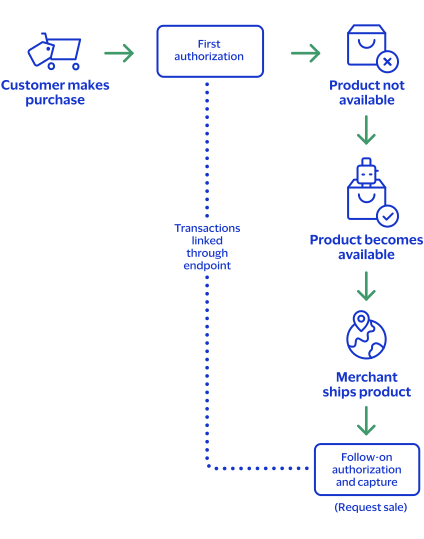
Step 1: Requesting an authorization
Request an authorization to ensure that funds are available before the product is
available for immediate shipment. The authorization request requires no additional
fields or requirements than a basic authorization.
Step 2: Processing a sale
When the product becomes available, ship the product and request a sale. The follow-on
authorization requires you to submit a sale request that includes the
processingInformation.linkId
field in addition to the
basic fields required for every sale request. The
processingInformation.linkId
field in an
authorization request triggers the split-shipment functionality. Set the
processingInformation.linkId
field to the
{id}
value from the endpoint. Field Specific to authorizing a sale for a product not yet available:
First Authorization Response: The
{id}
value is
returned in the endpoint.Follow-on Authorization Request:
processingInformation.linkId=SWVdPS5IM
Step 3:
Cybersource
attempts to link the follow-on authorization
request to the first authorization- If theprocessingInformation.linkIdvalue is valid, the follow-on authorization is linked to the original authorization in theBusiness Centerand in reports.
- If theprocessingInformation.linkIdvalue is not valid, the follow-on authorization is not linked to the original authorization in theBusiness Centerand in reports.
Step 4:
Cybersource
links the capture request- If theprocessingInformation.linkIdvalue for the follow-on authorization was valid, all three transactions (first authorization, follow-on authorization, capture) are linked together in theBusiness Centerand in reports.
- If theprocessingInformation.linkIdvalue for the follow-on authorization was not valid, the second authorization and capture are linked to each other in theBusiness Centerand in reports, but they are not linked to the first authorization.
See Basic Authorization for information on how to
process a basic authorization. See Sale for information on how to process
a sale.
Processing Two Authorizations and a Capture for Multiple Products
When the customer purchases a product that is not yet available, you can request two
authorizations and a capture. First request an authorization to ensure that funds are
available, and then ship the available products. After the remaining products become
available, request follow-on authorization to ensure funds are still available. Ship the
remaining products, and request a capture.
Cybersource
links the follow-on
authorization to the first authorization and the capture request to the other
transactions.Figure:
Processing Two Authorizations and a Capture for Multiple Products
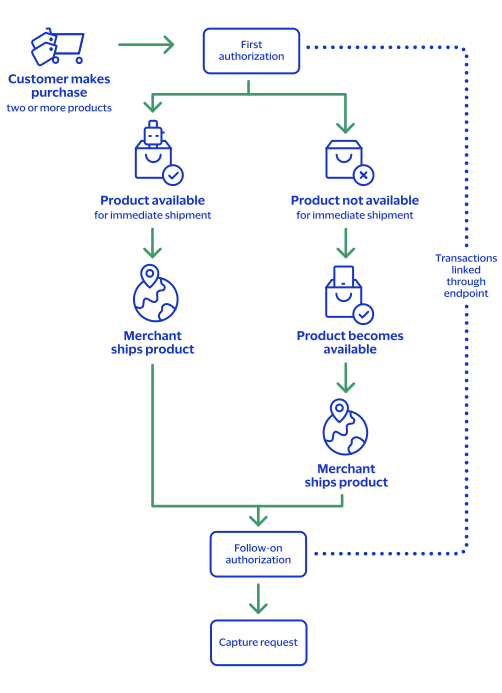
Step 1: Requesting an authorization
Request an authorization to ensure that funds are available for one or more of the products
that are available for immediate shipment. The authorization request requires no additional
fields or requirements than a basic authorization.
Step 2: Requesting a follow-on authorization
After the product becomes available, request a follow-on authorization to ensure that funds
are still available. The follow-on authorization request must include the
processingInformation.linkId
field in addition to the basic
fields required for every authorization request. The
processingInformation.linkId
field in an authorization
request triggers the split shipment functionality. Set the
processingInformation.linkId
field to the
{id}
value from the endpoint. Field specific to requesting a follow-on authorization request:
First Authorization Response: The
{id}
value is returned in
the endpoint.Follow-on Authorization Request:
processingInformation.linkId=SWVdPS5IM
Step 3:
Cybersource
attempts to link the follow-on authorization request
to the first authorization- If theprocessingInformation.linkIdvalue is valid, the follow-on authorization is linked to the original authorization in theBusiness Centerand in reports.
- If theprocessingInformation.linkIdvalue is not valid, the follow-on authorization is not linked to the original authorization in theBusiness Centerand in reports.
Step 4: Requesting a capture
You ship the product and request a capture. The capture request requires
only the basic fields as any capture request.
Step 5:
Cybersource
attempts to link the capture request to the other
transactionsAll three transactions (first authorization, follow-on authorization,
capture) are linked together in the
Business Center
and in reports.See Basic Authorization for information on how to
process a basic authorization. See Capture for information on how
to process a capture.
Processing an Authorization and Two Captures for Multiple Products
When the customer orders multiple products and one is not available, you must request an
authorization to ensure funds are available. You ship the products that are available and
request a capture for the amount of the shipped products. When the remaining product becomes
available, ship the product and request a follow-on capture for the amount of the product.
Cybersource
performs a system-generated authorization for the follow-on
capture request. Cybersource
then links the capture request. You receive the
status of the follow-on capture request and its associated system-generated authorization. Figure:
Processing an Authorization and Two Captures for Multiple Products
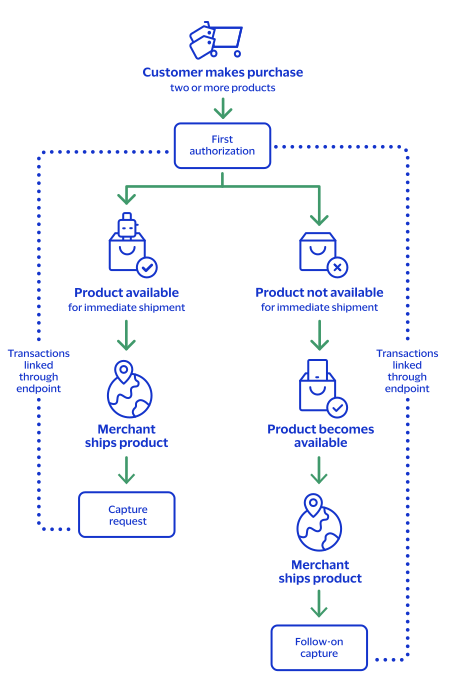
Step 1: Requesting an authorization
Request an authorization to ensure that funds are available for one or more products that are
available for immediate shipment. The authorization request requires no additional fields or
requirements other than a basic authorization.
Step 2: Requesting a capture
Ship the available product and request a capture while you wait for the remaining product to
become available. The capture request requires only the basic fields as any capture request.
Step 3: Requesting a follow-on capture
When the remaining product becomes available, ship it and request a capture for that amount.
The capture request requires only the basic fields as any capture request.
Step 4:
Cybersource
performs a system-generated authorizationCybersource
performs a system-generated authorization for the follow-on
capture request and link it to the original authorization in the Business Center
and
in reports. Cybersource
processes the capture request as a split shipment
request because your account is already enabled for split shipments. Step 5:
Cybersource
attempts to link the capture request to the other
transactionsThe capture is linked to the authorizations in the
Business Center
and in reports
through the request IDs as with any capture. All four transactions (first authorization,
system-generated authorization, first capture, follow-on capture) are linked together in the
Business Center
and in reports.Step 6:
Cybersource
provides the statusThe status of the follow-on capture request and its associated system-generated authorization
becomes available.
See Basic Authorization for information on how to
process a basic authorization. See Capture for information on how
to process a capture.