On This Page
How It Works
You can use the
Microform Integration
JavaScript library to securely replace
sensitive input fields with Cybersource
-hosted secure iframes. These
iframes capture payment information, including card numbers
and
data. This ensures that sensitive data is
handled securely within your checkout process.eCheck
Accepting Card Information
For card transactions, the captured card number is replaced with a mathematically
irreversible token that only you can use. This token can be used in place of the
card number for follow-on transactions in existing
Cybersource
APIs.Microform Integration
replaces the following card payment fields in your
input form:- Payment Card (PAN)
- CVN
- Month (non-sensitive)
- Year (non-sensitive)
With this option you can pass imonth and year in the request (if required), but these
fields are non-sensitive.
This figure shows the
Microform Integration
process for accepting
card information.Figure:
Microform Integration
Process with Card Information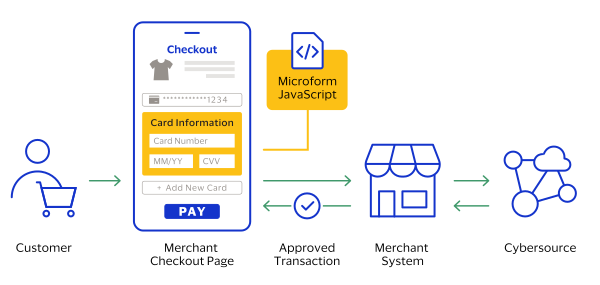
Accepting eCheck Information
eCheck
InformationMicroform Integration
also supports the
acceptance of eCheck
information. As with card transactions, the
sensitive eCheck
data is securely captured and replaced with a
token.Accepting
eCheck
information enables merchants to collect funds
from a customer's bank account through both the ACH service and eCheck service (US
only) for
either of these flows:- ACH servicesare a set of connections composed of the legacy gateway solutions whereCybersourceserves as the gateway.
- , the new service on Payments 2.0, is the acquirer solution whereeCheckCybersourceis the acquirer.
Microform Integration
replaces these
eCheck
information fields in your payment input form:- Routing Number
- Account Number
- Account type (non-sensitive)
This figure shows the
Microform Integration
process for accepting eCheck
information.Figure:
Microform Integration
Process with eCheck
Information