On This Page
Payments Developer Guide
This section describes how to use this guide and where to find further
information.
- Audience and Purpose
- This guide is written for application developers who want to use theREST APIto integrate payment card processing into an order management system.Implementing theCybersourcepayment services requires software development skills. You must write code that uses the API request and response fields to integrate the payment card services into your existing order management system.
- Conventions
- These statements appear in this document:IMPORTANTAnImportantstatement contains information essential to successfully completing a task or learning a concept.WARNINGAWarningcontains information or instructions, which, if not heeded, can result in a security risk, irreversible loss of data, or significant cost in time or revenue or both.
- Related Documentation
- Visit theCybersourcedocumentation hub to find additional processor-specific versions of this guide and additional technical documentation.
- Customer Support
- For support information about any service, visit the Support Center:
Recent Revisions to This Document
26.05.01
- Card Types Processing
- Added information about card processing. See Card Types.
- Token Management Service
- Added information aboutTMS. See Token Management Service.
26.04.01
Added related reference information (Related to this Page) to applicable topics.
Added Void a Payment.
26.02.01
This revision contains only
editorial changes and no technical updates.
26.01.02
This revision
contains only editorial changes and no technical updates.
26.01.01
This revision contains only editorial changes and no technical
updates.
25.09.02
This revision contains only editorial changes and no technical
updates.
25.09.01
This revision contains only editorial changes and no technical
updates.
25.08.01
This revision contains only editorial changes and no technical updates.
25.07.01
- Extensiveeftposupdates
- Added:
- Example of a sale with unbundled3-D Secure. See Rest Example: sale with unbundled 3-D Secure.
- Section about combining3-D Securewith sales. See Sales with3-D Secure.
- Section about sales bundled with payer authentication Enroll service. See Sales Bundled with Payer Authentication Enroll Service.
- A section about sales bundled with payer authentication Validate service. See Sales Bundled with Payer Authentication Validate Service.
- A section about follow-on refunds. See Follow-On Refunds.
- A section about stand-alone credits. See Stand-Alone Credits.
- A section about voiding a sale or stand-alone credit transaction. See Void for a Sale or Stand-Alone Credit Transaction.
- Required fields for specific types of sales transactions. See Additional Required Fields for Specific Sales Transactions.
- Updated:
- Introduction toeftpos. See eftpos Australia.
- Information about card types. See Card Types.
- Card-not-present information to explain cardholder-initiated transactions and merchant-initiated transactions. See Card-Not-Present Transactions.
- Types of sales transactions that are supported. See Sales.
- Test card numbers. See Test Card Numbers.
- New code examples.
- Removed:
- Content in the Payment Services section about authorizations.
- Content about dual message processing.
- Content about simulating errors.
- Content about American Express.
- Content about refunds.
- Content about timeout authorization reversals.
Introduction to Payments
This introduction provides the basic information that you need to successfully
process payment transactions. It also provides an overview of the payments industry
and provides workflows for each process.
With
Cybersource
payment services, you can process payment cards
(tokenized or non-tokenized), digital payments such as Apple Pay and Google Pay, and
customer ID transactions. You can process payments across the globe and across
multiple channels with scalability and security. Cybersource
supports a large number of payment cards and offers a wide choice of gateways and
financial institutions, all through one connection.Visit the
Cybersource
documentation hub to find additional processor-specific versions
of this guide and additional technical documentation.eftpos Australia
eftpos
Australiaeftpos
is Australia’s domestic debit card payments network.eftpos
primarily offers co-badged dual network debit cards with
international networks like Visa and Mastercard. These dual network debit cards can
be used to make transactions through eftpos
or the
Visa/Mastercard networks.eftpos
also has proprietary single network debit cards that are
used only for card present transactions.Financial Institutions and Payment Networks
Financial institutions and payment networks enable payment services to function. These
entities work together to complete the full payment cycle.
Merchant Financial Institutions (Acquirers)
A merchant financial institution, also known as an
acquirer
, offers accounts to
businesses that accept payments. Before you can accept payments, you must have a merchant
account from an acquirer. Your merchant account must be configured to process card-not-present
or mail-order/telephone-order (MOTO) transactions.Each acquirer has connections to a limited number of payment processors. You
must choose a payment processor that your acquirer supports.
You can expect to pay these fees:
- Discount rates: your acquirer charges a fee and collects a percentage of every transaction. The combination of the fee and the percentage is called thediscount rate. These charges can bebundled(combined into a single charge) orunbundled(charged separately).
- Interchange fees: payment networks, such as Visa or Mastercard, each have a base fee, called theinterchange fee, for each type of transaction. Your acquirer and processor can show you ways to reduce this fee.
- Chargebacks: when cardholders dispute charges, you can incurchargebacks. A chargeback occurs when a charge on a customer’s account is reversed. Your acquirer removes the money from your account and could charge you a fee for processing the chargeback.
Take these precautions to prevent chargebacks:
- Use accurate merchant descriptors so that customers can recognize the transactions on their statements.
- Provide good customer support.
- Ensure rapid problem resolution.
- Maintain a high level of customer satisfaction.
- Minimize fraudulent transactions.
If excessive chargebacks or fraudulent changes occur, these actions might be taken:
- You might be required to change your business processes to reduce the number chargebacks, fraud, or both.
- Your acquiring institution might increase your discount rate.
- Your acquiring institution might revoke your merchant account.
Contact your sales representative for information about products that can help prevent
fraud.
Customer Financial Institutions (Issuers)
A customer financial institution, also known as an
issuer
, provides payment cards to
and underwrites lines of credit for their customers. The issuer provides monthly statements
and collects payments. The issuer must follow the rules of the payment card companies to which
they belong. Payment Networks
Payment networks manage communications between acquirers and issuing banks. They also develop
industry standards, support their brands, and establish fees for acquiring institutions.
Some payment networks, such as Visa and Mastercard, are trade associations that do not issue
cards. Issuers are members of these associations, and they issue cards under license from the
association.
Payment Processors
Payment processors connect with acquirers. Before you can accept payments, you must
register with
a payment processor
. An acquirer might
require you to use a payment processor with an existing relationship with the
acquirer.
Your payment processor
assigns one or more merchant IDs (MIDs) to your
business. These unique codes identify your business during payment transactions.Card Types
For a list of supported card types, see Payment Processors.
These are the types of cards available for
eftpos
: - Proprietary single network debit cards: These cards function exclusively within the domesticeftposnetwork for facilitating financial transactions.
- Co-badged dual network debit cards: These cards allow domestic payments to be processed by either theeftposnetwork or one of the international networks, such as Mastercard and Visa, offering greater flexibility and convenience.
Card transactions for
eftpos
are processed through the eftpos
network, while Visa and Mastercard transactions are processed through
the Visa Platform Connect
gateway.For co-branded cards, transaction routing is determined by the value assigned to the
paymentInformation.card.type
field in the transaction request:
- 001– Visa card; routed through theVisa Platform Connectgateway
- 002– Mastercard card; routed through theVisa Platform Connectgateway
- 070–eftposcard; routed through theeftposnetwork
If you do not send the
paymentInformation.card.type
in the service
request, the system determines the routing based on your merchant configuration for
prefer_cobadged_secondary_brand
: - If enabled,Cybersourceselects card type070and routes the transaction through theeftposnetwork.
- If disabled,Cybersourceselects card type001or002and routes the transaction through theVisa Platform Connectgateway.
As a result,
Cybersource
automatically manages the default routing behavior, removing the
need for any additional integration effort by resellers or merchants.Transaction Types
This topic provides information about transaction types that are supported by your processor.
Card-Not-Present Transactions
When a customer provides a card number, but the card and the
customer are not physically present at the merchant's location, the purchase is known as a
card-not-present transaction
. eftpos
card-not-present transactions can be initiated either by the
cardholder or the merchant. - Cardholder-Initiated Transactions: These transactions can be authenticated using either the Cardholder Verification Value (CVV) or3-D Secure. Currently,3-D Secure2.1.0 is supported foreftpos.
- Merchant-Initiated Transactions: These transactions can be authenticated using the CVV.3-D Secureauthentication is not supported.
Online transaction security is bolstered by mechanisms such as CVV and
3-D Secure
, which play crucial roles in verifying cardholder identity and
preventing fraudulent activities. The Card Verification Value (CVV) is a three- or four-digit
number found on the back of credit or debit cards, providing an additional layer of security
by confirming that the person making the transaction physically possesses the card. Meanwhile,
3-D Secure
is a security protocol that adds an extra layer of authentication to
online transactions. It typically involves sending a one-time password (OTP) to the
cardholder's registered mobile device, ensuring that only the legitimate cardholder can
authorize the transaction.Currently,
3-D Secure
authentication is supported only for
cardholder-initiated transactions and version 2.1.0 of the 3-D Secure
protocol.Payment Services
Various services are involved in processing cards.
These services enable customers to purchase goods and services. They also enable merchants to
receive payments from customer accounts, to provide refunds, and to void transactions.
Sale
A sale is a bundled authorization and capture. eftpos uses single-message
format. Single-message processing treats the authorization and capture as a single
transaction. The request is treated as a full financial transaction.
There are several types of sale transactions.
- Single payment: The customer provides their card information to a merchant for a one-time purchase. This card information is not saved, but the consumer can store their card information after the transaction. Only the cardholder can initiate a single payment.
- First Pay As You Go (PAYG): The customer registers their card details with the merchant to use for the first payment. This type of sale can include ad hoc transactions like order-ahead apps or transactions with variable frequency and fixed amounts, such as automatic top-ups for road tolls. The initial PAYG transactions can be initiated by the merchant or the cardholder.
- Subsequent PAYG: After the initial PAYG transaction occurs, subsequent payments are processed as the cardholder continues buying goods and services from the merchant.
- First Fixed-Frequency Recurring: The cardholder agrees to a schedule of payments at regular intervals between the consumer and the merchant using the stored payment information. The payment amount can be fixed (for example, a gym membership) or variable (for example, a consumption-based utility bill). In the current implementation, only recurring transactions with a fixed payment amount are supported. The first recurring payment can be initiated by the cardholder or the merchant.
- Subsequent Fixed-Frequency Recurring: The merchant uses the cardholder payment information to initiate payments at the scheduled intervals. The transaction amounts can be fixed or variable and the number of transactions the merchant may initiate are unlimited. In the current implementation, only recurring transactions with a fixed payment amount are supported. All subsequent recurring payments are merchant initiated.
- First Installment: The cardholder provides payment information and agrees to the number of payments, transaction amount, and the frequency of payments before the first transaction. The initial installment payments can be initiated by the cardholder or the merchant.
- Subsequent Installment: The cardholder provides payment information and agrees to the number of payments, transaction amount, and the frequency of payments before the first transaction. Subsequent installment payments are initiated by the merchant.
Sale with 3-D Secure
3-D Secure
3-D Secure
helps to minimize costly fraudulent transactions by adding an
extra layer of protection to the payment process. Payer Authentication uses the 3-D Secure
protocol in online transactions to verify that payment is coming from
the actual cardholder. Most transactions can be authenticated without the customer being
aware of the process, but higher-risk transactions might require an exchange of one-time
passwords (OTPs) during authentication. This authentication of the payer before the
transaction, benefits the merchant by shifting chargeback liability from the merchant to
the card issuer.The authentication and sale transactions can be bundled together or can occur
sequentially, for example, authentication followed by authorization. Two types of
bundled scenarios are possible:
- Combining Check Enrollment with Sale: When a customer is authenticated without a challenge, the transaction can be authorized in the same request or in a separate authorization request. Whether authorization occurs in the same request or a separate request, the values from the check enrollment response must be passed to the authorization request to qualify for a liability shift.
- Combining Validation with Sale: When a customer is authenticated after a challenge, the transaction can be authorized in the same request or in a separate authorization request. Whether authorization is combined with validation or occurs in a separate request, the values from the validation response must be passed to the authorization request to qualify for a liability shift to the issuing bank.
The current solution supports the
3-D Secure
2.1.0 specification. All
customer-initiated card-not-present sales transactions with check enrollment can be
authenticated with 3-D Secure
. eftpos
does not allow merchant-initiated 3-D Secure
transactions.These ECI values support
3-D Secure
transactions:ECI Value | Description |
|---|---|
oci ( 05 ) | Authentication was successful for the eftpos
card. |
oci_attempted ( 06 ) | Authentication was attempted but not successful for the eftpos card. |
oci_failure ( 07 ) | Authentication was unsuccessful for the eftpos card. |
For more information about payer authentication, see the
Payer Authentication Developer Guide
. Refund
Refund
Refunds are payment refunds from a merchant to the cardholder after a
cardholder pays for a product or service and that payment is captured by the merchant. When a
refund request is successful, the issuer transfers funds from the merchant bank (acquirer)
account to the customer's account. It typically takes 2 to 4 days for the acquirer to transfer
funds from your merchant account.
There are two types of refunds: a
follow-on refund
that is linked to
an original capture or sale, and a stand-alone credit
that is not linked to an original
capture or sale.WARNING
You should carefully control access to your
refund and
credit services. Do not request
this service directly from your customer interface. Instead, incorporate this service as part
of your customer service process. This process reduces the potential for fraudulent
transactions.Follow-on Refund
Follow-on Refund
Follow-on refunds use the sale request ID to link the refund to the
original sale transaction. This request ID is returned during the sale request and is used
in all subsequent follow-on refunds associated with the original transaction. The request ID
links the transaction to the customer’s billing and account information, so you are not
required to include those fields in the credit request.
Unless otherwise specified,
refunds
must be requested within 180 days of a settlement. You can request multiple
follow-on refunds
against a single
capture or sale transaction as long as the total amount does not exceed the original
purchase amount. To perform multiple follow-on refunds
, use the same request ID in each request.Stand-Alone Credits
Stand-alone credits are not connected to an original transaction. Stand-alone credits do
not have a time restriction, and they can be used to issue refunds more than 180 days after
a transaction settlement.
Refund and Credit Workflow
This workflow applies to follow-on credits, also known as refunds, and stand-alone credits.
It begins when you send a request for a refund or credit.
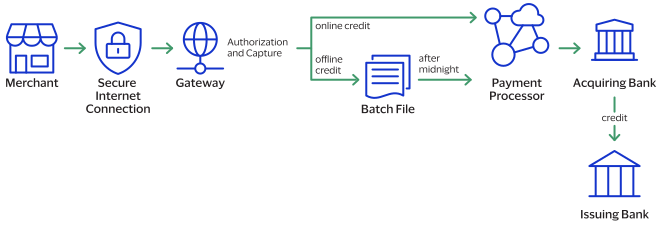
- The merchant sends the refund or credit request toCybersource.
- For online refunds and credits,Cybersourcevalidates the order information then sends the request to the payment processor.
- The processor validates the request and forwards it to the acquiring bank.
- The acquiring bank transfers funds to the issuing bank.
IMPORTANT
Not all processors support stand-alone credits.
Payment Features
You can apply features to different payment services to enhance the customer payment
processing experience. This section includes an overview of these features:
Token Management Service
The
Token Management Service
(TMS
) enables you to replace personally
identifiable information (PII), such as the primary account numbers (PANs), with
unique tokens. These tokens do not include the PII data, but act as a placeholder
for the personal information that would otherwise need to be shared. By using
tokens, businesses can provide a secure payment experience, reduce the risk of
fraud, and comply with industry consumer security regulations such as PCI-DSS.TMS
links tokens across service providers, payment types, and channels
for sellers, acquirers, and technology partners. TMS
tokenizes, securely stores, and manages the primary account number (PAN), the
payment card expiration date, electronic check
details,
and customer data. TMS
also enables you
to create a network token of a customer's payment card.IMPORTANT
Due to mandates from the Reserve Bank of India, merchants based in India
cannot store PANs. Use network tokens instead.
You can manage sensitive data securely by
creating, retrieving, updating, and deleting tokens through the TMS API.
TMS
simplifies your PCI DSS compliance. TMS
passes tokens
back to you that represent this data. You then store these tokens in your
environment and databases instead of storing customer payment
details.TMS
protects sensitive payment information through tokenization and
secures and manages customer data using these token types:- Customer tokens
- Instrument identifier tokens
- Payment instrument tokens
- Shipping address tokens
TMS
tokens can be used individually, or they can
be associated with one customer token:Figure:
TMS
Token Types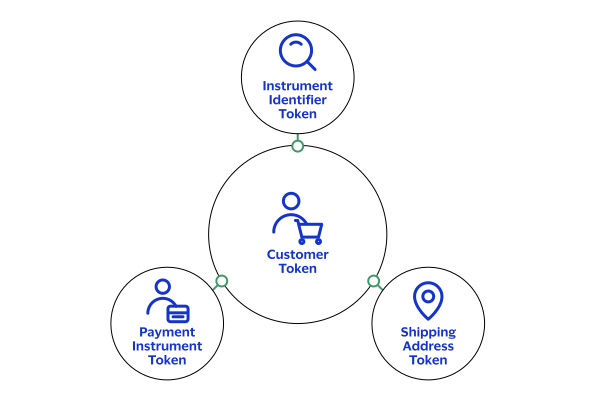
For detailed information about .
TMS
, see Token Management Service
Developer
GuideTesting the Payment Services
To ensure that requests are processed correctly, you must test the basic success and error
conditions for each service you plan to use.
Requirements for Testing
Before you can test, contact customer support to activate the credit
card services and configure your account for testing. You must also contact your processor
to set up your processor account.
IMPORTANT
When building your connection to the
Cybersource
payment gateway, ensure that you have implemented controls to prevent card testing or card
enumeration attacks on your platform. For more information, see the best practices guide.
When we detect suspicious
transaction activity associated with your merchant ID, including a card testing or card
enumeration attack, Cybersource
reserves the right to enable fraud
management tools on your behalf in order to mitigate the attack. The fraud team might also
implement internal controls to mitigate attack activity. These controls block traffic that
is perceived as fraudulent. Additionally, if you are using one of our fraud tools and
experience a significant attack, our internal team might modify or add rules to your
configuration to help prevent the attack and minimize the threat to our infrastructure.
However, any actions taken by Cybersource
would not replace the need for you
to follow industry standard best practices to protect your systems, servers, and
platforms.Follow these requirements when you test your system:
- Use your regular merchant ID.
- Use a real combination for the city, state, and postal code.
- Use a real combination for the area code and telephone number.
- Use a nonexistent account and domain name for the customer’s email address.
- REST API test endpoint:POSThttps://apitest.cybersource.com/pts/v2/payments
Test Card Numbers
Use these payment card numbers to test the authorization, capture, and credit services.
Remove the spaces from the test card numbers when sending them to the test system. Do not use
real payment card numbers. To test card types that are not included in the list, use an
account number that is in the card’s BIN range. For best results, try each test with a
different service request and with different test payment card numbers.
IMPORTANT
The test card numbers that are provided are
formatted with Xs for zeroes in the card number. When testing with these card numbers, remove the spaces and replace each X with a 0 (zero).
- eftposVisa co-badged card
- 4434 X2XX XXXX XXX6
- 4X65 87XX XXXX XXXX
- 494X 53XX XXXX XXX1
- eftposMastercard co-badged card
- 5163 6629 551X 5217
- eftpossole proprietary card
- 5X21 18XX XXXX XXX4
- 5X1X X7XX XXXX XXXX
- 5X18 X3XX XXXX XXX6
Test card numbers for testing
3-D Secure
scenarios are available. For more
information, go to the Payer Authentication Developer Guide
.Standard Payment Processing
This section shows you how to process various authorization, capture, credit, and sales
transactions.
Account Verification with a Zero Amount Authorization
Account verification with zero amount authorization is a standard e-commerce practice
where you send a zero amount transaction to verify a card is valid and whether the card
is lost or stolen. You cannot capture a zero amount authorization.
Most card networks refer to card account validation as zero amount authorization (ZAA).
These card networks have their own names for the service:
- Discover Zero Dollar Authorization
- Visa Account Verification
Endpoint
Production:
POST
https://api.cybersource.com
/pts/v2/paymentsTest:
POST
https://apitest.cybersource.com
/pts/v2/paymentsRequired Fields for Account Verification with Zero Amount Authorization
- Set the value toeftpos.
- Set the value toeftpos.
- Set the value toCNP.
- Set this value to0.
- Set the value tointernet.
REST Example: Account Verification with a Zero Amount Authorization
Request
{
  "clientReferenceInformation": {
    "code": "Purchase_A61_050",
    "partner": {
      "developerId": "eftPOS",
      "solutionId": "CNP"
    },
    "applicationUser": "eftPOS"
  },
  "processingInformation": {
    "commerceIndicator": "internet",
    "capture": "false"
  },
  "orderInformation": {
    "billTo": {
      "country": "AU",
      "lastName": "VDP",
      "address2": "Address 2",
      "address1": "123 Collins St",
      "postalCode": "3000",
      "locality": "Melbourne",
      "administrativeArea": "VI",
      "firstName": "CYBS",
      "phoneNumber": "3-9657-1234",
      "district": "VI",
      "buildingNumber": "123",
      "company": "Visa",
      "email": "test@cybs.com"
    },
    "amountDetails": {
      "totalAmount": "0.00",
      "currency": "aud"
    }
  },
  "paymentInformation": {
    "card": {
      "expirationYear": "2025",
      "number": "4687380100010006",
      "expirationMonth": "12",
      "type": "070",
      "securityCode": "123"
    }
  }
}
Response to a Successful Request
{
  "_links": {
    "authReversal": {
      "method": "POST",
      "href": "/pts/v2/payments/7464484268116175103091/reversals"
    },
    "self": {
      "method": "GET",
      "href": "/pts/v2/payments/7464484268116175103091"
    },
    "capture": {
      "method": "POST",
      "href": "/pts/v2/payments/7464484268116175103091/captures"
    }
  },
  "clientReferenceInformation": {
    "code": "Purchase_A61_050",
    "partner": {
      "developerId": "eftPOS",
      "solutionId": "CNP"
    }
  },
  "id": "7464484268116175103091",
  "orderInformation": {
    "amountDetails": {
      "authorizedAmount": "0.00",
      "currency": "aud"
    }
  },
  "paymentAccountInformation": {
    "card": {
      "type": "070"
    }
  },
  "paymentInformation": {
    "tokenizedCard": {
      "type": "070"
    },
    "card": {
      "type": "070"
    }
  },
  "processorInformation": {
    "systemTraceAuditNumber": "048168",
    "retrievalReferenceNumber": "048168334612",
    "responseCode": "00",
    "avs": {
      "code": "2"
    }
  },
  "reconciliationId": "7464484268116175103091",
  "status": "AUTHORIZED",
  "submitTimeUtc": "2025-05-05T12:33:47Z"
}
Sale
This section provides the information you need in order to process a sale
transaction.
A sale combines an authorization and a capture into a single transaction.
Endpoint
Production:
POST
https://api.cybersource.com
/pts/v2/paymentsTest:
POST
https://apitest.cybersource.com
/pts/v2/paymentsRequired Fields for a Sale
- Set the value toeftpos.
- Set the value toeftpos.
- Set the value toCNP.
- Required for3-D Securetransactions when the ECI value isocioroci_attempted.
- Required for3-D Securetransactions when the ECI value isocioroci_attempted.
- Set the value to1for the registration or first transaction and2for subsequent transactions.
- Required when the transaction is not a 3-D Secure transaction.
- Set the value totrue.
- Possible values:internet,recurring,install,oci,oci_attempted, andoci_failure
- Set the value to1for registration or first transaction and2for subsequent transactions.
Additional Required Fields for Specific Sale Transactions
Some types of sales transactions require additional fields. The need for these fields
and their values depend upon the type of transaction, whether the transaction was
initiated by the customer or the merchant, and whether
3-D Secure
authentication is used in the transaction. Pay as You Go First Transaction
The first transaction that is initiated by the customer.
- processingInformation.commerceIndicator
- Set the value tointernet,oci,oci_attempted, oroci_failure.
- processingInformation.authorizationOptions. initiator.type
- Set the value tocustomer.
- processingInformation.authorizationOptions. initiator.credentialStoredOnFile
- Set the value totrue.
The first transaction that is initiated by the merchant.
- processingInformation.commerceIndicator
- Set the value tointernet.
- processingInformation.authorizationOptions. initiator.type
- Set the value tomerchant.
- processingInformation.authorizationOptions. initiator.credentialStoredOnFile
- Set the value totrue.
Pay as You Go Subsequent Transaction
Pay as You Go subsequent transactions must include these additional fields in the
sales transaction.
Pay as You Go subsequent transactions that are initiated by the customer.
- processingInformation.commerceIndicator
- Set the value tointernet,oci,oci_attempted, oroci_failure.
- processingInformation.authorizationOptions. initiator.type
- Set the value tocustomer.
- processingInformation.authorizationOptions. initiator.storedCredentialUsed
- Set the value totrue.
Pay as You Go subsequent transactions that are initiated by the merchant.
- processingInformation.commerceIndicator
- Set the value tointernet.
- processingInformation.authorizationOptions. initiator.type
- Set the value tomerchant.
- processingInformation.authorizationOptions. initiator.storedCredentialUsed
- Set the value totrue.
Recurring First or Registration Transaction
First or registration transactions must include these additional fields in the
sales transaction. There are two sets of fields that can be used depending upon
whether
3-D Secure
authentication occurs with the transaction. Option 1
is the preferred set of fields to use.First or registration transactions that are initiated by the customer: Option
1
- processingInformation.commerceIndicator
- Set the value tointernet,oci,oci_attempted, oroci_failure.
- processingInformation.authorizationOptions. initiator.type
- Set the value tocustomer.
- processingInformation.authorizationOptions. initiator.credentialStoredOnFile
- Set the value totrue.
- recurringPaymentInformation.type
- Set the value to1.
First or registration transactions that are initiated by the customer: Option 2
(
3-D Secure
authentication cannot be done)- processingInformation.commerceIndicator
- Set the value torecurring.
- processingInformation.authorizationOptions. initiator.type
- Set the value tocustomer.
Initiated by the merchant
- processingInformation.commerceIndicator
- Set the value tointernet.
- processingInformation.authorizationOptions. initiator.type
- Set the value tomerchant.
- processingInformation.authorizationOptions. initiator.credentialStoredOnFile
- Set the value totrue.
- recurringPaymentInformation.type
- Set the value to1.
Subsequent Recurring Transaction
Subsequent transactions must include these additional fields in the sales
transaction. There are two sets of fields that can be used depending upon whether
3-D Secure
authentication occurs with the transaction. Option 1 is
the preferred set of fields to use.Subsequent recurring transactions that are initiated by the merchant: Option
1
- processingInformation.commerceIndicator
- Set the value tointernet.
- processingInformation.authorizationOptions. initiator.type
- Set the value tomerchant.
- processingInformation.authorizationOptions. initiator.storedCredentialUsed
- Set the value totrue. (optional)
- recurringPaymentInformation.type
- Set the value to2.
Subsequent recurring transactions that are initiated by the merchant: Option 2
- processingInformation.commerceIndicator
- Set the value torecurring.
- processingInformation.authorizationOptions. initiator.type
- Set the value tomerchant.
First or Registration Installment Transaction
First installment or registration transactions must include these additional
fields in the sales transaction. There are two sets of fields that can be used
depending upon whether
3-D Secure
authentication occurs with the
transaction. Option 1 is the preferred set of fields to use.The first or registration installment transaction that is initiated by the
customer: Option 1
- processingInformation.commerceIndicator
- Set the value tointernet,oci,oci_attempted, oroci_failure.
- processingInformation.authorizationOptions. initiator.type
- Set the value tocustomer.
- processingInformation.authorizationOptions. initiator.credentialStoredOnFile
- Set the value totrue.
- installmentInformation.paymentType
- Set the value to1.
Initiated by the customer: Option 2 (
3-D Secure
authentication
cannot be done)- processingInformation.commerceIndicator
- Set the value toinstall.
- processingInformation.authorizationOptions. initiator.type
- Set the value tocustomer.
The first or registration installment transaction that is initiated by the
merchant
- processingInformation.commerceIndicator
- Set the value tointernet.
- processingInformation.authorizationOptions. initiator.type
- Set the value tomerchant.
- processingInformation.authorizationOptions.initiator.credentialStoredOnFile
- Set the value totrue.
- installmentInformation.paymentType
- Set the value to1.
Subsequent Installment Transaction
Subsequent installment transactions must include these additional fields
in the sales transaction. There are two sets of fields that can be used depending
upon whether
3-D Secure
authentication occurs with the transaction.
Option 1 is the preferred set of fields to use.Subsequent installment transactions are initiated by the merchant: Option 1
- installmentInformation.paymentType
- Set the value to2.
- processingInformation.commerceIndicator
- Set the value tointernet.
- processingInformation.authorizationOptions. initiator.type
- Set the value tomerchant.
- processingInformation.authorizationOptions. initiator.storedCredentialUsed
- Set the value totrue. (optional)
Subsequent installment transactions are initiated by the merchant: Option 2
- processingInformation.commerceIndicator
- Set the value toinstall.
- processingInformation.authorizationOptions. initiator.type
- Set the value tomerchant.
REST Example: Sale
Request
{
  "clientReferenceInformation": {
    "code": "Purchase_A61_050",
    "partner": {
      "developerId": "eftPOS",
      "solutionId": "CNP"
    },
    "applicationUser": "eftPOS"
  },
  "processingInformation": {
    "commerceIndicator": "internet",
    "capture": "true"
  },
  "orderInformation": {
    "billTo": {
      "country": "AU",
      "lastName": "VDP",
      "address2": "Address 2",
      "address1": "123 Collins St",
      "postalCode": "3000",
      "locality": "Melbourne",
      "administrativeArea": "VI",
      "firstName": "CYBS",
      "phoneNumber": "3-9657-1234",
      "district": "VI",
      "buildingNumber": "123",
      "company": "Visa",
      "email": "test@cybs.com"
    },
    "amountDetails": {
      "totalAmount": "176",
      "currency": "aud"
    }
  },
  "paymentInformation": {
    "card": {
      "expirationYear": "2025",
      "number": "4687380100010006",
      "expirationMonth": "12",
      "type": "070",
      "securityCode": "123"
    }
  }
}
Response to a Successful Request
Most processors do not return all of the fields that are shown in this example.
{
  "_links": {
    "void": {
      "method": "POST",
      "href": "/pts/v2/payments/7464405393686886803092/voids"
    },
    "self": {
      "method": "GET",
      "href": "/pts/v2/payments/7464405393686886803092"
    }
  },
  "clientReferenceInformation": {
    "code": "Purchase_A61_050",
    "partner": {
      "developerId": "eftPOS",
      "solutionId": "CNP"
    }
  },
  "id": "7464405393686886803092",
  "orderInformation": {
    "amountDetails": {
      "totalAmount": "176.00",
      "authorizedAmount": "176.00",
      "currency": "aud"
    }
  },
  "paymentAccountInformation": {
    "card": {
      "type": "070"
    }
  },
  "paymentInformation": {
    "tokenizedCard": {
      "type": "070"
    },
    "card": {
      "type": "070"
    }
  },
  "processorInformation": {
    "systemTraceAuditNumber": "048393",
    "cardVerification": {
      "resultCode": "M"
    },
    "settlementDate": "0505",
    "retrievalReferenceNumber": "048393221910",
    "responseCode": "00",
    "avs": {
      "code": "2"
    }
  },
  "reconciliationId": "7464405393686886803092",
  "status": "AUTHORIZED",
  "submitTimeUtc": "2025-05-05T10:22:19Z"
  }
REST Example: Sale with Unbundled 3-D Secure
3-D Secure
Request
{
  "clientReferenceInformation": {
    "code": "Purchase_A61_050",
    "partner": {
      "developerId": "eftPOS",
      "solutionId": "CNP"
    },
    "applicationUser": "eftPOS"
  },
  "consumerAuthenticationInformation": {
    "cavv": "107b965bd3e20645afa84e63b91c03cc05050409",
    "directoryServerTransactionId": "f25084f0-5b16-4c0a-ae5d-b24808a95e4b"
  },
  "processingInformation": {
    "commerceIndicator": "oci",
    "capture": "true",
    "authorizationOptions": {
      "initiator": {
        "type": "customer"
      }
    }
  },
  "orderInformation": {
    "billTo": {
      "country": "AU",
      "lastName": "VDP",
      "address2": "Address 2",
      "address1": "123 Collins St",
      "postalCode": "3000",
      "locality": "Melbourne",
      "administrativeArea": "VI",
      "firstName": "CYBS",
      "phoneNumber": "3-9657-1234",
      "district": "VI",
      "buildingNumber": "123",
      "company": "Visa",
      "email": "test@email.com"
    },
    "amountDetails": {
      "totalAmount": "176",
      "currency": "aud"
    }
  },
  "paymentInformation": {
    "card": {
      "expirationYear": "2025",
      "number": "4687380100010006",
      "expirationMonth": "12",
      "type": "070"
    }
  }
}
Response to a Successful Request
{
  "_links": {
    "void": {
      "method": "POST",
      "href": "/pts/v2/payments/7459487237006411603091/voids"
    },
    "self": {
      "method": "GET",
      "href": "/pts/v2/payments/7459487237006411603091"
    }
  },
  "clientReferenceInformation": {
    "code": "Purchase_A61_050",
    "partner": {
      "developerId": "eftPOS",
      "solutionId": "CNP"
    }
  },
  "id": "7459487237006411603091",
  "orderInformation": {
    "amountDetails": {
      "totalAmount": "176.00",
      "authorizedAmount": "176.00",
      "currency": "aud"
    }
  },
  "paymentAccountInformation": {
    "card": {
      "type": "070"
    }
  },
  "paymentInformation": {
    "tokenizedCard": {
      "type": "070"
    },
    "card": {
      "type": "070"
    }
  },
  "processorInformation": {
    "systemTraceAuditNumber": "041646",
    "settlementDate": "0430",
    "retrievalReferenceNumber": "041646452417",
    "consumerAuthenticationResponse": {
      "code": "2",
      "codeRaw": "2"
    },
    "responseCode": "00",
    "avs": {
      "code": "2"
    }
  },
  "reconciliationId": "7459487237006411603091",
  "status": "AUTHORIZED",
  "submitTimeUtc": "2025-04-29T17:45:24Z"
}
Sale Bundled with Payer Authentication Enroll
Service
When a customer is authenticated without a challenge, the transaction can be authorized
either in the same request or in a separate authorization request. Whether authorization
occurs in the same request or a separate request, the values from the check enrollment
response must be passed to the authorization request to qualify for a liability shift.
This section provides information on how to process a transaction combined with
authentication of the cardholder that does not require additional authentication.
For more information about Payer Authentication, see the
Payer Authentication Developer Guide
. Endpoint
Production:
POST
https://api.cybersource.com
/pts/v2/paymentsTest:
POST
https://apitest.cybersource.com
/pts/v2/paymentsREST Example: Sale with Payer Authentication Enroll
Service
Request
{
  "clientReferenceInformation": {
    "code": "4f967fde-8bf1-46d6-9a75-3b3485514cc6",
    "applicationName": "REST API",
    "applicationVersion": "1.0"
  },
  "processingInformation": {
    "capture": "true",
    "actionList": [
      "CONSUMER_AUTHENTICATION"
    ]
  },
  "orderInformation": {
    "billTo": {
      "country": "US",
      "lastName": "Name",
      "address2": "Address 2",
      "address1": "1295 Charleston Rd",
      "postalCode": "94043",
      "locality": "San Francisco",
      "administrativeArea": "CA",
      "firstName": "Noreal",
      "phoneNumber": "4158880000",
      "district": "MI",
      "buildingNumber": "123",
      "company": "Visa",
      "email": "null@email.com"
    },
    "amountDetails": {
      "totalAmount": "25",
      "currency": "aud"
    }
  },
  "paymentInformation": {
    "card": {
      "expirationYear": "2027",
      "number": "4000000000005126",
      "securityCode": "123",
      "expirationMonth": "12",
      "type": "070"
    }
  },
  "consumerAuthenticationInformation": {
    "deviceChannel": "Browser",
    "acsWindowSize": "03",
    "strongAuthentication": {
      "transactionMode": "S"
    }
  },
  "deviceInformation": {
    "userAgentBrowserValue": "chrome",
    "httpBrowserTimeDifference": "300",
    "httpBrowserScreenWidth": "100000",
    "httpBrowserScreenHeight": "100000",
    "httpBrowserLanguage": "en_us",
    "httpBrowserJavaScriptEnabled": "Y",
    "httpBrowserJavaEnabled": "N",
    "httpAcceptContent": "all",
    "httpBrowserColorDepth": "24",
    "ipAddress": "139.130.4.5",
    "httpAcceptBrowserValue": "test"
  },
  "merchantInformation": {
    "merchantDescriptor": {
      "name": "Dusit LakeView Cairo",
      "administrativeArea": "TX",
      "country": "US"
    }
  }
}
Response to a Successful Request
{
  "_links": {
    "void": {
      "method": "POST",
      "href": "/pts/v2/payments/7448728340807102712431/voids"
    },
    "self": {
      "method": "GET",
      "href": "/pts/v2/payments/7448728340807102712431"
    }
  },
  "clientReferenceInformation": {
    "code": "4f967fde-8bf1-46d6-9a75-3b3485514cc6"
  },
  "consumerAuthenticationInformation": {
    "eciRaw": "05",
    "authenticationTransactionId": "TmIn2Zebtm42nWjq1YJ1",
    "strongAuthentication": {
      "OutageExemptionIndicator": "0"
    },
    "eci": "05",
    "token": "Axj//wSTk8vfEOjwJ0pvAMEs3aNHDdk4ZtGDhg3YsGTdiyaM2KbWNJ3KJRk2saTuUSEgycRPyhk2/+xcX
IKJFCAlJyeXviHR4E6U3gAA2gLd",
    "cavv": "AJkBBkhgQQAAAE4gSEJydQAAAAA=",
    "paresStatus": "Y",
    "acsReferenceNumber": "CardinalACS",
    "xid": "AJkBBkhgQQAAAE4gSEJydQAAAAA=",
    "directoryServerTransactionId": "45f774ac-c3f1-4817-88c0-d3b570bf01d5",
    "veresEnrolled": "Y",
    "threeDSServerTransactionId": "d0d14efc-0a60-4721-9acd-351348666a70",
    "acsOperatorID": "MerchantACS",
    "ecommerceIndicator": "oci",
    "specificationVersion": "2.1.0",
    "acsTransactionId": "772b5bef-121c-4af4-9397-e4c4b34eb972"
  },
  "id": "7448728340807102712431",
  "orderInformation": {
    "amountDetails": {
      "totalAmount": "25.00",
      "authorizedAmount": "25.00",
      "currency": "aud"
    }
  },
  "paymentAccountInformation": {
    "card": {
      "brandName": "EFTPOS",
      "type": "070"
    }
  },
  "paymentInformation": {
    "tokenizedCard": {
      "type": "070"
    },
    "card": {
      "bin": "400000",
      "type": "070"
    }
  },
  "processorInformation": {
    "systemTraceAuditNumber": "408128",
    "settlementDate": "0417",
    "retrievalReferenceNumber": "408128535506",
    "consumerAuthenticationResponse": {
      "code": "2",
      "codeRaw": "2"
    },
    "responseCode": "00",
    "avs": {
      "code": "2"
    }
  },
  "reconciliationId": "7448728340807102712431",
  "status": "AUTHORIZED",
  "submitTimeUtc": "2025-04-17T06:54:00Z"
}
Sale Bundled with Payer Authentication Validate
Service
When a customer is authenticated after a challenge, the transaction can be authorized in
the same request or in a separate authorization request. Whether authorization is
combined with validation or occurs in a separate request, the values from the validation
response must be passed to the authorization request to qualify for a liability shift to
the issuing bank. This section provides information on how to process that type of
transaction.
For more details about Payer Authentication, see the
Payer Authentication Developer Guide
. Endpoint
Production:
POST
https://api.cybersource.com
/pts/v2/paymentsTest:
POST
https://apitest.cybersource.com
/pts/v2/paymentsREST Example: Sale with Payer Authentication Validate
Service
Request
{
  "clientReferenceInformation": {
    "code": "4f967fde-8bf1-46d6-9a75-3b3485514cc6",
    "applicationName": "RESTAPI",
    "applicationVersion": "1.0"
  },
  "processingInformation": {
    "capture": "true",
    "actionList": [
      "VALIDATE_CONSUMER_AUTHENTICATION"
    ]
  },
  "orderInformation": {
    "billTo": {
      "country": "US",
      "lastName": "Name",
      "address2": "Address2",
      "address1": "1295 Charleston Rd",
      "postalCode": "94043",
      "locality": "san francisco",
      "administrativeArea": "CA",
      "firstName": "Noreal",
      "phoneNumber": "4158880000",
      "district": "MI",
      "buildingNumber": "123",
      "company": "Visa",
      "email": "null@email.com"
    },
    "amountDetails": {
      "totalAmount": "25",
      "currency": "aud"
    }
  },
  "paymentInformation": {
    "card": {
      "expirationYear": "2027",
      "number": "4000000000005290",
      "securityCode": "123",
      "expirationMonth": "12",
      "type": "070"
    }
  },
  "consumerAuthenticationInformation": {
    "authenticationTransactionId": "DxPf2DBldd8mHaFWv9d1",
    "deviceChannel": "Browser"
  },
  "merchantInformation": {
    "merchantDescriptor": {
      "name": "DusitLakeViewCairo",
      "administrativeArea": "TX",
      "country": "US"
    }
  }
}
Response to a Successful Request
{
  "_links": {
    "void": {
      "method": "POST",
      "href": "/pts/v2/payments/7448733951827103312431/voids"
    },
    "self": {
      "method": "GET",
      "href": "/pts/v2/payments/7448733951827103312431"
    }
  },
  "clientReferenceInformation": {
    "code": "4f967fde-8bf1-46d6-9a75-3b3485514cc6"
  },
  "consumerAuthenticationInformation": {
    "indicator": "oci",
    "eciRaw": "05",
    "authenticationResult": "0",
    "strongAuthentication": {
      "OutageExemptionIndicator": "0"
    },
    "authenticationStatusMsg": "Success",
    "eci": "05",
    "token": "Axj//wSTk8vzABpWHeovAMEs3aNHDdmzctWLhk3YsGbNiyaM2KbWNJ3W5Rk2saTutyEg
              ycRPzhk2/+xcXIKJFCApJyeX5gA0rDvUXgAA/AhZ",
    "cavv": "AAIBBYNoEwAAACcKhAJkdQAAAAA=",
    "paresStatus": "Y",
    "xid": "AAIBBYNoEwAAACcKhAJkdQAAAAA=",
    "directoryServerTransactionId": "6ed6067c-d76a-4a13-a8f2-b4fa2cb86aef",
    "threeDSServerTransactionId": "696c3af2-01f5-4211-8427-a927441b3241",
    "specificationVersion": "2.1.0",
    "acsTransactionId": "ea0e0dc4-772b-49b9-91d7-ffe259fa876a"
  },
  "id": "7448733951827103312431",
  "orderInformation": {
    "amountDetails": {
      "totalAmount": "25.00",
      "authorizedAmount": "25.00",
      "currency": "aud"
    }
  },
  "paymentAccountInformation": {
    "card": {
      "brandName": "EFTPOS",
      "type": "070"
    }
  },
  "paymentInformation": {
    "tokenizedCard": {
      "type": "070"
    },
    "card": {
      "bin": "400000",
      "type": "EFTPOS"
    }
  },
  "processorInformation": {
    "systemTraceAuditNumber": "408133",
    "seblementDate": "0417",
    "retrievalReferenceNumber": "408133031607",
    "consumerAuthenticationResponse": {
      "code": "2",
      "codeRaw": "2"
    },
    "responseCode": "00",
    "avs": {
      "code": "2"
    }
  },
  "reconciliationId": "7448733951827103312431",
  "status": "AUTHORIZED",
  "submitTimeUtc": "2025-04-17T07:03:21Z"
}
Follow-On Refund
Refund
This section provides the information you need in order to process a follow-on
refund
, which is linked to a capture or sale. You must request a follow-on refund
within 180 days of the authorization or sale.The card expiration date is optional for card-not-present follow-on refunds.
Endpoint
Production:
POST
https://api.cybersource.com
/pts/v2/payments/{id}
/refundsTest:
POST
https://apitest.cybersource.com
/pts/v2/payments/{id}
/refundsThe is the transaction ID
returned in the capture or sale response.
{id}
Required Fields for Processing a Follow-On Refund
Follow-On
Refund
REST Example: Processing a Refund
Request
{
  "clientReferenceInformation" : {
    "code" : "eftpos1"
  },
  "orderInformation" : {
    "amountDetails" : {
      "totalAmount" : "100.00",
      "currency" : "AUD"
    }
  }
}
Response to a Successful Request
{
  "_links" : {
    "void" : {
      "method" : "POST",
      "href" : "/pts/v2/refunds/7530655864106337303091/voids"
    },
    "self" : {
      "method" : "GET",
      "href" : "/pts/v2/refunds/7530655864106337303091"
    }
  },
  "clientReferenceInformation" : {
    "code" : "eftpos1"
  },
  "id" : "7530655864106337303091",
  "orderInformation" : {
    "amountDetails" : {
      "currency" : "AUD"
    }
  },
  "processorInformation" : {
    "systemTraceAuditNumber" : "188148",
    "retrievalReferenceNumber" : "188148394602",
    "settlementDate" : "0721",
    "responseCode" : "00"
  },
  "reconciliationId" : "7530655864106337303091",
  "refundAmountDetails" : {
    "currency" : "AUD",
    "refundAmount" : "100.00"
  },
  "status" : "PENDING",
  "submitTimeUtc" : "2025-07-21T02:39:46Z"
}
Stand-Alone Credit
This section shows you how to process a credit, which
is not linked to a capture or sale. There is no time limit for requesting a credit.
You can process a stand-alone credit, which is not linked to a sale
transaction. When you request a void for the credit and the credit is voided, if your account
is enabled for credit authorizations, the credit authorization is also reversed.
The expiration date is optional for card-not-present stand-alone credit
transactions.
Endpoint
Production:
POST
https://api.cybersource.com
/pts/v2/credits/Test:
POST
https://apitest.cybersource.com
/pts/v2/credits/Required Fields for Processing a Credit
REST Example: Processing a Stand-Alone Credit
Request
{
  "clientReferenceInformation": {
    "code": "Refund_A61_120",
    "partner": {
      "developerId": "eftPOS",
      "solu4onId": "CNP"
    },
    "applicationUser": "eftPOS"
  },
  "processingInformation": {
    "commerceIndicator": "internet",
    "reconcilia4onId": "222222"
  },
  "orderInformation": {
    "billTo": {
      "country": "AU",
      "lastName": "VDP",
      "address1": "123 Collins St",
      "postalCode": "3000",
      "locality": "Melbourne",
      "administra4veArea": "VI",
      "firstName": "CY",
      "phoneNumber": "3-9657-1234",
      "district": "VI",
      "buildingNumber": "123",
      "company": "Visa",
      "email": "test@email.com"
    },
    "amountDetails": {
      "totalAmount": "297.00",
      "currency": "aud"
    }
  },
  "paymentInformation": {
    "card": {
      "expirationYear": "2025",
      "number": "4687380100010006",
      "expirationMonth": "12"
    }
  }
}
Response to a Successful Request
{
  "_links": {
    "void": {
      "method": "POST",
      "href": "/pts/v2/credits/7495205466746998403091/voids"
    },
    "self": {
      "method": "GET",
      "href": "/pts/v2/credits/7495205466746998403091"
    }
  },
  "clientReferenceInformation": {
    "code": "Refund_A61_120",
    "partner": {
      "developerId": "eftPOS",
      "solutionId": "CNP"
    },
  },
  "creditAmountDetails": {
    "currency": "aud",
    "creditAmount": "297.00"
  },
  "id": "7495205466746998403091",
  "orderInformation": {
    "amountDetails": {
      "currency": "aud"
    }
  },
  "paymentAccountInformation": {
    "card": {
      "type": "070"
    }
  },
  "paymentInformation": {
    "tokenizedCard": {
      "type": "070"
    },
    "card": {
      "type": "070"
    }
  },
  "processorInformation": {
    "systemTraceAuditNumber": "277367",
    "retrievalReferenceNumber": "222222",
    "settlementDate": "0610",
    "responseCode": "00"
  },
  "reconciliationId": "222222",
  "status": "PENDING",
  "submitTimeUtc": "2025-06-10T01:55:46Z"
}
Void a Payment
This section describes how to void a payment that was submitted but not yet processed by the
processor. A payment is also known as a sale, which is an authorization and capture in one API
request. Include the payment ID in the void request endpoint to cancel the payment.
Required Fields for Voiding a Payment
REST Example: Voiding a Payment
Request
{
    "clientReferenceInformation": {
        "code": "123456789012"
    }
}
Response to a Successful Request
{
    "submitTimeUtc": "2025-03-11T16:39:30Z",
    "processorInformation": {
        "approvalCode": "OK1272",
        "responseCode": "000"
    },
    "consumerAuthenticationResponse": {
        "systemTraceAuditNumber": "500036"
    },
    "orderInformation": {
        "amountDetails": {
            "authorizedAmount": "110.00"
        }
    },
    "message": "Successful transaction.",
    "clientReferenceInformation": {
        "code": "123456789012"
    },
    "reconciliationId": "000000050000771",
    "id": "7417111702443232235535",
    "_links": {
        "self": {
            "method": "GET",
            "href": "/pts/v2/voids/7417111702443232235535"
        }
    },
    "status": "VOIDED"
}
Void for a Stand-Alone Credit
This section describes how to void a stand-alone credit that was submitted but not yet
processed by the processor.
Endpoint
Production:
POST
https://api.cybersource.com
/pts/v2/credits/{id}
/voidsTest:
POST
https://apitest.cybersource.com
/pts/v2/credits/{id}
/voidsThe is the transaction ID returned during the
credit response.
{id}
Required Field for Voiding a Stand-Alone Credit
REST Example: Void a Stand-Alone Credit
Request
{
    "clientReferenceInformation": {
        "code": "A61 050",
    }
}
Response to a Successful Request
{
  "_links" : {
    "self" : {
      "method" : "GET",
      "href" : "/pts/v2/voids/7495668874846651503091"
    }
  },
  "clientReferenceInformation" : {
    "code" : "A61_050"
  },
  "id" : "7495668874846651503091",
  "orderInformation" : {
    "amountDetails" : {
      "currency" : "AUD"
    }
  },
  "processorInformation" : {
    "retrievalReferenceNumber" : "277722470514",
    "settlementDate" : "0611",
    "responseCode" : "00"
  },
  "status" : "VOIDED",
  "submitTimeUtc" : "2025-06-10T14:48:10Z",
  "voidAmountDetails" : {
    "currency" : "AUD",
    "voidAmount" : "100.00"
  }
}
Timeout Void for a Sale
or a Stand-Alone Credit Transaction
Timeout Void for a Sale
or a Stand-Alone Credit Transaction
When you do not receive a response message after requesting a capture, sale,
refund
, or credit
, this
feature enables you to void the transaction that you requested.Include the
clientReferenceInformation.transactionId
field in the original request for a
capture, sale, refund
, or credit
. The value of the merchant transaction ID must be unique for 180
days.When the original transaction fails, the response message for the reversal request
includes these fields:
- voidAmountDetails.originalTransactionAmount
- processorInformation.responseCode
Endpoint
Production:
POST
https://api.cybersource.com
/pts/v2/voids/Test:
POST
https://apitest.cybersource.com
/pts/v2/voids/Required Fields for a Time-Out Void for a Capture, Sale, Refund, or Credit
Refund
, or Credit
Use these fields to request a timeout void for a refund
:REST Example: Time-Out Void for a Sale or Stand-Alone Credit or
Refund
Sale or Stand-Alone Credit or
Refund
Request
{
  "clientReferenceInformation": {
    "transactionId": "1234231332213112"
  }
}
Response to a Successful Request
{
  "_links": {
    "self": {
      "method": "GET",
      "href": "/pts/v2/voids/7171468281307104511992"
    }
  },
  "clientReferenceInformation": {
    "code": "CNP Ref1",
    "transactionId": "1234231332213112"
  },
  "id": "7171468281307104511992",
  "orderInformation": {
    "amountDetails": {
      "currency": "AUD"
    }
  },
  "processorInformation": {
    "retrievalReferenceNumber": "296327133309",
    "settlementDate": "0531",
    "responseCode": "00"
  },
  "reconciliationId": "7171468121957104411992",
  "status": "VOIDED",
  "submitTimeUtc": "2024-05-31T09:13:48Z",
  "voidAmountDetails": {
    "currency": "aud",
    "voidAmount": "101.00"
  }
}