On This Page
Online Bank Transfers
Online bank transfers enable customers to complete their purchase by securely logging
into their online banking environment. This method is secure, trusted, and widely used
in many European countries.
This is how online bank transfers work:
Figure:
Online Bank Transfers
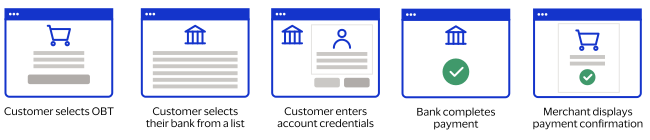
- The customer chooses online bank transfer as their payment method during checkout.
- The customer chooses their bank from the list of available banks and is redirected to their bank's website or application where they are prompted to enter their account credentials.
- The customer confirms their payment and completes the authorization process.
- The customer is notified that the payment is complete.
- The customer returns to your website for payment confirmation.
Unified Checkout
supports these online bank transfer payment methods:- Bancontact
- DragonPay
- iDeal
- Multibanco
- MyBank
- Przelewy24|P24
- Tink Pay By Bank
Payment Method | Method | Capture Context allowedPaymentTypes | Capture Context completeMandate.type | Separate Capture? | Payment Confirmation | Customer Country (Country Code) | Customer Currency |
|---|---|---|---|---|---|---|---|
iDEAL | PPRO | IDEAL | CAPTURE or PREFER_AUTH | No | Immediate | Netherlands (NL) | EUR |
Multibanco | PPRO | MULTIBANCO | CAPTURE or PREFER_AUTH | No | Immediate | Portugal (PT) | EUR |
Przelewy24|P24 | PPRO | P24 | CAPTURE or PREFER_AUTH | No | Immediate | Poland (PL) | PLN |
Bancontact | PPRO | BANCONTACT | CAPTURE or PREFER_AUTH | No | Immediate | Belgium (BE) | EUR |
MyBank | PPRO | MYBANK | CAPTURE or
PREFER_AUTH | No | Immediate | Italy (IT) | EUR |
Belgium (BE) | |||||||
Portugal (PT) | |||||||
Spain (ES) | |||||||
DragonPay | PPRO | DRAGONPAY | CAPTURE or PREFER_AUTH | No | Immediate | Philippines (PH) | PHP |
Payment Method | Capture Context allowedPaymentTypes | Capture Context completeMandate.type | Separate Capture? | Payment Confirmation | Customer Country (Country Code) | Customer Currency |
|---|---|---|---|---|---|---|
Tink Pay by Bank | TINKPAYBYBANK | CAPTURE or PREFER_AUTH | No | Immediate | United Kingdom (GB) | GBP |