On This Page
PIN Debit Processing Developer Guide
This section describes how to use this guide and where to find further information.
- Audience and Purpose
- This guide is written for application developers who want to use theCybersourceAPI to integrate PIN debit processing into their order management system.
- Conventions
- The following special statement is used in this document:IMPORTANTAnImportantstatement contains information essential to successfully completing a task or learning a concept.
- Related Documentation
- Visit theCybersourcedocumentation hub to find additional technical documentation.
- Customer Support
- For support information about any service, visit the Support Center:
Recent Revisions to This Document
26.01.01
- Renamed PIN Debit EBT Purchase with SNAP Account Swiped Track Data and Balance Inquiry to PIN Debit EBT Purchase with SNAP Account Swiped Track Data and Balance Response Data. Also replaced REST API request and response examples.
- Updated REST API required fields list and request and response examples in Reverse a PIN Debit EBT Purchase.
25.10.01
This revision contains only editorial changes and no technical updates.
25.01
This revision contains only editorial changes and no technical updates.
VISA Platform Connect: Specifications and Conditions for
Resellers/Partners
The following are specifications and conditions that apply to a Reseller/Partner enabling
its merchants through
Cybersource for
. Failure to meet any of the specifications and conditions below is
subject to the liability provisions and indemnification obligations under
Reseller/Partner’s contract with Visa/Cybersource.Visa Platform Connect
(“VPC”)
processing- Before boarding merchants for payment processing on a VPC acquirer’s connection, Reseller/Partner and the VPC acquirer must have a contract or other legal agreement that permits Reseller/Partner to enable its merchants to process payments with the acquirer through the dedicated VPC connection and/or traditional connection with such VPC acquirer.
- Reseller/Partner is responsible for boarding and enabling its merchants in accordance with the terms of the contract or other legal agreement with the relevant VPC acquirer.
- Reseller/Partner acknowledges and agrees that all considerations and fees associated with chargebacks, interchange downgrades, settlement issues, funding delays, and other processing related activities are strictly between Reseller and the relevant VPC acquirer.
- Reseller/Partner acknowledges and agrees that the relevant VPC acquirer is responsible for payment processing issues, including but not limited to, transaction declines by network/issuer, decline rates, and interchange qualification, as may be agreed to or outlined in the contract or other legal agreement between Reseller/Partner and such VPC acquirer.
DISCLAIMER: NEITHER VISA NOR CYBERSOURCE WILL BE RESPONSIBLE OR LIABLE FOR ANY ERRORS OR
OMISSIONS BY THE
Visa Platform Connect
ACQUIRER IN PROCESSING TRANSACTIONS. NEITHER VISA
NOR CYBERSOURCE WILL BE RESPONSIBLE OR LIABLE FOR RESELLER/PARTNER BOARDING MERCHANTS OR
ENABLING MERCHANT PROCESSING IN VIOLATION OF THE TERMS AND CONDITIONS IMPOSED BY THE
RELEVANT Visa Platform Connect
ACQUIRER. Introduction to PIN Debit Processing
Customers commonly use debit cards, also called
ATM cards
or check cards
,
in card-present situations. Your agreement with the debit networks determines whether
the customer must provide a personal identification number (PIN). Cybersource
supports PIN debit transactions on Visa Platform Connect
.
PIN debit transactions are supported only in the U.S.Debit cards are branded with debit network logos, such as STAR, NYCE, Accel, and Pulse,
and often with Visa or Mastercard logos. The logos indicate that the cards are accepted
wherever Visa or Mastercard are accepted and are processed through a debit or credit
card network.
IMPORTANT
Issuer regulations require that you present the customer with the
choice to use their debit card as a debit or credit card.
The customer chooses whether to process the card as a debit card or a credit card. In
either case, the money is taken out of the customer's bank account, and the transaction
is included on the customer's bank account statement. The customer does not receive a
credit card bill as they would with a regular credit card.
PIN Debit Integration
Follow these steps to integrate PIN debit processing:
- ContactCybersourceor your acquirer to determine whether you are eligible to process PIN debit transactions. As part of this process, the debit networks might require you to complete applications.
- Determine whetherCybersourceor your acquirer requires any additional banking information from you.
- Determine whether you must comply with any special debit network requirements when processing PIN debit transactions. For example, some networks require that you verify the customer's identity before processing the payment.
- Contact customer support so that yourCybersourceaccount can be configured for PIN debit transactions.
PIN Debit Transactions
PIN debit transactions begin when the customer presents a PIN debit card at the payment
terminal.
Figure:
PIN Debit Transaction Flow
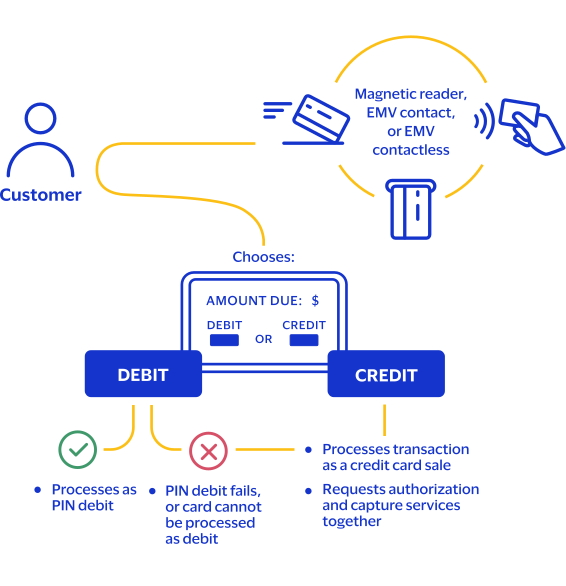
- The customer swipes the card through a magnetic card reader, inserts the card into the EMV terminal (contact), or taps the card against an EMV scanner (contactless) on the terminal.
- The customer chooses to process the card as a debit card or a credit card.IMPORTANTIssuer regulations require that you present the customer with the choice to use their debit card as a debit or credit card.
- If the customer chooses the debit card option, you request the PIN debit purchase service. The transaction is routed through the debit card networks.PIN debit transactions arefull-financial transactions; they are single message transactions that include an authorization and capture. As such, you do not need to request a separate capture as you would with a credit card transaction.If the PIN debit purchase service fails, you can attempt to process the card as a credit card.
- If the customer chooses the credit card option, or if the card cannot be used for a PIN debit purchase, process the transaction as a credit card sale, requesting the authorization and capture services together. The transaction is routed through the credit card networks.Refer to thePayments Developer Guide for the REST API | Visa Platform Connectfor information about using credit card services to process debit card transactions.
- If you need to refund a PIN debit purchase, use the PIN debit credit service.
- To reverse a PIN debit purchase or PIN debit credit, use the PIN debit reversal service.IMPORTANTTo request a PIN debit reversal, you must submit the request within one hour of the request that you are reversing.
PIN Debit Network Routing
Listing your preferred network routing codes in your
Business Center
merchant
account is an optional setting. To ensure that transactions are routed to networks in
your priority order, Cybersource
recommends including the
processingInformation.networkRoutingOrder
field in PIN debit
requests. Set the value to the priority order of the routing networks for the
transaction. When you include this field it overrides your merchant account setting.
When you do not include this field in your request, Cybersource
uses the
list of network codes in your merchant account.For Electronic Benefit Transfer (EBT) transactions, set the
processingInformation.networkRoutingOrder
field to
K
. If you do not include this field in EBT requests, your merchant account
must be configured with K
in the first priority order for network
routing.PIN Debit Processing Versus Credit Card Processing
You can process Visa or Mastercard branded debit cards through the credit card network by
using the credit card authorization and capture services, which is the same way that you
process credit card transactions.
PIN debit transactions and credit card transactions are processed differently from each
other:
- For a PIN debit transaction, request only the authorization service. You are not required to request a capture because the authorization service authorizes the transaction and moves the money.
- For a credit card transaction, you receive an authorization code indicating an approval. For a PIN debit transaction, you do not necessarily receive an authorization code. Some processors provide an authorization code, but the code is not required in order for you to receive your money. For a PIN debit transaction, you cannot verbally obtain an authorization code from the processor or bank.
PIN Debit Reconciliation
PIN debit purchase and credit data is added to the TC33A capture file for reconciliation
purposes only. Use it to verify this information:
- Merchant ID (MID)
- Total amount
- Approved: yes or no
- Action code
Track Data
PIN debit processing uses track 2 data in purchase and credit requests. When you include
track data in a request using the
pointOfSaleInformation.trackData
field, the sentinels
are required. In this example, the track 2 data follows the semicolon (;). The most important parts of
the track data are the card number, card expiration year, and card expiration month. In
this example, the card number is 4111111111111111, the expiration year is 26, and the
expiration month is 12. The end sentinel (?) follows the final character of data
recorded on the track.
Track Data Example
;4111111111111111=26121019761186800000?
Terminal IDs
By default, your merchant account is configured to validate a default terminal ID (TID).
If you want to override the default TID and send TIDs in the
pointOfSaleInformation.terminalId
request field in PIN Debit
requests, contact customer support to configure your account to disable TID validation. Electronic Benefit Transfer
Public assistance programs in the United States use Electronic Benefits Transfer (EBT)
payment cards to issue monthly food and cash benefits to eligible people. EBT cards
function like prepaid debit cards that can be used at authorized retailers. Food
benefits are issued through the Supplemental Nutrition Assistance Program (SNAP), which
helps people with low incomes purchase eligible food items.
This feature enables you to submit purchase, credit, and reversal requests on EBT cards
and vouchers. For EBT transactions, only swiped and manually keyed entry are supported. Contactless EMV transactions are not supported.
IMPORTANT
Federal law mandates that you cannot deny an EBT transaction because of technical
problems such as a non-working terminal or a non-working PIN pad.
When a technical
problem prevents you from initiating an EBT transaction, follow these steps:
- Complete an EBT voucher transaction, which is similar to a verbal authorization.
- Telephone the issuer to receive the approval information verbally.
- Capture all of the approval information on one of the paper vouchers that you received with the EBT network device.
- When the EBT system is back online, enter the voucher information into the EBT device to complete the transaction.
PIN Debit Optional Features
This section describes the optional features that are available for PIN Debit
processing.
Cash Back
This feature enables a customer in a card-present situation to add a cash-back amount to
the total transaction amount when using a debit card. The customer receives that amount
in cash along with the purchase. For example, a customer purchasing products totaling
18.99 might ask for 20.00 cash back. They would pay a total of 38.99 (18.99 + 20.00)
with their debit card and receive 20.00 in cash along with their products.
IMPORTANT
Cash back is not supported on partial authorizations.
To use this feature, include the
orderInformation.amountDetails.cashbackAmount
field in a PIN
debit purchase request.When the cash-back amount is 0.00, do not include the
orderInformation.amountDetails.cashbackAmount
field.For more information, see PIN Debit Purchase with Contactless EMV and Cash Back.
Merchant Descriptors
This feature enables you to submit merchant descriptor values that are displayed on a
cardholder's statement.
IMPORTANT
Before using merchant descriptors in your requests, check with your
bank to learn whether you must pre-register your merchant descriptor information with
them.
Cybersource
always provides merchant descriptor information to the
acquirer for all of your PIN debit purchase and PIN debit credit transactions. When you
do not include a particular merchant descriptor in your PIN debit purchase or PIN debit
credit request, Cybersource
uses the corresponding value from your
merchant account.For more information, see PIN Debit Purchase with Swiped Track Data and Merchant Descriptors.
Merchant Descriptor Fields
You can include these merchant descriptor fields in a PIN debit purchase or PIN debit credit:
- merchantInformation.merchantDescriptor.administrativeArea
- If you include this field in a request, you must also includemerchantInformation.merchantDescriptor.country.
- merchantInformation.merchantDescriptor.alternateName
- merchantInformation.merchantDescriptor.country
- If you include this field in a request, you must also includemerchantInformation.merchantDescriptor.administrativeArea.
- merchantInformation.merchantDescriptor.locality
- merchantInformation.merchantDescriptor.name
- merchantInformation.merchantDescriptor.postalCode
Merchant-Inititated Reversals
When you do not receive a response message after sending a PIN debit purchase or credit
request, your request might have timed out. This feature enables you to reverse a
timed-out transaction within 2 hours of the original request.
When using the merchant-initiated reversals feature, include the
clientReferenceInformation.transactionId
field in your original
request for a PIN debit purchase. The value of the transaction ID must be unique for 60
days. It links your reversal request to your original request.Partial Authorizations
For PIN debit cards, the issuing bank can approve a partial amount if the balance on the
card is less than the requested authorization amount.
Support for your processor and card type does not guarantee a partial authorization. The
issuing bank decides whether or not to approve a partial amount. When the balance on a
debit card or prepaid card is less than the requested authorization amount, the issuing
bank can approve a partial amount. When this happens, you can accept multiple forms of
payment for the order starting with some or all of the approved amount, followed by one
or more different payment methods.
You must opt in to be able to receive and capture partial authorizations. Choose one of
these options:
- CallCybersourcecustomer support to have your merchant account enabled for partial authorizations. When you do this, all of your authorization requests are enabled for partial authorizations.
- Set theprocessingInformation.authorizationOptions.partialAuthIndicatorfield totruein a PIN debit purchase request. When you do this, only that specific transaction is enabled for partial authorization.
When your account is enabled for partial authorizations, you can disable partial authorization for a specific transaction by setting the
processingInformation.authorizationOptions.partialAuthIndicator
field to false
in the PIN debit purchase request.For more information, see PIN Debit Partial Authorization with Swiped Track Data.
Payment Network Tokens
Payment network tokens are supported as card-present contactless transactions.
Surcharge Fees
This feature enables you to charge the customer a surcharge fee for a PIN debit purchase
or credit transaction.
IMPORTANT
Surcharge fees are not allowed on debit or prepaid cards in the
U.S.
Include the surcharge amount in the total transaction amount, and set the
orderInformation.amountDetails.surcharge.amount
field to the
surcharge amount. This information is passed to the issuer and acquirer for tracking.
The issuer can provide information about the surcharge amount to the customer.When there is no surcharge fee, do not include the
orderInformation.amountDetails.surcharge.amount
field in the
request.For more information, see PIN Debit Purchase with Contactless EMV and a Surcharge Fee.
PIN Debit Services
This section describes how to process PIN debit transactions that use these services:
- Contactless EMV purchases
- Swiped purchases
- Cash back
- Credits
- Electronic Benefits Transfer (EBT) transactions:
- EBT cash benefit account purchases
- EBT Supplemental Nutrition Assistance Program (SNAP) account purchases
- EBT voucher purchases
- EBT purchases with cash back
- EBT credits
- EBT reversals
- Merchant-initiated reversals
- Partial authorizations
PIN Debit Purchase with Contactless EMV
This section describes how to process a PIN debit purchase with contactless EMV when the
customer taps the card on the terminal.
Endpoint
Production:
POST
https://api.cybersource.com
/pts/v2/paymentsTest:
POST
https://apitest.cybersource.com
/pts/v2/paymentsRequired Fields for a PIN Debit Purchase with Contactless EMV
- Cybersourceprovides the value for this field.
- Set the value toUA.
- Leave this field blank.
- Set the value toCARD.
- Set the value toDEBIT.
- Required only when the card has a sequence number configured on the EMV chip.
- Set the value tocontactless.
- Set the value toretail.
REST Example: PIN Debit Purchase with Contactless EMV
Request
{
  "clientReferenceInformation": {
    "code": "ABC123",
    "partner": {
      "thirdPartyCertificationNumber": "PTP1234"
    }
  },
  "processingInformation": {
    "commerceIndicator": "retail",
    "networkRoutingOrder": "GUFV"
  },
  "paymentInformation": {
    "paymentType": {
      "name": "CARD",
      "subTypeName": "DEBIT"
    },
    "card": {
      "useAs": "",
      "sourceAccountType": "UA"
    }
  },
  "orderInformation": {
    "amountDetails": {
      "totalAmount": "24.00",
      "currency": "USD"
    }
  },
  "pointOfSaleInformation": {
    "entryMode": "contactless",
    "terminalCapability": 4,
    "emv": {
      "tags": "9F3303204000950500000000009F3704518823719F100706011103A000009F26081E1756ED0E2134E29F36020015820200009C01009F1A0208409A030006219F02060000000020005F2A0208409F0306000000000000",
      "cardSequenceNumber": "01"
    },
    "trackData": ";4111111111111111=33121019761186800000?"
  }
}
Response to a Successful Request
{
  "_links": {
    "void": {
      "method": "POST",
      "href": "/pts/v2/payments/6883842752296552503964/voids"
    },
    "self": {
      "method": "GET",
      "href": "/pts/v2/payments/6883842752296552503964"
    }
  },
  "clientReferenceInformation": {
    "code": "ABC123"
  },
  "id": "6883842752296552503964",
  "orderInformation": {
    "amountDetails": {
      "authorizedAmount": "24.00",
      "currency": "usd"
    }
  },
  "processingInformation": {
    "reconciliationId": "6883842752296552503964"
  },
  "processorInformation": {
    "systemTraceAuditNumber": "109328",
    "routing": {
      "network": "0000"
    },
    "approvalCode": "831000",
    "retrievalReferenceNumber": "123456109328",
    "transactionId": "000000000000000",
    "responseCode": "00"
  },
  "reconciliationId": "6883842752296552503964",
  "status": "AUTHORIZED",
  "submitTimeUtc": "2023-07-03T11:37:55Z"
}
PIN Debit Purchase with Contact EMV
This section describes how to process a PIN debit purchase with contact EMV when the
customer inserts the card into the terminal.
Endpoint
Production:
POST
https://api.cybersource.com
/pts/v2/paymentsTest:
POST
https://apitest.cybersource.com
/pts/v2/paymentsRequired Fields for a PIN Debit Purchase with Contact EMV
- Cybersourceprovides the value for this field.
- Set the value toUA.
- Leave this field blank.
- Set the value toCARD.
- Set the value toDEBIT.
- Required only when the card has a sequence number configured on the EMV chip.
- Set the value tocontactless.
- Set the value to1.
- Set the value toretail.
REST Example: PIN Debit Purchase with Contact EMV
Request
{
  "clientReferenceInformation": {
    "code": "ABC123",
    "partner": {
      "thirdPartyCertificationNumber": "PTP1234"
    }
  },
  "processingInformation": {
    "commerceIndicator": "retail",
    "networkRoutingOrder": "VMHF"
  },
  "paymentInformation": {
    "paymentType": {
      "name": "CARD",
      "subTypeName": "DEBIT"
    },
    "card": {
      "useAs": "",
      "sourceAccountType": "UA"
    }
  },
  "orderInformation": {
    "amountDetails": {
      "totalAmount": "202.00",
      "currency": "USD"
    }
  },
  "pointOfSaleInformation": {
    "terminalId": "12345678",
    "entryMode": "contact",
    "terminalCapability": 4,
    "emv": {
      "tags": "9F3303204000950500000000009F3704518823719F100706011103A000009F26081E1756ED0E2134E29F36020015820200009C01009F1A0208409A030006219F02060000000020005F2A0208409F0306000000000000",
      "cardSequenceNumber": "01"
    },
    "trackData": ";4111111111111111=33121019761186800000?",
    "pinBlockEncodingFormat": "0",,
    "encryptedPin": "5D5FA5E5B448F33B",
    "encryptedKeySerialNumber": "FFFF1B1D140000200001"
  }
}
Response to a Successful Request
{
  "_links": {
    "void": {
      "method": "POST",
      "href": "/pts/v2/payments/7012752230096541604951/voids"
    },
    "self": {
      "method": "GET",
      "href": "/pts/v2/payments/7012752230096541604951"
    }
  },
  "clientReferenceInformation": {
    "code": "ABC123"
  },
  "id": "7012752230096541604951",
  "orderInformation": {
    "amountDetails": {
      "authorizedAmount": "202.00",
      "currency": "usd"
    }
  },
  "processingInformation": {
    "reconciliationId": "7012752230096541604951"
  },
  "processorInformation": {
    "systemTraceAuditNumber": "141924",
    "routing": {
      "network": "0000"
    },
    "approvalCode": "831000",
    "retrievalReferenceNumber": "123456141924",
    "transactionId": "000000000000000",
    "responseCode": "00"
  },
  "reconciliationId": "7012752230096541604951",
  "status": "AUTHORIZED",
  "submitTimeUtc": "2023-11-29T16:27:03Z"
}
{
  "_links": {
    "void": {
      "method": "POST",
      "href": "/pts/v2/payments/6883842752296552503964/voids"
    },
    "self": {
      "method": "GET",
      "href": "/pts/v2/payments/6883842752296552503964"
    }
  },
  "clientReferenceInformation": {
    "code": "ABC123"
  },
  "id": "6883842752296552503964",
  "orderInformation": {
    "amountDetails": {
      "authorizedAmount": "24.00",
      "currency": "usd"
    }
  },
  "processingInformation": {
    "reconciliationId": "6883842752296552503964"
  },
  "processorInformation": {
    "systemTraceAuditNumber": "109328",
    "routing": {
      "network": "0000"
    },
    "approvalCode": "831000",
    "retrievalReferenceNumber": "123456109328",
    "transactionId": "000000000000000",
    "responseCode": "00"
  },
  "reconciliationId": "6883842752296552503964",
  "status": "AUTHORIZED",
  "submitTimeUtc": "2023-07-03T11:37:55Z"
}
PIN Debit Purchase with Contactless EMV and Cash Back
This section describes how to process a PIN debit purchase with contactless EMV and cash
back.
Field Specific to This Use Case
This API field is specific to this use case:
Endpoint
Production:
POST
https://api.cybersource.com
/pts/v2/paymentsTest:
POST
https://apitest.cybersource.com
/pts/v2/paymentsRequired Fields for a PIN Debit Purchase with Contactless EMV and Cash Back
- Cybersourceprovides the value for this field.
- Set the value toUA.
- Leave this field blank.
- Set the value toCARD.
- Set the value toDEBIT.
- Required only when the card has a sequence number configured on the EMV chip.
- Set the value tocontactless.
- Set the value toretail.
REST Example: PIN Debit Purchase with Contactless EMV and Cash Back
Request
{
  "clientReferenceInformation": {
    "code": "ABC123",
    "partner": {
      "thirdPartyCertificationNumber": "PTP1234"
    }
  },
  "processingInformation": {
    "commerceIndicator": "retail",
    "networkRoutingOrder": "GUFV"
  },
  "paymentInformation": {
    "paymentType": {
      "name": "CARD",
      "subTypeName": "DEBIT"
    },
    "card": {
      "useAs": "",
      "sourceAccountType": "UA"
    }
  },
  "orderInformation": {
    "amountDetails": {
      "totalAmount": "204.00",
      "currency": "USD",
      "cashbackAmount": "45.00"
    }
  },
  "pointOfSaleInformation": {
    "entryMode": "contactless",
    "terminalCapability": 4,
    "emv": {
      "tags": "9F3303204000950500000000009F3704518823719F100706011103A000009F26081E1756ED0E2134E29F36020015820200009C01009F1A0208409A030006219F02060000000020005F2A0208409F0306000000000000",
      "cardSequenceNumber": "01"
    },
    "trackData": ";4111111111111111=33121019761186800000?"
  }
}
Response to a Successful Request
{
  "_links": {
    "void": {
      "method": "POST",
      "href": "/pts/v2/payments/6883842752296552503955/voids"
    },
    "self": {
      "method": "GET",
      "href": "/pts/v2/payments/6883842752296552503955"
    }
  },
  "clientReferenceInformation": {
    "code": "ABC123"
  },
  "id": "6883842752296552503955",
  "orderInformation": {
    "amountDetails": {
      "authorizedAmount": "204.00",
      "currency": "usd"
    }
  },
  "processingInformation": {
    "reconciliationId": "6883842752296552503955"
  },
  "processorInformation": {
    "systemTraceAuditNumber": "109328",
    "routing": {
      "network": "0000"
    },
    "approvalCode": "831000",
    "retrievalReferenceNumber": "123456109328",
    "transactionId": "000000000000000",
    "responseCode": "00"
  },
  "reconciliationId": "6883842752296552503955",
  "status": "AUTHORIZED",
  "submitTimeUtc": "2023-07-03T11:37:55Z"
}
PIN Debit Purchase with Swiped Track Data and Merchant Descriptors
This section describes how to process a PIN debit purchase with swiped track data and
merchant descriptors.
Fields Specific to This Use Case
These optional API request fields are specific to this use case:
Endpoint
Production:
POST
https://api.cybersource.com
/pts/v2/paymentsTest:
POST
https://apitest.cybersource.com
/pts/v2/paymentsRequired Fields for a PIN Debit Purchase with Swiped Track Data and Merchant
Descriptors
- Cybersourceprovides the value for this field.
- Set the value toUA.
- Leave this field blank.
- Set the value toCARD.
- Set the value toDEBIT.
- Set the value toswiped.
- Set the value to1.
- Set the value toretail.
REST Example: PIN Debit Purchase with Swiped Track Data and Merchant Descriptors
Request
{
  "clientReferenceInformation": {
    "code": "ABC1234",
    "partner": {
      "thirdPartyCertificationNumber": "PTP1234"
    }
  },
  "processingInformation": {
    "commerceIndicator": "retail",
    "networkRoutingOrder": "GUFV"
  },
  "paymentInformation": {
    "paymentType": {
      "name": "CARD",
      "subTypeName": "DEBIT"
    },
    "card": {
      "useAs": "",
      "sourceAccountType": "UA"
    }
  },
  "orderInformation": {
    "amountDetails": {
      "totalAmount": "202.00",
      "currency": "USD"
    }
  },
  "merchantInformation": {
    "merchantDescriptor": {
      "name": "John Smith",
      "alternateName": "ABC Limited",
      "locality": "Austin",
      "country": "United States",
      "administrativeArea": "AL"
    }
  },
  "pointOfSaleInformation": {
    "entryMode": "swiped",
    "terminalCapability": 4,
    "trackData": "%B4111111111111111^JONES/JONES ^3312101976110000868000000?;4111111111111111=33121019761186800000?",
    "pinBlockEncodingFormat": 1,
    "encryptedPin": "52F20658C04DB351",
    "encryptedKeySerialNumber": "FFFF1B1D140000000005"
  }
}
Response to a Successful Request
{
  "_links": {
    "void": {
      "method": "POST",
      "href": "/pts/v2/payments/6883842752296552503995/voids"
    },
    "self": {
      "method": "GET",
      "href": "/pts/v2/payments/6883842752296552503995"
    }
  },
  "clientReferenceInformation": {
    "code": "ABC123"
  },
  "id": "6883842752296552503995",
  "orderInformation": {
    "amountDetails": {
      "authorizedAmount": "24.00",
      "currency": "usd"
    }
  },
  "processingInformation": {
    "reconciliationId": "6883842752296552503995"
  },
  "processorInformation": {
    "systemTraceAuditNumber": "109328",
    "routing": {
      "network": "0000"
    },
    "approvalCode": "831000",
    "retrievalReferenceNumber": "123456109328",
    "transactionId": "000000000000000",
    "responseCode": "00"
  },
  "reconciliationId": "6883842752296552503995",
  "status": "AUTHORIZED",
  "submitTimeUtc": "2023-07-03T11:37:55Z"
}
PIN Debit Partial Authorization with Swiped Track Data
This section describes how to process a PIN debit partial authorization with swiped track
data.
Fields Specific to This Use Case
This API request field is specific to this use case:
- Set the value totrue.
Endpoint
Production:
POST
https://api.cybersource.com
/pts/v2/paymentsTest:
POST
https://apitest.cybersource.com
/pts/v2/paymentsRequired Fields for a Swiped PIN Debit Partial Authorization
- Cybersourceprovides the value for this field.
- Set the value toUA.
- Leave this field blank.
- Set the value toCARD.
- Set the value toDEBIT.
- Set the value toswiped.
- Set the value to1.
- Set the value totrue.
- Set the value toretail.
REST Example: PIN Debit Partial Authorization with Swiped Track Data
Request
{
  "clientReferenceInformation": {
    "code": "ABC1234",
    "partner": {
      "thirdPartyCertificationNumber": "PTP1234"
    }
  },
  "processingInformation": {
    "commerceIndicator": "retail",
    "networkRoutingOrder": "GUFV",
    "authorizationOptions": {
      "partialAuthIndicator": "true"
    }
  },
  "paymentInformation": {
    "paymentType": {
      "name": "CARD",
      "subTypeName": "DEBIT"
    },
    "card": {
      "useAs": "",
      "sourceAccountType": "UA"
    }
  },
  "orderInformation": {
    "amountDetails": {
      "totalAmount": "202.00",
      "currency": "USD"
    }
  },
  "merchantInformation": {
    "merchantDescriptor": {
      "name": "John Smith",
      "alternateName": "ABC Limited",
      "locality": "Austin",
      "country": "United States",
      "administrativeArea": "AL"
    }
  },
  "pointOfSaleInformation": {
    "entryMode": "swiped",
    "terminalCapability": "4",
    "trackData": "%B4111111111111111^JONES/JONES ^3312101976110000868000000?;4111111111111111=33121019761186800000?",
    "pinBlockEncodingFormat": 1,
    "encryptedPin": "52F20658C04DB351",
    "encryptedKeySerialNumber": "FFFF1B1D140000000005"
  }
}
Response to a Successful Request
{
  "_links": {
    "void": {
      "method": "POST",
      "href": "/pts/v2/payments/6886788570426450204953/voids"
    },
    "self": {
      "method": "GET",
      "href": "/pts/v2/payments/6886788570426450204953"
    }
  },
  "clientReferenceInformation": {
    "code": "Pin Debit Purchase Using Swiped Track Data"
  },
  "id": "6886788570426450204953",
  "orderInformation": {
    "amountDetails": {
      "authorizedAmount": "150.00",
      "currency": "usd"
    }
  },
  "processingInformation": {
    "reconciliationId": "6886788570426450204953"
  },
  "processorInformation": {
    "systemTraceAuditNumber": "111888",
    "routing": {
      "network": "0000"
    },
    "approvalCode": "831000",
    "retrievalReferenceNumber": "123456111888",
    "transactionId": "000000000000000",
    "responseCode": "10"
  },
  "reconciliationId": "6886788570426450204953",
  "status": "AUTHORIZED",
  "submitTimeUtc": "2023-07-06T21:27:37Z"
}
PIN Debit Purchase with Contactless EMV and a Surcharge Fee
This section describes how to process a EMV PIN debit purchase with contactless EMV and a
surcharge fee.
Field Specific to This Use Case
This API request field is specific to this use case:
Endpoint
Production:
POST
https://api.cybersource.com
/pts/v2/paymentsTest:
POST
https://apitest.cybersource.com
/pts/v2/paymentsRequired Fields for a PIN Debit Purchase with Contactless EMV and a Surcharge Fee
- Cybersourceprovides the value for this field.
- Set the value toUA.
- Leave this field blank.
- Set the value toCARD.
- Set the value toDEBIT.
- Required only when the card has a sequence number configured on the EMV chip.
- Set the value tocontactless.
- Set the value toretail.
REST Example: PIN Debit Purchase with Contactless EMV and a Surcharge Fee
Request
{
  "clientReferenceInformation": {
    "code": "ABC123",
    "partner": {
      "thirdPartyCertificationNumber": "PTP1234"
    }
  },
  "processingInformation": {
    "commerceIndicator": "retail",
    "networkRoutingOrder": "GUFV"
    },
  },
  "paymentInformation": {
    "paymentType": {
      "name": "CARD",
      "subTypeName": "DEBIT"
    },
    "card": {
      "useAs": "",
      "sourceAccountType": "UA"
    }
  },
  "orderInformation": {
    "amountDetails": {
      "totalAmount": "24.00",
      "currency": "USD",
      "surcharge": {
        "amount": "-20.00"
      }
    }
  },
  "pointOfSaleInformation": {
    "entryMode": "contactless",
    "terminalCapability": 4,
    "emv": {
      "tags": "9F3303204000950500000000009F3704518823719F100706011103A000009F26081E1756ED0E2134E29F36020015820200009C01009F1A0208409A030006219F02060000000020005F2A0208409F0306000000000000",
      "cardSequenceNumber": "01"
    },
    "trackData": ";4111111111111111=33121019761186800000?"
  }
}
Response to a Successful Request
{
  "_links": {
    "void": {
      "method": "POST",
      "href": "/pts/v2/payments/6883842752296552503964/voids"
    },
    "self": {
      "method": "GET",
      "href": "/pts/v2/payments/6883842752296552503964"
    }
  },
  "clientReferenceInformation": {
    "code": "ABC123"
  },
  "id": "6883842752296552503964",
  "orderInformation": {
    "amountDetails": {
      "authorizedAmount": "24.00",
      "currency": "usd"
    }
  },
  "processingInformation": {
    "reconciliationId": "6883842752296552503964"
  },
  "processorInformation": {
    "systemTraceAuditNumber": "109328",
    "routing": {
      "network": "0000"
    },
    "approvalCode": "831000",
    "retrievalReferenceNumber": "123456109328",
    "transactionId": "000000000000000",
    "responseCode": "00"
  },
  "reconciliationId": "6883842752296552503964",
  "status": "AUTHORIZED",
  "submitTimeUtc": "2023-07-03T11:37:55Z"
}
PIN Debit Balance Inquiry with Contactless EMV
This section describes how to process a PIN debit balance inquiry with contactless EMV.
Fields Specific to This Use Case
This API request field and value is specific to this use case:
- processingInformation.authorizationOptions.balanceInquiry
- Set the value totrue.
These API response fields are returned in this use case:
- paymentInformation.accountFeatures.accountType
- paymentInformation.accountFeatures.balanceAmount
- paymentInformation.accountFeatures.balanceAmountType
- paymentInformation.accountFeatures.balanceSign
- paymentInformation.accountFeatures.currency
Endpoint
Production:
POST
https://api.cybersource.com
/pts/v2/paymentsTest:
POST
https://apitest.cybersource.com
/pts/v2/paymentsRequired Fields for a PIN Debit Balance Inquiry with Contactless EMV
- Set the value to0.00.
- Set the value toUA.
- Leave this field blank.
- Set the value toCARD.
- Set the value toDEBIT.
- Required only when the card has a sequence number configured on the EMV chip.
- Set the value tocontactless.
- Set the value totrue.
- Set the value toretail.
REST Example: PIN Debit Balance Inquiry with Contactless EMV
Request
{
  "clientReferenceInformation": {
    "code": "ABC123",
    "partner": {
      "thirdPartyCertificationNumber": "PTP1234"
    }
  },
  "processingInformation": {
    "commerceIndicator": "retail",
    "authorizationOptions": {
      "balanceInquiry": "true"
    }
  },
  "paymentInformation": {
    "paymentType": {
      "name": "CARD",
      "subTypeName": "DEBIT"
    },
    "card": {
      "useAs": "",
      "sourceAccountType": "UA"
    }
  },
  "merchantInformation": {
    "transactionLocalDateTime": "20200323103021"
  },
  "orderInformation": {
    "amountDetails": {
      "totalAmount": "0.00",
      "currency": "USD"
    }
  },
  "pointOfSaleInformation": {
    "entryMode": "contactless",
    "terminalCapability": 4,
    "emv": {
      "tags": "9F3303204000950500000000009F3704518823719F100706011103A000009F26081E1756ED0E2134E29F36020015820200009C01009F1A0208409A030006219F02060000000020005F2A0208409F0306000000000000",
      "cardSequenceNumber": "01"
    },
    "trackData": ";4111111111111111=33121019761186800000?"
  }
}
Response to a Successful Request
{
  "_links": {
    "void": {
      "method": "POST",
      "href": "/pts/v2/payments/6898513109826580904004/voids"
    },
    "self": {
      "method": "GET",
      "href": "/pts/v2/payments/6898513109826580904004"
    }
  },
  "clientReferenceInformation": {
  "code": "ABC123"
  },
  "id": "6898513109826580904004",
  "orderInformation": {
    "amountDetails": {
      "authorizedAmount": "0.00",
      "currency": "usd"
    }
  },
  "paymentInformation": {
    "accountFeatures": {
      "balances": [
        {
          "amountType": "02",
          "amount": "+20.00",
          "accountType": "00",
          "currency": "usd"
        }
      ]
    }
  }
},
  "processingInformation": {
    "reconciliationId": "6898513109826580904004"
  },
  "processorInformation": {
    "systemTraceAuditNumber": "191877",
    "routing": {
      "network": "0000"
    },
    "approvalCode": "831000",
    "retrievalReferenceNumber": "123456191877",
    "transactionId": "016153570198200",
    "responseCode": "00"
  },
  "reconciliationId": "6898513109826580904004",
  "status": "AUTHORIZED",
  "submitTimeUtc": "2023-07-20T11:08:31Z"
}
PIN Debit Balance Inquiry with Swiped Track Data
This section describes how to process a PIN debit balance inquiry with swiped track
data.
Fields Specific to This Use Case
This API request field and value is specific to this use case:
- processingInformation.authorizationOptions.balanceInquiry
- Set the value totrue.
These API response fields are returned in this use case:
- paymentInformation.accountFeatures.accountType
- paymentInformation.accountFeatures.balanceAmount
- paymentInformation.accountFeatures.balanceAmountType
- paymentInformation.accountFeatures.balanceSign
- paymentInformation.accountFeatures.currency
Endpoint
Production:
POST
https://api.cybersource.com
/pts/v2/paymentsTest:
POST
https://apitest.cybersource.com
/pts/v2/paymentsRequired Fields for a PIN Debit Balance Inquiry with Swiped Track Data
- Set the value to0.00.
- Set the value toUA.
- Leave this field blank.
- Set the value toCARD.
- Set the value toDEBIT.
- Set the value toswiped.
- Set the value to1.
- Set the value totrue.
- Set the value toretail.
REST Example: PIN Debit Balance Inquiry with Swiped Track Data
Request
{
  "clientReferenceInformation": {
    "code": "ABC123",
    "partner": {
      "thirdPartyCertificationNumber": "PTP1234"
    }
  },
  "processingInformation": {
    "commerceIndicator": "retail",
    "authorizationOptions": {
      "balanceInquiry": "true"
    }
  },
  "merchantInformation": {
    "transactionLocalDateTime": "20200323103021"
  },
  "orderInformation": {
    "amountDetails": {
      "totalAmount": "0.00",
      "currency": "USD"
    }
  },
  "paymentInformation": {
    "paymentType": {
      "name": "CARD",
      "subTypeName": "DEBIT"
    },
    "card": {
      "useAs": "",
      "sourceAccountType": "UA"
    }
  },
  "pointOfSaleInformation": {
    "entryMode": "swiped",
    "terminalCapability": 4,
    "pinBlockEncodingFormat": 1,
    "encryptedPin": "52F20658C04DB351",
    "encryptedKeySerialNumber": "FFFF1B1D140000000005",
    "trackData": "%B4111111111111111^JONES/JONES ^3112101976110000868000000?;4111111111111111=33121019761186800000?"
  }
}
Response to a Successful Request
{
  "_links": {
    "void": {
      "method": "POST",
      "href": "/pts/v2/payments/6879489725216492803092/voids"
    },
    "self": {
      "method": "GET",
      "href": "/pts/v2/payments/6879489725216492803092"
    }
  },
  "clientReferenceInformation": {
    "code": "987654321"
  },
  "id": "6879489725216492803092",
  "orderInformation": {
    "amountDetails": {
      "authorizedAmount": "0.00",
      "currency": "usd"
    }
  },
  "paymentInformation": {
    "accountFeatures": {
      "balances": [
        {
          "amountType": "02",
          "amount": "+20.00",
          "accountType": "00",
          "currency": "usd"
        }
      ]
    }
  }
},
  "processingInformation": {
    "reconciliationId": "6879489725216492803092"
  },
  "processorInformation": {
    "systemTraceAuditNumber": "837760",
    "routing": {
      "network": "0000"
    },
    "approvalCode": "831000",
    "retrievalReferenceNumber": "123456837760",
    "transactionId": "016153570198200",
    "responseCode": "00"
  },
  "reconciliationId": "6879489725216492803092",
  "status": "AUTHORIZED",
  "submitTimeUtc": "2023-06-28T10:42:52Z"
}
PIN Debit Credit with Swiped Track Data
This section describes how to process a PIN debit credit with swiped track data.
Endpoint
Production:
POST
https://api.cybersource.com
/pts/v2/credits/Test:
POST
https://apitest.cybersource.com
/pts/v2/credits/Required Fields for a PIN Debit Credit with Swiped Track Data
- Cybersourceprovides the value for this field.
- Set the value toUA.
- Leave this field blank.
- Set the value toCARD.
- Set the value toDEBIT.
- Set the value toswiped.
- Set the value toretail.
REST Example: PIN Debit Credit with Swiped Track Data
Request
{
  "clientReferenceInformation": {
    "code": "Pin Debit Credit Swiped Track Data",
    "partner": {
      "thirdPartyCertificationNumber": "PTP1234"
    }
  },
  "processingInformation": {
    "commerceIndicator": "retail",
    "networkRoutingOrder": "GUFV"
  },
  "paymentInformation": {
    "paymentType": {
      "name": "CARD",
      "subTypeName": "DEBIT"
    },
    "card": {
      "useAs": "",
      "sourceAccountType": "UA"
    }
  },
  "orderInformation": {
    "amountDetails": {
      "totalAmount": "202.00",
      "currency": "USD"
    }
  },
  "pointOfSaleInformation": {
    "entryMode": "swiped",
    "terminalCapability": 4,
    "trackData": "%B4111111111111111^JONES/JONES ^3312101976110000868000000?;4111111111111111=33121019761186800000?"
  }
}
Response to a Successful Request
{
  "_links": {
    "void": {
      "method": "POST",
      "href": "/pts/v2/credits/6886766930876811204951/voids"
    },
    "self": {
      "method": "GET",
      "href": "/pts/v2/credits/6886766930876811204951"
    }
  },
  "clientReferenceInformation": {
    "code": "ABC1234"
  },
  "creditAmountDetails": {
    "currency": "usd",
    "creditAmount": "202.00"
  },
  "id": "6886766930876811204951",
  "orderInformation": {
    "amountDetails": {
      "currency": "usd"
    }
  },
  "processingInformation": {
    "reconciliationId": "6886766930876811204951"
  },
  "processorInformation": {
    "systemTraceAuditNumber": "120775",
    "routing": {
      "network": "0000"
    },
    "approvalCode": "831000",
    "retrievalReferenceNumber": "123456120775",
    "transactionId": "000000000000000",
    "responseCode": "00"
  },
  "reconciliationId": "6886766930876811204951",
  "status": "AUTHORIZED",
  "submitTimeUtc": "2023-06-22T15:50:58Z"
}
PIN Debit Credit with Contactless EMV
This section describes how to process a PIN debit credit with contactless EMV.
Endpoint
Production:
POST
https://api.cybersource.com
/pts/v2/credits/Test:
POST
https://apitest.cybersource.com
/pts/v2/credits/Required Fields for a PIN Debit Credit with Contactless EMV
- Cybersourceprovides the value for this field.
- Set the value toUA.
- Leave this field blank.
- Set the value toCARD.
- Set the value toDEBIT.
- Required only when the card has a sequence number configured on the EMV chip.
- Set the value tocontactless.
- Set the value toretail.
REST Example: PIN Debit Credit with Contactless EMV
Request
{
  "clientReferenceInformation": {
    "code": "ABC1234",
    "partner": {
      "thirdPartyCertificationNumber": "PTP1234"
    }
  },
  "processingInformation": {
    "commerceIndicator": "retail",
    "networkRoutingOrder": "GUFV"
  },
  "paymentInformation": {
    "paymentType": {
      "name": "CARD",
      "subTypeName": "DEBIT"
    },
    "card": {
      "useAs": "",
      "sourceAccountType": "UA"
    }
  },
  "orderInformation": {
    "amountDetails": {
      "totalAmount": "202.00",
      "currency": "USD"
    }
  },
  "pointOfSaleInformation": {
    "entryMode": "contactless",
    "terminalCapability": 4,
    "emv": {
      "tags": "9F3303204000950500000000009F3704518823719F100706011103A000009F26081E1756ED0E2134E29F36020015820200009C01009F1A0208409A030006219F02060000000020005F2A0208409F0306000000000000",
      "cardSequenceNumber": "01"
    },
    "trackData": "%B4111111111111111^JONES/JONES ^3312101976110000868000000?;4111111111111111=33121019761186800000?"
  }
}
Response to a Successful Request
{
  "_links": {
    "void": {
      "method": "POST",
      "href": "/pts/v2/credits/6886766930876811204951/voids"
    },
    "self": {
      "method": "GET",
      "href": "/pts/v2/credits/6886766930876811204951"
    }
  },
  "clientReferenceInformation": {
    "code": "ABC1234"
  },
  "creditAmountDetails": {
    "currency": "usd",
    "creditAmount": "202.00"
  },
  "id": "6886766930876811204951",
  "orderInformation": {
    "amountDetails": {
      "currency": "usd"
    }
  },
  "processingInformation": {
    "reconciliationId": "6886766930876811204951"
  },
  "processorInformation": {
    "systemTraceAuditNumber": "120775",
    "routing": {
      "network": "0000"
    },
    "approvalCode": "831000",
    "retrievalReferenceNumber": "123456120775",
    "transactionId": "000000000000000",
    "responseCode": "00"
  },
  "reconciliationId": "6886766930876811204951",
  "status": "AUTHORIZED",
  "submitTimeUtc": "2023-06-22T15:50:58Z"
}
Reverse a PIN Debit Purchase or Credit
This section describes how to request a merchant-initiated reversal for a PIN debit purchase
or credit when you do not receive a response message for your original transaction request.
Send the merchant-initiated reversal request to the voids endpoint.
Endpoint
Production:
POST
https://api.cybersource.com
/pts/v2/payments/{id}
/voidsTest:
POST
https://apitest.cybersource.com
/pts/v2/payments/{id}
/voidsThe is the transaction ID returned in the
purchase response.
{id}
Required Fields to Reverse a PIN Debit Purchase or Credit
- Cybersourceprovides the value for this field.
- Set the value toUA.
- Leave this field blank.
- Set the value toCARD.
- Set the value toDEBIT.
REST Example: Reverse a PIN Debit Purchase or Credit
Request
{
    "clientReferenceInformation": {
        "code": "ABC1234",
        "transactionId": "2759375893",
        "partner": {
           "thirdPartyCertificationNumber": "PTP1234"
        }
  },
    "orderInformation": {
        "amountDetails": {
            "totalAmount": "202.00",
            "currency": "USD"
        }
    },
    "paymentInformation": {
        "paymentType": {
            "name": "CARD",
            "subTypeName": "DEBIT"
        },
        "card": {
            "useAs": "",
            "sourceAccountType": "UA"
        }
    }
}
Response to a Successful Request
{
    "_links": {
        "self": {
            "method": "GET",
            "href": "/pts/v2/payments/6869126948216005803117"
        }
    },
    "clientReferenceInformation": {
        "code": "ABC1234",
        "transactionId": "2759375893"
    },
    "id": "6869126948216005803117",
    "orderInformation": {
        "amountDetails": {
            "currency": "usd"
        }
    },
    "processorInformation": {
        "retrievalReferenceNumber": "123456827618",
        "responseCode": "00"
    },
    "reconciliationId": "6869126890096005703117",
    "status": "REVERSED",
    "submitTimeUtc": "2023-06-16T10:51:35Z",
    "voidAmountDetails": {
        "currency": "usd",
        "voidAmount": "202.00"
    }
}
PIN Debit EBT Purchase with a SNAP Voucher
This section describes how to process a PIN debit EBT purchase with a SNAP voucher.
Fields Specific to This Use Case
These API request fields and values are specific to this use case:
Endpoint
Production:
POST
https://api.cybersource.com
/pts/v2/paymentsTest:
POST
https://apitest.cybersource.com
/pts/v2/paymentsRequired Fields for a PIN Debit EBT Purchase with a SNAP Voucher
- Cybersourceprovides the value for this field.
- IMPORTANTThis field is optional if your account is configured for relaxed requirements for expiration date.For details about relaxed requirements, see the support article Relaxed Requirements for Address Data and Expiration Date in Credit Card Transactions.
- Set the value toUA.
- Leave this field blank.
- Set the value toCARD.
- Set the value toDEBIT.
- Set the value tokeyed.
- Set the value toretail.
- Set the value toFOOD.
- Set the value totrue.
REST Example: PIN Debit EBT Purchase with a SNAP Voucher
Request
{
  "clientReferenceInformation": {
    "code": "ABCD123",
     "partner": {
      "thirdPartyCertificationNumber": "PTP1234"
    }
  },
  "processingInformation": {
    "commerceIndicator": "retail",
    "purchaseOptions": {
      "isElectronicBenefitsTransfer": "true"
    },
    "electronicBenefitsTransfer": {
      "category": "FOOD",
      "voucherSerialNumber": "123451234512345"
    },
    "networkRoutingOrder": "K"
    },
  },
  "paymentInformation": {
    "card": {
      "number": "4012xxxxxxxxxxxx",
      "expirationMonth": "12",
      "expirationYear": "25",
      "useAs": "",
      "sourceAccountType": "UA"
    },
    "paymentType": {
      "name": "CARD",
      "subTypeName": "DEBIT"
    }
  },
  "orderInformation": {
    "amountDetails": {
      "totalAmount": "103.00",
      "currency": "USD"
    }
  },
  "pointOfSaleInformation": {
    "entryMode": "keyed",
    "terminalCapability": "4",
    "trackData": "%B4111111111111111^JONES/JONES ^3112101976110000868000000?;4111111111111111=33121019761186800000?"
  }
}
Response to a Successful Request
{
  "_links": {
    "void": {
      "method": "POST",
      "href": "/pts/v2/payments/6898886939816860704951/voids"
    },
    "self": {
      "method": "GET",
      "href": "/pts/v2/payments/6898886939816860704951"
    }
  },
  "clientReferenceInformation": {
  "code": "ABCD123"
  },
  "id": "6898886939816860704951",
  "orderInformation": {
    "amountDetails": {
      "authorizedAmount": "103.00",
      "currency": "usd"
    }
  },
  "processingInformation": {
    "reconciliationId": "6898886939816860704951"
  },
  "processorInformation": {
    "systemTraceAuditNumber": "110391",
    "routing": {
      "network": "0029"
    },
    "approvalCode": "831000",
    "retrievalReferenceNumber": "123456199278",
    "transactionId": "000000000000000",
    "responseCode": "00"
  },
  "reconciliationId": "6898886939816860704951",
  "status": "AUTHORIZED",
  "submitTimeUtc": "2023-07-03T12:02:34Z"
}
PIN Debit EBT Purchase with SNAP Account Swiped Track Data
Use this information to process a PIN debit EBT purchase with SNAP account swiped track
data.
Fields Specific to This Use Case
These API request fields and values are specific to this use case:
- processingInformation.electronicBenefitsTransfer.category
- Set the value toFOOD.
- processingInformation.purchaseOptions.isElectronicBenefitsTransfer
- Set the value totrue.
Endpoint
Production:
POST
https://api.cybersource.com
/pts/v2/paymentsTest:
POST
https://apitest.cybersource.com
/pts/v2/paymentsRequired Fields for a PIN Debit EBT Purchase with SNAP Account Swiped Track Data
- Cybersourceprovides the value for this field.
- Set the value toUA.
- Leave this field blank.
- Set the value toCARD.
- Set the value toDEBIT.
- Set the value toswiped.
- Set the value to1.
- Set the value toretail.
- Set the value toFOOD.
- Set the value totrue.
REST Example: PIN Debit EBT Purchase with SNAP Account Swiped
Track Data
Request
{
  "clientReferenceInformation": {
    "code": "ABC123",
    "partner": {
      "thirdPartyCertificationNumber": "PTP1234"
    }
  },
  "processingInformation": {
    "commerceIndicator": "retail",
    "purchaseOptions": {
      "isElectronicBenefitsTransfer": true
    },
    "electronicBenefitsTransfer": {
      "category": "FOOD"
    },
    "networkRoutingOrder": "K"
  },
  "paymentInformation": {
    "paymentType": {
      "name": "CARD",
      "subTypeName": "DEBIT"
    },
    "card": {
      "useAs": "",
      "sourceAccountType": "UA"
    }
  },
  "orderInformation": {
    "amountDetails": {
      "totalAmount": "101.00",
      "currency": "USD"
    }
  },
  "pointOfSaleInformation": {
    "entryMode": "swiped",
    "terminalCapability": 4,
    "trackData": "%B4111111111111111^JONES/JONES ^3112101976110000868000000?;4111111111111111=33121019761186800000?",
    "pinBlockEncodingFormat": 1,
    "encryptedPin": "52F20658C04DB351",
    "encryptedKeySerialNumber": "FFFF1B1D140000000005"
  }
}
Response to a Successful Request
{
  "_links": {
    "void": {
      "method": "POST",
      "href": "/pts/v2/payments/6883856591656519703954/voids"
    },
    "self": {
      "method": "GET",
      "href": "/pts/v2/payments/6883856591656519703954"
    }
  },
  "clientReferenceInformation": {
    "code": "ABC123"
  },
  "id": "6883856591656519703954",
  "orderInformation": {
    "amountDetails": {
      "authorizedAmount": "101.00",
      "currency": "usd"
    }
  },
  "processingInformation": {
    "reconciliationId": "6883856591656519703954"
  },
  "processorInformation": {
    "systemTraceAuditNumber": "113647",
    "routing": {
      "network": "0029"
    },
    "approvalCode": "831000",
    "retrievalReferenceNumber": "123456113647",
    "transactionId": "000000000000000",
    "responseCode": "00"
  },
  "reconciliationId": "6883856591656519703954",
  "status": "AUTHORIZED",
  "submitTimeUtc": "2023-07-03T12:00:59Z"
}
PIN Debit EBT Purchase with SNAP Account Swiped Track Data and Balance Response
Data
This section describes how to process a PIN debit EBT purchase with SNAP account swiped
track data and balance response data. The issuer sends balance REST API fields
(
paymentInformation.accountFeatures.balance
) in the response. Fields Specific to This Use Case
These API request fields and values are specific to this use case:
- processingInformation.authorizationOptions.balanceInquiry
- Set the value totrue.
- processingInformation.electronicBenefitsTransfer.category
- Set the value toFOOD.
- processingInformation.purchaseOptions.isElectronicBenefitsTransfer
- Set the value totrue.
Endpoint
Production:
POST
https://api.cybersource.com
/pts/v2/paymentsTest:
POST
https://apitest.cybersource.com
/pts/v2/paymentsRequired Fields for a PIN Debit EBT Purchase with SNAP Account Swiped Track Data and
Balance Response Data
- Cybersourceprovides the value for this field.
- Set the value toUA.
- Leave this field blank.
- Set the value toCARD.
- Set the value toDEBIT.
- Set the value toswiped.
- Set the value to1.
- Set the value totrue.
- Set the value toretail.
- Set the value toFOOD.
- Set the value totrue.
- Set the value toK.
REST Example: PIN Debit EBT Purchase with SNAP Account
Swiped Track Data and Balance Response Data
Request
{
    "clientReferenceInformation": {
        "code": "ABC123",
        "partner": {
            "thirdPartyCerticationNumber": "PTP1234"
        },
        "transactionId": "UniqueTranID111"
    },
    "processingInformation": {
        "commerceIndicator": "retail",
        "purchaseOptions": {
            "isElectronicBenefitsTransfer": true
        },
        "electronicBenefitsTransfer": {
            "category": "FOOD"
        },
        "networkRoutingOrder": "K"
    },
    "paymentInformation": {
        "paymentType": {
            "name": "CARD",
            "subTypeName": "DEBIT"
        },
        "card": {
            "useAs": "",
            "sourceAccountType": "UA"
        }
    },
    "orderInformation": {
        "amountDetails": {
            "totalAmount": "6022.00",
            "currency": "USD"
        }
    },
    "pointOfSaleInformation": {
        "entryMode": "swiped",
        "terminalCapability": 4,
        "trackData": "%B4111111111111111^JONES/JONES^3112101976110000868000000?;
4111111111111111=33121019761186800000?",
        "pinBlockEncodingFormat": 1,
        "encryptedPin": "52F20658C04DB351",
        "encryptedKeySerialNumber": "FFFF1B1D140000000005"
    }
}
Response to a Successful Request
{
    "_links": {
        "void": {
            "method": "POST",
            "href": "/pts/v2/payments/7588173885706895303813/voids"
        },
        "self": {
            "method": "GET",
            "href": "/pts/v2/payments/7588173885706895303813"
        }
    },
    "clientReferenceInformation": {
        "code": "ABC123",
        "transactionId": "UniqueTranID111"
    },
    "id": "7588173885706895303813",
    "orderInformation": {
        "amountDetails": {
            "authorizedAmount": "6022.00",
            "currency": "usd"
        }
    },
    "paymentInformation": {
        "tokenizedCard": {
            "requestorId": "41111111111",
            "assuranceLevel": "AB"
        },
        "accountFeatures": {
            "accountStatus": "R",
            "balances": [
                {
                    "amountType": "03",
                    "amount": "+30.00",
                    "accountType": "98",
                    "currency": "usd"
                },
                {
                    "amountType": "03",
                    "amount": "+50.00",
                    "accountType": "98",
                    "currency": "usd"
                }
            ]
        },
        "card": {
            "suffix": "1234"
        }
    },
    "processingInformation": {
        "reconciliationId": "7588173885706895303813"
    },
    "processorInformation": {
        "systemTraceAuditNumber": "343709",
        "routing": {
            "network": "0029"
        },
        "approvalCode": "831000",
        "retrievalReferenceNumber": "123456343709",
        "transactionId": "016153570198200",
        "responseCode": "00"
    },
    "reconciliationId": "7588173885706895303813",
    "status": "AUTHORIZED",
    "submitTimeUtc": "2025-09-25T16:23:08Z"
}
PIN Debit EBT Purchase with a Cash Benefits Account Swiped Track Data and Cash
Back
This section describes how to process a PIN debit EBT purchase with a cash benefits
account swiped track data and cash back.
Fields Specific to This Use Case
These API request fields and values are specific to this use case:
- processingInformation.electronicBenefitsTransfer.category
- Set the value toCASH.
- processingInformation.purchaseOptions.isElectronicBenefitsTransfer
- Set the value totrue.
Endpoint
Production:
POST
https://api.cybersource.com
/pts/v2/paymentsTest:
POST
https://apitest.cybersource.com
/pts/v2/paymentsRequired Fields for a PIN Debit EBT Purchase with a Cash Benefits Account Swiped Track
Data and Cash Back
- Cybersourceprovides the value for this field.
- Set the value toUA.
- Leave this field blank.
- Set the value toCARD.
- Set the value toDEBIT.
- Set the value toswiped.
- Set the value to1.
- Set the value toretail.
- Set the value toCASH.
- Set the value totrue.
REST Example: PIN Debit EBT Purchase with a Cash Benefits Account Swiped Track Data and Cash Back
Request
{
  "clientReferenceInformation": {
    "code": "ABC1234",
    "partner": {
      "thirdPartyCertificationNumber": "PTP1234"
    }
  },
  "processingInformation": {
    "commerceIndicator": "retail",
    "purchaseOptions": {
      "isElectronicBenefitsTransfer": true
    },
    "electronicBenefitsTransfer": {
      "category": "CASH"
    },
    "networkRoutingOrder": "K"
  },
  "paymentInformation": {
    "card": {
      "type": "001",
      "useAs": "",
      "sourceAccountType": "UA"
    },
    "paymentType": {
      "name": "CARD",
      "subTypeName": "DEBIT"
    }
  },
  "orderInformation": {
    "amountDetails": {
      "totalAmount": "702.00",
      "currency": "USD",
      "cashbackAmount": "45.00"
    }
  },
  "pointOfSaleInformation": {
    "entryMode": "swiped",
    "terminalCapability": 4,
    "trackData": "%B4111111111111111^JONES/JONES ^3112101976110000868000000?;4111111111111111=33121019761186800000?",
    "pinBlockEncodingFormat": 1,
    "encryptedPin": "52F20658C04DB351",
    "encryptedKeySerialNumber": "FFFF1B1D140000000005"
  }
}
Response to a Successful Request
{
  "_links": {
    "void": {
      "method": "POST",
      "href": "/pts/v2/payments/6898891873156928404951/voids"
    },
    "self": {
      "method": "GET",
      "href": "/pts/v2/payments/6898891873156928404951"
    }
  },
  "clientReferenceInformation": {
    "code": "ABC1234"
  },
  "id": "6898891873156928404951",
  "orderInformation": {
    "amountDetails": {
      "authorizedAmount": "702.00",
      "currency": "usd"
    }
  },
  "processingInformation": {
    "reconciliationId": "6898891873156928404951"
  },
  "processorInformation": {
    "systemTraceAuditNumber": "188477",
    "routing": {
      "network": "0029"
    },
    "approvalCode": "831000",
    "retrievalReferenceNumber": "123456188477",
    "transactionId": "000000000000000",
    "responseCode": "00"
  },
  "reconciliationId": "6898891873156928404951",
  "status": "AUTHORIZED",
  "submitTimeUtc": "2023-07-03T12:05:01Z"
}
Credit a PIN Debit EBT Purchase with SNAP Account
This section describes how to credit a PIN debit EBT purchase with a SNAP account.
Fields Specific to This Use Case
These API request fields and values are specific to this use case:
- processingInformation.electronicBenefitsTransfer.category
- Set the value toFOOD.
- processingInformation.purchaseOptions.isElectronicBenefitsTransfer
- Set the value totrue.
Endpoint
Production:
POST
https://api.cybersource.com
/pts/v2/credits/Test:
POST
https://apitest.cybersource.com
/pts/v2/credits/Required Fields to Credit a PIN Debit EBT Purchase with SNAP Account
- Cybersourceprovides the value for this field.
- Set the value toUA.
- Leave this field blank.
- Set the value toCARD.
- Set the value toDEBIT.
- Set the value toswiped.
- Set the value to1.
- Set the value toretail.
- Set the value toFOOD.
- Set the value totrue.
REST Example: Credit a PIN Debit EBT Purchase with SNAP Account
Request
{
  "clientReferenceInformation": {
    "code": "ABC1234",
    "partner": {
      "thirdPartyCertificationNumber": "PTP1234"
    }
  },
  "processingInformation": {
    "commerceIndicator": "retail",
    "networkRoutingOrder": "K",
    "purchaseOptions": {
      "isElectronicBenefitsTransfer": true
    },
    "electronicBenefitsTransfer": {
      "category": "FOOD"
    }
  },
  "paymentInformation": {
    "card": {
      "type": "001"
    },
    "paymentType": {
      "name": "CARD",
      "subTypeName": "DEBIT"
    }
  },
  "orderInformation": {
    "amountDetails": {
      "totalAmount": "204.00",
      "currency": "USD"
    },
    "card": {
      "useAs": "",
      "sourceAccountType": "UA"
    }
  },
  "merchantInformation": {
    "categoryCode": "5411"
  },
  "pointOfSaleInformation": {
    "entryMode": "swiped",
    "terminalCapability": 4,
    "trackData": "%B4111111111111111^JONES/JONES ^3312101976110000868000000?;4111111111111111=33121019761186800000?",
    "pinBlockEncodingFormat": 1,
    "encryptedPin": "52F20658C04DB351",
    "encryptedKeySerialNumber": "FFFF1B1D140000000005"
  }
}
Response to a Successful Request
{
  "_links": {
    "void": {
      "method": "POST",
      "href": "/pts/v2/credits/6898900347906058304951/voids"
    },
    "self": {
      "method": "GET",
      "href": "/pts/v2/credits/6898900347906058304951"
    }
  },
  "clientReferenceInformation": {
    "code": "Merchandise Return / Credit Voucher from SNAP"
  },
  "creditAmountDetails": {
    "currency": "usd",
    "creditAmount": "204.00"
  },
  "id": "6898900347906058304951",
  "orderInformation": {
    "amountDetails": {
      "currency": "usd"
    }
  },
  "processingInformation": {
    "reconciliationId": "6898900347906058304951"
  },
  "processorInformation": {
    "systemTraceAuditNumber": "188586",
    "routing": {
      "network": "0029"
    },
    "approvalCode": "831000",
    "retrievalReferenceNumber": "123456188586",
    "transactionId": "000000000000000",
    "responseCode": "00"
  },
  "reconciliationId": "6898900347906058304951",
  "status": "AUTHORIZED",
  "submitTimeUtc": "2023-07-20T21:53:55Z"
}
Reverse a PIN Debit EBT Purchase
This section describes how to reverse a PIN debit EBT purchase.
You can reverse these types of transactions:
- Purchase from a cash benefits account
- Purchase from a SNAP account
- Purchase manually entered from a SNAP account
- Electronic voucher purchase from a SNAP account
Send the reversal request to the voids endpoint.
Endpoint
Production:
POST
https://api.cybersource.com
/pts/v2/payments/{id}
/voidsTest:
POST
https://apitest.cybersource.com
/pts/v2/payments/{id}
/voidsThe is the transaction ID returned in the
purchase response.
{id}
Required Fields to Reverse a PIN Debit EBT Purchase
- Cybersourceprovides the value for this field.
- Set the value toCARD.
- Set the value toDEBIT.
REST Example: Reverse a PIN Debit EBT Purchase
Request
{
  "clientReferenceInformation": {
    "code": "ABC1234",
    "partner": {
      "thirdPartyCertificationNumber": "PTP1234"
    }
  },
  "orderInformation": {
    "amountDetails": {
      "totalAmount": "22.22",
      "currency": "USD"
    }
  },
  "paymentInformation": {
    "paymentType": {
      "subTypeName": "DEBIT",
      "name": "CARD"
    }
  }
}
Response to a Successful Request
{
  "_links": {
    "self": {
      "method": "GET",
      "href": "/pts/v2/payments/7418942961476872303814"
    }
  },
  "clientReferenceInformation": {
    "code": "ABC1234"
  },
  "id": "7418942961476872303814",
  "orderInformation": {
    "amountDetails": {
      "currency": "usd"
    }
  },
  "processorInformation": {
    "retrievalReferenceNumber": "123456490645",
    "responseCode": "00"
  },
  "reconciliationId": "7418940234946082403813",
  "status": "REVERSED",
  "submitTimeUtc": "2025-03-13T19:31:36Z",
  "voidAmountDetails": {
    "currency": "usd",
    "voidAmount": "22.22"
  }
}
Relaxed Requirements for Address Data and Expiration Date in Payment Transactions
With relaxed requirements for address data and the expiration date, not all standard payment request fields are required. It is your responsibility to determine whether your account is enabled to use this feature and which fields are required.