On This Page
Transaction Statuses Workflow
This workflow shows the statuses that can occur at each stage of processing a sale
and refund.
Figure:
Transaction Statuses Workflow
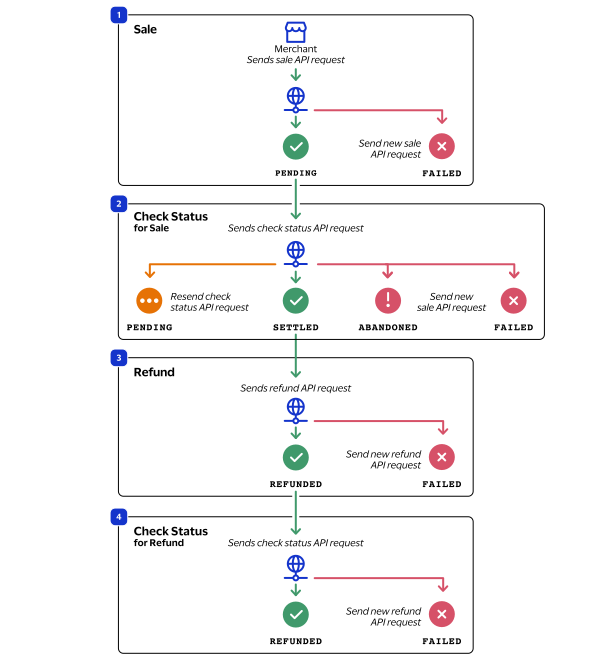
- When a customer begins to check out, you send a sale request toCybersourceand receive one of these possible statuses:
- FAILED: The sale cannot be completed.
- PENDING: The sale request is accepted but is not completed. Send the check status request to retrieve status updates.
- You send a check status request toCybersourceto verify the sale status and receive one of these statuses:
- ABANDONED: The customer did not complete the payment using the redirect URL.
- FAILED: The sale request failed. A failed request can be due to either a rejection or a technical error.
- PENDING: The sale request is accepted but is not completed. Send the check status request as often as necessary to obtain the information that you need.
- SETTLED: The sale request is settled for the requested amount. When the settled amount is deposited into the merchant's bank account, the status updates toFUNDED.
- If a customer returns a purchase, you send a refund request toCybersourceand receive one of these possible statuses:
- FAILED: The refund request failed.
- REFUNDED: The refund request is accepted but is not completed. Request the check status service to retrieve status updates.
- You send a check status request toCybersourceto verify the refund status and receive one of these statuses:
- FAILED: The refund could not be completed.
- REFUNDED: The settled amount is successfully refunded.