On This Page
Generate Payment Credentials for Digital Commerce Authentication Program
This section describes how to create payment credentials with data for the Digital
Commerce Authentication Program (DCAP).
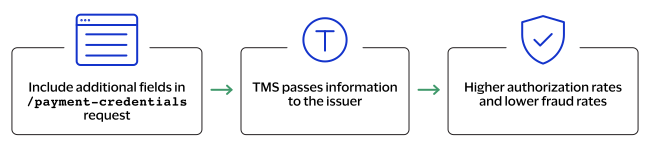
The Digital Commerce Authentication Program (DCAP), provides you with a way to enhance
the security and reliability of card-not-present transactions by providing enhanced data
without adding complexity in checkout. DCAP helps the clients that use network
tokenization to provide more information to issuers when purchases are made using
network tokens.
DCAP does not require the token to be an authenticated payment credential. Instead, you
can include additional fields in the transaction request that are sent to the issuer and
are used in risk scoring. This enables issuers to make a more informed authorization
decision.
You can use the payment credentials API to retrieve the payment credentials for an
existing customer, payment instrument, instrument identifier or tokenized card. For
information about these token types, see these topics:
Endpoint
Test:
POST
https://apitest.cybersource.com
/tms/v2/tokens/{tokenId}/
payment-credentialsProduction:
POST
https://api.cybersource.com
/tms/v2/tokens/{tokenId}/
payment-credentialsProduction in India:
POST
https://api.in.cybersource.com
/tms/v2/tokens/{tokenId}/
payment-credentialsProduction in Saudi Arabia:
POST
https://api.sa.cybersource.com
/tms/v2/tokens/{tokenId}/
payment-credentialsTest in Saudi Arabia:
POST
https://apitest.sa.cybersource.com
/tms/v2/tokens/{tokenId}/
payment-credentialsThe is the identifier of the tokenized card.
{tokenId}
Required Fields for Generating Payment Credentials for DCAP
- deviceInformation.id
- Required in the US.
- Required whenorderInformation.billTo.phoneNumberis not included in the request. either if not in US
- Required in the US.
- Set to one of these values: add to request
- CRYPTOGRAM
- NETWORK_TOKEN
- SECURITY_CODE
Related Information
REST Example: Generating Payment Credentials for
DCAP
Request
{
  "paymentCredentialType": "CRYPTOGRAM",
  "transactionType": "ECOM",
  "orderInformation": {
    "billTo": {
      "firstName": "John",
      "lastName": "Doe",
      "address1": "1 Market St",
      "locality": "San Francisco",
      "administrativeArea": "CA",
      "postalCode": "94105",
      "country": "US",
      "email": "test@cybs.com"
      "phoneNumber": "123-456-7890"
    }
  },
  "deviceInformation": {
    "id": "1234567890",
    "ipAddress": "127.0.0.1"
  }
}
Response to a Successful Request
{
  "_links": {
    "self": {
      "href": "/tms/v2/tokens/7010000000016241111/payment-credentials"
    }
  },
  "tokenizedCard": {
    "state": "ACTIVE",
    "enrollmentId": "c2d1b36fad46aed1ca8318dca5ed1e02",
    "tokenReferenceId": "168661ada5115ca3589b1ba3dabdb102",
    "number": "X895370016750801",
    "expirationMonth": "12",
    "expirationYear": "2023",
    "type": "visa",
    "cryptogram": "AwAAAADggP/Ce5+ZciCXQUUAAAA=",
    "eci": "05",
    "requestorId": "40010052236",
    "card": {
      "suffix": "0394",
      "expirationMonth": "12",
      "expirationYear": "2023"
    }
  },
  "card": {
    "number": "411111XXXXXX1111"
  },
  "issuer": {
    "paymentAccountReference": "V0010013022298169667504231315"
  },
  "processingInformation": {
    "authorizationOptions": {
      "initiator": {
        "merchantInitiatedTransaction": {
          "previousTransactionId": "123456789619999"
        }
      }
    },
    "commerceIndicator": "vbv"
  }
}