On This Page
Cloud Token Framework Key Generation
Follow these steps to generate the credentials required to send device binding
requests:
When you follow these steps you create these files:
- root-ca-private-key.pem
- root-ca-certificate.pem
- device-signing-private-key.pem
- device-signing.csr
- device-signing-certificate.pem
File Name | Description and Usage |
|---|---|
root-ca-private-key.pem | Private CA key. Keep this key offline and do not share
it. |
root-ca-certificate.pem | Self-signed CA public certificate. This certificate must be
associated with the token requestor account to establish the
trust anchor for device-issued certificates. |
device-signing-private-key.pem | Device-signing private key. This key stays on the device or
secure storage and is used to sign the
authenticatedIdentities data that is
sent in these API requests:
|
device-signing.csr | Certificate signing request (CSR) for the device-signing
key. This can be discarded post-issuance. |
device-signing-certificate.pem | Issued device-signing certificate. This certificate is
submitted in the POST /tms/v2/devices API
request. |
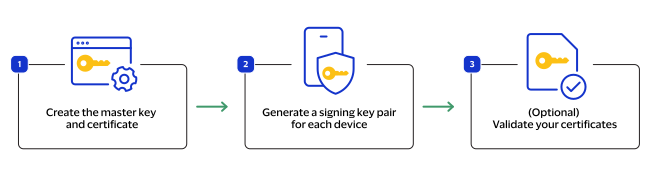
- Create your master key (root-ca-private-key.pem) and certificate (root-ca-certificate.pem).IMPORTANTDo not shareroot-ca-private-key.pem.Example command:# Private CA key (keep offline, never share) openssl genrsa -out root-ca-private-key.pem 2048 # Self-signed CA certificate (public) with proper CA extensions openssl req -x509 -new -nodes -key root-ca-private-key.pem -days 3650 -out root-ca-certificate.pem
- Generate a signing key pair for each device. This createsdevice-signing-private-key.pem,device-signing.csr, anddevice-signing-certificate.pem.# Device signing private key openssl genrsa -out device-signing-private-key.pem 2048 # Certificate signing request (CSR) for the device signing key openssl req -new -key device-signing-private-key.pem -out device-signing.csr # Issue the device signing certificate from your CA openssl x509 -req -in device-signing.csr -CA root-ca-certificate.pem -CAkey root-ca-private-key.pem -CAcreateserial -out device-signing-certificate.pem -days 500 -outform PEM
- (Optional) Validate your certificates.Example command:# Verify that device-signing-certificate.pem chains to root-ca-certificate.pem openssl verify -CAfile root-ca-certificate.pem device-signing-certificate.pem # Verify that data signed with device-signing-private-key.pem matches device-signing-certificate.pem openssl x509 -in device-signing-certificate.pem -pubkey -noout > device-signing-public-key.pem echo 'test' > message.txt openssl dgst -sha256 -sign device-signing-private-key.pem -out message.sig message.txt openssl dgst -sha256 -verify device-signing-public-key.pem -signature message.sig message.txt