On This Page
Common Mass Transit Transaction Workflows and Features
This section describes mass transit transaction workflows and features that are common across
supported card schemes.
Aggregated Fare Transaction Workflow
This section describes the Aggregated Fare transactions workflow. In this workflow, the
final transit fare is not always known at the time of travel. It is calculated at the
end of a travel period, typically 24 hours, based on the journeys made during that
period and any applicable fare limits. An
aggregated transaction
is used on
contactless terminals at transit system access points to support fare calculation after
the travel period has ended.Figure:
Aggregated Fare Transaction Workflow

Aggregated Model with the Token Management Service
Token Management Service
Using tokens can reduce the amount of cardholder information that your systems store,
process, or transmit. This approach can simplify your Payment Card Industry Data
Security Standard (PCI DSS) compliance efforts for maintaining a secure payment
processing environment.
When you integrate aggregated acceptance models with the
Token Management Service
(TMS
), TMS
tokenizes, stores,
and manages customer and payment data. You store these tokens in your environment
instead of customer payment details.Use
TMS
to store these types of data: - EMV track 2 equivalent
- EMV tag-length-value (TLV) string of tags for use during payment authorization
- Card number (TMSinstrument identifier)
- Card hash value (used within deny list management systems)
TMS
uses a cryptographic base derivation key (BDK) to create
tokens that represent the customer and payment data. You store these tokens in your
environment and databases instead of customer payment details.Aggregated Model with the Token Management Service
Workflow
Token Management Service
WorkflowThe Aggregated Model with
TMS
workflow begins when the rider taps a
payment card at a fare collection reader (terminal) in the transit system.Figure:
Transit Transactions with
TMS
Workflow
First Tap Process with TMS
TMS
This process begins when the rider taps their card at the validator.
- Rider taps card at the validator.
- The terminal uses the Level 3 payment application to generate a card hash and checks the deny list for the card hash.
- When the card hash is on the deny list, the card is not approved for travel and the terminal does not open the gate.
- When the card hash is not on the deny list, the card is approved for travel and the terminal opens the gate and begins the account verification request (AVR) process.
- The rider performs additional taps as required by the transit system during the travel period.
AVR Process with TMS
TMS
This process begins when the validator sends the transient token data to the back
office.
- The validator sends this tap data toTMSto tokenize the data:
- Transient token, in the ID field
- Card hash
- Fluid data descriptor, encoding, and value
- TMScreates tokens of the tap data and stores the card hash with the tokens.
- The back office performs a verification request as required by the card scheme transit model.
- The back office uses the transient token ID for these requests:
- Retrieving the token IDs for debt recovery and BIN lookup requests
- Performing an AVR, deferred authorization, and follow-on transactions
End of Travel Period Process with TMS
TMS
This process begins at the end of the travel period.
- At the end of the travel period, the back office calculates the fare and sends a deferred authorization, which can be a combined authorization and capture, using the transient token ID in place of the card data.
- If the authorization fails, the back office retrieves the card hash fromTMS, adds the card hash to the deny list, and begins the debt recovery process.
Debt Recovery Process with TMS
TMS
This process begins when your back office requests debt recovery.
- In accordance with the relevant card scheme rule set, the back office requests a merchant-initiated debt recovery using the instrument identifier token ID in place of a card number.
- When debt recovery is successful, the back office uses the card hash token to retrieve the full card hash value.
- The back office removes the card hashes from the deny list.
- When the debt recovery fails, the associated card hashes stay on the deny list.
Near Real-Time Workflow
The near real-time workflow begins when the cardholder taps a payment card at the
validator to enter the transit system.
Figure:
Near Real-Time Workflow

- The validator checks the deny list for the payment card.
- When the card is on the deny list due to a previous failed payment, the validator does not open the gate, and the payment is processed through a debt recovery workflow. See the Debt Recovery Workflows.
- When the card is not on the deny list, the validator opens the transit gate for the cardholder to travel.
- A new transient token is generated for processing the account verification request (AVR).
- The back office sends an account verification request (AVR) toCybersource.
- When the AVR fails, the card is added to the deny list and might be eligible for the first ride risk debt recovery.
- When the AVR is successful, the card data is used to track subsequent taps, calculate fares for the day, and capture the deferred authorization.
Fare Calculation and Submission Workflow
The fare calculation workflow begins at the end of the travel period.
Figure:
Visa Fare Calculation and Submission Workflow

- The back office calculates the fare of all rides taken during the travel period.
- You request a sale transaction for the accumulated fare. See Visa Deferred Sale with EMV Data.
- When the sale is successful, the process is complete.
- When the sale is declined, the card hash is added to the deny list.
- When the declined sale amount is above the chargeback threshold, the transaction is moved to debt recovery. See Debt Recovery Workflows.
- When the declined sale amount is for a first ride and below the chargeback threshold, you can request the payment using the first ride risk chargeback rules as defined by each card scheme.
Debt Recovery Workflows
Debt recovery workflows show how to use debt recovery transactions to collect outstanding
debt when an aggregated end-of-day transaction is declined.
Card schemes require merchants to support merchant-initiated debt recovery. This type of
transaction can also be required to remove a card from a deny list. Each card scheme has
its own transaction-processing rules for debt recovery retry attempts, transaction time
limits, and related mass transit transactions. For more information, see each card
scheme's rules for transit debt recovery retry attempts and transaction time limits.
IMPORTANT
Use a debt recovery transaction to remove a card from a deny list.
This action must be completed within one hour of receiving the authorization
approval.
These debt recovery transactions are supported:
- A merchant-initiated transaction that uses the card number.
- A tap-initiated transaction that uses the EMV track 2 equivalent and EMV tags created when the cardholder re-enters the transit system.
- A cardholder-initiated transaction that the customer requests by contacting you.
When a debt recovery transaction is declined, you can request payment using the First
Ride Risk liability model. For more information, see each card scheme's rules for mass
transit transaction chargebacks.
Merchant-Initiated Debt Recovery
A
merchant-initiated
(MIT) debt recovery
transaction is a deferred
authorization that originates from your back office. This type of transaction is
also called auto-debt recovery
. The authorization resubmission typically uses
the card number and references the original, end-of-day transaction that was
declined. Visa allows up to six authorization resubmissions within 14 days.Figure:
Visa Merchant-Initiated Debt Recovery Workflow

- When the number of retry attempts for the MIT debt recovery transaction exceeds the card scheme’s limit, stop further processing and keep the card on the deny list.
- When the amount is below the debt recovery amount limit, send a sale request. See Merchant-Initiated Sale for Visa Debt Recovery with Stored Card Data.
- When the transaction is declined, keep the card on the deny list.
- When the transaction is successful, remove the card from the deny list.
Scheduled Debt Recovery Transaction Resubmission
A
scheduled debt recovery
transaction is a system-generated transaction that
originates from your back office. This transaction typically uses the card number
and references the original, end-of-day transaction that was declined. Multiple
authorization resubmissions might be triggered within 14 days. Figure:
Scheduled Debt Recovery Workflow
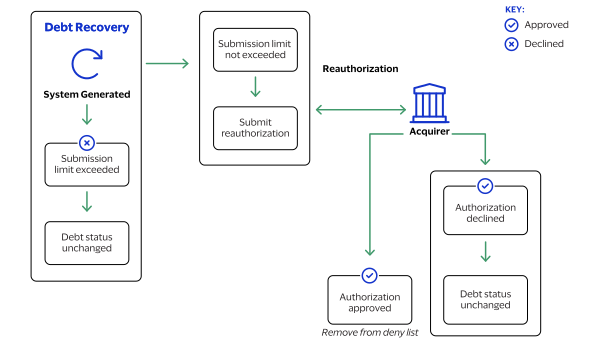
- You configure your payment system to generate scheduled debt recovery authorization requests.
- The scheduled authorizations attempt debt recovery submissions within 14 days of the initial transaction.
- When the number of retry attempts for the scheduled debt transaction exceeds the card scheme’s limit, stop further processing and keep the card on the deny list.
- When the amount is below the debt recovery amount limit, send a sale request.
- When the transaction is declined, keep the card on the deny list.
- When the transaction is successful, remove the card from the deny list.
Tap-Initiated Debt Recovery
A
tap-initiated debt recovery
transaction occurs when the cardholder returns
to the transit gate, and the validator recognizes a new contactless tap. You can deny the rider entrance unless the tap-initiated debt recovery transaction is
attempted in real time while the cardholder is at the gate. The authorization
request includes the EMV track 2 equivalent and EMV tags from the new tap, and a
future capture date.
Figure:
Tap-Initiated Debt Recovery Workflow

- The cardholder taps their card to enter the transit system.
- You submit a new authorization request using the EMV track 2 equivalent and EMV tags created by the validator and a capture date in the future.
- When the transaction is declined, keep the card on the deny list.
- When the transaction is successful, remove the card from the deny list.
Cardholder-Initiated Debt Recovery
A
cardholder-initiated debt recovery
transaction occurs when the cardholder
contacts you. The method of contact depends on where the transaction occurred such
as on your e-commerce website or by phone or email for a mail order or telephone
order (MOTO) transaction.For information about e-commerce or MOTO payment services, see the
Payments Developer Guide
.Figure:
Cardholder-Initiated Debt Recovery Flow

- The cardholder contacts you through your website or by phone or email for a MOTO transaction.
- You process a card-not-present (CNP) authorization.
- When the request is successful, remove the card from the deny list.
- When the request fails, leave the card on the deny list.
Using Multiple Accounts for Processing Functions
Mass transit systems can use multiple accounts to support a variety of processing
functions. Processing functions include these types of tasks:
- Creating tap tokens
- Processing payment requests
- Retrieving card hash values
- Supporting customer journey history inquiries
- Account 1
- This account processes tap token create requests only. For this option, the validators communicate directly withCybersource. Using a separate account enables you to deploy a separate security key to the validator system.
- Account 2
- This account processes payment requests using tokens. You can also choose to further separate debt recovery transactions from standard payment transactions. In that case,account 2ais dedicated to standard payment transactions, andaccount 2bis dedicated to debt recovery transactions.
- Account 3
- This account processes card hash retrieval requests only. The responses include the full, unmasked card hash value. Using a separate account enables you to deploy a separate security key to the validator system.
- Account 4
- This account operates a customer service web portal where riders can make journey history inquiries. The riders provide the card number to a hosted payment service (such asCybersourceSecure Acceptance) where they register as a user. Registration produces theTMSinstrument identifier token and the card scheme PAR value. These values can be used by your back-office system to look up journey and billing information.
Journey History Service
Card schemes might require transit operators to provide cardholders with a journey
history service that enables the cardholder to view their journey history and receipt
information. Refer to card scheme documentation for more information about each card
scheme's requirements for journey history.
Payment Account Reference
Cybersource
supports the use of the payment account reference (PAR)
by providing the PAR value in authorization responses when a PAR is available from
the card issuer. The PAR response field is
processorInformation.paymentAccountReferenceNumber
. Using the
PAR enables you to track card accounts when digital devices, such as smart phones
and smart watches, have a network token or DPAN that the card issuer provided to the
device. You can use the PAR to provide journey history to cardholders and to match
the card account FPAN and DPAN values.Merchant Descriptor
You can use the merchant descriptor feature to produce a transaction-specific
reference that cardholders can see on their card account statement. To use the
merchant descriptor feature, include the
merchantInformation.merchantDescriptor.name
field in your
authorization, credit, and capture requests. The value for the field must consist
solely of English characters.IMPORTANT
Before implementing transit journey history functionality,
confirm with your acquirer and card schemes that the PAR and merchant descriptor
features are supported.
Additional Information
For information about the
Cybersource
card-not-present services that
support a transit system's journey history service, see the Payments Developer Guide
.Journey History Service Workflow
The Journey History Service workflow begins when begins when the rider taps a payment
card at a fare collection terminal. This service enables the cardholder to view
their journey history and receipt information. See card scheme documentation for
more information about each scheme’s journey history requirements.
Figure:
Journey History Request with Token Creation Workflow
