On This Page
Multibanco by Thunes Transaction Workflow
This workflow describes the sequence of events that comprises a successful Multibanco
payment and refund.
Figure:
Multibanco Transaction Workflow
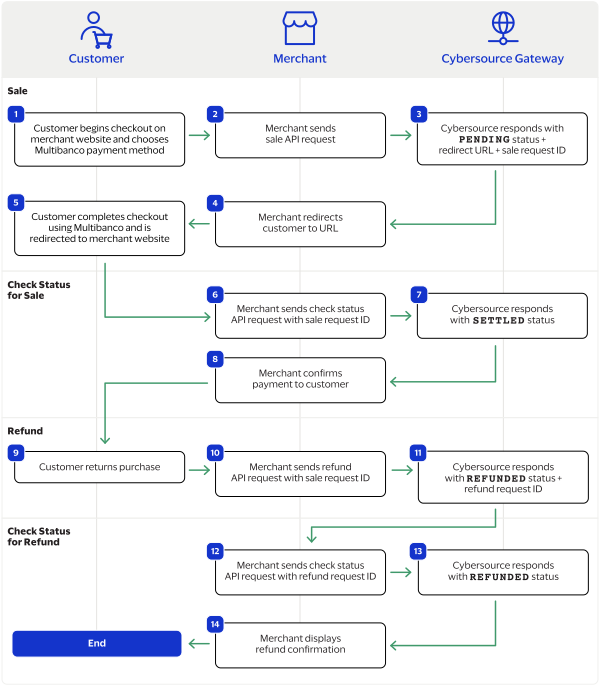
- The customer begins to checkout on your website and chooses the Multibanco payment method.
- You send a sale API request toCybersource. For more information, see Process a Sale.
- Cybersourceresponds to you with aPENDINGstatus, Multibanco redirect URL, and sale request ID.
- You redirect the customer to the Multibanco URL.
- The customer completes the checkout using Multibanco and is redirected to your website.
- You send a check status API request toCybersource. For more information, see Check a Status.
- Cybersourceresponds to you with aSETTLEDstatus.
- You confirm the payment to the customer.
- The customer returns the purchase.
- You send a refund API request toCybersourcewith the sale request ID. For more information, see Refund a Payment.
- Cybersourceresponds to you with aREFUNDEDstatus and refund request ID.
- You send a check status request toCybersourceto verify the refund status.
- Cybersourcerespond to you with aREFUNDEDstatus.
- You confirm the refund to the customer.