On This Page
Introduction to Acceptance Devices | PAX All-in-One Android Solution
The Acceptance Devices | PAX All-in-One Android Solution enables you to integrate your
point-of-sale (POS) system directly with supported PAX terminals in an all-in-one
configuration. With this solution, the POS application runs natively on the PAX
terminal, streamlining both hardware and software management.
To manage the payment flow, you can integrate the PAX All-in-One Android software
development kit (SDK) into your Android app, enabling seamless transaction processing on
the device.
For information about the current version of the SDK, see the Release Notes for PAX All-in-One Android Solution.
Supported Payment Terminals and Capabilities
The PAX All-in-One Android Solution supports a variety of PAX payment terminals, card
types, and payment services, as shown in the tables.
Processor support differs across terminals, card types, and payment
services.

| 
| 
| 
|
|---|---|---|---|

| |||

| Android 10 PCI PTS 6.0 4-inch display Privacy shield | Ethernet Wi-Fi | |

| Android 11 PCI PTS 6.0 7-inch display Portable | Ethernet Wi-Fi | |

| Android 10 PCI PTS 6.0 4-inch display | Wi-Fi 4G | |

| Android 8 PCI PTS 6.0 5.5-inch display Professional scanner | Wi-Fi 4G | |

| Android 12 PCI PTS 6.0 5.5-inch display Printer | Wi-Fi 4G | |

| Android 12 PCI PTS 6.0 6.5-inch display Professional scanner | Wi-Fi 4G | |

| Android 12 PCI PTS 6.0 6.5-inch display Professional scanner | Wi-Fi 4G | |

| Android 8 or 10 PCI PTS 6.0 5.5- or 6-inch display Printer | Wi-Fi 4G | |

| Android 10 PCI PTS 6.0 5-inch display Mounting bracket | Ethernet Wi-Fi | |
|
| |||
Card Type | Processor | Payment Service | Processor | ||
|---|---|---|---|---|---|
FDC Nashville Global | Visa Platform Connect | FDC Nashville Global | Visa Platform Connect | ||
American Express | 
|
| Account verification |
|
|
China Union Pay |
| 
| Capture |
|
|
Diners |
|
| Cashback |
|
|
Discover |
|
| Custom card read |
|
|
EBT |
|
| Incremental authorization |
|
|
JCB |
|
| Mail order or telephone order (MOTO) |
|
|
Mastercard |
|
| Offline sale (Deferred authorization/Store and
Forward) |
|
|
Meeza |
|
| On-reader tipping |
|
|
U.S. Common Debit |
|
| On-receipt tipping |
|
|
Visa |
|
| Pre-authorization |
|
|
Refund |
|
| |||
Sale |
|
| |||
Stand-alone credit |
|
| |||
Token refund |
|
| |||
Transaction Workflow for the PAX All-in-One Android Solution
This diagram shows the transaction workflow for the PAX All-in-One Android Solution.
Figure:
PAX All-in-One Android Solution Transaction Workflow
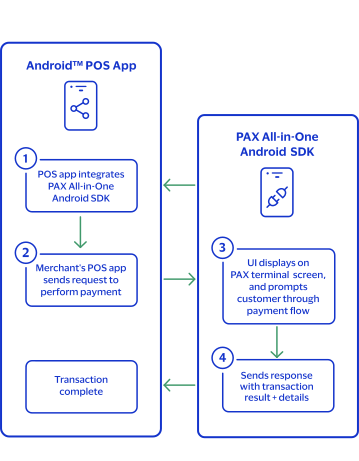
- The Android Point of Sale (POS) app integrates with the PAX All-in-One Android SDK.
- The merchant's Android POS app sends a request to the PAX All-in-One Android SDK to process a payment.
- The PAX All-In-One Android SDK user interface opens on the PAX terminal screen, and it displays prompts to guide the customer through the payment flow.
- The PAX All-In-One Android SDK sends the transaction result and details to the Android POS app, which completes the transaction.