On This Page
Google Pay Developer Guide
This section describes how to use this guide and where to find further information.
Audience and Purpose
This document is written for merchants who want to enable customers to use Google Pay to
pay for in-app purchases. This document provides an overview of integrating the Google API
and describes how to request the
Cybersource
API to process an
authorization.This document describes the Google Pay service and the
Cybersource
API. You
must request the Google API to receive the customer’s encrypted payment data before
requesting the Cybersource
API to process the transaction.Elavon
supports Google Pay as a digital wallet,
and this guide shows how authorize a Google Pay digital wallet payment
with and without 3-D Secure 2.2 authentication.Conventions
The following special statements are used in this document:
IMPORTANT
An
Important
statement contains information essential to
successfully completing a task or learning a concept.Related Documentation
Refer to the Technical Documentation Hub in the
Cybersource
Developer
Center for additional technical documentation:Customer Support
For support information about any service, visit the Support Center:
Recent Revisions to This Document
26.03.01
Initial release of the
Elavon
version of this guide.Introduction
You can use the
Cybersource
platform to process and manage Google Pay transactions.Google Pay Overview
Google Pay is a simple, secure in-app mobile and Web payment solution. You can choose
Cybersource
to process Google Pay transactions through all
e-commerce channels.You can simplify your payment processing by allowing
Cybersource
to
decrypt the payment data for you during processing.This method integrates simply and enables you to process transactions without seeing the
payment network token and transaction data.
- Using the Google API, request the customer’s encrypted payment data.
- Using theCybersourceAPI, construct and submit the authorization request, and include the encrypted payment data from the Google Pay callback.
- Cybersourcedecrypts the encrypted payment data to create the payment network token and processes the authorization request.
Google Pay Digital Wallets
With
Elavon
,
Cybersource
supports Google Pay as a digital wallet,
a mobile app that enables users to link their
credit cards, debit cards, loyalty card to their mobile phones.
The mobile wallet enables fast online checkouts and
contactless in-store payments.
Cybersource
digital wallets integrate through
Unified Checkout
, ensuring secure transactions.Elavon
supports 3-D Secure 2.2
with Diners Club, Mastercard, and Visa card transactions. The section
Authorizing Google Pay Digital Wallet Payments covers authorizations
of Google Pay digital wallet payments without 3-D Secure and with 3-D Secure.Payment Network Tokens
Authorizations with payment network tokens enable you to securely request a payment
transaction with a payment network token instead of a customer’s primary account number
(PAN).
The payment network token is included in the customer’s encrypted payment data, which is
returned by the payment processor.
For information about authorizations with payment network tokens, see the Authorizations with Payment Network
Tokens section of the
Payments Developer Guide
.Prerequisite Requirements
Before using Google Pay, you must have:
- ACybersourcemerchant evaluation account.
- To register, go to: https://developer.cybersource.com/hello-world/sandbox.html
- A merchant evaluation account with a supported processor. See Supported Card Types.
- TheCybersourceREST APIClient installed on your system.
- A Google developer account.
- Google Pay APIs embedded into your application or website. For details about integrating Google Pay, see the Google Pay API documentation.
Supported Card Types
Processor | Card Types | Optional Features |
|---|---|---|
Elavon |
|
How Google Pay Works
The following figure describes the Google Pay workflow:
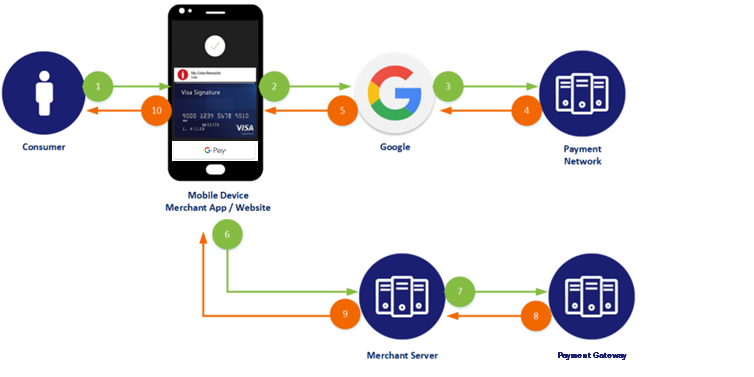
- The customer chooses the Google Pay button. Using the Google API, your system initiates the Google Pay request identifyingCybersourceas your payment gateway, passing yourCybersourcemerchant ID as the gateway merchant ID.
- The customer confirms the payment. The Google API contacts Google Pay services to retrieve the consumer’s payment parameters.
- If the customer’s selected payment credentials are tokenized, or you are tokenizing new payment credentials, the Google Pay service contacts the appropriate payment network to retrieve the appropriate cryptogram.
- The payment network returns the appropriate token and cryptogram to the Google Pay service.
- Google creates encrypted payment data using the gateway-specific key that is supplied in the Wallet request and includes it in the Google API response.
- The Google Pay callback returns the encrypted payment data.
- Your system prepares the Google Pay response information for submission to theCybersourceservice.
- Cybersourcesends the authorization request to the acquirer.
- The acquirer processes the request fromCybersourceand creates the payment network authorization request.
- The payment network processes the request from the acquirer and creates the issuer authorization request.
- The issuer processes the request from the payment network. The issuer looks up the payment information and returns an approved or declined authorization message to the payment network.
- The payment network returns the authorization response to the acquirer.
- The acquirer returns the authorization response toCybersource.
- Cybersourcereturns the authorization response to your system.
- Your system returns the authorization response to the payment application.
- The payment application displays the confirmation or decline message to the customer.
- The acquirer submits the settlement request to the issuer for funds.
- The issuer supplies the funds to the acquirer for the authorized transactions.
Additional Services
These additional services can be used with Google Pay.
Follow-on Services
After the authorization is requested, you can request follow-on services to complete
the transaction. For more information on these services, see Follow-on Services.
- Authorized Reversal
- An authorized reversal is a follow-on service that uses the request ID returned from the previous authorization. An authorization reversal releases the hold that the authorization placed on the customer’s credit card funds. Use this service to reverse an unnecessary or undesired authorization.
- Capture
- A capture is a follow-on service that uses the request ID returned from the previous authorization. The request ID links the capture to the authorization. This service transfers funds from the customer’s account to your bank and usually takes two to four days to complete.
- Sale
- A sale is a bundled authorization and capture. Request the authorization and capture services at the same time.Cybersourceprocesses the capture immediately.
Follow-on Transactions
After the payment transaction is complete, additional follow-on transactions can be made
as Merchant-Initiated Transactions (MITs).
For more information about how to process MITs, see the
Introduction to Credentialed Transactions
section in the
.Credentialed Transactions Developer Guide
MITs include:
- Delayed Authorizations— Visa Only
- No-Show Transactions—Visa Only
- Reauthorizations—Visa Only
- Recurring Transactions
- Resubmissions—Visa Only
- Unscheduled Transactions
Formatting Encrypted Payment Data
This section shows you how to format encrypted payment data using these procedures:
Configuring Google Pay
You must provide your
Cybersource
merchant ID to Google in order to
ensure proper encryption of the Google Pay payload and authenticity of the request.For a Google Pay tutorial, see Google Pay for Payments.
Set the gateway and gateway merchant ID to the appropriate indicators. The following code
examples show how to configure the
PaymentMethodTokenizationParameters
object using Cybersource
as the gateway.Example: Java Code
.setPaymentMethodTokenizationType(WalletConstants.PAYMENT_METHOD_TOKENIZATION_TYPE_PAYMENT_GATEWAY)
     .addParameter("gateway", "")
     .addParameter("gatewayMerchantId", "[yourCybersourceMID]")
Example: JavaScript Code
tokenizationType: 'PAYMENT_GATEWAY',
     parameters: {
     gateway: 'cybersource',
          gatewayMerchantId: '[yourCybersourceMID]'
Formatting Payment Blobs
IMPORTANT
This section is only applicable if you are using the
Cybersource
decryption method.To prepare the Google Pay payload for submission to
Cybersource
, you must
extract the token data element from the Google Pay payload and encode the token data
element using Base64.These samples can be used to Base64-encode payment responses:
JavaScript
let token = paymentData.paymentMethodData.tokenizationData.token;
console.log(token);
var enc=window.btoa(token);
Android with Java
This sample uses the Android Studio Base64 utility.
public static <outputString> encodeToString (byte[] <inputToken>, int DEFAULT)
Apple iPhone with Swift 3
This sample requires the Foundation utility.
extension String {
     func base64Encoded() -> <outputString>
          if let data = self.dat(using:.utf8) {
               return data.base64EncodedString()
          }
          return nil
}
Examples of Google Pay Responses
Decrypted Google Pay Response
{"signature":"MEUCIQDhTxhHqwY8pXB9hpYxaSK5jFgsqpG2E1rX77QXssK8tAIgUBvYYAI/
bnBS8T/Tfxnm2AF981Mv5y0pHyGexM5dMJk\u003d","protocolVersion":"ECv1","
signedMessage":"{\"encryptedMessage\":\"
odyUGGA7B+blletYcJbS43AQUFQJpWEFCN4UuUExQ5LX0\/
XcLwKElXcB95nMnmPO9lM2KGp13FYsL768ccCzAjBGLYF+
fugcJTcvkrUhcNSyXr7hwf12BEsrweqJM6I7Vs5lfrPAukRJeLDQG4FxmTLW49QyP8vIZC+
tz2c+Z3zozzI5oB9jE8fA2dolFa13Cu6gXqdKH\/
IHRh7UniLUuTy+0G5FQV2pwST2uBSNNkZhb8WYJDHbxBjz0UebVP+
ObmT5cc8AKU5dgHRdfr4GKpEZ4EBzB90 BPxLqYHpopriJ6lbFgFVsQQ6\/
8HBqQ7ImIMH5y7G8p8qAFkWnB78ZcL0Fh5BjXojkxGoFp2gjAsrhhttHAFbe3WQBuPkwJu09\/
6\/MyJpCSrpMHFouF\/dj0SYjQ+xI097lCHZec7jQrAhISLWZ9DZkuMvGKPWpu0CKn2XqTXQ=\
",\"ephemeralPublicKey\":\
"MFkwEwYHKoZIzj0CAQYIKoZIzj0DAQcDQgAEnn4yjy0N6xlXO8\/8j7\/
4jvmLJCYAqgXLwP1FhjuTgIM9oCtPijZfI9so2QEOs2ZnVp3D0dl3JYIDVe+396KkAQ==\
",\"tag\":\"DRp cc+YQ33RNgsTcxztnJbMJnirbU5DW3dStjfhFiwc=\"}"}
Base64-Encoded Google Pay Response
eyJzaWduYXR1cmUiOiJNRVVDSVFEaFR4aEhxd1k4cFhCOWhwWXhhU0s1akZnc3FwRzJ
FMXJYNzdRWHNzSzh0QUlnVUJ2WVlBSS9ibkJTOFQvVGZ4bm0yQUY5ODFNdjV5MHBIeU
dleE01ZE1Ka1x1MDAzZCIsInByb3RvY29sVmVyc2lvbiI6IkVDdjEiLCJzaWduZWRNZ
XNzYWdlIjoie1wiZW5jcnlwdGVkTWVzc2FnZVwiOlwib2R5VUdHQTdCK2JsbGV0WWNK
YlM0M0FRVUZRSnBXRUZDTjRVdVVFeFE1TFgwXC9YY0x3S0VsWGNCOTVuTW5tUE85bE0
yS0dwMTNGWXNMNzY4Y2NDekFqQkdMWUYrZnVnY0pUY3ZrclVoY05TeVhyN2h3ZjEyQk
VzcndlcUpNNkk3VnM1bGZyUEF1a1JKZUxEUUc0RnhtVExXNDlReVA4dklaQyt0ejJjK
1ozem96ekk1b0I5akU4ZkEyZG9sRmExM0N1NmdYcWRLSFwvSUhSaDdVbmlMVXVUeSsw
RzVGUVYycHdTVDJ1QlNOTmtaaGI4V1lKREhieEJqejBVZWJWUCtPYm1UNWNjOEFLVTV
kZ0hSZGZyNEdLcEVaNEVCekI5MEJQeExxWUhwb3ByaUo2bGJGZ0ZWc1FRNlwvOEhCcV
E3SW1JTUg1eTdHOHA4cUFGa1duQjc4WmNMMEZoNUJqWG9qa3hHb0ZwMmdqQXNyaGh0d
EhBRmJlM1dRQnVQa3dKdTA5XC82XC9NeUpwQ1NycE1IRm91RlwvZGowU1lqUSt4STA5
N2xDSFplYzdqUXJBaElTTFdaOURaa3VNdkdLUFdwdTBDS24yWHFUWFE9XCIsXCJlcGh
lbWVyYWxQdWJsaWNLZXlcIjpcIk1Ga3dFd1lIS29aSXpqMENBUVlJS29aSXpqMERBUW
NEUWdBRW5uNHlqeTBONnhsWE84XC84ajdcLzRqdm1MSkNZQXFnWEx3UDFGaGp1VGdJT
TlvQ3RQaWpaZkk5c28yUUVPczJablZwM0QwZGwzSllJRFZlKzM5NktrQVE9PVwiLFwi
dGFnXCI6XCJEUnBjYytZUTMzUk5nc1RjeHp0bkpiTUpuaXJiVTVEVzNkU3RqZmhGaXd
jPVwifSJ9
Google Pay Authorizations
This section shows you how to make a successful authorization request.
After you send the request, check the response messages to make sure that the request was
successful.
A 200-level HTTP response code indicates
success.
For information about response codes, see
.
Follow-on Transactions
After the initial transaction is complete, additional follow-on transactions can be
made as Merchant-Initiated Transactions (MITs).
For more information about how to process MITs, see the
Introduction to Credentialed Transactions
section in the
.Credentialed Transactions Developer Guide
Endpoint
Production:
POST
https://api.cybersource.com
/pts/v2/paymentsTest:
POST
https://apitest.cybersource.com
/pts/v2/paymentsRequired Fields for a Google Pay Authorization
Include these required fields to request a successful authorization.
- orderInformation.amountDetails.currency
- orderInformation.amountDetails.totalAmount
- orderInformation.billTo.address1
- orderInformation.billTo.administrativeArea
- orderInformation.billTo.country
- orderInformation.billTo.email
- orderInformation.billTo.firstName
- orderInformation.billTo.lastName
- orderInformation.billTo.locality
- orderInformation.billTo.postalCode
- paymentInformation.fluidData.value
- Set to the string value generated from the full wallet response.
- processingInformation.paymentSolution
- Set to012.
Related Information
Authorizing Google Pay Digital Wallet Payments
Elavon
supports Google Pay digital wallet transactions.
A Google Pay digital wallet uses tokenization
to prevent sensitive card data from
being exposed or intercepted during transactions. A token is generated when a user adds
a supported card to their Google Pay digital wallet.Elavon
supports 3-D Secure 2.2 with Diners Club, Mastercard, and Visa card transactions.IMPORTANT
Elavon
does not support the
3-D Secure 2.2 protocol if it is used with network tokens
or digital
payment
. Cybersource
will decline any transaction processed
by Elavon
that uses both 3-D Secure 2.2 and either network
tokens or digital payments.This section shows you how to request authorization of a Google Pay digital wallet payment:
Authorizing a Google Pay Digital Wallet Payment without 3-D Secure
The topics in this section show to how to authorize a Google Pay digital wallet payment
without 3-D Secure authentication:
- Basic steps
- Required fields
- REST example using a Visa card
- Common error responses and resolutions
When 3-D Secure is not used, the transaction ID is automatically populated with the cryptogram value
For general information about basic authorizations, see the "Standard
Payments Processing" section of the .
Basic Steps to Authorize a Google Pay Digital Wallet Payment without 3-D Secure
- Follow these steps to request a Google Pay payment on a supported card without 3-D Secure authentication:
- Create the request message with the requiredRESTAPI fields.
- Use the API fields listed in Required Fields to Authorize a Google Pay Digital Wallet Payment without 3-D Secure.These REST API fields are specific to this request payload:
- merchantInformation.merchantDomain
- paymentInformation.tokenizedCard.cryptogram
- paymentInformation.tokenizedCard.transactionType
- processingInformation.commerceIndicator
- processingInformation.paymentSolution
- Refer to the example Visa Card Example: Authorize a Google Pay Digital Wallet Payment without 3-D Secure.IMPORTANTThe example is based on a Visa card transaction. For a Diners Club card or a Mastercard transaction, set the card-specific value for thepaymentInformation.tokenizedCard.typefield.
- Send the message to one of these endpoints:
- Production:POSThttps://api.cybersource.com/pts/v2/payments
- Test:POSThttps://apitest.cybersource.com/pts/v2/payments
- Verify the response messages to make sure that the request was successful.
ADDITIONAL INFORMATION
A 200-level HTTP response code indicates success. See the . - If the response message contain errors, see Common Error Responses for Transactions without 3-D Secure.
Required Fields to Authorize a Google Pay Digital Wallet Payment without 3-D Secure
These REST API fields are required to request authorization of
a Google Pay Digital Wallet payment without 3-D Secure authentication.
- clientReferenceInformation.code
- merchantInformation.merchantId
- orderInformation.amountDetails.currency
- orderInformation.amountDetails.totalAmount
- orderInformation.billTo.address1
- orderInformation.billTo.administrativeArea
- orderInformation.billTo.country
- orderInformation.billTo.email
- orderInformation.billTo.firstName
- orderInformation.billTo.lastName
- orderInformation.billTo.locality
- orderInformation.billTo.phoneNumber
- orderInformation.billTo.postalCode
- paymentInformation.tokenizedCard.cryptogram
- Set the value to the network token cryptogram from Google Pay.
- paymentInformation.tokenizedCard.expirationMonth
- paymentInformation.tokenizedCard.expirationYear
- paymentInformation.tokenizedCard.transactionType
- Set the value to1for network tokens.
- paymentInformation.tokenizedCard.type
- Set the value to the card type code. Possible values:
- 001for Visa
- 002for Mastercard
- 005for Diners Club
- processingInformation.commerceIndicator
- Set the value tointernetfor a Diners Club, Discover, and Visa card for an authorization request without 3-D Secure authentication.
- processingInformation.paymentSolution
- Set the value to012for Google Pay digital wallet transactions.
Related Information
Visa Card Example: Authorize a Google Pay Digital Wallet Payment without 3-D Secure
Request
{
  "clientReferenceInformation": {
    "code": "VISA-NO3DS-GOOGLEPAY-002"
  },
  "orderInformation": {
    "amountDetails": {
      "totalAmount": "89.99",
      "currency": "USD"
    },
    "billTo": {
      "firstName": "Maria",
      "lastName": "Garcia",
      "address1": "123 Main Street",
      "locality": "San Francisco",
      "administrativeArea": "CA",
      "postalCode": "94105",
      "country": "US",
      "email": "maria.garcia@example.com",
      "phoneNumber": "415-555-0123"
    }
  },
  "paymentInformation": {
    "tokenizedCard": {
      "cryptogram": "BgAAAAAABk4DWZ4C28yUQAAAAAA=",
      "transactionType": "1",
      "expirationMonth": "11",
      "expirationYear": "2026",
      "type": "001"
    }
  },
  "processingInformation": {
    "paymentSolution": "012",
    "commerceIndicator": "internet"
  },
  "merchantInformation": {
    "merchantId": "demo_merchant_12345"
  }
}
Common Error Responses for Transactions without 3-D Secure
This topic lists common error responses to transaction requests without 3-D Secure authentication.
- 3DS ECI provided for non-3DS transaction
- Cause: Invalid e-commerce indicator for a transaction that does not use 3-D Secure.
- Resolution: Make sure theprocessingInformation.commerceIndicatorfield is set tointernetto indicate a transaction without 3-D Secure authentication. You could also omit the field from your request and let the gateway assign the value.
- Authentication data present in non-3DS transaction
- Cause: Conflicting authentication data.
- Resolution: Remove the cardholder authentication data, which is used for transactions with 3-D Secure:
- Remove theconsumerAuthenticationInformation. cavvfield (for Diners Club or Visa cards).
- Remove theconsumerAuthenticationInformation. ucafAuthenticationDatafield (for Mastercard only).
- Digital wallet transaction missing required cryptogram
- Cause: Missing or invalid cryptogram.
- Resolution: Make sure thepaymentInformation.tokenizedCard.cryptogramfield is populated with the correct value.
Authorizing a Google Pay Digital Wallet Payment with 3-D Secure
The topics in this section show to how to authorize a Google Pay digital wallet payment
with 3-D Secure authentication:
- Basic steps
- Required fields
- REST example using a Mastercard
For general information about basic authorizations, see the "Standard
Payments Processing" section of the .
Basic Steps to Authorize a Google Pay Digital Wallet Payments with 3-D Secure
- Follow these steps to authorize a Google Pay payment on Mastercard with 3-D Secure authentication:
- Create the request message with the requiredRESTAPI fields.
- Use the API fields listed in Required Fields to Authorize a Google Pay Digital Wallet Payment with 3-D Secure.These REST API fields are specific to this payload:
- merchantInformation.merchantDomain
- consumerAuthenticationInformation.cavv—Diners Club and Visa only
- consumerAuthenticationInformation.ucafAuthenticationData—Mastercard only
- consumerAuthenticationInformation.ucafCollectionIndicator—Mastercard only
- paymentInformation.tokenizedCard.cryptogram
- paymentInformation.tokenizedCard.transactionType
- paymentInformation.tokenizedCard.type
- processingInformation.commerceIndicator
- processingInformation.paymentSolution
- processingInformation.paymentNetworkTokenTransactionType
- Refer to the example Mastercard Example: Authorize a Google Pay Digital Wallet Payment with 3-D Secure.IMPORTANTThe example is based on a Mastercard transaction. Set these fields to the appropriate values based on the card type:
- paymentInformation.tokenizedCard.type
- processingInformation.commerceIndicator
- Send the message to one of these endpoints:
- Production:POSThttps://api.cybersource.com/pts/v2/payments
- Test:POSThttps://apitest.cybersource.com/pts/v2/payments
- Verify the response messages to make sure that the request was successful.
ADDITIONAL INFORMATION
A 200-level HTTP response code indicates success. See the .
Required Fields to Authorize a Google Pay Digital Wallet Payment with 3-D Secure
These REST API fields are required to request authorization of a Google Pay digital wallet payment
with 3-D Secure authentication.
- clientReferenceInformation.code
- consumerAuthenticationInformation.cavv
- For Diners Club and Visa cards only—Set this value to the universal cardholder authentication number to indicate 3-D Secure authentication.
- consumerAuthenticationInformation.directoryServerTransactionId
- consumerAuthenticationInformation.paSpecificationVersion
- consumerAuthenticationInformation.ucafAuthenticationData
- For Mastercard transactions only—Set this value to the universal cardholder authentication field (UCAF) data to indicate 3-D Secure authentication.
- consumerAuthenticationInformation.ucafCollectionIndicator
- For Mastercard transactions only—Set the value of this field to2. UCAF collection is supported on your website and the UCAF was populated. This value indicates a successful Mastercard Identity Check transaction.
- merchantInformation.merchantId
- orderInformation.amountDetails.currency
- orderInformation.amountDetails.totalAmount
- orderInformation.billTo.address1
- orderInformation.billTo.country
- orderInformation.billTo.email
- orderInformation.billTo.firstName
- orderInformation.billTo.lastName
- orderInformation.billTo.locality
- orderInformation.billTo.phoneNumber
- orderInformation.billTo.postalCode
- paymentInformation.tokenizedCard.cryptogram
- Set the value to the network token cryptogram from Google Pay.
- paymentInformation.tokenizedCard.expirationMonth
- paymentInformation.tokenizedCard.expirationYear
- paymentInformation.tokenizedCard.transactionType
- Set the value to1.
- paymentInformation.tokenizedCard.type
- Set the value to the card type code. Possible values:
- 001for Visa
- 002for Mastercard
- 005for Diners Club
- processingInformation.commerceIndicator
- Set the value to the code for the 3-D Secure authentication service. Possible values:
- pbfor 3-D Secure authentication by Diners Club ProtectBuy
- spafor 3-D Secure authentication by Mastercard Identity Check
- vbvfor 3-D Secure authentication by Visa Secure
- processingInformation.paymentSolution
- Set the value to012for Google Pay digital wallet transactions.
Related Information
Mastercard Example: Authorize a Google Pay Digital Wallet Payment
with 3-D Secure
Request
{
  "clientReferenceInformation": {
    "code": "MC-3DS-GOOGLEPAY-003"
  },
  "orderInformation": {
    "amountDetails": {
      "totalAmount": "199.00",
      "currency": "EUR"
    },
    "billTo": {
      "firstName": "Pierre",
      "lastName": "Dubois",
      "address1": "15 Rue de la Paix",
      "locality": "Paris",
      "postalCode": "75001",
      "country": "FR",
      "email": "pierre.dubois@example.fr",
      "phoneNumber": "+33-1-42-96-12-34"
    }
  },
  "paymentInformation": {
    "tokenizedCard": {
      "cryptogram": "BwABBJQ0AgAAAAAgJDUCAAAAAAA=",
      "transactionType": "1",
      "expirationMonth": "08",
      "expirationYear": "2027",
      "type": "002"
    }
  },
  "consumerAuthenticationInformation": {
    "ucafAuthenticationData": "BgABBJQ0AgAAAAAgJDUCAAAAAA=",
    "ucafCollectionIndicator": "2",
    "directoryServerTransactionId": "8a2+89r+vs8fsc8w+v+79y==",
    "paSpecificationVersion": "2.2.0"
  },
  "processingInformation": {
    "paymentSolution": "012",
    "commerceIndicator": "pb"
  },
  "merchantInformation": {
    "merchantId": "demo_merchant_12345"
  }
}
Follow-on Services
This section provides information about and procedures for requesting these follow-on
services:
- Authorization Reversal:A follow-on service that uses the request ID returned from the previous authorization. An authorization reversal releases the hold that the authorization placed on the customer’s credit card funds. Use this service to reverse an unnecessary or undesired authorization.
- Capture:A follow-on service that uses the request ID returned from the previous authorization. The request ID links the capture to the authorization. This service transfers funds from the customer’s account to your bank and usually takes two to four days to complete.
- Sale:A sale is a bundled authorization and capture. Request the authorization and capture services at the same time.Cybersourceprocesses the capture immediately.
Capture
This section describes how to capture an authorized transaction.
Endpoint
Production:
POST
https://api.cybersource.com
/pts/v2/payments/{id}
/capturesTest:
POST
https://apitest.cybersource.com
/pts/v2/payments/{id}
/capturesThe is the transaction ID
returned in the authorization response.
{id}
Required Fields for Capturing an Authorization
- This field value maps from the original authorization, sale, or credit transaction.
REST Example: Capturing an Authorization
Request
{
    "clientReferenceInformation": {
        "code": "ABC123"
    },
    "orderInformation": {
        "amountDetails": {
            "totalAmount": "100.00",
            "currency": "EUR"
    }
}
Response to a Successful Request
{
    "_links": {
        "void": {
            "method": "POST",
            "href": "/pts/v2/captures/6662994431376681303954/voids"
        },
        "self": {
            "method": "GET",
            "href": "/pts/v2/captures/6662994431376681303954"
        }
    },
    "clientReferenceInformation": {
        "code": "1666299443215"
    },
    "id": "6662994431376681303954",
    "orderInformation": {
        "amountDetails": {
            "totalAmount": "100.00",
            "currency": "EUR"
        }
    },
    "reconciliationId": "66535942B9CGT52U",
    "status": "PENDING",
    "submitTimeUtc": "2022-10-20T20:57:23Z"
}
Sale
This section provides the information you need in order to process a sale
transaction.
A sale combines an authorization and a capture into a single transaction.
Endpoint
Production:
POST
https://api.cybersource.com
/pts/v2/paymentsTest:
POST
https://apitest.cybersource.com
/pts/v2/paymentsRequired Fields for a Sale
- Set the value totrue.
REST Example: Sale
Request
{
  "processingInformation": {
    "capture": true
  },
  "orderInformation" : {
    "billTo" : {
    "country" : "US",
    "lastName" : "VDP",
    "address1" : "201 S. Division St.",
    "postalCode" : "48104-2201",
    "locality" : "Ann Arbor",
    "administrativeArea" : "MI",
    "firstName" : "RTS",
    "email" : "test@cybs.com"
  },
    "amountDetails" : {
      "totalAmount" : "100.00",
      "currency" : "usd"
     }
   },
  "paymentInformation" : {
    "card" : {
      "expirationYear" : "2031",
      "number" : "4111111111111111",
      "expirationMonth" : "12",
      "type" : "001
    }
  }
}
Response to a Successful Request
Most processors do not return all of the fields that are shown in this
example.
{
  "_links" : {
    "void" : {
      "method" : "POST",
      "href" : "/pts/v2/payments/6485004068966546103093/voids"
    },
    "self" : {
      "method" : "GET",
      "href" : "/pts/v2/payments/6485004068966546103093"
    }
  },
  "clientReferenceInformation" : {
    "code" : "RTS-Auth"
  },
  "id" : "6485004068966546103093",
  "orderInformation" : {
    "amountDetails" : {
      "totalAmount" : "100.00",
      "authorizedAmount" : "100.00",
      "currency" : "usd"
    }
  },
  "paymentAccountInformation" : {
    "card" : {
      "type" : "001"
    }
  },
  "paymentInformation" : {
    "tokenizedCard" : {
      "type" : "001"
    },
    "card" : {
      "type" : "001"
    }
  },
  "processorInformation" : {
    "systemTraceAuditNumber" : "841109",
    "approvalCode" : "831000",
    "merchantAdvice" : {
      "code" : "01",
      "codeRaw" : "M001"
    },
    "responseDetails" : "ABC",
    "networkTransactionId" : "016153570198200",
    "retrievalReferenceNumber" : "208720841109",
    "consumerAuthenticationResponse" : {
      "code" : "2",
      "codeRaw" : "2"
    },
    "transactionId" : "016153570198200",
    "responseCode" : "00",
    "avs" : {
      "code" : "Y",
      "codeRaw" : "Y"
    }
  },
  "reconciliationId" : "6485004068966546103093",
  "status" : "AUTHORIZED",
  "submitTimeUtc" : "2022-03-28T20:46:47Z"
}
Follow-on Transactions
After the payment transaction is complete, additional follow-on transactions can be made
as Merchant-Initiated Transactions (MITs).
For more information about how to process MITs, see the
Introduction to Credentialed Transactions
section in the
.Credentialed Transactions Developer Guide
MITs include:
- Delayed Authorizations— Visa Only
- No-Show Transactions—Visa Only
- Reauthorizations—Visa Only
- Recurring Transactions
- Resubmissions—Visa Only
- Unscheduled Transactions