On This Page
Introduction to Acceptance Devices | Tap to Pay on Android Solution
Using existing mobile technology, the Acceptance Devices | Tap to Pay on Android Solution
enables any compatible Android smartphone to operate as a secure payment acceptance
device. By integrating the Tap to Pay on Android software development kit (SDK) into
your Android point-of-sale (POS) application, you can efficiently manage the payment
flow and deliver a seamless transaction experience for both merchants and customers.
For information about the current version of the SDK, see the Release Notes for Tap to Pay on Android Solution.
Compatibility Requirements for Android Devices
To accept contactless payments, your Android device must be compatible with the Tap to
Pay on Android Solution. These are the key requirements for a compatible Android
device:
- Tap to Pay Ready app is installed. You can download the app from the Google Play Store.
- Google Play Integrity API containsDEVICE_INTEGRITYverdict. For more information, see the Android Developer documentation.
- Supports Google Mobile Services (GMS) and Google Play Store.
- Hardware-backed keystore.
- Near-field communication (NFC) enabled chip.
- Android 12 or later operating system (OS), with a security update version of May 2022 or later. Android OS versions that do not receive security updates are not supported.
- Automatic time and date detection are enabled.
- Developer options are disabled.
- Device is not rooted. This setting prevents you from changing system-level files or settings.
Payment Devices Supported by the Tap to Pay on Android Solution
The Tap to Pay on Android Solution supports validated payment devices that meet
compatibility requirements. For more information, see Compatibility Requirements for Android Devices.
The table lists supported payment devices. However, all models of supported devices are
not shown. If your device is not listed, contact your implementation manager for help
with determining if the device is supported.
Portable Devices | Kiosk Devices | Tablet Devices |
|---|---|---|
Android compatible phones | Elo Touch 22-inch | iMin Falcon 2 |
Elo Touch M51 | oona 22 | MobiWire WM26 MobiTab |
iMin Swift 2 | Sunmi FLEX 3 | oona 10 |
MobiWire MobiGo2+ Pro | Orderman HT10 | |
MobiWire MP5 MobiPrint 5 | Sunmi CPad | |
MobiWire WM19 MobiTap | Sunmi D3 MINI | |
Newland S90, S90 Pro | Sunmi V3 MIX | |
Orderman 10 | ||
Sunmi L3 | ||
Sunmi M3 | ||
Sunmi V3 | ||
Zebra EM45 |
Transaction Workflow for the Tap to Pay on Android Solution
This diagram shows the transaction workflow for the Tap to Pay on Android
Solution.
Figure:
Tap to Pay on Android Solution Transaction Workflow
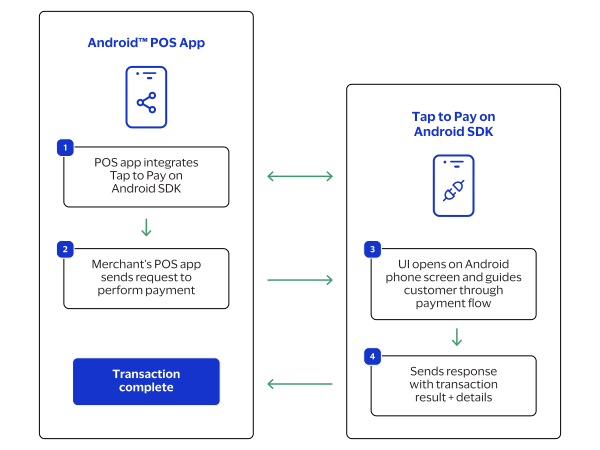
- The Android point-of-sale (POS) app integrates to the Tap to Pay on Android SDK.
- The merchant's Android POS app sends a request to the Tap to Pay on Android SDK to process a payment.
- The Tap to Pay on Android SDK user interface (UI) opens on the Android device screen and guides the customer through the payment flow.
- The Tap to Pay on Android SDK sends a response with the transaction result and details to the Android POS app.
PCI MPoC Standard Compliance
The Tap to Pay on Android Solution complies with the PCI Security Standards Council (PCI
SSC) Mobile Payments on COTS (MPoC) standard. This standard is typically referred to as
PCI MPoC
. Compliance with this standard helps ensure secure and reliable
payment processing across supported Android devices. The PCI-Certified MPoC Solution uses the Tap to Pay Ready app by Visa to meet PCI MPoC
software, attestation, and monitoring requirements. The app uses a transparent overlay
during payment processing to preserve the seamless UI experience. For app installation
instructions, see Install the Tap to Pay Ready App.
Using an app-to-app approach, payment processing is handled independently from your
point-of-sale (POS) application. Transactions are started in your POS app, securely
passed to the Tap to Pay Ready app for processing, and then returned to the original
app. This approach meets compliance requirements and helps you achieve these
benefits:
- Reduces PCI compliance complexity
- Lowers development and maintenance costs
- Accelerates time-to-market
- Enables seamless MPoC-related updates without affecting your app
For information about the PCI compliance status of the Tap to Pay on Android Solution,
see the PCI MPoC Solution Listing.
Transaction Workflow for the PCI-Certified MPoC Solution
This diagram shows the transaction workflow for the PCI-Certified MPoC Solution in the
Tap to Pay on Android Solution.
Figure:
PCI-Certified MPoC Solution Workflow
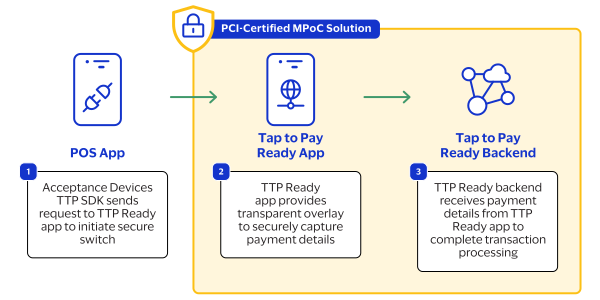
The PCI-Certified MPoC Solution workflow typically includes this sequence of events:
- The point-of-sale (POS) app sends a request to the Tap to Pay Ready app to initiate a secure switch to the other app. This activity is invisible to the customer, which ensures that the UI experience is seamless.
- The PCI-Certified MPoC Solution uses the Tap to Pay Ready app to provide a transparent overlay to securely capture payment details.
- The Tap to Pay Ready backend receives payment details from the Tap to Pay Ready app to complete transaction processing.