On This Page
Checkout
Checkout UI
This image shows an example of the
Unified Checkout
checkout UI. You
can display the checkout UI in embedded or sidebar mode.Figure:
Unified Checkout
Checkout UI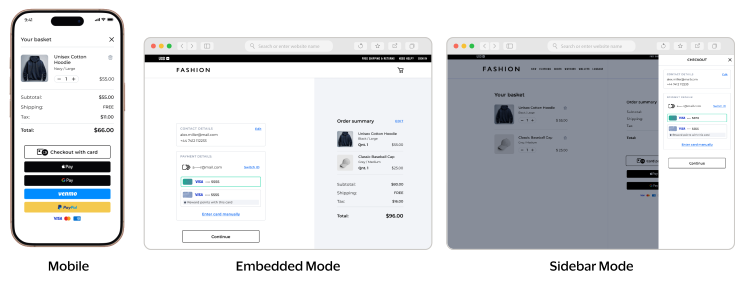
Checkout Integration JavaScript Example
// ============================================================
// CHECKOUT API - USAGE GUIDE
// ============================================================

// ============================================================
// FLOW 1: AUTO-PROCESSING (autoProcessing: true)
// Mount returns complete payment result
// Defaults to true when completeMandate is in session
// ============================================================

// Initialize the Unified Checkout client
const client = await window.VAS.UnifiedCheckout(sessionJWT);

// Create checkout with auto-processing enabled
const checkout = await client.createCheckout({ autoProcessing: true });

// Mount - automatically processes payment and returns complete result
const paymentResult = await checkout.mount('#payment-buttons');
console.log('Payment complete:', paymentResult);

// Clean up
checkout.destroy();
client.destroy();


// ============================================================
// FLOW 2: MANUAL COMPLETE (autoProcessing: false)
// Mount returns transient token, then the merchant can manually complete payment
// ============================================================

// Initialize the Unified Checkout client
const client = await window.VAS.UnifiedCheckout(sessionJWT);

// Create checkout with auto-processing disabled
const checkout = await client.createCheckout({ autoProcessing: false });

// Mount - returns transient token only
const token = await checkout.mount('#payment-buttons');
console.log('Received token:', token);

// Manually complete the payment
const paymentResult = await checkout.complete(token);
console.log('Payment complete:', paymentResult);

// Clean up
checkout.destroy();
client.destroy();


// ============================================================
// FLOW 3: TRANSIENT TOKEN ONLY (autoProcessing: false, no complete)
// Mount returns transient token only — server handles payment authorization
// ============================================================

// Initialize the Unified Checkout client
const client = await window.VAS.UnifiedCheckout(sessionJWT);

// Create checkout with auto-processing disabled
const checkout = await client.createCheckout({ autoProcessing: false });

// Mount - returns transient token only
const transientToken = await checkout.mount('#payment-buttons');
console.log('Received token:', transientToken);

// Pass transient token to your server for payment authorization
sendToServer(transientToken);

// Clean up
checkout.destroy();
client.destroy();


// ============================================================
// MOUNT OPTIONS
// ============================================================

// Sidebar - payment selection and form rendered in the same container
const result = await checkout.mount('#payment-buttons');

// Embedded - payment selection and form rendered in separate containers
const result = await checkout.mount({
    paymentSelection: '#payment-buttons',
    paymentScreen: '#payment-form'
});


// ============================================================
// LIFECYCLE METHODS (available in all flows)
// ============================================================

// Mount - display the checkout
const result = await checkout.mount('#payment-buttons');

// Destroy checkout instance
checkout.destroy();

// Destroy client instance
client.destroy();


// ============================================================
// ERROR HANDLING
// ============================================================

try {
    const client = await window.VAS.UnifiedCheckout(sessionJWT);
    const checkout = await client.createCheckout();
    const result = await checkout.mount('#payment-buttons');
    sendToServer(result);
} catch (error) {
    if (error.name === 'UnifiedCheckoutError') {
        handleError(error.reason, error.message);
    }
} finally {
    checkout.destroy();
    client.destroy();
}


// ============================================================
// SUPPORTED PAYMENT TYPES
// ============================================================

// All payment types configured in the session are displayed
// checkout.mount() renders buttons for every type in the session