On This Page
Create a Digital Signature Key
Use the information in this section to create a
digital signature key
. The Digital
Signature Key request uses Visa's key management service to store your credentials. The
Webhooks platform retrieves your credentials from key management to digitally authenticate
your notifications.You must create a digital signature key to enable
Cybersource
to send
notifications to your servers. Replace the digital signature key every year. When you generate
a new digital signature key, it overrides the old key and new transactions must use the new
key. Notifications that use message-level encryption must also the digital signature key.
IMPORTANT
Store the created digital signature key in a secure location in your
system.
Optional Notification Validation
After you set up a webhook subscription, you can validate each notification you receive using
your digital signature key. For more information, see Validating a Notification with the Digital Signature Key.
Endpoints
Send a POST request to one of these endpoints:
- Test:POSThttps://apitest.cybersource.com/kms/egress/v2/keys-sym
- Production:POSThttps://api.cybersource.com/kms/egress/v2/keys-sym
- India Production:POST https://api.in.cybersource.com/kms/egress/v2/keys-sym
Required Fields for Creating a Digital Signature Key
- clientRequestAction
- Set the value toCREATE.
- keyInformation.expiryDuration
- Set to a number of days. We recommend365.
- keyInformation.keyType
- Set the value tosharedSecret.
- keyInformation.organizationId
- Set the value to the organization ID of the organization requesting the key.
- keyInformation.provider
- Set the value tonrtd.
- keyInformation.tenant
- Set the value to the organization ID of the organization requesting the key.
Example: Creating a Digital Signature Key
Digital Signature Key Request
{
  "clientRequestAction": "CREATE",
  "keyInformation": {
    "provider": "nrtd",
    "tenant": "merchantName",
    "keyType": "sharedSecret",
    "organizationId": "merchantName"
  }
}
Digital Signature Key Response
{
"submitTimeUtc": "2021-03-17T06:53:06+0000",
"status": "SUCCESS",
"keyInformation": {
"provider": "NRTD",
"tenant": "merchantName",
"organizationId": "merchantName",
"keyId": "bdc0fe52-091e-b0d6-e053-34b8d30a0504", //ID associated with the key in the key field
"key": "u3qgvoaJ73rLJdPLTU3moxrXyNZA4eo5dklKtIXhsAE=", //Base64 encoded key
"keyType": "sharedSecret",
"status": "Active",
"expirationDate": "2022-03-17T06:53:06+0000"
}
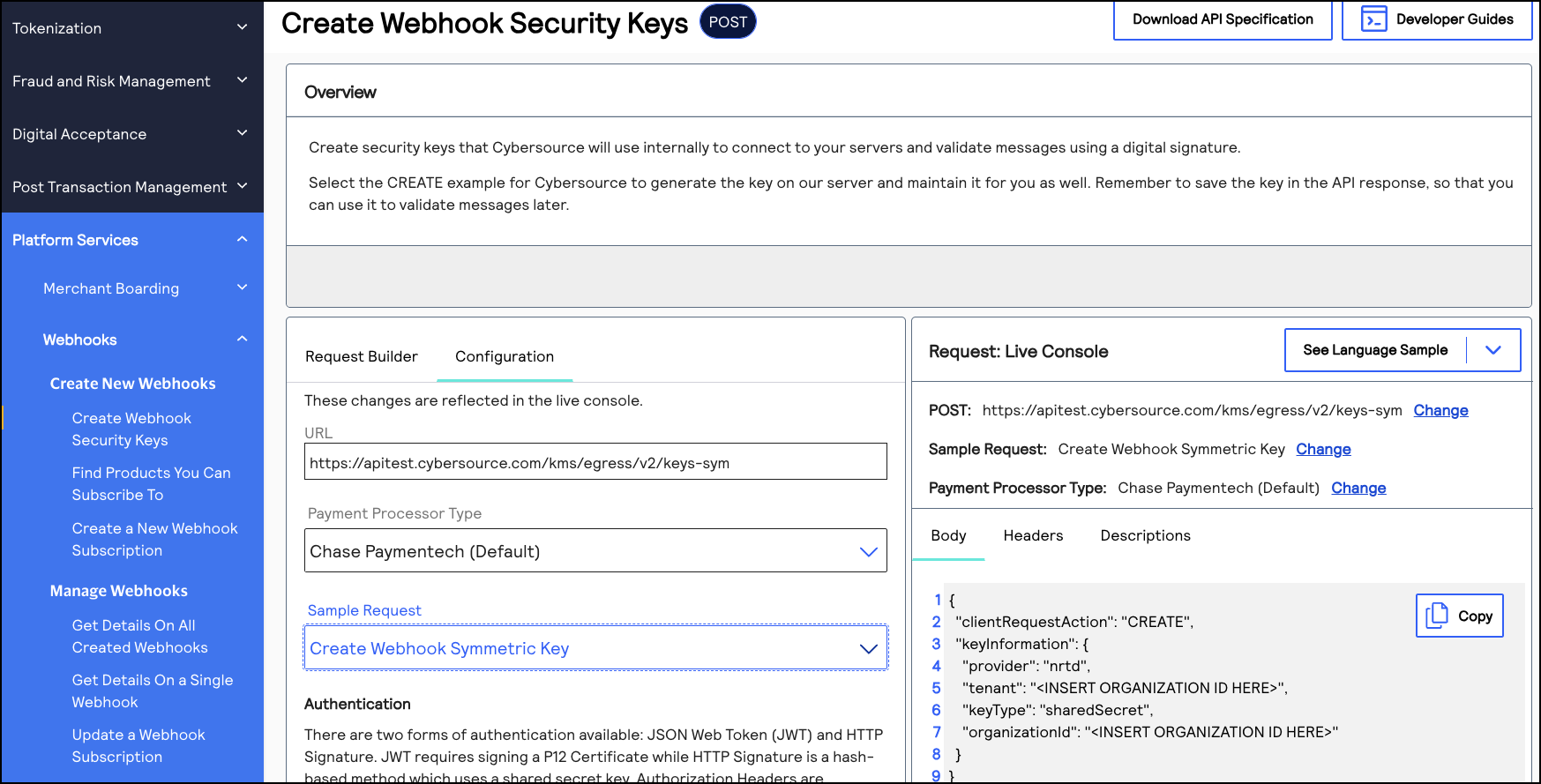
REST Interactive Example: Creating a Digital Signature Key
Click this image to access the interactive code example for creating a digital
signature key. The Live Console refers to this request as
Create Webhook
Symmetric Key
.Figure:
Creating a Digital Signature Key
Validating a Notification with the Digital Signature Key
You can use the digital signature key to verify that the webhook notifications you receive are
from
Cybersource
. Verifying your webhook notifications validates their
integrity and helps prevent replay attacks.When you receive a webhook notification from
Cybersource
, it contains a digital
signature key. You can configure your system to compare the notification's digital signature
to the digital signature you created. If the digital signatures match, the notification is
validated. Complete these tasks to validate the webhook notifications that you receive:
- Create a digital signature key by sending acreate a digital signature keyrequest toCybersource. You may have already completed this requirement while setting up your first webhook subscription. For more information, see Create a Digital Signature Key.
- Extract the digital signature from the digital signature key that you created.
- Configure your system to compare your digital signature to the digital signatures in the notifications that you receive. A webhook notification is valid if the notification's digital signature matches your digital signature.
Digital Signature Format
When you receive a webhook notification from
Cybersource
, it contains a
v-c-signature
header in this format:v-c-signature: t=1617830804768;keyId=bf44c857-b182-bb05-e053-34b8d30a7a72;sig=CzHY47nzJgCSD/BREtSIb+9l/vfkaaL4qf9n8MNJ4CY=";
The header contains these three parameters concatenated with semicolons:
- t: The timestamp at which the digital signature key was created.
- keyId: The digital signature key ID.
- sig: The digital signature. It is encrypted using the HMAC-SHA256 algorithm.
Validating
a Notification
Follow these steps to validate the integrity of your webhook notifications.
- Separate the signature parameters with a semicolon (;) and extract thet,keyId, andsigvalues.
- Use thekeyIdvalue to fetch the digital signature key.
- Generate the payload by concatenating the timestamp and the payload from the body of the notification, using a period (.) to join them.
- Use the SHA-256 algorithm to encrypt the generated payload from Step 3 using the key from Step 2.
- Verify that the encrypted value matches the value insigparameter.
Example: Validating a Notification
This example shows a system script that validates webhook notifications by comparing the
merchant's digital signature with the webhook notification's signature. Use this example as
a reference for how to configure your system.
import javax.crypto.Mac;
import javax.crypto.spec.SecretKeySpec;
import java.nio.charset.StandardCharsets;
import java.util.Arrays;
import java.util.Base64;

public class Validator {
    public static void main(String[] args) {

        // Sample signature header
        String signatureHeader = "v-c-signature: t=1617830804768;keyId=bf44c857-b182-bb05-e053-34b8d30a7a72;sig=CzHY47nzJgCSD/BREtSIb+9l/vfkaaL4qf9n8MNJ4CY=";
        String payload = "this is a decrypted payload";
        // Convert the received signatureHeader into timestamp, keyId, and signature.
        DigitalSignature companySignature = new DigitalSignature(signatureHeader);
        // Check if the timestamp is within tolerance.
        if (companySignature.isValidTimestamp()) {
            // Client regenerates their signature using the timestamp from header and received payload.
            byte[] signature = regenerateSignature(companySignature.getTimestamp(), payload);
            // Check if the generated signature is same as signature received in header.
            if (isValidSignature(signature, companySignature.getSignature())) {
                System.out.println("Success - Signature is valid");
            } else {
                System.out.println("Error - Signatures do not match");
            }
        } else {
            System.out.println("Error - timestamp is outside of tolerance level");
        }
    }
    /**
     * Compute HMAC with the SHA256 hash function.
     * key is your private key.
     * message is timestamp.payload.
     * @return
     */
    public static byte[] regenerateSignature(long timestamp, String message) {
        String timestampedMessage = timestamp + "." + message;
        String key = getSecurityKey();
        // Generate the hash using key and message.
        return calcHmacSHA256(Base64.getDecoder().decode(key), timestampedMessage.getBytes(StandardCharsets.UTF_8));
    }
    /**
    * A mechanism to fetch the security key using keyId from a source. We're using Base64encoded version of
    (test_key).
    * @return
    */
    private static String getSecurityKey() {
        return "dGVzdF9rZXk="; //test_key
    }
    /**
     * Generate SHA256 using secretKey and a message.
     * Sample Hmacgenerator to test: https://8gwifi.org/hmacgen.jsp
     * @param secretKey
     * @param message
     * @return
     */
    private static byte[] calcHmacSHA256(byte[] secretKey, byte[] message) {
        byte[] hmacSha256 = null;
        try {
            Mac mac = Mac.getInstance("HmacSHA256");
            SecretKeySpec secretKeySpec = new SecretKeySpec(secretKey, "HmacSHA256");
            mac.init(secretKeySpec);
            hmacSha256 = mac.doFinal(message);
        } catch (Exception e) {
            throw new RuntimeException("Failed to calculate hmac-sha256", e);
        }
        return hmacSha256;
    }
    /**
     * Compare the Base64 decoding of the signature with the signature received in the header.
     * Sample encoder/decoder to test:
     * https://www.base64encode.org/
     * https://www.base64decode.org/
     * @param bankSignature
     * @param companySignature
     * @return
     */
    private static boolean isValidSignature(byte[] bankSignature, String companySignature) {
        return Arrays.equals(bankSignature, Base64.getDecoder().decode(companySignature));
    }
}

import java.time.Clock;

public class DigitalSignature {
    private long timestamp;
    private String keyId;
    private String signature;

    public DigitalSignature(String digitalSignature) {
        try {
            //split the header by space. first part is the key "v-c-signature" second part is the actual signature
              String signature = digitalSignature.split(" ")[1];

            //separate the actual signature by semicolon. this creates 3 parts (timestamp, keyId, sig)
            String[] signatureParts = signature.split(";");

            //timestamp section is the first block. split timestamp section by = sign and actual timestamp is in the second block
            this.timestamp = Long.parseLong(signatureParts[0].split("=")[1]);

            //keyId section is the second block. split keyId section by = sign and actual keyId is in the second block
            this.keyId = signatureParts[1].split("=")[1];

            //digital signature is the third block. split digital signature by = sign and actual signature is in the second block. This is Base64 encoded
            this.signature = signatureParts[2].split("=")[1];

            if unable to format exactly like the above then would recommend the following edit:
            /* split the header by space. first part is the key "v-c-signature" second part is the actual signature */
              String signature = digitalSignature.split(" ")[1];

            /* separate the actual signature by semicolon. this creates 3 parts (timestamp, keyId, sig) */
            String[] signatureParts = signature.split(";");

            /* timestamp section is the first block. split timestamp section by = sign and actual timestamp is in the second block */
            this.timestamp = Long.parseLong(signatureParts[0].split("=")[1]);

            /* keyId section is the second block. split keyId section by = sign and actual keyId is in the second block */
            this.keyId = signatureParts[1].split("=")[1];

            /* digital signature is the third block. split digital signature by = sign and actual signature is in the second block. This is Base64 encoded */
            this.signature = signatureParts[2].split("=")[1];
        } catch (Exception e) {
            System.out.println("Invalid digital signature format");
        }
    }
    public long getTimestamp() {
        return timestamp;
    }
    public void setTimestamp(long timestamp) {
        this.timestamp = timestamp;
    }
    public String getKeyId() {
        return keyId;
    }
    public void setKeyId(String keyId) {
        this.keyId = keyId;
    }
    public String getSignature() {
        return signature;
    }
    public void setSignature(String signature) {
        this.signature = signature;
    }
    /**
     * Using a tolerance of 60 mins
     * Compute the current time in UTC and make sure the timestamp was generated within the tolerance period.
     * UTC millis generator to test: https://currentmillis.com/
     *
     * @return
     */
    public boolean isValidTimestamp() {
        long tolerance = 60 * 60 * 1000L; //60 mins
        // return Clock.systemUTC().millis() - timestamp  < tolerance; // Enable this if you want timestamp
        validation.
        return true;
    }
}