On This Page
Local Mode Payment Services
Use the information in this section to process payment services featured in the
Acceptance Devices app when operated in Local mode.
These are some Local mode features:
- The point-of-sale (POS) system communicates with the Acceptance Devices app on the Android device over a local Wi-Fi network.
- You can retrieve the Root CA certificate to validate the Acceptance Devices app server’s certificate.
- You have the option to activate an mTLS connection in the Acceptance Devices app.
For information about other modes available in the Acceptance Devices app, see:
Communication Protocol Used in Local Mode
When using the solution in Local mode, the communication protocol used between the
Acceptance Devices app and the point-of-sale (POS) system is a single WebSocket channel.
Through this channel, simultaneous, two-way communication occurs between the Acceptance
Devices app and the POS system.
Retrieving the Root CA Certificate
When the app is operating in Local mode, you can validate the Acceptance Devices app
server’s certificate by adding the Root CA certificate to your trust store. This action
is required if you want to use an mTLS connection. For more information, see Activating a Secure mTLS Connection.
Use the information in this section to retrieve the Root CA certificate in the
Business Center
or by using an API request. Retrieve the Root CA Certificate in the Business Center
Business Center
Follow these steps to retrieve the Root CA certificate in the Business Center:
- In theBusiness Center, go to the left navigation panel and chooseAcceptance Devices > Activation Codes. The Activation Codes page appears.
- ClickDownload Root CA Certificate. When the download is complete, the browser window shows a download completion message.
- In the local folder directory of your computer, navigate to the Download folder to access the Root CA certificate file.
Retrieve the Root CA Certificate Using a REST API Request
You can use a REST API request to retrieve the Acceptance Devices app server’s Root CA
certificate when the app is operating in Local mode. You would then add the certificate
to your trust store.
You must authenticate each API request you send to a
Cybersource
API by using a REST shared secret key or a REST certificate. For more information about authentication
requirements, see the .Endpoints
Test:
GET
https://apitest.cybersource.com
/dms/v2/devices/certificates/rootcaProduction:
GET
https://api.cybersource.com
/dms/v2/devices/certificates/rootcaRequired Fields to Retrieve the Root CA Certificate Using a REST API Request
The body of the API request is empty.
REST Example: Retrieve the Root CA Certificate Using a REST
API Request
Request
The body of the request is empty.
{
}
Response to a Successful Request
The response includes a PEM–encoded certificate chain.
{
    "certificateChain": "-----BEGIN CERTIFICATE-----Your certificate response data appears here.-----END CERTIFICATE-----"
}
Activating a Secure mTLS Connection
Use the information in this section to activate a secure Mutual Transport Layer Security
(mTLS) connection. When the app is operating in Local mode, using a mTLS connection
creates an additional layer of security for communication between the Acceptance Devices
app running on your Android device and point-of-sale (POS) system.
Using the mTLS protocol is recommended because it employs two-way verification. The
minimum requirement for providing end-to-end data security is using the Transport Layer
Security (TLS) protocol.
Before activating an mTLS connection, you must retrieve the Root CA certificate. For more
information, see Retrieving the Root CA Certificate.
Endpoints
The endpoint is the same for the test and production environments.
Test:
POST https://{device IP address:port number}/ or wss://{device IP
address:port number}/
Production:
POST https://{device IP address:port number}/ or wss://{device IP
address:port number}/
Generate a POS Connection Code for the Point-of-Sale System
Before you can sync your Android device with the point-of-sale (POS) system to
establish a secure connection, you must activate the device. For more information, see
Activating an Android Device in the Acceptance Devices App.
To ensure the security of the data sent over the internet between your POS system and
Android device, you must establish a secure connection (sync) between your system
and the device. You must complete this task one time for each POS system you are
using.
If Mutual Transport Layer Security (mTLS) is enabled and the device activation is
complete, the Generate Code screen appears in the Acceptance Devices app.
Follow these steps to generate a POS connection code for a POS system in the
Acceptance Devices app:
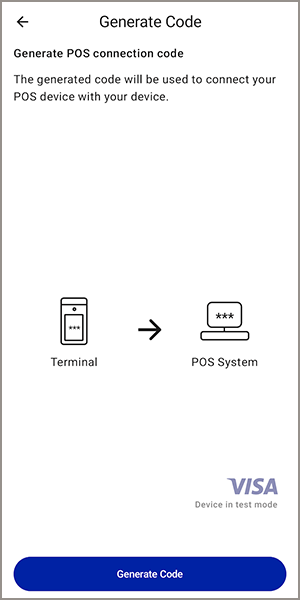
- On the Generate Code screen, tapGenerate Code.
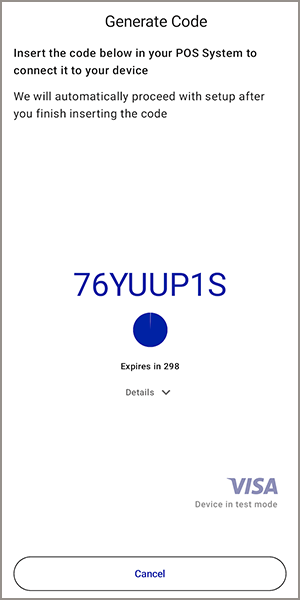
- Record the eight-character code that appears on the screen. You will use this code to request a certificate from the POS system. The screen shows an expiration timer for the code, which refreshes every 300 seconds.
Request Certificates for the Point-of-Sale System
Before you can request certificates, you must generate a set-up code for the
point-of-sale (POS) system.
To finish activating the secure mTLS connection, request certificates for the POS
system by sending a request to the Android device through the POS system.
- On the Generate Code screen, tap theDetailsarrow. The Details section expands to show the HTTP and WSS (WebSocket) addresses and the port number.
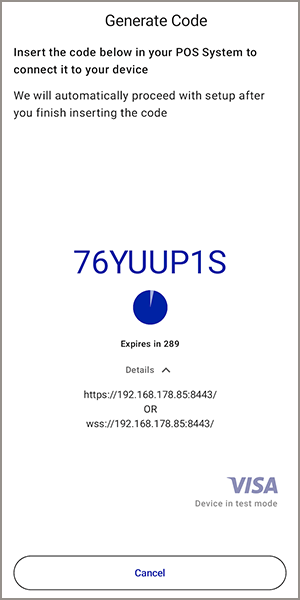
- Record the HTTP and WSS addresses and port number shown in the Details section. You will use this information to request a certificate through the POS system, using the HTTPS or WSS address.
- To request the certificates, send an API request through the POS system to the HTTP or WSS address and port number, along with the POS connection code shown on the Android device and a unique POS ID.
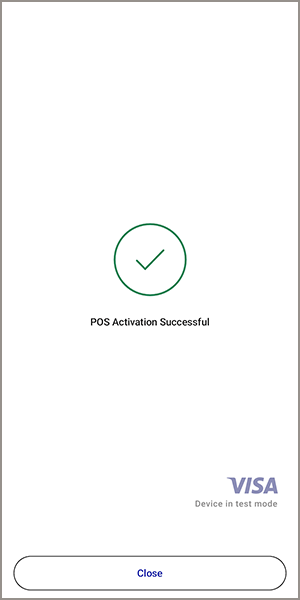
- After the certificates are retrieved by the POS system and the sync between your POS system and Android device is complete, thePOS Activation Successfulmessage appears. TapClose. The next set-up screen appears.
Required Fields to Request Certificates for the Point-of-Sale System
- posId
- Set the value to a unique, user-defined ID for the POS system.
- setupCode
- Set the value to the POS connection code shown on the Generate POS Connection Code screen in the Acceptance Devices app.
REST Example: Request Certificates for the Point-of-Sale System
Request
{
  "posId" : "123",
  "setupCode" : "8QW1YS1D"
}
Response to a Successful Request
The response includes the private key and certificates required to establish the
secure Mutual Transport Layer Security (mTLS) connection between the Android device
and POS system. For security reasons, this example does not show actual private key
and certificate response data.
-----BEGIN RSA PRIVATE KEY-----
Your RSA private key response data appears here.
-----END RSA PRIVATE KEY-----
-----BEGIN CERTIFICATE-----
Your certificate response data appears here.
-----END CERTIFICATE-----
-----BEGIN CERTIFICATE-----
Your certificate response data appears here.
-----END CERTIFICATE-----
-----BEGIN CERTIFICATE-----
Your certificate response data appears here.
-----END CERTIFICATE-----
Implement Hostname Validation in Local Mode
When operating in Local mode, your app can optionally perform hostname
validation for enhanced security. When the Android device is activated, a
certificate is generated on the device. The certificate includes a Subject
Alternative Name (SAN). This SAN appears as a Domain Name System (DNS) entry for the
Acceptance Devices app server.
This is the SAN format:
{terminal-serial-number}.cybs.seclib.io
.To enable hostname validation or connect to the Android device using the SAN instead
of its IP address, update your system’s
hosts
file to include both
the terminal’s IP address and its corresponding SAN.Sale
Use the information in this section to process a sale transaction when the app is in
Local mode. This type of transaction combines an authorization and a capture into a
single transaction.
Endpoints
The endpoint is the same for the test and production environments.
Test:
wss://{device IP address:port number}/
Production:
wss://{device IP address:port number}/
Required Fields for a Sale
- type
- Set the value toPaymentRequest.
- merchantReferenceCode
- Set the value to a unique, user-defined reference code. The code can consist of up to 50 alphanumeric characters, underscores (_), and dashes (-). Avoid using formatting that resembles a telephone number (XXX-XXX-XXXX) or a Social Security number (XXX-XX-XXXX).
- amountDetails.amount
- Set the value to the transaction amount.
- amountDetails.currency
- Set the value to the currency code.
REST Example: Sale
Request
{
      "type" : "PaymentRequest",
      "merchantReferenceCode" : "058ed6c3430e436dab91b782f4113fd2",
      "amountDetails" : {
        "amount" : "1.00",
        "currency" : "GBP"
      }
}
Mid-Transaction Status Updates
During the transaction, you might receive one or more update responses indicating the
current status of the transaction. You can choose to display these updates on your
point-of-sale (POS) system.
{
      "type": "TransactionStatusResponse",
      "message": "Status update to display.",
      "canBeAborted": true/false
}
Response to a Successful Request
{
      "type" : "PaymentResponse",
      "message" : "Payment approved",
      "transactionDetails" : {
        "id" : "1541387b383d456aabb81cdf558b4e8e",
        "merchantReferenceCode" : "058ed6c3430e436dab91b782f4113fd2",
        "submitTimeUtc" : "2023-12-01T20:24:47+0000",
        "captured" : true,
        "amountDetails" : {
          "currency" : "GBP",
          "amount" : "1.00",
          "capturedAmount" : "1.00",
          "refundableAmount" : "1.00"
        }
      },
      "processingDetails" : {
        "status" : "APPROVED",
        "verificationMethod" : "NONE",
        "entryMode" : "NFC_ICC",
        "card" : {
          "expirationMonth" : "12",
          "expirationYear" : "2025",
          "type" : "VISA",
          "maskedPan" : "476173XXXXXX0119",
          "countryCode" : "840"
        }
      },
      "additionalInformation" : {
        "instrumentId" : "7030000000022690119",
        "requestId" : "7014622903166318504010"
      },
      "linkedOperations" : [ ],
      "receipts" : {
        "merchantReceipt" : {
          "preformattedReceipt" : "Merchant Receipt\nCP Test\nSample Street\nUB3 2EA London\nUnited Kingdom\n1234567\n\nSale\n£1.00\n\n\nPlease retain receipt!\n\n\nCard: Payworks VISA\nAccount: **** **** **** 0119\nEntry Mode: Contactless\nAID: A0000000031010\nVerification: None\n\nAuthorization: 938238\nMerchant ID: **37599\nTerminal ID: ****0063\n\n1541387b383d456aabb81cdf558b4e8e\n21:24:51: 01/12/2023\n\n\n",
          "receiptData" : {
            "lines" : {
              "MERCHANT_DETAILS_PUBLIC_NAME" : {
                "label" : "Name",
                "value" : "CP Test"
              },
              "MERCHANT_DETAILS_ADDRESS" : {
                "label" : "Address",
                "value" : "Sample Street"
              },
              "MERCHANT_DETAILS_ZIP" : {
                "label" : "Zip",
                "value" : "UB3 2EA"
              },
              "MERCHANT_DETAILS_CITY" : {
                "label" : "City",
                "value" : "London"
              },
              "MERCHANT_DETAILS_COUNTRY" : {
                "label" : "Country",
                "value" : "United Kingdom"
              },
              "MERCHANT_DETAILS_CONTACT" : {
                "label" : "Contact",
                "value" : "1234567"
              },
              "MERCHANT_DETAILS_ADDITIONAL_INFORMATION" : {
                "label" : "Additional Information",
                "value" : ""
              },
              "PAYMENT_DETAILS_SCHEME_OR_LABEL" : {
                "label" : "Card",
                "value" : "Payworks VISA"
              },
              "PAYMENT_DETAILS_MASKED_ACCOUNT" : {
                "label" : "Account",
                "value" : "**** **** **** 0119"
              },
              "PAYMENT_DETAILS_EMV_APPLICATION_ID" : {
                "label" : "AID",
                "value" : "A0000000031010"
              },
              "PAYMENT_DETAILS_SOURCE" : {
                "label" : "Entry Mode",
                "value" : "Contactless"
              },
              "PAYMENT_DETAILS_CUSTOMER_VERIFICATION" : {
                "label" : "Verification",
                "value" : "None"
              },
              "CLEARING_DETAILS_AUTHORIZATION_CODE" : {
                "label" : "Authorization",
                "value" : "938238"
              },
              "CLEARING_DETAILS_MERCHANT_IDENTIFIER" : {
                "label" : "Merchant ID",
                "value" : "**37599"
              },
              "CLEARING_DETAILS_TERMINAL_ID" : {
                "label" : "Terminal ID",
                "value" : "****0063"
              },
              "RECEIPT_TYPE" : {
                "label" : "Receipt Type",
                "value" : "Merchant Receipt"
              },
              "TRANSACTION_TYPE" : {
                "label" : "Type",
                "value" : "Sale"
              },
              "SUBJECT" : {
                "label" : "Description",
                "value" : ""
              },
              "IDENTIFIER" : {
                "label" : "PWID",
                "value" : "1541387b383d456aabb81cdf558b4e8e"
              },
              "AMOUNT_AND_CURRENCY" : {
                "label" : "Amount",
                "value" : "£1.00"
              },
              "DATE" : {
                "label" : "Date",
                "value" : "01/12/2023"
              },
              "TIME" : {
                "label" : "Time",
                "value" : "21:24:51"
              },
              "STATUS_TEXT" : {
                "label" : "Information",
                "value" : "Please retain receipt!"
              }
            },
            "signatureLineRequired" : false
          }
        },
        "customerReceipt" : {
          "preformattedReceipt" : "Cardholder Receipt\nCP Test\nSample Street\nUB3 2EA London\nUnited Kingdom\n1234567\n\nSale\n£1.00\n\n\nPlease retain receipt!\n\n\nCard: Payworks VISA\nAccount: **** **** **** 0119\nEntry Mode: Contactless\nAID: A0000000031010\nVerification: None\n\nAuthorization: 938238\nMerchant ID: **37599\nTerminal ID: ****0063\n\n1541387b383d456aabb81cdf558b4e8e\n21:24:51: 01/12/2023\n\n\n",
          "receiptData" : {
            "lines" : {
              "MERCHANT_DETAILS_PUBLIC_NAME" : {
                "label" : "Name",
                "value" : "CP Test"
              },
              "MERCHANT_DETAILS_ADDRESS" : {
                "label" : "Address",
                "value" : "Sample Street"
              },
              "MERCHANT_DETAILS_ZIP" : {
                "label" : "Zip",
                "value" : "UB3 2EA"
              },
              "MERCHANT_DETAILS_CITY" : {
                "label" : "City",
                "value" : "London"
              },
              "MERCHANT_DETAILS_COUNTRY" : {
                "label" : "Country",
                "value" : "United Kingdom"
              },
              "MERCHANT_DETAILS_CONTACT" : {
                "label" : "Contact",
                "value" : "1234567"
              },
              "MERCHANT_DETAILS_ADDITIONAL_INFORMATION" : {
                "label" : "Additional Information",
                "value" : ""
              },
              "PAYMENT_DETAILS_SCHEME_OR_LABEL" : {
                "label" : "Card",
                "value" : "Payworks VISA"
              },
              "PAYMENT_DETAILS_MASKED_ACCOUNT" : {
                "label" : "Account",
                "value" : "**** **** **** 0119"
              },
              "PAYMENT_DETAILS_EMV_APPLICATION_ID" : {
                "label" : "AID",
                "value" : "A0000000031010"
              },
              "PAYMENT_DETAILS_SOURCE" : {
                "label" : "Entry Mode",
                "value" : "Contactless"
              },
              "PAYMENT_DETAILS_CUSTOMER_VERIFICATION" : {
                "label" : "Verification",
                "value" : "None"
              },
              "CLEARING_DETAILS_AUTHORIZATION_CODE" : {
                "label" : "Authorization",
                "value" : "938238"
              },
              "CLEARING_DETAILS_MERCHANT_IDENTIFIER" : {
                "label" : "Merchant ID",
                "value" : "**37599"
              },
              "CLEARING_DETAILS_TERMINAL_ID" : {
                "label" : "Terminal ID",
                "value" : "****0063"
              },
              "RECEIPT_TYPE" : {
                "label" : "Receipt Type",
                "value" : "Cardholder Receipt"
              },
              "TRANSACTION_TYPE" : {
                "label" : "Type",
                "value" : "Sale"
              },
              "SUBJECT" : {
                "label" : "Description",
                "value" : ""
              },
              "IDENTIFIER" : {
                "label" : "PWID",
                "value" : "1541387b383d456aabb81cdf558b4e8e"
              },
              "AMOUNT_AND_CURRENCY" : {
                "label" : "Amount",
                "value" : "£1.00"
              },
              "DATE" : {
                "label" : "Date",
                "value" : "01/12/2023"
              },
              "TIME" : {
                "label" : "Time",
                "value" : "21:24:51"
              },
              "STATUS_TEXT" : {
                "label" : "Information",
                "value" : "Please retain receipt!"
              }
            },
            "signatureLineRequired" : false
          }
        }
      }
}
Response to an Unsuccessful Request
When the request is unsuccessful, you will receive an error response with details.
{
      "type": "ErrorResponse",
      "message": "Error message to display.",
      "developerDescription": "Detailed description of error."
}
Refund
Use the information in this section to process a refund when the app is in Local mode.
This type of refund includes a reference to the original transaction for a full or
partial transaction amount. Stand-alone credits are also supported in this Acceptance
Devices solution. For more information, see Stand-Alone Credit.
Endpoints
The endpoint is the same for the test and production environments.
Test:
wss://{device IP address:port number}/
Production:
wss://{device IP address:port number}/
Required Fields for a Refund
- type
- Set the value toLinkedRefundRequest.
- transactionId
- Set the value to theidfield value from the original transaction.
Optional Fields for a Refund
Use the optional amount and currency fields to process a partial refund. Otherwise,
the full amount will be refunded.
- amountDetails.amount
- Set the value to the transaction amount.
- amountDetails.currency
- Set the value to the currency code.
REST Example: Refund
Request
{
      "type": "LinkedRefundRequest",
      "transactionId": "8fe5fa21d0814424bcec4997c9dc89c4",
      "amountDetails": {
        "amount": "1.00",
        "currency": "GBP"
      }
}
Mid-Transaction Status Updates
During the transaction, you might receive one or more update responses indicating the
current status of the transaction. You can choose to display these updates on your
point-of-sale (POS) system.
{
      "type": "TransactionStatusResponse",
      "message": "Status update to display.",
      "canBeAborted": true/false
}
Response to a Successful Request
{
      "type" : "LinkedRefundResponse",
      "message" : "Refund approved",
      "transactionDetails" : {
        "id" : "8fe5fa21d0814424bcec4997c9dc89c4",
        "merchantReferenceCode" : "e94e3aa304514140ae1700ba0959c7c5",
        "submitTimeUtc" : "2023-12-01T20:57:30+0000",
        "captured" : true,
        "amountDetails" : {
          "currency" : "GBP",
          "amount" : "1.00",
          "capturedAmount" : "0.00",
          "refundableAmount" : "0.00"
        }
      },
      "processingDetails" : {
        "status" : "APPROVED",
        "verificationMethod" : "NONE",
        "entryMode" : "NFC_ICC",
        "card" : {
          "expirationMonth" : "12",
          "expirationYear" : "2025",
          "type" : "VISA",
          "maskedPan" : "476173XXXXXX0119",
          "countryCode" : "840"
        }
      },
      "additionalInformation" : {
        "instrumentId" : "7030000000022690119",
        "requestId" : "7014642534986108604008"
      },
      "linkedOperations" : [ {
        "id" : "b383db1aecab46d89f1dbec8b0a9aa90",
        "type" : "REFUND",
        "amount" : "1.00",
        "status" : "APPROVED",
        "submitTimeUtc" : "2023-12-01T20:57:48+0000"
      } ],
      "receipts" : {
        "merchantReceipt" : {
          "preformattedReceipt" : "Merchant Receipt\nCP Test\nSample Street\nUB3 2EA London\nUnited Kingdom\n1234567\n\nVoid\n-£1.00\n\n\nReversal accepted.\n\n\nCard: Payworks VISA\nAccount: **** **** **** 0119\nEntry Mode: Keyed\n\nAuthorization: -\nMerchant ID: **37599\nTerminal ID: ****0063\n\nb383db1aecab46d89f1dbec8b0a9aa90\n21:57:50: 01/12/2023\n\n\n",
          "receiptData" : {
            "lines" : {
              "MERCHANT_DETAILS_PUBLIC_NAME" : {
                "label" : "Name",
                "value" : "CP Test"
              },
              "MERCHANT_DETAILS_ADDRESS" : {
                "label" : "Address",
                "value" : "Sample Street"
              },
              "MERCHANT_DETAILS_ZIP" : {
                "label" : "Zip",
                "value" : "UB3 2EA"
              },
              "MERCHANT_DETAILS_CITY" : {
                "label" : "City",
                "value" : "London"
              },
              "MERCHANT_DETAILS_COUNTRY" : {
                "label" : "Country",
                "value" : "United Kingdom"
              },
              "MERCHANT_DETAILS_CONTACT" : {
                "label" : "Contact",
                "value" : "1234567"
              },
              "MERCHANT_DETAILS_ADDITIONAL_INFORMATION" : {
                "label" : "Additional Information",
                "value" : ""
              },
              "PAYMENT_DETAILS_SCHEME_OR_LABEL" : {
                "label" : "Card",
                "value" : "Payworks VISA"
              },
              "PAYMENT_DETAILS_MASKED_ACCOUNT" : {
                "label" : "Account",
                "value" : "**** **** **** 0119"
              },
              "PAYMENT_DETAILS_SOURCE" : {
                "label" : "Entry Mode",
                "value" : "Keyed"
              },
              "CLEARING_DETAILS_AUTHORIZATION_CODE" : {
                "label" : "Authorization",
                "value" : "-"
              },
              "CLEARING_DETAILS_MERCHANT_IDENTIFIER" : {
                "label" : "Merchant ID",
                "value" : "**37599"
              },
              "CLEARING_DETAILS_TERMINAL_ID" : {
                "label" : "Terminal ID",
                "value" : "****0063"
              },
              "RECEIPT_TYPE" : {
                "label" : "Receipt Type",
                "value" : "Merchant Receipt"
              },
              "TRANSACTION_TYPE" : {
                "label" : "Type",
                "value" : "Void"
              },
              "SUBJECT" : {
                "label" : "Description",
                "value" : ""
              },
              "IDENTIFIER" : {
                "label" : "PWID",
                "value" : "b383db1aecab46d89f1dbec8b0a9aa90"
              },
              "AMOUNT_AND_CURRENCY" : {
                "label" : "Amount",
                "value" : "-£1.00"
              },
              "DATE" : {
                "label" : "Date",
                "value" : "01/12/2023"
              },
              "TIME" : {
                "label" : "Time",
                "value" : "21:57:50"
              },
              "STATUS_TEXT" : {
                "label" : "Information",
                "value" : "Reversal accepted."
              }
            },
            "signatureLineRequired" : false
          }
        },
        "customerReceipt" : {
          "preformattedReceipt" : "Cardholder Receipt\nCP Test\nSample Street\nUB3 2EA London\nUnited Kingdom\n1234567\n\nVoid\n-£1.00\n\n\nReversal accepted.\n\n\nCard: Payworks VISA\nAccount: **** **** **** 0119\nEntry Mode: Keyed\n\nAuthorization: -\nMerchant ID: **37599\nTerminal ID: ****0063\n\nb383db1aecab46d89f1dbec8b0a9aa90\n21:57:50: 01/12/2023\n\n\n",
          "receiptData" : {
            "lines" : {
              "MERCHANT_DETAILS_PUBLIC_NAME" : {
                "label" : "Name",
                "value" : "CP Test"
              },
              "MERCHANT_DETAILS_ADDRESS" : {
                "label" : "Address",
                "value" : "Sample Street"
              },
              "MERCHANT_DETAILS_ZIP" : {
                "label" : "Zip",
                "value" : "UB3 2EA"
              },
              "MERCHANT_DETAILS_CITY" : {
                "label" : "City",
                "value" : "London"
              },
              "MERCHANT_DETAILS_COUNTRY" : {
                "label" : "Country",
                "value" : "United Kingdom"
              },
              "MERCHANT_DETAILS_CONTACT" : {
                "label" : "Contact",
                "value" : "1234567"
              },
              "MERCHANT_DETAILS_ADDITIONAL_INFORMATION" : {
                "label" : "Additional Information",
                "value" : ""
              },
              "PAYMENT_DETAILS_SCHEME_OR_LABEL" : {
                "label" : "Card",
                "value" : "Payworks VISA"
              },
              "PAYMENT_DETAILS_MASKED_ACCOUNT" : {
                "label" : "Account",
                "value" : "**** **** **** 0119"
              },
              "PAYMENT_DETAILS_SOURCE" : {
                "label" : "Entry Mode",
                "value" : "Keyed"
              },
              "CLEARING_DETAILS_AUTHORIZATION_CODE" : {
                "label" : "Authorization",
                "value" : "-"
              },
              "CLEARING_DETAILS_MERCHANT_IDENTIFIER" : {
                "label" : "Merchant ID",
                "value" : "**37599"
              },
              "CLEARING_DETAILS_TERMINAL_ID" : {
                "label" : "Terminal ID",
                "value" : "****0063"
              },
              "RECEIPT_TYPE" : {
                "label" : "Receipt Type",
                "value" : "Cardholder Receipt"
              },
              "TRANSACTION_TYPE" : {
                "label" : "Type",
                "value" : "Void"
              },
              "SUBJECT" : {
                "label" : "Description",
                "value" : ""
              },
              "IDENTIFIER" : {
                "label" : "PWID",
                "value" : "b383db1aecab46d89f1dbec8b0a9aa90"
              },
              "AMOUNT_AND_CURRENCY" : {
                "label" : "Amount",
                "value" : "-£1.00"
              },
              "DATE" : {
                "label" : "Date",
                "value" : "01/12/2023"
              },
              "TIME" : {
                "label" : "Time",
                "value" : "21:57:50"
              },
              "STATUS_TEXT" : {
                "label" : "Information",
                "value" : "Reversal accepted."
              }
            },
            "signatureLineRequired" : false
          }
        }
      }
}
Response to an Unsuccessful Request
When the request is unsuccessful, you will receive an error response with details.
{
      "type": "ErrorResponse",
      "message": "Error message to display.",
      "developerDescription": "Detailed description of error."
}
Stand-Alone Credit
Use the information in this section to process a stand-alone credit when the app is in
Local mode. This type of transaction is used to process a credit without reference to
the original transaction. The customer is required to present their card for this type
of transaction.
WARNING
When processing a stand-alone credit, there is no limit on the credit
amount because there is no reference to the original transaction amount. The
recommendation is to use a refund transaction whenever possible. For more information,
see Refund.
Endpoints
The endpoint is the same for the test and production environments.
Test:
wss://{device IP address:port number}/
Production:
wss://{device IP address:port number}/
Required Fields for a Stand-Alone Credit
- type
- Set the value toStandaloneRefundRequest.
- merchantReferenceCode
- Set the value to a unique, user-defined reference code. The code can consist of up to 50 alphanumeric characters, underscores (_), and dashes (-). Avoid using formatting that resembles a telephone number (XXX-XXX-XXXX) or a Social Security number (XXX-XX-XXXX).
- amountDetails.amount
- Set the value to the transaction amount.
- amountDetails.currency
- Set the value to the currency code.
REST Example: Stand-Alone Credit
Request
{
      "type": "StandaloneRefundRequest",
      "merchantReferenceCode": "2490c8ec0e2f4b509526815714313e33",
      "amountDetails": {
        "amount": "1.00",
        "currency": "GBP"
      }
}
Mid-Transaction Status Updates
During the transaction, you might receive one or more update responses indicating the current status of the transaction. You can choose to display these updates on your point-of-sale (POS) system.
{
      "type": "TransactionStatusResponse",
      "message": "Status update to display.",
      "canBeAborted": true/false
}
Response to a Successful Request
{
      "type" : "StandaloneRefundResponse",
      "message" : "Refund approved",
      "transactionDetails" : {
        "id" : "3043e0b61fad4c5483db3d498309460f",
        "merchantReferenceCode" : "2490c8ec0e2f4b509526815714313e33",
        "submitTimeUtc" : "2023-12-01T21:04:19+0000",
        "amountDetails" : {
          "amount" : "1.00",
          "currency" : "GBP"
        }
      },
      "processingDetails" : {
        "status" : "APPROVED",
        "verificationMethod" : "NONE",
        "entryMode" : "ICC",
        "card" : {
          "expirationMonth" : "12",
          "expirationYear" : "2025",
          "type" : "AMERICAN_EXPRESS",
          "maskedPan" : "374245XXXXX0001"
        }
      },
      "additionalInformation" : {
        "requestId" : "7014646720206287504012"
      },
      "receipts" : {
        "merchantReceipt" : {
          "preformattedReceipt" : "Merchant Receipt\nCP Test\nSample Street\nUB3 2EA London\nUnited Kingdom\n1234567\n\nRefund\n-£1.00\n\n\nPlease retain receipt!\n\n\nCard: Payworks AMEX\nAccount: *** **** **** 0001\nEntry Mode: Chip\nAID: A0000000250100\n\nTransaction: -\nAuthorization: -\nMerchant ID: *****67890\nTerminal ID: ****0026\n\n3043e0b61fad4c5483db3d498309460f\n10:04:19 PM: 12/1/2023\n\n\n",
          "receiptData" : {
            "lines" : {
              "MERCHANT_DETAILS_PUBLIC_NAME" : {
                "label" : "Name",
                "value" : "CP Test"
              },
              "MERCHANT_DETAILS_ADDRESS" : {
                "label" : "Address",
                "value" : "Sample Street"
              },
              "MERCHANT_DETAILS_ZIP" : {
                "label" : "Zip",
                "value" : "UB3 2EA"
              },
              "MERCHANT_DETAILS_CITY" : {
                "label" : "City",
                "value" : "London"
              },
              "MERCHANT_DETAILS_COUNTRY" : {
                "label" : "Country",
                "value" : "United Kingdom"
              },
              "MERCHANT_DETAILS_CONTACT" : {
                "label" : "Contact",
                "value" : "1234567"
              },
              "MERCHANT_DETAILS_ADDITIONAL_INFORMATION" : {
                "label" : "Additional Information",
                "value" : ""
              },
              "PAYMENT_DETAILS_SCHEME_OR_LABEL" : {
                "label" : "Card",
                "value" : "Payworks AMEX"
              },
              "PAYMENT_DETAILS_MASKED_ACCOUNT" : {
                "label" : "Account",
                "value" : "*** **** **** 0001"
              },
              "PAYMENT_DETAILS_EMV_APPLICATION_ID" : {
                "label" : "AID",
                "value" : "A0000000250100"
              },
              "PAYMENT_DETAILS_SOURCE" : {
                "label" : "Entry Mode",
                "value" : "Chip"
              },
              "CLEARING_DETAILS_TRANSACTION_IDENTIFIER" : {
                "label" : "Transaction",
                "value" : "-"
              },
              "CLEARING_DETAILS_AUTHORIZATION_CODE" : {
                "label" : "Authorization",
                "value" : "-"
              },
              "CLEARING_DETAILS_MERCHANT_IDENTIFIER" : {
                "label" : "Merchant ID",
                "value" : "*****67890"
              },
              "CLEARING_DETAILS_TERMINAL_ID" : {
                "label" : "Terminal ID",
                "value" : "****0026"
              },
              "RECEIPT_TYPE" : {
                "label" : "Receipt Type",
                "value" : "Merchant Receipt"
              },
              "TRANSACTION_TYPE" : {
                "label" : "Type",
                "value" : "Refund"
              },
              "SUBJECT" : {
                "label" : "Description",
                "value" : ""
              },
              "IDENTIFIER" : {
                "label" : "PWID",
                "value" : "3043e0b61fad4c5483db3d498309460f"
              },
              "AMOUNT_AND_CURRENCY" : {
                "label" : "Amount",
                "value" : "-£1.00"
              },
              "DATE" : {
                "label" : "Date",
                "value" : "12/1/2023"
              },
              "TIME" : {
                "label" : "Time",
                "value" : "10:04:19 PM"
              },
              "STATUS_TEXT" : {
                "label" : "Information",
                "value" : "Please retain receipt!"
              }
            },
            "signatureLineRequired" : false
          }
        },
        "customerReceipt" : {
          "preformattedReceipt" : "Cardholder Receipt\nCP Test\nSample Street\nUB3 2EA London\nUnited Kingdom\n1234567\n\nRefund\n-£1.00\n\n\nPlease retain receipt!\n\n\nCard: Payworks AMEX\nAccount: *** **** **** 0001\nEntry Mode: Chip\nAID: A0000000250100\n\nTransaction: -\nAuthorization: -\nMerchant ID: *****67890\nTerminal ID: ****0026\n\n3043e0b61fad4c5483db3d498309460f\n10:04:19 PM: 12/1/2023\n\n\n",
          "receiptData" : {
            "lines" : {
              "MERCHANT_DETAILS_PUBLIC_NAME" : {
                "label" : "Name",
                "value" : "CP Test"
              },
              "MERCHANT_DETAILS_ADDRESS" : {
                "label" : "Address",
                "value" : "Sample Street"
              },
              "MERCHANT_DETAILS_ZIP" : {
                "label" : "Zip",
                "value" : "UB3 2EA"
              },
              "MERCHANT_DETAILS_CITY" : {
                "label" : "City",
                "value" : "London"
              },
              "MERCHANT_DETAILS_COUNTRY" : {
                "label" : "Country",
                "value" : "United Kingdom"
              },
              "MERCHANT_DETAILS_CONTACT" : {
                "label" : "Contact",
                "value" : "1234567"
              },
              "MERCHANT_DETAILS_ADDITIONAL_INFORMATION" : {
                "label" : "Additional Information",
                "value" : ""
              },
              "PAYMENT_DETAILS_SCHEME_OR_LABEL" : {
                "label" : "Card",
                "value" : "Payworks AMEX"
              },
              "PAYMENT_DETAILS_MASKED_ACCOUNT" : {
                "label" : "Account",
                "value" : "*** **** **** 0001"
              },
              "PAYMENT_DETAILS_EMV_APPLICATION_ID" : {
                "label" : "AID",
                "value" : "A0000000250100"
              },
              "PAYMENT_DETAILS_SOURCE" : {
                "label" : "Entry Mode",
                "value" : "Chip"
              },
              "CLEARING_DETAILS_TRANSACTION_IDENTIFIER" : {
                "label" : "Transaction",
                "value" : "-"
              },
              "CLEARING_DETAILS_AUTHORIZATION_CODE" : {
                "label" : "Authorization",
                "value" : "-"
              },
              "CLEARING_DETAILS_MERCHANT_IDENTIFIER" : {
                "label" : "Merchant ID",
                "value" : "*****67890"
              },
              "CLEARING_DETAILS_TERMINAL_ID" : {
                "label" : "Terminal ID",
                "value" : "****0026"
              },
              "RECEIPT_TYPE" : {
                "label" : "Receipt Type",
                "value" : "Cardholder Receipt"
              },
              "TRANSACTION_TYPE" : {
                "label" : "Type",
                "value" : "Refund"
              },
              "SUBJECT" : {
                "label" : "Description",
                "value" : ""
              },
              "IDENTIFIER" : {
                "label" : "PWID",
                "value" : "3043e0b61fad4c5483db3d498309460f"
              },
              "AMOUNT_AND_CURRENCY" : {
                "label" : "Amount",
                "value" : "-£1.00"
              },
              "DATE" : {
                "label" : "Date",
                "value" : "12/1/2023"
              },
              "TIME" : {
                "label" : "Time",
                "value" : "10:04:19 PM"
              },
              "STATUS_TEXT" : {
                "label" : "Information",
                "value" : "Please retain receipt!"
              }
            },
            "signatureLineRequired" : false
          }
        }
      }
}
Response to an Unsuccessful Request
When the request is unsuccessful, you will receive an error response with details.
{
      "type": "ErrorResponse",
      "message": "Error message to display.",
      "developerDescription": "Detailed description of error."
}
Check Transaction Status
Use the information in this section to request a check transaction status when the app is
in Local mode. This transaction is used to obtain response data for a transaction that
was lost or timed out.
Endpoints
The endpoint is the same for the test and production environments.
Test:
wss://{device IP address:port number}/
Production:
wss://{device IP address:port number}/
Required Fields to Request a Check Transaction Status
- type
- Set the value toTransactionLookupRequest.
- idType
- Set the value toTRANSACTION_IDorMERCHANT_REFERENCE_CODE.
- id
- Set the value to theidormerchantReferenceCodefield value from the original transaction.
REST Example: Request a Check Transaction Status
Request
{
      "type": "TransactionLookupRequest",
      "idType": "TRANSACTION_ID",
      "id": "1541387b383d456aabb81cdf558b4e8e"
}
Mid-Transaction Status Updates
During the transaction, you might receive one or more update responses indicating the
current status of the transaction. You can choose to display these updates on your
point-of-sale (POS) system.
{
      "type": "TransactionStatusResponse",
      "message": "Status update to display.",
      "canBeAborted": true/false
}
Response to a Successful Request
{
      "type" : "TransactionLookupResponse",
      "transactionDetails" : {
        "id" : "1541387b383d456aabb81cdf558b4e8e",
        "merchantReferenceCode" : "058ed6c3430e436dab91b782f4113fd2",
        "submitTimeUtc" : "2023-12-01T20:24:47+0000",
        "captured" : true,
        "amountDetails" : {
          "currency" : "GBP",
          "amount" : "1.00",
          "capturedAmount" : "1.00",
          "refundableAmount" : "1.00"
        }
      },
      "processingDetails" : {
        "status" : "APPROVED",
        "verificationMethod" : "NONE",
        "entryMode" : "NFC_ICC",
        "card" : {
          "expirationMonth" : "12",
          "expirationYear" : "2025",
          "type" : "VISA",
          "maskedPan" : "476173XXXXXX0119",
          "countryCode" : "840"
        }
      },
      "additionalInformation" : {
        "instrumentId" : "7030000000022690119",
        "requestId" : "7014622903166318504010"
      },
      "linkedOperations" : [ ],
      "receipts" : {
        "merchantReceipt" : {
          "preformattedReceipt" : "Merchant Receipt\nCP Test\nSample Street\nUB3 2EA London\nUnited Kingdom\n1234567\n\nSale\n£1.00\n\n\nPlease retain receipt!\n\n\nCard: Payworks VISA\nAccount: **** **** **** 0119\nEntry Mode: Contactless\nAID: A0000000031010\nVerification: None\n\nAuthorization: 938238\nMerchant ID: **37599\nTerminal ID: ****0063\n\n1541387b383d456aabb81cdf558b4e8e\n21:24:51: 01/12/2023\n\n\n",
          "receiptData" : {
            "lines" : {
              "MERCHANT_DETAILS_PUBLIC_NAME" : {
                "label" : "Name",
                "value" : "CP Test"
              },
              "MERCHANT_DETAILS_ADDRESS" : {
                "label" : "Address",
                "value" : "Sample Street"
              },
              "MERCHANT_DETAILS_ZIP" : {
                "label" : "Zip",
                "value" : "UB3 2EA"
              },
              "MERCHANT_DETAILS_CITY" : {
                "label" : "City",
                "value" : "London"
              },
              "MERCHANT_DETAILS_COUNTRY" : {
                "label" : "Country",
                "value" : "United Kingdom"
              },
              "MERCHANT_DETAILS_CONTACT" : {
                "label" : "Contact",
                "value" : "1234567"
              },
              "MERCHANT_DETAILS_ADDITIONAL_INFORMATION" : {
                "label" : "Additional Information",
                "value" : ""
              },
              "PAYMENT_DETAILS_SCHEME_OR_LABEL" : {
                "label" : "Card",
                "value" : "Payworks VISA"
              },
              "PAYMENT_DETAILS_MASKED_ACCOUNT" : {
                "label" : "Account",
                "value" : "**** **** **** 0119"
              },
              "PAYMENT_DETAILS_EMV_APPLICATION_ID" : {
                "label" : "AID",
                "value" : "A0000000031010"
              },
              "PAYMENT_DETAILS_SOURCE" : {
                "label" : "Entry Mode",
                "value" : "Contactless"
              },
              "PAYMENT_DETAILS_CUSTOMER_VERIFICATION" : {
                "label" : "Verification",
                "value" : "None"
              },
              "CLEARING_DETAILS_AUTHORIZATION_CODE" : {
                "label" : "Authorization",
                "value" : "938238"
              },
              "CLEARING_DETAILS_MERCHANT_IDENTIFIER" : {
                "label" : "Merchant ID",
                "value" : "**37599"
              },
              "CLEARING_DETAILS_TERMINAL_ID" : {
                "label" : "Terminal ID",
                "value" : "****0063"
              },
              "RECEIPT_TYPE" : {
                "label" : "Receipt Type",
                "value" : "Merchant Receipt"
              },
              "TRANSACTION_TYPE" : {
                "label" : "Type",
                "value" : "Sale"
              },
              "SUBJECT" : {
                "label" : "Description",
                "value" : ""
              },
              "IDENTIFIER" : {
                "label" : "PWID",
                "value" : "1541387b383d456aabb81cdf558b4e8e"
              },
              "AMOUNT_AND_CURRENCY" : {
                "label" : "Amount",
                "value" : "£1.00"
              },
              "DATE" : {
                "label" : "Date",
                "value" : "01/12/2023"
              },
              "TIME" : {
                "label" : "Time",
                "value" : "21:24:51"
              },
              "STATUS_TEXT" : {
                "label" : "Information",
                "value" : "Please retain receipt!"
              }
            },
            "signatureLineRequired" : false
          }
        },
        "customerReceipt" : {
          "preformattedReceipt" : "Cardholder Receipt\nCP Test\nSample Street\nUB3 2EA London\nUnited Kingdom\n1234567\n\nSale\n£1.00\n\n\nPlease retain receipt!\n\n\nCard: Payworks VISA\nAccount: **** **** **** 0119\nEntry Mode: Contactless\nAID: A0000000031010\nVerification: None\n\nAuthorization: 938238\nMerchant ID: **37599\nTerminal ID: ****0063\n\n1541387b383d456aabb81cdf558b4e8e\n21:24:51: 01/12/2023\n\n\n",
          "receiptData" : {
            "lines" : {
              "MERCHANT_DETAILS_PUBLIC_NAME" : {
                "label" : "Name",
                "value" : "CP Test"
              },
              "MERCHANT_DETAILS_ADDRESS" : {
                "label" : "Address",
                "value" : "Sample Street"
              },
              "MERCHANT_DETAILS_ZIP" : {
                "label" : "Zip",
                "value" : "UB3 2EA"
              },
              "MERCHANT_DETAILS_CITY" : {
                "label" : "City",
                "value" : "London"
              },
              "MERCHANT_DETAILS_COUNTRY" : {
                "label" : "Country",
                "value" : "United Kingdom"
              },
              "MERCHANT_DETAILS_CONTACT" : {
                "label" : "Contact",
                "value" : "1234567"
              },
              "MERCHANT_DETAILS_ADDITIONAL_INFORMATION" : {
                "label" : "Additional Information",
                "value" : ""
              },
              "PAYMENT_DETAILS_SCHEME_OR_LABEL" : {
                "label" : "Card",
                "value" : "Payworks VISA"
              },
              "PAYMENT_DETAILS_MASKED_ACCOUNT" : {
                "label" : "Account",
                "value" : "**** **** **** 0119"
              },
              "PAYMENT_DETAILS_EMV_APPLICATION_ID" : {
                "label" : "AID",
                "value" : "A0000000031010"
              },
              "PAYMENT_DETAILS_SOURCE" : {
                "label" : "Entry Mode",
                "value" : "Contactless"
              },
              "PAYMENT_DETAILS_CUSTOMER_VERIFICATION" : {
                "label" : "Verification",
                "value" : "None"
              },
              "CLEARING_DETAILS_AUTHORIZATION_CODE" : {
                "label" : "Authorization",
                "value" : "938238"
              },
              "CLEARING_DETAILS_MERCHANT_IDENTIFIER" : {
                "label" : "Merchant ID",
                "value" : "**37599"
              },
              "CLEARING_DETAILS_TERMINAL_ID" : {
                "label" : "Terminal ID",
                "value" : "****0063"
              },
              "RECEIPT_TYPE" : {
                "label" : "Receipt Type",
                "value" : "Cardholder Receipt"
              },
              "TRANSACTION_TYPE" : {
                "label" : "Type",
                "value" : "Sale"
              },
              "SUBJECT" : {
                "label" : "Description",
                "value" : ""
              },
              "IDENTIFIER" : {
                "label" : "PWID",
                "value" : "1541387b383d456aabb81cdf558b4e8e"
              },
              "AMOUNT_AND_CURRENCY" : {
                "label" : "Amount",
                "value" : "£1.00"
              },
              "DATE" : {
                "label" : "Date",
                "value" : "01/12/2023"
              },
              "TIME" : {
                "label" : "Time",
                "value" : "21:24:51"
              },
              "STATUS_TEXT" : {
                "label" : "Information",
                "value" : "Please retain receipt!"
              }
            },
            "signatureLineRequired" : false
          }
        }
      }
}
Response to an Unsuccessful Request
When the request is unsuccessful, you will receive an error response with details.
{
      "type": "ErrorResponse",
      "message": "Error message to display.",
      "developerDescription": "Detailed description of error."
}
Cancel Transaction
Use the information in this section to process a cancel transaction request in Local
mode. This request is sent to interrupt an in-process transaction.
Endpoints
The endpoint is the same for the test and production environments.
Test:
wss://{device IP address:port number}/
Production:
wss://{device IP address:port number}/
Required Fields to Cancel Transaction
- type
- Set the value toCancelRequest.
REST Example: Cancel Transaction
Request
{
      "type": "CancelRequest"
}
Mid-Transaction Status Updates
During the transaction, you might receive one or more update responses indicating the
current status of the transaction. You can choose to display these updates on your
point-of-sale (POS) system.
{
      "type": "TransactionStatusResponse",
      "message": "Status update to display.",
      "canBeAborted": true/false
}
Response to a Successful Request
{
      "type" : "PaymentResponse",
      "message" : "Payment aborted",
      "transactionDetails" : {
        "id" : "b6522aeb9d8d49b386f7c67852581145",
        "merchantReferenceCode" : "50c86aaa02ed4c0bb4b4b596379713f7",
        "submitTimeUtc" : "2023-12-01T20:30:05+0000",
        "captured" : false,
        "amountDetails" : {
          "currency" : "GBP",
          "amount" : "1.00",
          "capturedAmount" : "0.00",
          "refundableAmount" : "0.00"
        }
      },
      "processingDetails" : {
        "status" : "ABORTED",
        "verificationMethod" : "UNKNOWN",
        "entryMode" : "NFC_ICC",
        "card" : {
          "expirationMonth" : "00",
          "expirationYear" : "00",
          "type" : "UNKNOWN",
          "maskedPan" : ""
        }
      },
      "linkedOperations" : [ ],
      "receipts" : {
        "merchantReceipt" : {
          "preformattedReceipt" : "Merchant Receipt\nCP Test\nSample Street\nUB3 2EA London\nUnited Kingdom\n1234567\n\nSale\n£1.00\n\n\nCanceled transaction.\n\n\nEntry Mode: Contactless\nAID: NULL\n\n\nb6522aeb9d8d49b386f7c67852581145\n21:30:05: 01/12/2023\n\n\n",
          "receiptData" : {
            "lines" : {
              "MERCHANT_DETAILS_PUBLIC_NAME" : {
                "label" : "Name",
                "value" : "CP Test"
              },
              "MERCHANT_DETAILS_ADDRESS" : {
                "label" : "Address",
                "value" : "Sample Street"
              },
              "MERCHANT_DETAILS_ZIP" : {
                "label" : "Zip",
                "value" : "UB3 2EA"
              },
              "MERCHANT_DETAILS_CITY" : {
                "label" : "City",
                "value" : "London"
              },
              "MERCHANT_DETAILS_COUNTRY" : {
                "label" : "Country",
                "value" : "United Kingdom"
              },
              "MERCHANT_DETAILS_CONTACT" : {
                "label" : "Contact",
                "value" : "1234567"
              },
              "MERCHANT_DETAILS_ADDITIONAL_INFORMATION" : {
                "label" : "Additional Information",
                "value" : ""
              },
              "PAYMENT_DETAILS_EMV_APPLICATION_ID" : {
                "label" : "AID",
                "value" : "NULL"
              },
              "PAYMENT_DETAILS_SOURCE" : {
                "label" : "Entry Mode",
                "value" : "Contactless"
              },
              "RECEIPT_TYPE" : {
                "label" : "Receipt Type",
                "value" : "Merchant Receipt"
              },
              "TRANSACTION_TYPE" : {
                "label" : "Type",
                "value" : "Sale"
              },
              "SUBJECT" : {
                "label" : "Description",
                "value" : ""
              },
              "IDENTIFIER" : {
                "label" : "PWID",
                "value" : "b6522aeb9d8d49b386f7c67852581145"
              },
              "AMOUNT_AND_CURRENCY" : {
                "label" : "Amount",
                "value" : "£1.00"
              },
              "DATE" : {
                "label" : "Date",
                "value" : "01/12/2023"
              },
              "TIME" : {
                "label" : "Time",
                "value" : "21:30:05"
              },
              "STATUS_TEXT" : {
                "label" : "Information",
                "value" : "Canceled transaction."
              }
            },
            "signatureLineRequired" : false
          }
        },
        "customerReceipt" : {
          "preformattedReceipt" : "Cardholder Receipt\nCP Test\nSample Street\nUB3 2EA London\nUnited Kingdom\n1234567\n\nSale\n£1.00\n\n\nCanceled transaction.\n\n\nEntry Mode: Contactless\nAID: NULL\n\n\nb6522aeb9d8d49b386f7c67852581145\n21:30:05: 01/12/2023\n\n\n",
          "receiptData" : {
            "lines" : {
              "MERCHANT_DETAILS_PUBLIC_NAME" : {
                "label" : "Name",
                "value" : "CP Test"
              },
              "MERCHANT_DETAILS_ADDRESS" : {
                "label" : "Address",
                "value" : "Sample Street"
              },
              "MERCHANT_DETAILS_ZIP" : {
                "label" : "Zip",
                "value" : "UB3 2EA"
              },
              "MERCHANT_DETAILS_CITY" : {
                "label" : "City",
                "value" : "London"
              },
              "MERCHANT_DETAILS_COUNTRY" : {
                "label" : "Country",
                "value" : "United Kingdom"
              },
              "MERCHANT_DETAILS_CONTACT" : {
                "label" : "Contact",
                "value" : "1234567"
              },
              "MERCHANT_DETAILS_ADDITIONAL_INFORMATION" : {
                "label" : "Additional Information",
                "value" : ""
              },
              "PAYMENT_DETAILS_EMV_APPLICATION_ID" : {
                "label" : "AID",
                "value" : "NULL"
              },
              "PAYMENT_DETAILS_SOURCE" : {
                "label" : "Entry Mode",
                "value" : "Contactless"
              },
              "RECEIPT_TYPE" : {
                "label" : "Receipt Type",
                "value" : "Cardholder Receipt"
              },
              "TRANSACTION_TYPE" : {
                "label" : "Type",
                "value" : "Sale"
              },
              "SUBJECT" : {
                "label" : "Description",
                "value" : ""
              },
              "IDENTIFIER" : {
                "label" : "PWID",
                "value" : "b6522aeb9d8d49b386f7c67852581145"
              },
              "AMOUNT_AND_CURRENCY" : {
                "label" : "Amount",
                "value" : "£1.00"
              },
              "DATE" : {
                "label" : "Date",
                "value" : "01/12/2023"
              },
              "TIME" : {
                "label" : "Time",
                "value" : "21:30:05"
              },
              "STATUS_TEXT" : {
                "label" : "Information",
                "value" : "Canceled transaction."
              }
            },
            "signatureLineRequired" : false
          }
        }
      }
}
Response to an Unsuccessful Request
When the request is unsuccessful, you will receive an error response with details.
{
      "type": "ErrorResponse",
      "message": "Error message to display.",
      "developerDescription": "Detailed description of error."
    }
Sale with On-Reader Tipping
Use the information in this section to process a sale with on-reader tipping in Local
mode. At the start of each transaction, the Android device prompts the customer to add a
tip by showing suggested tip amounts. The customer selects or enters a tip amount on the
device before presenting their payment card.
Endpoints
The endpoint is the same for the test and production environments.
Test:
wss://{device IP address:port number}/
Production:
wss://{device IP address:port number}/
Required Fields for a Sale with On-Reader Tipping
- type
- Set the value toPaymentRequest.
- merchantReferenceCode
- Set the value to a unique, user-defined reference code. The code can consist of up to 50 alphanumeric characters, underscores (_), and dashes (-). Avoid using formatting that resembles a telephone number (XXX-XXX-XXXX) or a Social Security number (XXX-XX-XXXX).
- amountDetails.amount
- Set the value to the transaction amount.
- amountDetails.currency
- Set the value to the currency code.
- askForTip
- Set the value toON_DEVICE.
REST Example: Sale with On-Reader Tipping
Request
{
      "type" : "PaymentRequest",
      "merchantReferenceCode" : "adf0fa5ca70d462ba5fc0249436b656c",
      "amountDetails" : {
        "amount" : "5.00",
        "currency" : "GBP"
      },
      "askForTip" : "ON_DEVICE"
}
Mid-Transaction Status Updates
During the transaction, you might receive one or more update responses indicating the
current status of the transaction. You can choose to display these updates on your
point-of-sale (POS) system.
{
      "type": "TransactionStatusResponse",
      "message": "Status update to display.",
      "canBeAborted": true/false
}
Response to a Successful Request
{
      "type" : "PaymentResponse",
      "message" : "Payment approved",
      "transactionDetails" : {
        "id" : "55678c8b152046f7b1d77fd2286ce392",
        "merchantReferenceCode" : "adf0fa5ca70d462ba5fc0249436b656c",
        "submitTimeUtc" : "2023-12-01T21:01:23+0000",
        "captured" : true,
        "amountDetails" : {
          "currency" : "GBP",
          "amount" : "6.00",
          "capturedAmount" : "6.00",
          "refundableAmount" : "6.00",
          "includedTipAmount" : "1.00"
        }
      },
      "processingDetails" : {
        "status" : "APPROVED",
        "verificationMethod" : "NONE",
        "entryMode" : "NFC_ICC",
        "card" : {
          "expirationMonth" : "12",
          "expirationYear" : "2025",
          "type" : "VISA",
          "maskedPan" : "476173XXXXXX0119",
          "countryCode" : "840"
        }
      },
      "additionalInformation" : {
        "instrumentId" : "7030000000022690119",
        "requestId" : "7014644863036208304012"
      },
      "linkedOperations" : [ ],
      "receipts" : {
        "merchantReceipt" : {
          "preformattedReceipt" : "Merchant Receipt\nCP Test\nSample Street\nUB3 2EA London\nUnited Kingdom\n1234567\n\nSale\nPurchase Amount: £5.00\nTip Amount: £1.00\nTotal Amount: £6.00\n\n\nPlease retain receipt!\n\n\nCard: Payworks VISA\nAccount: **** **** **** 0119\nEntry Mode: Contactless\nAID: A0000000031010\nVerification: None\n\nAuthorization: 938252\nMerchant ID: **37599\nTerminal ID: ****0063\n\n55678c8b152046f7b1d77fd2286ce392\n22:01:27: 01/12/2023\n\n\n",
          "receiptData" : {
            "lines" : {
              "MERCHANT_DETAILS_PUBLIC_NAME" : {
                "label" : "Name",
                "value" : "CP Test"
              },
              "MERCHANT_DETAILS_ADDRESS" : {
                "label" : "Address",
                "value" : "Sample Street"
              },
              "MERCHANT_DETAILS_ZIP" : {
                "label" : "Zip",
                "value" : "UB3 2EA"
              },
              "MERCHANT_DETAILS_CITY" : {
                "label" : "City",
                "value" : "London"
              },
              "MERCHANT_DETAILS_COUNTRY" : {
                "label" : "Country",
                "value" : "United Kingdom"
              },
              "MERCHANT_DETAILS_CONTACT" : {
                "label" : "Contact",
                "value" : "1234567"
              },
              "MERCHANT_DETAILS_ADDITIONAL_INFORMATION" : {
                "label" : "Additional Information",
                "value" : ""
              },
              "PAYMENT_DETAILS_SCHEME_OR_LABEL" : {
                "label" : "Card",
                "value" : "Payworks VISA"
              },
              "PAYMENT_DETAILS_MASKED_ACCOUNT" : {
                "label" : "Account",
                "value" : "**** **** **** 0119"
              },
              "PAYMENT_DETAILS_EMV_APPLICATION_ID" : {
                "label" : "AID",
                "value" : "A0000000031010"
              },
              "PAYMENT_DETAILS_SOURCE" : {
                "label" : "Entry Mode",
                "value" : "Contactless"
              },
              "PAYMENT_DETAILS_CUSTOMER_VERIFICATION" : {
                "label" : "Verification",
                "value" : "None"
              },
              "CLEARING_DETAILS_AUTHORIZATION_CODE" : {
                "label" : "Authorization",
                "value" : "938252"
              },
              "CLEARING_DETAILS_MERCHANT_IDENTIFIER" : {
                "label" : "Merchant ID",
                "value" : "**37599"
              },
              "CLEARING_DETAILS_TERMINAL_ID" : {
                "label" : "Terminal ID",
                "value" : "****0063"
              },
              "RECEIPT_TYPE" : {
                "label" : "Receipt Type",
                "value" : "Merchant Receipt"
              },
              "TRANSACTION_TYPE" : {
                "label" : "Type",
                "value" : "Sale"
              },
              "SUBJECT" : {
                "label" : "Description",
                "value" : ""
              },
              "IDENTIFIER" : {
                "label" : "PWID",
                "value" : "55678c8b152046f7b1d77fd2286ce392"
              },
              "AMOUNT_AND_CURRENCY" : {
                "label" : "Amount",
                "value" : "£6.00"
              },
              "DATE" : {
                "label" : "Date",
                "value" : "01/12/2023"
              },
              "TIME" : {
                "label" : "Time",
                "value" : "22:01:27"
              },
              "STATUS_TEXT" : {
                "label" : "Information",
                "value" : "Please retain receipt!"
              }
            },
            "signatureLineRequired" : false
          }
        },
        "customerReceipt" : {
          "preformattedReceipt" : "Cardholder Receipt\nCP Test\nSample Street\nUB3 2EA London\nUnited Kingdom\n1234567\n\nSale\nPurchase Amount: £5.00\nTip Amount: £1.00\nTotal Amount: £6.00\n\n\nPlease retain receipt!\n\n\nCard: Payworks VISA\nAccount: **** **** **** 0119\nEntry Mode: Contactless\nAID: A0000000031010\nVerification: None\n\nAuthorization: 938252\nMerchant ID: **37599\nTerminal ID: ****0063\n\n55678c8b152046f7b1d77fd2286ce392\n22:01:27: 01/12/2023\n\n\n",
          "receiptData" : {
            "lines" : {
              "MERCHANT_DETAILS_PUBLIC_NAME" : {
                "label" : "Name",
                "value" : "CP Test"
              },
              "MERCHANT_DETAILS_ADDRESS" : {
                "label" : "Address",
                "value" : "Sample Street"
              },
              "MERCHANT_DETAILS_ZIP" : {
                "label" : "Zip",
                "value" : "UB3 2EA"
              },
              "MERCHANT_DETAILS_CITY" : {
                "label" : "City",
                "value" : "London"
              },
              "MERCHANT_DETAILS_COUNTRY" : {
                "label" : "Country",
                "value" : "United Kingdom"
              },
              "MERCHANT_DETAILS_CONTACT" : {
                "label" : "Contact",
                "value" : "1234567"
              },
              "MERCHANT_DETAILS_ADDITIONAL_INFORMATION" : {
                "label" : "Additional Information",
                "value" : ""
              },
              "PAYMENT_DETAILS_SCHEME_OR_LABEL" : {
                "label" : "Card",
                "value" : "Payworks VISA"
              },
              "PAYMENT_DETAILS_MASKED_ACCOUNT" : {
                "label" : "Account",
                "value" : "**** **** **** 0119"
              },
              "PAYMENT_DETAILS_EMV_APPLICATION_ID" : {
                "label" : "AID",
                "value" : "A0000000031010"
              },
              "PAYMENT_DETAILS_SOURCE" : {
                "label" : "Entry Mode",
                "value" : "Contactless"
              },
              "PAYMENT_DETAILS_CUSTOMER_VERIFICATION" : {
                "label" : "Verification",
                "value" : "None"
              },
              "CLEARING_DETAILS_AUTHORIZATION_CODE" : {
                "label" : "Authorization",
                "value" : "938252"
              },
              "CLEARING_DETAILS_MERCHANT_IDENTIFIER" : {
                "label" : "Merchant ID",
                "value" : "**37599"
              },
              "CLEARING_DETAILS_TERMINAL_ID" : {
                "label" : "Terminal ID",
                "value" : "****0063"
              },
              "RECEIPT_TYPE" : {
                "label" : "Receipt Type",
                "value" : "Cardholder Receipt"
              },
              "TRANSACTION_TYPE" : {
                "label" : "Type",
                "value" : "Sale"
              },
              "SUBJECT" : {
                "label" : "Description",
                "value" : ""
              },
              "IDENTIFIER" : {
                "label" : "PWID",
                "value" : "55678c8b152046f7b1d77fd2286ce392"
              },
              "AMOUNT_AND_CURRENCY" : {
                "label" : "Amount",
                "value" : "£6.00"
              },
              "DATE" : {
                "label" : "Date",
                "value" : "01/12/2023"
              },
              "TIME" : {
                "label" : "Time",
                "value" : "22:01:27"
              },
              "STATUS_TEXT" : {
                "label" : "Information",
                "value" : "Please retain receipt!"
              }
            },
            "signatureLineRequired" : false
          }
        }
      }
}
Response to an Unsuccessful Request
When the request is unsuccessful, you will receive an error response with details.
{
      "type": "ErrorResponse",
      "message": "Error message to display.",
      "developerDescription": "Detailed description of error."
}
Pre-Authorization
Use the information in this section to process a pre-authorization for an initial amount
in Local mode. A pre-authorization transaction places a temporary hold on the customer's
payment card, which can be captured at a later time.
Most authorizations expire in 5 to 7 days. The issuing bank sets the length of time
before expiration. When an authorization expires with the issuing bank, your bank or
processor might require you to re-submit an authorization request and include a request
for capture in the same message. For more information, see Capture.
Endpoints
The endpoint is the same for the test and production environments.
Test:
wss://{device IP address:port number}/
Production:
wss://{device IP address:port number}/
Required Fields for a Pre-Authorization
- type
- Set the value toPaymentRequest.
- merchantReferenceCode
- Set the value to a unique, user-defined reference code. The code can consist of up to 50 alphanumeric characters, underscores (_), and dashes (-). Avoid using formatting that resembles a telephone number (XXX-XXX-XXXX) or a Social Security number (XXX-XX-XXXX).
- amountDetails.amount
- Set the value to the transaction amount.
- amountDetails.currency
- Set the value to the currency code.
- capture
- Set the value tofalse.
REST Example: Pre-Authorization
Request
{
      "type" : "PaymentRequest",
      "merchantReferenceCode" : "47bd9ed54f3f4bfabb9d3ee94cfa3008",
      "amountDetails" : {
        "amount" : "1.00",
        "currency" : "GBP"
      },
      "capture" : false
}
Mid-Transaction Status Updates
During the transaction, you might receive one or more update responses indicating the
current status of the transaction. You can choose to display these updates on your
point-of-sale (POS) system.
{
      "type": "TransactionStatusResponse",
      "message": "Status update to display.",
      "canBeAborted": true/false
}
Response to a Successful Request
{
      "type" : "PaymentResponse",
      "message" : "Payment approved",
      "transactionDetails" : {
        "id" : "e43069fbf85543659e478edd8d50f244",
        "merchantReferenceCode" : "47bd9ed54f3f4bfabb9d3ee94cfa3008",
        "submitTimeUtc" : "2023-12-01T20:38:14+0000",
        "captured" : false,
        "amountDetails" : {
          "currency" : "GBP",
          "amount" : "1.00",
          "capturedAmount" : "0.00",
          "refundableAmount" : "1.00"
        }
      },
      "processingDetails" : {
        "status" : "APPROVED",
        "verificationMethod" : "NONE",
        "entryMode" : "NFC_ICC",
        "card" : {
          "expirationMonth" : "12",
          "expirationYear" : "2025",
          "type" : "VISA",
          "maskedPan" : "476173XXXXXX0119",
          "countryCode" : "840"
        }
      },
      "additionalInformation" : {
        "instrumentId" : "7030000000022690119",
        "requestId" : "7014630972006630604008"
      },
      "linkedOperations" : [ ],
      "receipts" : {
        "merchantReceipt" : {
          "preformattedReceipt" : "Merchant Receipt\nCP Test\nSample Street\nUB3 2EA London\nUnited Kingdom\n1234567\n\nAuth only\n£1.00\n\n\nPlease retain receipt!\n\n\nCard: Payworks VISA\nAccount: **** **** **** 0119\nEntry Mode: Contactless\nAID: A0000000031010\nVerification: None\n\nAuthorization: 938242\nMerchant ID: **37599\nTerminal ID: ****0063\n\ne43069fbf85543659e478edd8d50f244\n21:38:18: 01/12/2023\n\n\n",
          "receiptData" : {
            "lines" : {
              "MERCHANT_DETAILS_PUBLIC_NAME" : {
                "label" : "Name",
                "value" : "CP Test"
              },
              "MERCHANT_DETAILS_ADDRESS" : {
                "label" : "Address",
                "value" : "Sample Street"
              },
              "MERCHANT_DETAILS_ZIP" : {
                "label" : "Zip",
                "value" : "UB3 2EA"
              },
              "MERCHANT_DETAILS_CITY" : {
                "label" : "City",
                "value" : "London"
              },
              "MERCHANT_DETAILS_COUNTRY" : {
                "label" : "Country",
                "value" : "United Kingdom"
              },
              "MERCHANT_DETAILS_CONTACT" : {
                "label" : "Contact",
                "value" : "1234567"
              },
              "MERCHANT_DETAILS_ADDITIONAL_INFORMATION" : {
                "label" : "Additional Information",
                "value" : ""
              },
              "PAYMENT_DETAILS_SCHEME_OR_LABEL" : {
                "label" : "Card",
                "value" : "Payworks VISA"
              },
              "PAYMENT_DETAILS_MASKED_ACCOUNT" : {
                "label" : "Account",
                "value" : "**** **** **** 0119"
              },
              "PAYMENT_DETAILS_EMV_APPLICATION_ID" : {
                "label" : "AID",
                "value" : "A0000000031010"
              },
              "PAYMENT_DETAILS_SOURCE" : {
                "label" : "Entry Mode",
                "value" : "Contactless"
              },
              "PAYMENT_DETAILS_CUSTOMER_VERIFICATION" : {
                "label" : "Verification",
                "value" : "None"
              },
              "CLEARING_DETAILS_AUTHORIZATION_CODE" : {
                "label" : "Authorization",
                "value" : "938242"
              },
              "CLEARING_DETAILS_MERCHANT_IDENTIFIER" : {
                "label" : "Merchant ID",
                "value" : "**37599"
              },
              "CLEARING_DETAILS_TERMINAL_ID" : {
                "label" : "Terminal ID",
                "value" : "****0063"
              },
              "RECEIPT_TYPE" : {
                "label" : "Receipt Type",
                "value" : "Merchant Receipt"
              },
              "TRANSACTION_TYPE" : {
                "label" : "Type",
                "value" : "Auth only"
              },
              "SUBJECT" : {
                "label" : "Description",
                "value" : ""
              },
              "IDENTIFIER" : {
                "label" : "PWID",
                "value" : "e43069fbf85543659e478edd8d50f244"
              },
              "AMOUNT_AND_CURRENCY" : {
                "label" : "Amount",
                "value" : "£1.00"
              },
              "DATE" : {
                "label" : "Date",
                "value" : "01/12/2023"
              },
              "TIME" : {
                "label" : "Time",
                "value" : "21:38:18"
              },
              "STATUS_TEXT" : {
                "label" : "Information",
                "value" : "Please retain receipt!"
              }
            },
            "signatureLineRequired" : false
          }
        },
        "customerReceipt" : {
          "preformattedReceipt" : "Cardholder Receipt\nCP Test\nSample Street\nUB3 2EA London\nUnited Kingdom\n1234567\n\nAuth only\n£1.00\n\n\nPlease retain receipt!\n\n\nCard: Payworks VISA\nAccount: **** **** **** 0119\nEntry Mode: Contactless\nAID: A0000000031010\nVerification: None\n\nAuthorization: 938242\nMerchant ID: **37599\nTerminal ID: ****0063\n\ne43069fbf85543659e478edd8d50f244\n21:38:18: 01/12/2023\n\n\n",
          "receiptData" : {
            "lines" : {
              "MERCHANT_DETAILS_PUBLIC_NAME" : {
                "label" : "Name",
                "value" : "CP Test"
              },
              "MERCHANT_DETAILS_ADDRESS" : {
                "label" : "Address",
                "value" : "Sample Street"
              },
              "MERCHANT_DETAILS_ZIP" : {
                "label" : "Zip",
                "value" : "UB3 2EA"
              },
              "MERCHANT_DETAILS_CITY" : {
                "label" : "City",
                "value" : "London"
              },
              "MERCHANT_DETAILS_COUNTRY" : {
                "label" : "Country",
                "value" : "United Kingdom"
              },
              "MERCHANT_DETAILS_CONTACT" : {
                "label" : "Contact",
                "value" : "1234567"
              },
              "MERCHANT_DETAILS_ADDITIONAL_INFORMATION" : {
                "label" : "Additional Information",
                "value" : ""
              },
              "PAYMENT_DETAILS_SCHEME_OR_LABEL" : {
                "label" : "Card",
                "value" : "Payworks VISA"
              },
              "PAYMENT_DETAILS_MASKED_ACCOUNT" : {
                "label" : "Account",
                "value" : "**** **** **** 0119"
              },
              "PAYMENT_DETAILS_EMV_APPLICATION_ID" : {
                "label" : "AID",
                "value" : "A0000000031010"
              },
              "PAYMENT_DETAILS_SOURCE" : {
                "label" : "Entry Mode",
                "value" : "Contactless"
              },
              "PAYMENT_DETAILS_CUSTOMER_VERIFICATION" : {
                "label" : "Verification",
                "value" : "None"
              },
              "CLEARING_DETAILS_AUTHORIZATION_CODE" : {
                "label" : "Authorization",
                "value" : "938242"
              },
              "CLEARING_DETAILS_MERCHANT_IDENTIFIER" : {
                "label" : "Merchant ID",
                "value" : "**37599"
              },
              "CLEARING_DETAILS_TERMINAL_ID" : {
                "label" : "Terminal ID",
                "value" : "****0063"
              },
              "RECEIPT_TYPE" : {
                "label" : "Receipt Type",
                "value" : "Cardholder Receipt"
              },
              "TRANSACTION_TYPE" : {
                "label" : "Type",
                "value" : "Auth only"
              },
              "SUBJECT" : {
                "label" : "Description",
                "value" : ""
              },
              "IDENTIFIER" : {
                "label" : "PWID",
                "value" : "e43069fbf85543659e478edd8d50f244"
              },
              "AMOUNT_AND_CURRENCY" : {
                "label" : "Amount",
                "value" : "£1.00"
              },
              "DATE" : {
                "label" : "Date",
                "value" : "01/12/2023"
              },
              "TIME" : {
                "label" : "Time",
                "value" : "21:38:18"
              },
              "STATUS_TEXT" : {
                "label" : "Information",
                "value" : "Please retain receipt!"
              }
            },
            "signatureLineRequired" : false
          }
        }
      }
}
Response to an Unsuccessful Request
When the request is unsuccessful, you will receive an error response with details.
{
      "type": "ErrorResponse",
      "message": "Error message to display.",
      "developerDescription": "Detailed description of error."
}
Incremental Authorization
Use the information in this section to process an incremental authorization in Local
mode. This type of request can be made on a pre-authorization transaction to increase
the authorized amount before it is captured.
Endpoints
The endpoint is the same for the test and production environments.
Test:
wss://{device IP address:port number}/
Production:
wss://{device IP address:port number}/
Required Fields for an Incremental Authorization
- type
- Set the value toIncrementalAuthorizationRequest.
- transactionId
- Set the value to theidfield value from the original transaction.
- amountDetails.amount
- Set the value to the transaction amount.
- amountDetails.currency
- Set the value to the currency code.
REST Example: Incremental Authorization
Request
{
      "type": "IncrementalAuthorizationRequest",
      "transactionId": "e43069fbf85543659e478edd8d50f244",
      "amountDetails": {
        "amount": "2.00",
        "currency": "GBP"
      }
}
Mid-Transaction Status Updates
During the transaction, you might receive one or more update responses indicating the
current status of the transaction. You can choose to display these updates on your
point-of-sale (POS) system.
{
      "type": "TransactionStatusResponse",
      "message": "Status update to display.",
      "canBeAborted": true/false
}
Response to a Successful Request
{
      "type" : "IncrementalAuthorizationResponse",
      "message" : "Payment approved",
      "transactionDetails" : {
        "id" : "6da4aff381e8483ebc65ebf4fbb27ec8",
        "merchantReferenceCode" : "47bd9ed54f3f4bfabb9d3ee94cfa3008",
        "submitTimeUtc" : "2023-12-01T20:39:43+0000",
        "captured" : false,
        "amountDetails" : {
          "currency" : "GBP",
          "amount" : "2.00",
          "capturedAmount" : "0.00",
          "refundableAmount" : "0.00"
        }
      },
      "processingDetails" : {
        "status" : "APPROVED",
        "verificationMethod" : "NONE",
        "entryMode" : "MANUAL",
        "card" : {
          "expirationMonth" : "00",
          "expirationYear" : "00",
          "type" : "VISA",
          "maskedPan" : "476173XXXXXX0119"
        }
      },
      "additionalInformation" : {
        "requestId" : "7014631843806649604009"
      },
      "linkedOperations" : [ ],
      "receipts" : {
        "merchantReceipt" : {
          "preformattedReceipt" : "Merchant Receipt\nCP Test\nSample Street\nUB3 2EA London\nUnited Kingdom\n1234567\n\nTop-up\n£2.00\n\n\nPlease retain receipt!\n\n\nCard: Payworks VISA\nAccount: **** **** **** 0119\nEntry Mode: Keyed\nVerification: None\n\nAuthorization: 938243\nMerchant ID: **37599\nTerminal ID: ****0063\n\n6da4aff381e8483ebc65ebf4fbb27ec8\n21:39:45: 01/12/2023\n\n\n",
          "receiptData" : {
            "lines" : {
              "MERCHANT_DETAILS_PUBLIC_NAME" : {
                "label" : "Name",
                "value" : "CP Test"
              },
              "MERCHANT_DETAILS_ADDRESS" : {
                "label" : "Address",
                "value" : "Sample Street"
              },
              "MERCHANT_DETAILS_ZIP" : {
                "label" : "Zip",
                "value" : "UB3 2EA"
              },
              "MERCHANT_DETAILS_CITY" : {
                "label" : "City",
                "value" : "London"
              },
              "MERCHANT_DETAILS_COUNTRY" : {
                "label" : "Country",
                "value" : "United Kingdom"
              },
              "MERCHANT_DETAILS_CONTACT" : {
                "label" : "Contact",
                "value" : "1234567"
              },
              "MERCHANT_DETAILS_ADDITIONAL_INFORMATION" : {
                "label" : "Additional Information",
                "value" : ""
              },
              "PAYMENT_DETAILS_SCHEME_OR_LABEL" : {
                "label" : "Card",
                "value" : "Payworks VISA"
              },
              "PAYMENT_DETAILS_MASKED_ACCOUNT" : {
                "label" : "Account",
                "value" : "**** **** **** 0119"
              },
              "PAYMENT_DETAILS_SOURCE" : {
                "label" : "Entry Mode",
                "value" : "Keyed"
              },
              "PAYMENT_DETAILS_CUSTOMER_VERIFICATION" : {
                "label" : "Verification",
                "value" : "None"
              },
              "CLEARING_DETAILS_AUTHORIZATION_CODE" : {
                "label" : "Authorization",
                "value" : "938243"
              },
              "CLEARING_DETAILS_MERCHANT_IDENTIFIER" : {
                "label" : "Merchant ID",
                "value" : "**37599"
              },
              "CLEARING_DETAILS_TERMINAL_ID" : {
                "label" : "Terminal ID",
                "value" : "****0063"
              },
              "RECEIPT_TYPE" : {
                "label" : "Receipt Type",
                "value" : "Merchant Receipt"
              },
              "TRANSACTION_TYPE" : {
                "label" : "Type",
                "value" : "Top-up"
              },
              "SUBJECT" : {
                "label" : "Description",
                "value" : ""
              },
              "IDENTIFIER" : {
                "label" : "PWID",
                "value" : "6da4aff381e8483ebc65ebf4fbb27ec8"
              },
              "AMOUNT_AND_CURRENCY" : {
                "label" : "Amount",
                "value" : "£2.00"
              },
              "DATE" : {
                "label" : "Date",
                "value" : "01/12/2023"
              },
              "TIME" : {
                "label" : "Time",
                "value" : "21:39:45"
              },
              "STATUS_TEXT" : {
                "label" : "Information",
                "value" : "Please retain receipt!"
              }
            },
            "signatureLineRequired" : false
          }
        },
        "customerReceipt" : {
          "preformattedReceipt" : "Cardholder Receipt\nCP Test\nSample Street\nUB3 2EA London\nUnited Kingdom\n1234567\n\nTop-up\n£2.00\n\n\nPlease retain receipt!\n\n\nCard: Payworks VISA\nAccount: **** **** **** 0119\nEntry Mode: Keyed\nVerification: None\n\nAuthorization: 938243\nMerchant ID: **37599\nTerminal ID: ****0063\n\n6da4aff381e8483ebc65ebf4fbb27ec8\n21:39:45: 01/12/2023\n\n\n",
          "receiptData" : {
            "lines" : {
              "MERCHANT_DETAILS_PUBLIC_NAME" : {
                "label" : "Name",
                "value" : "CP Test"
              },
              "MERCHANT_DETAILS_ADDRESS" : {
                "label" : "Address",
                "value" : "Sample Street"
              },
              "MERCHANT_DETAILS_ZIP" : {
                "label" : "Zip",
                "value" : "UB3 2EA"
              },
              "MERCHANT_DETAILS_CITY" : {
                "label" : "City",
                "value" : "London"
              },
              "MERCHANT_DETAILS_COUNTRY" : {
                "label" : "Country",
                "value" : "United Kingdom"
              },
              "MERCHANT_DETAILS_CONTACT" : {
                "label" : "Contact",
                "value" : "1234567"
              },
              "MERCHANT_DETAILS_ADDITIONAL_INFORMATION" : {
                "label" : "Additional Information",
                "value" : ""
              },
              "PAYMENT_DETAILS_SCHEME_OR_LABEL" : {
                "label" : "Card",
                "value" : "Payworks VISA"
              },
              "PAYMENT_DETAILS_MASKED_ACCOUNT" : {
                "label" : "Account",
                "value" : "**** **** **** 0119"
              },
              "PAYMENT_DETAILS_SOURCE" : {
                "label" : "Entry Mode",
                "value" : "Keyed"
              },
              "PAYMENT_DETAILS_CUSTOMER_VERIFICATION" : {
                "label" : "Verification",
                "value" : "None"
              },
              "CLEARING_DETAILS_AUTHORIZATION_CODE" : {
                "label" : "Authorization",
                "value" : "938243"
              },
              "CLEARING_DETAILS_MERCHANT_IDENTIFIER" : {
                "label" : "Merchant ID",
                "value" : "**37599"
              },
              "CLEARING_DETAILS_TERMINAL_ID" : {
                "label" : "Terminal ID",
                "value" : "****0063"
              },
              "RECEIPT_TYPE" : {
                "label" : "Receipt Type",
                "value" : "Cardholder Receipt"
              },
              "TRANSACTION_TYPE" : {
                "label" : "Type",
                "value" : "Top-up"
              },
              "SUBJECT" : {
                "label" : "Description",
                "value" : ""
              },
              "IDENTIFIER" : {
                "label" : "PWID",
                "value" : "6da4aff381e8483ebc65ebf4fbb27ec8"
              },
              "AMOUNT_AND_CURRENCY" : {
                "label" : "Amount",
                "value" : "£2.00"
              },
              "DATE" : {
                "label" : "Date",
                "value" : "01/12/2023"
              },
              "TIME" : {
                "label" : "Time",
                "value" : "21:39:45"
              },
              "STATUS_TEXT" : {
                "label" : "Information",
                "value" : "Please retain receipt!"
              }
            },
            "signatureLineRequired" : false
          }
        }
      }
}
Response to an Unsuccessful Request
When the request is unsuccessful, you will receive an error response with details.
{
      "type": "ErrorResponse",
      "message": "Error message to display.",
      "developerDescription": "Detailed description of error."
}
Capture
Use the information in this section to capture a pre-authorized transaction in Local
mode. The capture request references the approved pre-authorization request.
Endpoints
The endpoint is the same for the test and production environments.
Test:
wss://{device IP address:port number}/
Production:
wss://{device IP address:port number}/
Required Fields for a Capture
- type
- Set the value toCaptureRequest.
- transactionId
- Set the value to theidfield value from the original transaction.
Optional Fields for a Capture
Use the optional amount and currency fields to process a partial capture. Otherwise,
the full amount will be captured.
- amountDetails.amount
- Set the value to the transaction amount.
- amountDetails.currency
- Set the value to the currency code.
REST Example: Capture
Request
{
      "type": "CaptureRequest",
      "transactionId": "cb6475bafbb94d03b0f984629c63c294",
      "amountDetails": {
        "amount": "3.00",
        "currency": "GBP"
      }
}
Mid-Transaction Status Updates
During the transaction, you might receive one or more update responses indicating the
current status of the transaction. You can choose to display these updates on your
point-of-sale (POS) system.
{
      "type": "TransactionStatusResponse",
      "message": "Status update to display.",
      "canBeAborted": true/false
}
Response to a Successful Request
{
      "type" : "CaptureResponse",
      "message" : "Payment approved",
      "transactionDetails" : {
        "id" : "cb6475bafbb94d03b0f984629c63c294",
        "merchantReferenceCode" : "dd02499055544be18ba7fa0397909d65",
        "submitTimeUtc" : "2023-12-01T20:43:03+0000",
        "captured" : true,
        "amountDetails" : {
          "currency" : "GBP",
          "amount" : "3.00",
          "capturedAmount" : "3.00",
          "refundableAmount" : "3.00"
        }
      },
      "processingDetails" : {
        "status" : "APPROVED",
        "verificationMethod" : "NONE",
        "entryMode" : "NFC_ICC",
        "card" : {
          "expirationMonth" : "12",
          "expirationYear" : "2025",
          "type" : "VISA",
          "maskedPan" : "476173XXXXXX0119",
          "countryCode" : "840"
        }
      },
      "additionalInformation" : {
        "instrumentId" : "7030000000022690119",
        "requestId" : "7014633860196734504012"
      },
      "linkedOperations" : [ ],
      "receipts" : {
        "merchantReceipt" : {
          "preformattedReceipt" : "Merchant Receipt\nCP Test\nSample Street\nUB3 2EA London\nUnited Kingdom\n1234567\n\nSale\n£3.00\n\n\nPlease retain receipt!\n\n\nCard: Payworks VISA\nAccount: **** **** **** 0119\nEntry Mode: Contactless\nAID: A0000000031010\nVerification: None\n\nAuthorization: 938244\nMerchant ID: **37599\nTerminal ID: ****0063\n\ncb6475bafbb94d03b0f984629c63c294\n21:43:07: 01/12/2023\n\n\n",
          "receiptData" : {
            "lines" : {
              "MERCHANT_DETAILS_PUBLIC_NAME" : {
                "label" : "Name",
                "value" : "CP Test"
              },
              "MERCHANT_DETAILS_ADDRESS" : {
                "label" : "Address",
                "value" : "Sample Street"
              },
              "MERCHANT_DETAILS_ZIP" : {
                "label" : "Zip",
                "value" : "UB3 2EA"
              },
              "MERCHANT_DETAILS_CITY" : {
                "label" : "City",
                "value" : "London"
              },
              "MERCHANT_DETAILS_COUNTRY" : {
                "label" : "Country",
                "value" : "United Kingdom"
              },
              "MERCHANT_DETAILS_CONTACT" : {
                "label" : "Contact",
                "value" : "1234567"
              },
              "MERCHANT_DETAILS_ADDITIONAL_INFORMATION" : {
                "label" : "Additional Information",
                "value" : ""
              },
              "PAYMENT_DETAILS_SCHEME_OR_LABEL" : {
                "label" : "Card",
                "value" : "Payworks VISA"
              },
              "PAYMENT_DETAILS_MASKED_ACCOUNT" : {
                "label" : "Account",
                "value" : "**** **** **** 0119"
              },
              "PAYMENT_DETAILS_EMV_APPLICATION_ID" : {
                "label" : "AID",
                "value" : "A0000000031010"
              },
              "PAYMENT_DETAILS_SOURCE" : {
                "label" : "Entry Mode",
                "value" : "Contactless"
              },
              "PAYMENT_DETAILS_CUSTOMER_VERIFICATION" : {
                "label" : "Verification",
                "value" : "None"
              },
              "CLEARING_DETAILS_AUTHORIZATION_CODE" : {
                "label" : "Authorization",
                "value" : "938244"
              },
              "CLEARING_DETAILS_MERCHANT_IDENTIFIER" : {
                "label" : "Merchant ID",
                "value" : "**37599"
              },
              "CLEARING_DETAILS_TERMINAL_ID" : {
                "label" : "Terminal ID",
                "value" : "****0063"
              },
              "RECEIPT_TYPE" : {
                "label" : "Receipt Type",
                "value" : "Merchant Receipt"
              },
              "TRANSACTION_TYPE" : {
                "label" : "Type",
                "value" : "Sale"
              },
              "SUBJECT" : {
                "label" : "Description",
                "value" : ""
              },
              "IDENTIFIER" : {
                "label" : "PWID",
                "value" : "cb6475bafbb94d03b0f984629c63c294"
              },
              "AMOUNT_AND_CURRENCY" : {
                "label" : "Amount",
                "value" : "£3.00"
              },
              "DATE" : {
                "label" : "Date",
                "value" : "01/12/2023"
              },
              "TIME" : {
                "label" : "Time",
                "value" : "21:43:07"
              },
              "STATUS_TEXT" : {
                "label" : "Information",
                "value" : "Please retain receipt!"
              }
            },
            "signatureLineRequired" : false
          }
        },
        "customerReceipt" : {
          "preformattedReceipt" : "Cardholder Receipt\nCP Test\nSample Street\nUB3 2EA London\nUnited Kingdom\n1234567\n\nSale\n£3.00\n\n\nPlease retain receipt!\n\n\nCard: Payworks VISA\nAccount: **** **** **** 0119\nEntry Mode: Contactless\nAID: A0000000031010\nVerification: None\n\nAuthorization: 938244\nMerchant ID: **37599\nTerminal ID: ****0063\n\ncb6475bafbb94d03b0f984629c63c294\n21:43:07: 01/12/2023\n\n\n",
          "receiptData" : {
            "lines" : {
              "MERCHANT_DETAILS_PUBLIC_NAME" : {
                "label" : "Name",
                "value" : "CP Test"
              },
              "MERCHANT_DETAILS_ADDRESS" : {
                "label" : "Address",
                "value" : "Sample Street"
              },
              "MERCHANT_DETAILS_ZIP" : {
                "label" : "Zip",
                "value" : "UB3 2EA"
              },
              "MERCHANT_DETAILS_CITY" : {
                "label" : "City",
                "value" : "London"
              },
              "MERCHANT_DETAILS_COUNTRY" : {
                "label" : "Country",
                "value" : "United Kingdom"
              },
              "MERCHANT_DETAILS_CONTACT" : {
                "label" : "Contact",
                "value" : "1234567"
              },
              "MERCHANT_DETAILS_ADDITIONAL_INFORMATION" : {
                "label" : "Additional Information",
                "value" : ""
              },
              "PAYMENT_DETAILS_SCHEME_OR_LABEL" : {
                "label" : "Card",
                "value" : "Payworks VISA"
              },
              "PAYMENT_DETAILS_MASKED_ACCOUNT" : {
                "label" : "Account",
                "value" : "**** **** **** 0119"
              },
              "PAYMENT_DETAILS_EMV_APPLICATION_ID" : {
                "label" : "AID",
                "value" : "A0000000031010"
              },
              "PAYMENT_DETAILS_SOURCE" : {
                "label" : "Entry Mode",
                "value" : "Contactless"
              },
              "PAYMENT_DETAILS_CUSTOMER_VERIFICATION" : {
                "label" : "Verification",
                "value" : "None"
              },
              "CLEARING_DETAILS_AUTHORIZATION_CODE" : {
                "label" : "Authorization",
                "value" : "938244"
              },
              "CLEARING_DETAILS_MERCHANT_IDENTIFIER" : {
                "label" : "Merchant ID",
                "value" : "**37599"
              },
              "CLEARING_DETAILS_TERMINAL_ID" : {
                "label" : "Terminal ID",
                "value" : "****0063"
              },
              "RECEIPT_TYPE" : {
                "label" : "Receipt Type",
                "value" : "Cardholder Receipt"
              },
              "TRANSACTION_TYPE" : {
                "label" : "Type",
                "value" : "Sale"
              },
              "SUBJECT" : {
                "label" : "Description",
                "value" : ""
              },
              "IDENTIFIER" : {
                "label" : "PWID",
                "value" : "cb6475bafbb94d03b0f984629c63c294"
              },
              "AMOUNT_AND_CURRENCY" : {
                "label" : "Amount",
                "value" : "£3.00"
              },
              "DATE" : {
                "label" : "Date",
                "value" : "01/12/2023"
              },
              "TIME" : {
                "label" : "Time",
                "value" : "21:43:07"
              },
              "STATUS_TEXT" : {
                "label" : "Information",
                "value" : "Please retain receipt!"
              }
            },
            "signatureLineRequired" : false
          }
        }
      }
}
Response to an Unsuccessful Request
When the request is unsuccessful, you will receive an error response with details.
{
      "type": "ErrorResponse",
      "message": "Error message to display.",
      "developerDescription": "Detailed description of error."
}
Sale with Installment Details
Use the information in this section to process a sale transaction with installment
details when the app is in Local mode. This type of transaction can be used to include
the required installment details as part of the sale transaction.
This transaction is available only in the Latin American & Caribbean (LAC)
region.
Endpoints
The endpoint is the same for the test and production environments.
Test:
wss://{device IP address:port number}/
Production:
wss://{device IP address:port number}/
Required Fields for a Sale with Installment Details
- type
- Set the value toPaymentRequest.
- merchantReferenceCode
- Set the value to a unique, user-defined reference code. The code can consist of up to 50 alphanumeric characters, underscores (_), and dashes (-). Avoid using formatting that resembles a telephone number (XXX-XXX-XXXX) or a Social Security number (XXX-XX-XXXX).
- amountDetails.amount
- Set the value to the transaction amount.
- amountDetails.currency
- Set the value to the currency code.
Optional Fields for a Sale with Installment Details
Use one or more of the optional
installmentDetails
fields to
provide additional installment details.- installmentDetails.numberOfInstallments
- Set the value to the number of installments.
- installmentDetails.planType
- Set the value toMERCHANT_FUNDEDorISSUER_FUNDED.
- installmentDetails.interestPlan
- Set the value totrueorfalse.
- installmentDetails.governmentPlan
- Set the value totrueorfalse.
REST Example: Sale with Installment Details
Request
{
      "type" : "PaymentRequest",
      "merchantReferenceCode" : "058ed6c3430e436dab91b782f4113fd2",
      "amountDetails" : {
        "amount" : "20.00",
        "currency" : "USD"
      },
      "installmentDetails": {
        "numberOfInstallments": 5,
        "planType": "MERCHANT_FUNDED",
        "interestPlan": true,
        "governmentPlan": true
      }
}
Mid-Transaction Status Updates
During the transaction, you might receive one or more update responses indicating the
current status of the transaction. You can choose to display these updates on your
point-of-sale (POS) system.
{
      "type": "TransactionStatusResponse",
      "message": "Status update to display.",
      "canBeAborted": true/false
}
Response to a Successful Request
{
    "type": "PaymentResponse",
    "message": "Payment approved",
    "transactionDetails": {
        "id": "8ccb150a88bd4c6f9a00a687f39ca97d",
        "merchantReferenceCode": "058ed6c3430e436dab91b782f4113fd2",
        "submitTimeUtc": "2024-09-20T08:15:12+0000",
        "captured": true,
        "amountDetails": {
            "amount": "20.00",
            "currency": "USD",
            "capturedAmount": "20.00",
            "refundableAmount": "20.00"
        }
    },
    "processingDetails": {
        "status": "APPROVED",
        "verificationMethod": "NONE",
        "entryMode": "NFC_ICC",
        "card": {
            "expirationMonth": "12",
            "expirationYear": "2025",
            "type": "VISA",
            "maskedPan": "476173XXXXXX0119",
            "countryCode": "840"
        }
    },
    "additionalInformation": {
        "requestId": "7268201146336069504011"
    },
    "linkedOperations": [],
    "receipts": {
        "merchantReceipt": {
            "preformattedReceipt": "Merchant Receipt\nTest\nSample Street 123\n34351 New York\nUnited States\n12345678\n\nPayment\nUSD$20.00\n\nPlease retain receipt!\n\nCard: Payworks VISA\nAccount: **** **** **** 0119\nEntry Mode: Contactless\nAID: A0000000031010\nVerification: No Verification\n\nTransaction: 546712\nAuthorization: 831000\nMerchant ID: ************st051\nTerminal ID: ****7069\n\n\n8ccb150a88bd4c6f9a00a687f39ca97d\n\n4:15:12 AM: 9/20/2024\n\n\n",
            "receiptData": {
                "signatureLineRequired": false,
                "lines": {
                    "MERCHANT_DETAILS_PUBLIC_NAME": {
                        "label": "Name",
                        "value": "Test"
                    },
                    "MERCHANT_DETAILS_ADDRESS": {
                        "label": "Address",
                        "value": "Sample Street 123"
                    },
                    "MERCHANT_DETAILS_ZIP": {
                        "label": "Zip",
                        "value": "34351"
                    },
                    "MERCHANT_DETAILS_CITY": {
                        "label": "City",
                        "value": "New York"
                    },
                    "MERCHANT_DETAILS_COUNTRY": {
                        "label": "Country",
                        "value": "United States"
                    },
                    "MERCHANT_DETAILS_CONTACT": {
                        "label": "Contact",
                        "value": "12345678"
                    },
                    "MERCHANT_DETAILS_ADDITIONAL_INFORMATION": {
                        "label": "Additional Information",
                        "value": ""
                    },
                    "PAYMENT_DETAILS_SCHEME_OR_LABEL": {
                        "label": "Card",
                        "value": "Payworks VISA"
                    },
                    "PAYMENT_DETAILS_MASKED_ACCOUNT": {
                        "label": "Account",
                        "value": "**** **** **** 0119"
                    },
                    "PAYMENT_DETAILS_EMV_APPLICATION_ID": {
                        "label": "AID",
                        "value": "A0000000031010"
                    },
                    "PAYMENT_DETAILS_SOURCE": {
                        "label": "Entry Mode",
                        "value": "Contactless"
                    },
                    "PAYMENT_DETAILS_CUSTOMER_VERIFICATION": {
                        "label": "Verification",
                        "value": "No Verification"
                    },
                    "CLEARING_DETAILS_TRANSACTION_IDENTIFIER": {
                        "label": "Transaction",
                        "value": "546712"
                    },
                    "CLEARING_DETAILS_AUTHORIZATION_CODE": {
                        "label": "Authorization",
                        "value": "831000"
                    },
                    "CLEARING_DETAILS_MERCHANT_IDENTIFIER": {
                        "label": "Merchant ID",
                        "value": "************st051"
                    },
                    "CLEARING_DETAILS_TERMINAL_ID": {
                        "label": "Terminal ID",
                        "value": "****7069"
                    },
                    "RECEIPT_TYPE": {
                        "label": "Receipt Type",
                        "value": "Merchant Receipt"
                    },
                    "TRANSACTION_TYPE": {
                        "label": "Type",
                        "value": "Payment"
                    },
                    "SUBJECT": {
                        "label": "Description",
                        "value": ""
                    },
                    "IDENTIFIER": {
                        "label": "PWID",
                        "value": "8ccb150a88bd4c6f9a00a687f39ca97d"
                    },
                    "AMOUNT_AND_CURRENCY": {
                        "label": "Amount",
                        "value": "USD$20.00"
                    },
                    "DATE": {
                        "label": "Date",
                        "value": "9/20/2024"
                    },
                    "TIME": {
                        "label": "Time",
                        "value": "4:15:12 AM"
                    },
                    "STATUS_TEXT": {
                        "label": "Information",
                        "value": "Please retain receipt!"
                    }
                },
                "tipLineRequired": false,
                "totalLineRequired": false
            }
        },
        "customerReceipt": {
            "preformattedReceipt": "Cardholder Receipt\nTest\nSample Street 123\n34351 New York\nUnited States\n12345678\n\nPayment\nUSD$20.00\n\nPlease retain receipt!\n\nCard: Payworks VISA\nAccount: **** **** **** 0119\nEntry Mode: Contactless\nAID: A0000000031010\nVerification: No Verification\n\nTransaction: 546712\nAuthorization: 831000\nMerchant ID: ************st051\nTerminal ID: ****7069\n\n\n8ccb150a88bd4c6f9a00a687f39ca97d\n\n4:15:12 AM: 9/20/2024\n\n\n",
            "receiptData": {
                "signatureLineRequired": false,
                "lines": {
                    "MERCHANT_DETAILS_PUBLIC_NAME": {
                        "label": "Name",
                        "value": "Test"
                    },
                    "MERCHANT_DETAILS_ADDRESS": {
                        "label": "Address",
                        "value": "Sample Street 123"
                    },
                    "MERCHANT_DETAILS_ZIP": {
                        "label": "Zip",
                        "value": "34351"
                    },
                    "MERCHANT_DETAILS_CITY": {
                        "label": "City",
                        "value": "New York"
                    },
                    "MERCHANT_DETAILS_COUNTRY": {
                        "label": "Country",
                        "value": "United States"
                    },
                    "MERCHANT_DETAILS_CONTACT": {
                        "label": "Contact",
                        "value": "12345678"
                    },
                    "MERCHANT_DETAILS_ADDITIONAL_INFORMATION": {
                        "label": "Additional Information",
                        "value": ""
                    },
                    "PAYMENT_DETAILS_SCHEME_OR_LABEL": {
                        "label": "Card",
                        "value": "Payworks VISA"
                    },
                    "PAYMENT_DETAILS_MASKED_ACCOUNT": {
                        "label": "Account",
                        "value": "**** **** **** 0119"
                    },
                    "PAYMENT_DETAILS_EMV_APPLICATION_ID": {
                        "label": "AID",
                        "value": "A0000000031010"
                    },
                    "PAYMENT_DETAILS_SOURCE": {
                        "label": "Entry Mode",
                        "value": "Contactless"
                    },
                    "PAYMENT_DETAILS_CUSTOMER_VERIFICATION": {
                        "label": "Verification",
                        "value": "No Verification"
                    },
                    "CLEARING_DETAILS_TRANSACTION_IDENTIFIER": {
                        "label": "Transaction",
                        "value": "546712"
                    },
                    "CLEARING_DETAILS_AUTHORIZATION_CODE": {
                        "label": "Authorization",
                        "value": "831000"
                    },
                    "CLEARING_DETAILS_MERCHANT_IDENTIFIER": {
                        "label": "Merchant ID",
                        "value": "************st051"
                    },
                    "CLEARING_DETAILS_TERMINAL_ID": {
                        "label": "Terminal ID",
                        "value": "****7069"
                    },
                    "RECEIPT_TYPE": {
                        "label": "Receipt Type",
                        "value": "Cardholder Receipt"
                    },
                    "TRANSACTION_TYPE": {
                        "label": "Type",
                        "value": "Payment"
                    },
                    "SUBJECT": {
                        "label": "Description",
                        "value": ""
                    },
                    "IDENTIFIER": {
                        "label": "PWID",
                        "value": "8ccb150a88bd4c6f9a00a687f39ca97d"
                    },
                    "AMOUNT_AND_CURRENCY": {
                        "label": "Amount",
                        "value": "USD$20.00"
                    },
                    "DATE": {
                        "label": "Date",
                        "value": "9/20/2024"
                    },
                    "TIME": {
                        "label": "Time",
                        "value": "4:15:12 AM"
                    },
                    "STATUS_TEXT": {
                        "label": "Information",
                        "value": "Please retain receipt!"
                    }
                },
                "tipLineRequired": false,
                "totalLineRequired": false
            }
        }
    },
    "installmentDetails": {
        "numberOfInstallments": 5,
        "planType": "MERCHANT_FUNDED",
        "interestPlan": true,
        "governmentPlan": true
    }
}
Response to an Unsuccessful Request
When the request is unsuccessful, you will receive an error response with details.
{
      "type": "ErrorResponse",
      "message": "Error message to display.",
      "developerDescription": "Detailed description of error."
}
Sale with Payment Facilitator Details
Use the information in this section to process a sale transaction with payment
facilitator details when the app is in Local mode. This type of transaction can be used
to include the required payment facilitator details as part of the sale transaction.
Endpoints
The endpoint is the same for the test and production environments.
Test:
wss://{device IP address:port number}/
Production:
wss://{device IP address:port number}/
Required Fields for a Sale with Payment Facilitator Details
- type
- Set the value toPaymentRequest.
- merchantReferenceCode
- Set the value to a unique, user-defined reference code. The code can consist of up to 50 alphanumeric characters, underscores (_), and dashes (-). Avoid using formatting that resembles a telephone number (XXX-XXX-XXXX) or a Social Security number (XXX-XX-XXXX).
- amountDetails.amount
- Set the value to the transaction amount.
- amountDetails.currency
- Set the value to the currency code.
Optional Fields for a Sale with Payment Facilitator Details
Use one or more of the optional
merchantDetails
fields to provide
the required payment facilitator details.- merchantDetails.salesOrganizationId
- Set the value to the sales organization identifier.
- merchantDetails.subMerchantId
- Set the value to the sub-merchant identifier.
- merchantDetails.descriptorName
- Set the value to the descriptor name.
REST Example: Sale with Payment Facilitator Details
Request
{
      "type" : "PaymentRequest",
      "merchantReferenceCode" : "058ed6c3430e436dab91b782f4113fd2",
      "amountDetails" : {
        "amount" : "1.00",
        "currency" : "USD"
      },
      "merchantDetails": {
        "salesOrganizationId": "12345",
        "subMerchantId": "SM67890",
        "descriptorName": "ExampleMerchant"
      }
}
Mid-Transaction Status Updates
During the transaction, you might receive one or more update responses indicating the
current status of the transaction. You can choose to display these updates on your
point-of-sale (POS) system.
{
      "type": "TransactionStatusResponse",
      "message": "Status update to display.",
      "canBeAborted": true/false
}
Response to a Successful Request
{
    "type": "PaymentResponse",
    "message": "Payment approved",
    "transactionDetails": {
        "id": "940d49ee94444764acb1c898e2254954",
        "merchantReferenceCode": "058ed6c3430e436dab91b782f4113fd2",
        "submitTimeUtc": "2024-09-20T07:53:36+0000",
        "captured": true,
        "amountDetails": {
            "amount": "1.00",
            "currency": "USD",
            "capturedAmount": "1.00",
            "refundableAmount": "1.00"
        }
    },
    "processingDetails": {
        "status": "APPROVED",
        "verificationMethod": "NONE",
        "entryMode": "NFC_ICC",
        "card": {
            "expirationMonth": "12",
            "expirationYear": "2025",
            "type": "VISA",
            "maskedPan": "476173XXXXXX0119",
            "countryCode": "840"
        }
    },
    "additionalInformation": {
        "requestId": "7268188188226629104009"
    },
    "linkedOperations": [],
    "receipts": {
        "merchantReceipt": {
            "preformattedReceipt": "Merchant Receipt\nTest\nSample Street 123\n34351 New York\nUnited States\n12345678\n\nPayment\nUSD$1.00\n\nPlease retain receipt!\n\nCard: Payworks VISA\nAccount: **** **** **** 0119\nEntry Mode: Contactless\nAID: A0000000031010\nVerification: No Verification\n\nTransaction: 545814\nAuthorization: 831000\nMerchant ID: ************st051\nTerminal ID: ****7069\n\n\n940d49ee94444764acb1c898e2254954\n\n3:53:36 AM: 9/20/2024\n\n\n",
            "receiptData": {
                "signatureLineRequired": false,
                "lines": {
                    "MERCHANT_DETAILS_PUBLIC_NAME": {
                        "label": "Name",
                        "value": "Test"
                    },
                    "MERCHANT_DETAILS_ADDRESS": {
                        "label": "Address",
                        "value": "Sample Street 123"
                    },
                    "MERCHANT_DETAILS_ZIP": {
                        "label": "Zip",
                        "value": "34351"
                    },
                    "MERCHANT_DETAILS_CITY": {
                        "label": "City",
                        "value": "New York"
                    },
                    "MERCHANT_DETAILS_COUNTRY": {
                        "label": "Country",
                        "value": "United States"
                    },
                    "MERCHANT_DETAILS_CONTACT": {
                        "label": "Contact",
                        "value": "12345678"
                    },
                    "MERCHANT_DETAILS_ADDITIONAL_INFORMATION": {
                        "label": "Additional Information",
                        "value": ""
                    },
                    "PAYMENT_DETAILS_SCHEME_OR_LABEL": {
                        "label": "Card",
                        "value": "Payworks VISA"
                    },
                    "PAYMENT_DETAILS_MASKED_ACCOUNT": {
                        "label": "Account",
                        "value": "**** **** **** 0119"
                    },
                    "PAYMENT_DETAILS_EMV_APPLICATION_ID": {
                        "label": "AID",
                        "value": "A0000000031010"
                    },
                    "PAYMENT_DETAILS_SOURCE": {
                        "label": "Entry Mode",
                        "value": "Contactless"
                    },
                    "PAYMENT_DETAILS_CUSTOMER_VERIFICATION": {
                        "label": "Verification",
                        "value": "No Verification"
                    },
                    "CLEARING_DETAILS_TRANSACTION_IDENTIFIER": {
                        "label": "Transaction",
                        "value": "545814"
                    },
                    "CLEARING_DETAILS_AUTHORIZATION_CODE": {
                        "label": "Authorization",
                        "value": "831000"
                    },
                    "CLEARING_DETAILS_MERCHANT_IDENTIFIER": {
                        "label": "Merchant ID",
                        "value": "************st051"
                    },
                    "CLEARING_DETAILS_TERMINAL_ID": {
                        "label": "Terminal ID",
                        "value": "****7069"
                    },
                    "RECEIPT_TYPE": {
                        "label": "Receipt Type",
                        "value": "Merchant Receipt"
                    },
                    "TRANSACTION_TYPE": {
                        "label": "Type",
                        "value": "Payment"
                    },
                    "SUBJECT": {
                        "label": "Description",
                        "value": ""
                    },
                    "IDENTIFIER": {
                        "label": "PWID",
                        "value": "940d49ee94444764acb1c898e2254954"
                    },
                    "AMOUNT_AND_CURRENCY": {
                        "label": "Amount",
                        "value": "USD$1.00"
                    },
                    "DATE": {
                        "label": "Date",
                        "value": "9/20/2024"
                    },
                    "TIME": {
                        "label": "Time",
                        "value": "3:53:36 AM"
                    },
                    "STATUS_TEXT": {
                        "label": "Information",
                        "value": "Please retain receipt!"
                    }
                },
                "tipLineRequired": false,
                "totalLineRequired": false
            }
        },
        "customerReceipt": {
            "preformattedReceipt": "Cardholder Receipt\nTest\nSample Street 123\n34351 New York\nUnited States\n12345678\n\nPayment\nUSD$1.00\n\nPlease retain receipt!\n\nCard: Payworks VISA\nAccount: **** **** **** 0119\nEntry Mode: Contactless\nAID: A0000000031010\nVerification: No Verification\n\nTransaction: 545814\nAuthorization: 831000\nMerchant ID: ************st051\nTerminal ID: ****7069\n\n\n940d49ee94444764acb1c898e2254954\n\n3:53:36 AM: 9/20/2024\n\n\n",
            "receiptData": {
                "signatureLineRequired": false,
                "lines": {
                    "MERCHANT_DETAILS_PUBLIC_NAME": {
                        "label": "Name",
                        "value": "Test"
                    },
                    "MERCHANT_DETAILS_ADDRESS": {
                        "label": "Address",
                        "value": "Sample Street 123"
                    },
                    "MERCHANT_DETAILS_ZIP": {
                        "label": "Zip",
                        "value": "34351"
                    },
                    "MERCHANT_DETAILS_CITY": {
                        "label": "City",
                        "value": "New York"
                    },
                    "MERCHANT_DETAILS_COUNTRY": {
                        "label": "Country",
                        "value": "United States"
                    },
                    "MERCHANT_DETAILS_CONTACT": {
                        "label": "Contact",
                        "value": "12345678"
                    },
                    "MERCHANT_DETAILS_ADDITIONAL_INFORMATION": {
                        "label": "Additional Information",
                        "value": ""
                    },
                    "PAYMENT_DETAILS_SCHEME_OR_LABEL": {
                        "label": "Card",
                        "value": "Payworks VISA"
                    },
                    "PAYMENT_DETAILS_MASKED_ACCOUNT": {
                        "label": "Account",
                        "value": "**** **** **** 0119"
                    },
                    "PAYMENT_DETAILS_EMV_APPLICATION_ID": {
                        "label": "AID",
                        "value": "A0000000031010"
                    },
                    "PAYMENT_DETAILS_SOURCE": {
                        "label": "Entry Mode",
                        "value": "Contactless"
                    },
                    "PAYMENT_DETAILS_CUSTOMER_VERIFICATION": {
                        "label": "Verification",
                        "value": "No Verification"
                    },
                    "CLEARING_DETAILS_TRANSACTION_IDENTIFIER": {
                        "label": "Transaction",
                        "value": "545814"
                    },
                    "CLEARING_DETAILS_AUTHORIZATION_CODE": {
                        "label": "Authorization",
                        "value": "831000"
                    },
                    "CLEARING_DETAILS_MERCHANT_IDENTIFIER": {
                        "label": "Merchant ID",
                        "value": "************st051"
                    },
                    "CLEARING_DETAILS_TERMINAL_ID": {
                        "label": "Terminal ID",
                        "value": "****7069"
                    },
                    "RECEIPT_TYPE": {
                        "label": "Receipt Type",
                        "value": "Cardholder Receipt"
                    },
                    "TRANSACTION_TYPE": {
                        "label": "Type",
                        "value": "Payment"
                    },
                    "SUBJECT": {
                        "label": "Description",
                        "value": ""
                    },
                    "IDENTIFIER": {
                        "label": "PWID",
                        "value": "940d49ee94444764acb1c898e2254954"
                    },
                    "AMOUNT_AND_CURRENCY": {
                        "label": "Amount",
                        "value": "USD$1.00"
                    },
                    "DATE": {
                        "label": "Date",
                        "value": "9/20/2024"
                    },
                    "TIME": {
                        "label": "Time",
                        "value": "3:53:36 AM"
                    },
                    "STATUS_TEXT": {
                        "label": "Information",
                        "value": "Please retain receipt!"
                    }
                },
                "tipLineRequired": false,
                "totalLineRequired": false
            }
        }
    },
    "merchantDetails": {
        "salesOrganizationId": "12345",
        "subMerchantId": "SM67890",
        "descriptorName": "ExampleMerchant"
    }
}
Response to an Unsuccessful Request
When the request is unsuccessful, you will receive an error response with details.
{
      "type": "ErrorResponse",
      "message": "Error message to display.",
      "developerDescription": "Detailed description of error."
}
Sale with Tax Details
Use the information in this section to process a sale transaction with tax details when
the app is in Local mode. This type of transaction can be used to include the required
tax details as part of the sale transaction.
Endpoints
The endpoint is the same for the test and production environments.
Test:
wss://{device IP address:port number}/
Production:
wss://{device IP address:port number}/
Required Fields for a Sale with Tax Details
- type
- Set the value toPaymentRequest.
- merchantReferenceCode
- Set the value to a unique, user-defined reference code. The code can consist of up to 50 alphanumeric characters, underscores (_), and dashes (-). Avoid using formatting that resembles a telephone number (XXX-XXX-XXXX) or a Social Security number (XXX-XX-XXXX).
- amountDetails.amount
- Set the value to the transaction amount.
- amountDetails.currency
- Set the value to the currency code.
Optional Fields for a Sale with Tax Details
Use one or more of the optional
taxDetails
fields to provide the
required tax details.- taxDetails.taxId
- Set the value to the merchant tax identifier.
- taxDetails.salesSlipNumber
- Set the value to the sales slip number.
- taxDetails.includedTaxAmount
- Set the value to the tax amount.
- taxDetails.includedLocalTaxAmount
- Set the value to the local tax amount.
- taxDetails.includedNationalTaxAmount
- Set the value to the national tax amount.
REST Example: Sale with Tax Details
Request
{
      "type" : "PaymentRequest",
      "merchantReferenceCode" : "058ed6c3430e436dab91b782f4113fd2",
      "amountDetails" : {
        "amount" : "20.00",
        "currency" : "USD"
      },
      "taxDetails": {
        "taxId": "TaxID1234",
        "salesSlipNumber": 12345678,
        "includedTaxAmount": "5.00",
        "includedLocalTaxAmount": "1.00",
        "includedNationalTaxAmount": "2.00"
      }
}
Mid-Transaction Status Updates
During the transaction, you might receive one or more update responses indicating the
current status of the transaction. You can choose to display these updates on your
point-of-sale (POS) system.
{
      "type": "TransactionStatusResponse",
      "message": "Status update to display.",
      "canBeAborted": true/false
}
Response to a Successful Request
{
    "type": "PaymentResponse",
    "message": "Payment approved",
    "transactionDetails": {
        "id": "4bebd72cf0ff4a9ea212baca0c6d9faf",
        "merchantReferenceCode": "058ed6c3430e436dab91b782f4113fd2",
        "submitTimeUtc": "2024-09-20T07:15:25+0000",
        "captured": true,
        "amountDetails": {
            "amount": "20.00",
            "currency": "USD",
            "capturedAmount": "20.00",
            "refundableAmount": "20.00"
        }
    },
    "processingDetails": {
        "status": "APPROVED",
        "verificationMethod": "NONE",
        "entryMode": "NFC_ICC",
        "card": {
            "expirationMonth": "12",
            "expirationYear": "2025",
            "type": "VISA",
            "maskedPan": "476173XXXXXX0119",
            "countryCode": "840"
        }
    },
    "additionalInformation": {
        "requestId": "7268165283576248404007"
    },
    "linkedOperations": [],
    "receipts": {
        "merchantReceipt": {
            "preformattedReceipt": "Merchant Receipt\nTest\nSample Street 123\n34351 New York\nUnited States\n12345678\n\nPayment\nUSD$20.00\n\nPlease retain receipt!\n\nCard: Payworks VISA\nAccount: **** **** **** 0119\nEntry Mode: Contactless\nAID: A0000000031010\nVerification: No Verification\n\nTransaction: 129702\nAuthorization: 831000\nMerchant ID: ************st051\nTerminal ID: ****7069\n\n\n4bebd72cf0ff4a9ea212baca0c6d9faf\n\n3:15:25 AM: 9/20/2024\n\n\n",
            "receiptData": {
                "signatureLineRequired": false,
                "lines": {
                    "MERCHANT_DETAILS_PUBLIC_NAME": {
                        "label": "Name",
                        "value": "Test"
                    },
                    "MERCHANT_DETAILS_ADDRESS": {
                        "label": "Address",
                        "value": "Sample Street 123"
                    },
                    "MERCHANT_DETAILS_ZIP": {
                        "label": "Zip",
                        "value": "34351"
                    },
                    "MERCHANT_DETAILS_CITY": {
                        "label": "City",
                        "value": "New York"
                    },
                    "MERCHANT_DETAILS_COUNTRY": {
                        "label": "Country",
                        "value": "United States"
                    },
                    "MERCHANT_DETAILS_CONTACT": {
                        "label": "Contact",
                        "value": "12345678"
                    },
                    "MERCHANT_DETAILS_ADDITIONAL_INFORMATION": {
                        "label": "Additional Information",
                        "value": ""
                    },
                    "PAYMENT_DETAILS_SCHEME_OR_LABEL": {
                        "label": "Card",
                        "value": "Payworks VISA"
                    },
                    "PAYMENT_DETAILS_MASKED_ACCOUNT": {
                        "label": "Account",
                        "value": "**** **** **** 0119"
                    },
                    "PAYMENT_DETAILS_EMV_APPLICATION_ID": {
                        "label": "AID",
                        "value": "A0000000031010"
                    },
                    "PAYMENT_DETAILS_SOURCE": {
                        "label": "Entry Mode",
                        "value": "Contactless"
                    },
                    "PAYMENT_DETAILS_CUSTOMER_VERIFICATION": {
                        "label": "Verification",
                        "value": "No Verification"
                    },
                    "CLEARING_DETAILS_TRANSACTION_IDENTIFIER": {
                        "label": "Transaction",
                        "value": "129702"
                    },
                    "CLEARING_DETAILS_AUTHORIZATION_CODE": {
                        "label": "Authorization",
                        "value": "831000"
                    },
                    "CLEARING_DETAILS_MERCHANT_IDENTIFIER": {
                        "label": "Merchant ID",
                        "value": "************st051"
                    },
                    "CLEARING_DETAILS_TERMINAL_ID": {
                        "label": "Terminal ID",
                        "value": "****7069"
                    },
                    "RECEIPT_TYPE": {
                        "label": "Receipt Type",
                        "value": "Merchant Receipt"
                    },
                    "TRANSACTION_TYPE": {
                        "label": "Type",
                        "value": "Payment"
                    },
                    "SUBJECT": {
                        "label": "Description",
                        "value": ""
                    },
                    "IDENTIFIER": {
                        "label": "PWID",
                        "value": "4bebd72cf0ff4a9ea212baca0c6d9faf"
                    },
                    "AMOUNT_AND_CURRENCY": {
                        "label": "Amount",
                        "value": "USD$20.00"
                    },
                    "DATE": {
                        "label": "Date",
                        "value": "9/20/2024"
                    },
                    "TIME": {
                        "label": "Time",
                        "value": "3:15:25 AM"
                    },
                    "STATUS_TEXT": {
                        "label": "Information",
                        "value": "Please retain receipt!"
                    }
                },
                "tipLineRequired": false,
                "totalLineRequired": false
            }
        },
        "customerReceipt": {
            "preformattedReceipt": "Cardholder Receipt\nTest\nSample Street 123\n34351 New York\nUnited States\n12345678\n\nPayment\nUSD$20.00\n\nPlease retain receipt!\n\nCard: Payworks VISA\nAccount: **** **** **** 0119\nEntry Mode: Contactless\nAID: A0000000031010\nVerification: No Verification\n\nTransaction: 129702\nAuthorization: 831000\nMerchant ID: ************st051\nTerminal ID: ****7069\n\n\n4bebd72cf0ff4a9ea212baca0c6d9faf\n\n3:15:25 AM: 9/20/2024\n\n\n",
            "receiptData": {
                "signatureLineRequired": false,
                "lines": {
                    "MERCHANT_DETAILS_PUBLIC_NAME": {
                        "label": "Name",
                        "value": "Test"
                    },
                    "MERCHANT_DETAILS_ADDRESS": {
                        "label": "Address",
                        "value": "Sample Street 123"
                    },
                    "MERCHANT_DETAILS_ZIP": {
                        "label": "Zip",
                        "value": "34351"
                    },
                    "MERCHANT_DETAILS_CITY": {
                        "label": "City",
                        "value": "New York"
                    },
                    "MERCHANT_DETAILS_COUNTRY": {
                        "label": "Country",
                        "value": "United States"
                    },
                    "MERCHANT_DETAILS_CONTACT": {
                        "label": "Contact",
                        "value": "12345678"
                    },
                    "MERCHANT_DETAILS_ADDITIONAL_INFORMATION": {
                        "label": "Additional Information",
                        "value": ""
                    },
                    "PAYMENT_DETAILS_SCHEME_OR_LABEL": {
                        "label": "Card",
                        "value": "Payworks VISA"
                    },
                    "PAYMENT_DETAILS_MASKED_ACCOUNT": {
                        "label": "Account",
                        "value": "**** **** **** 0119"
                    },
                    "PAYMENT_DETAILS_EMV_APPLICATION_ID": {
                        "label": "AID",
                        "value": "A0000000031010"
                    },
                    "PAYMENT_DETAILS_SOURCE": {
                        "label": "Entry Mode",
                        "value": "Contactless"
                    },
                    "PAYMENT_DETAILS_CUSTOMER_VERIFICATION": {
                        "label": "Verification",
                        "value": "No Verification"
                    },
                    "CLEARING_DETAILS_TRANSACTION_IDENTIFIER": {
                        "label": "Transaction",
                        "value": "129702"
                    },
                    "CLEARING_DETAILS_AUTHORIZATION_CODE": {
                        "label": "Authorization",
                        "value": "831000"
                    },
                    "CLEARING_DETAILS_MERCHANT_IDENTIFIER": {
                        "label": "Merchant ID",
                        "value": "************st051"
                    },
                    "CLEARING_DETAILS_TERMINAL_ID": {
                        "label": "Terminal ID",
                        "value": "****7069"
                    },
                    "RECEIPT_TYPE": {
                        "label": "Receipt Type",
                        "value": "Cardholder Receipt"
                    },
                    "TRANSACTION_TYPE": {
                        "label": "Type",
                        "value": "Payment"
                    },
                    "SUBJECT": {
                        "label": "Description",
                        "value": ""
                    },
                    "IDENTIFIER": {
                        "label": "PWID",
                        "value": "4bebd72cf0ff4a9ea212baca0c6d9faf"
                    },
                    "AMOUNT_AND_CURRENCY": {
                        "label": "Amount",
                        "value": "USD$20.00"
                    },
                    "DATE": {
                        "label": "Date",
                        "value": "9/20/2024"
                    },
                    "TIME": {
                        "label": "Time",
                        "value": "3:15:25 AM"
                    },
                    "STATUS_TEXT": {
                        "label": "Information",
                        "value": "Please retain receipt!"
                    }
                },
                "tipLineRequired": false,
                "totalLineRequired": false
            }
        }
    },
    "taxDetails": {
        "taxId": "TaxID1234",
        "salesSlipNumber": 12345678,
        "includedTaxAmount": "5.00",
        "includedLocalTaxAmount": "1.00",
        "includedNationalTaxAmount": "2.00"
    }
}
Response to an Unsuccessful Request
When the request is unsuccessful, you will receive an error response with details.
{
      "type": "ErrorResponse",
      "message": "Error message to display.",
      "developerDescription": "Detailed description of error."
}
Sale with Lodging Details
Use this information to process a sale transaction with lodging details in Local mode.
This transaction includes required lodging details as part of the sale transaction.
Endpoints
The endpoint is the same for the test and production environments.
Test:
wss://{terminal IP address:port number}/
Production:
wss://{terminal IP address:port number}/
Required Fields for a Sale with Lodging Details
- type
- Set this field toPaymentRequest.
- merchantReferenceCode
- Set this field to a unique, user-defined reference code. The code can consist of up to 50 alphanumeric characters, underscores (_), and dashes (-). Avoid using formatting that resembles a telephone number (XXX-XXX-XXXX) or a Social Security number (XXX-XX-XXXX).
- amountDetails.amount
- Set this field to the transaction amount.
- amountDetails.currency
- Set this field to the currency code.
Optional Fields for a Sale with Lodging Details
Use one or more of the optional fields to include additional details in the
transaction.
- lodgingDetails.duration
- Set this field to the number of nights of the lodging stay.
- lodgingDetails.checkInDate
- Set this field to the check-in date in MMDDYY format.
- lodgingDetails.checkOutDate
- Set this field to the check-out date in MMDDYY format.
- lodgingDetails.guestSmokingPreference
- Set this field toYorNto indicate the guest's smoking preference.
- lodgingDetails.numberOfGuests
- Set this field to the number of guests.
- lodgingDetails.numberOfRoomsBooked
- Set this field to the number of rooms booked.
- lodgingDetails.guestName
- Set this field to the name of the guest.
- lodgingDetails.roomLocation
- Set this field to the room location description.
- lodgingDetails.roomTaxElements
- Set this field to the applicable room tax elements.
- lodgingDetails.roomBedType
- Set this field to the type of bed in the room.
- lodgingDetails.roomRateType
- Set this field to the room rate type.
- lodgingDetails.specialProgramCode
- Set this field to the special program code.
- lodgingDetails.dailyRoomRate1
- Set this field to the daily room rate for the first rate tier.
- lodgingDetails.dailyRoomRate2
- Set this field to the daily room rate for the second rate tier.
- lodgingDetails.dailyRoomRate3
- Set this field to the daily room rate for the third rate tier.
- lodgingDetails.roomNights1
- Set this field to the number of nights at the first rate tier.
- lodgingDetails.roomNights2
- Set this field to the number of nights at the second rate tier.
- lodgingDetails.roomNights3
- Set this field to the number of nights at the third rate tier.
- lodgingDetails.corporateClientCode
- Set this field to the corporate client code.
- lodgingDetails.promotionalCode
- Set this field to the promotional code.
- lodgingDetails.additionalCoupon
- Set this field to an additional coupon code.
- lodgingDetails.travelAgencyCode
- Set this field to the travel agency code.
- lodgingDetails.travelAgencyName
- Set this field to the name of the travel agency.
- lodgingDetails.customerServicePhoneNumber
- Set this field to the customer service phone number.
- lodgingDetails.tax
- Set this field to the total tax amount.
- lodgingDetails.prepaidCost
- Set this field to the prepaid cost amount.
- lodgingDetails.foodAndBeverageCost
- Set this field to the food and beverage cost.
- lodgingDetails.roomTax
- Set this field to the room tax amount.
- lodgingDetails.adjustmentAmount
- Set this field to the adjustment amount.
- lodgingDetails.phoneCost
- Set this field to the phone cost.
- lodgingDetails.restaurantCost
- Set this field to the restaurant cost.
- lodgingDetails.roomServiceCost
- Set this field to the room service cost.
- lodgingDetails.miniBarCost
- Set this field to the mini bar cost.
- lodgingDetails.laundryCost
- Set this field to the laundry cost.
- lodgingDetails.miscellaneousCost
- Set this field to the miscellaneous cost.
- lodgingDetails.giftShopCost
- Set this field to the gift shop cost.
- lodgingDetails.movieCost
- Set this field to the movie cost.
- lodgingDetails.healthClubCost
- Set this field to the health club cost.
- lodgingDetails.valetParkingCost
- Set this field to the valet parking cost.
- lodgingDetails.cashDisbursementCost
- Set this field to the cash disbursement cost.
- lodgingDetails.nonRoomCost
- Set this field to the non-room cost.
- lodgingDetails.businessCenterCost
- Set this field to the business center cost.
- lodgingDetails.loungeBarCost
- Set this field to the lounge or bar cost.
- lodgingDetails.transportationCost
- Set this field to the transportation cost.
- lodgingDetails.gratuityCost
- Set this field to the gratuity cost.
- lodgingDetails.conferenceRoomCost
- Set this field to the conference room cost.
- lodgingDetails.audioVisualCost
- Set this field to the audio/visual equipment cost.
- lodgingDetails.banquetCost
- Set this field to the banquet cost.
- lodgingDetails.internetAccessCost
- Set this field to the internet access cost.
- lodgingDetails.earlyCheckOutCost
- Set this field to the early check-out cost.
- lodgingDetails.nonRoomTax
- Set this field to the non-room tax amount.
REST Example: Sale with Lodging Details
Request
{
      "type": "PaymentRequest",
      "merchantReferenceCode": "058ed6c3430e436dab91b782f4113fd2",
      "amountDetails": {
        "amount": "500.00",
        "currency": "USD"
      },
      "lodgingDetails": {
        "duration": 3,
        "checkInDate": "030125",
        "checkOutDate": "030425",
        "guestSmokingPreference": "N",
        "numberOfGuests": 2,
        "numberOfRoomsBooked": 1,
        "guestName": "John Doe",
        "roomLocation": "Ocean View",
        "roomTaxElements": "VAT",
        "roomBedType": "KING",
        "roomRateType": "CORPORATE",
        "specialProgramCode": "1",
        "dailyRoomRate1": "150.00",
        "dailyRoomRate2": "160.00",
        "dailyRoomRate3": "170.00",
        "roomNights1": 1,
        "roomNights2": 1,
        "roomNights3": 1,
        "corporateClientCode": "CORP123456",
        "promotionalCode": "PROMO2025",
        "additionalCoupon": "DISCOUNT10",
        "travelAgencyCode": "TA789",
        "travelAgencyName": "Premium Travel Agency",
        "customerServicePhoneNumber": "1-800-555-0199",
        "tax": "45.00",
        "prepaidCost": "200.00",
        "foodAndBeverageCost": "125.00",
        "roomTax": "30.00",
        "adjustmentAmount": "15.00",
        "phoneCost": "8.00",
        "restaurantCost": "95.00",
        "roomServiceCost": "40.00",
        "miniBarCost": "25.00",
        "laundryCost": "18.00",
        "miscellaneousCost": "12.00",
        "giftShopCost": "35.00",
        "movieCost": "10.00",
        "healthClubCost": "20.00",
        "valetParkingCost": "30.00",
        "cashDisbursementCost": "5.00",
        "nonRoomCost": "40.00",
        "businessCenterCost": "15.00",
        "loungeBarCost": "55.00",
        "transportationCost": "75.00",
        "gratuityCost": "45.00",
        "conferenceRoomCost": "120.00",
        "audioVisualCost": "65.00",
        "banquetCost": "180.00",
        "internetAccessCost": "12.00",
        "earlyCheckOutCost": "20.00",
        "nonRoomTax": "25.00"
      }
}
Mid-Transaction Status Updates
During the transaction, you might receive one or more update responses indicating the
current status of the transaction. You can choose to display these updates on your
point-of-sale (POS) system.
{
      "type": "TransactionStatusResponse",
      "message": "Status update to display.",
      "canBeAborted": true/false
}
Response to a Successful Request
{ "type": "PaymentResponse", "message": "Payment approved", "transactionDetails": { "id": "8ccb150a88bd4c6f9a00a687f39ca97d", "merchantReferenceCode": "058ed6c3430e436dab91b782f4113fd2", "submitTimeUtc": "2024-09-20T08:15:12+0000", "captured": true, "amountDetails": { "amount": "500.00", "currency": "USD", "capturedAmount": "500.00", "refundableAmount": "500.00" } }, "processingDetails": { "status": "APPROVED", "verificationMethod": "NONE", "entryMode": "NFC_ICC", "card": { "expirationMonth": "12", "expirationYear": "2025", "type": "VISA", "maskedPan": "476173XXXXXX0119", "countryCode": "840" } }, "additionalInformation": { "requestId": "7268201146336069504011" }, "linkedOperations": [], "receipts": { "merchantReceipt": { "preformattedReceipt": "Merchant Receipt\nTest\nSample Street 123\n34351 New York\nUnited States\n12345678\n\nPayment\nUSD$500.00\n\nPlease retain receipt!\n\nCard: Payworks VISA\nAccount: **** **** **** 0119\nEntry Mode: Contactless\nAID: A0000000031010\nVerification: No Verification\n\nTransaction: 546712\nAuthorization: 831000\nMerchant ID: ************st051\nTerminal ID: ****7069\n\n\n8ccb150a88bd4c6f9a00a687f39ca97d\n\n4:15:12 AM: 9/20/2024\n\n\n", "receiptData": { "signatureLineRequired": false, "lines": { "MERCHANT_DETAILS_PUBLIC_NAME": { "label": "Name", "value": "Test" }, "MERCHANT_DETAILS_ADDRESS": { "label": "Address", "value": "Sample Street 123" }, "MERCHANT_DETAILS_ZIP": { "label": "Zip", "value": "34351" }, "MERCHANT_DETAILS_CITY": { "label": "City", "value": "New York" }, "MERCHANT_DETAILS_COUNTRY": { "label": "Country", "value": "United States" }, "MERCHANT_DETAILS_CONTACT": { "label": "Contact", "value": "12345678" }, "MERCHANT_DETAILS_ADDITIONAL_INFORMATION": { "label": "Additional Information", "value": "" }, "PAYMENT_DETAILS_SCHEME_OR_LABEL": { "label": "Card", "value": "Payworks VISA" }, "PAYMENT_DETAILS_MASKED_ACCOUNT": { "label": "Account", "value": "**** **** **** 0119" }, "PAYMENT_DETAILS_EMV_APPLICATION_ID": { "label": "AID", "value": "A0000000031010" }, "PAYMENT_DETAILS_SOURCE": { "label": "Entry Mode", "value": "Contactless" }, "PAYMENT_DETAILS_CUSTOMER_VERIFICATION": { "label": "Verification", "value": "No Verification" }, "CLEARING_DETAILS_TRANSACTION_IDENTIFIER": { "label": "Transaction", "value": "546712" }, "CLEARING_DETAILS_AUTHORIZATION_CODE": { "label": "Authorization", "value": "831000" }, "CLEARING_DETAILS_MERCHANT_IDENTIFIER": { "label": "Merchant ID", "value": "************st051" }, "CLEARING_DETAILS_TERMINAL_ID": { "label": "Terminal ID", "value": "****7069" }, "RECEIPT_TYPE": { "label": "Receipt Type", "value": "Merchant Receipt" }, "TRANSACTION_TYPE": { "label": "Type", "value": "Payment" }, "SUBJECT": { "label": "Description", "value": "" }, "IDENTIFIER": { "label": "PWID", "value": "8ccb150a88bd4c6f9a00a687f39ca97d" }, "AMOUNT_AND_CURRENCY": { "label": "Amount", "value": "USD$500.00" }, "DATE": { "label": "Date", "value": "9/20/2024" }, "TIME": { "label": "Time", "value": "4:15:12 AM" }, "STATUS_TEXT": { "label": "Information", "value": "Please retain receipt!" } }, "tipLineRequired": false, "totalLineRequired": false } }, "customerReceipt": { "preformattedReceipt": "Cardholder Receipt\nTest\nSample Street 123\n34351 New York\nUnited States\n12345678\n\nPayment\nUSD$500.00\n\nPlease retain receipt!\n\nCard: Payworks VISA\nAccount: **** **** **** 0119\nEntry Mode: Contactless\nAID: A0000000031010\nVerification: No Verification\n\nTransaction: 546712\nAuthorization: 831000\nMerchant ID: ************st051\nTerminal ID: ****7069\n\n\n8ccb150a88bd4c6f9a00a687f39ca97d\n\n4:15:12 AM: 9/20/2024\n\n\n", "receiptData": { "signatureLineRequired": false, "lines": { "MERCHANT_DETAILS_PUBLIC_NAME": { "label": "Name", "value": "Test" }, "MERCHANT_DETAILS_ADDRESS": { "label": "Address", "value": "Sample Street 123" }, "MERCHANT_DETAILS_ZIP": { "label": "Zip", "value": "34351" }, "MERCHANT_DETAILS_CITY": { "label": "City", "value": "New York" }, "MERCHANT_DETAILS_COUNTRY": { "label": "Country", "value": "United States" }, "MERCHANT_DETAILS_CONTACT": { "label": "Contact", "value": "12345678" }, "MERCHANT_DETAILS_ADDITIONAL_INFORMATION": { "label": "Additional Information", "value": "" }, "PAYMENT_DETAILS_SCHEME_OR_LABEL": { "label": "Card", "value": "Payworks VISA" }, "PAYMENT_DETAILS_MASKED_ACCOUNT": { "label": "Account", "value": "**** **** **** 0119" }, "PAYMENT_DETAILS_EMV_APPLICATION_ID": { "label": "AID", "value": "A0000000031010" }, "PAYMENT_DETAILS_SOURCE": { "label": "Entry Mode", "value": "Contactless" }, "PAYMENT_DETAILS_CUSTOMER_VERIFICATION": { "label": "Verification", "value": "No Verification" }, "CLEARING_DETAILS_TRANSACTION_IDENTIFIER": { "label": "Transaction", "value": "546712" }, "CLEARING_DETAILS_AUTHORIZATION_CODE": { "label": "Authorization", "value": "831000" }, "CLEARING_DETAILS_MERCHANT_IDENTIFIER": { "label": "Merchant ID", "value": "************st051" }, "CLEARING_DETAILS_TERMINAL_ID": { "label": "Terminal ID", "value": "****7069" }, "RECEIPT_TYPE": { "label": "Receipt Type", "value": "Cardholder Receipt" }, "TRANSACTION_TYPE": { "label": "Type", "value": "Payment" }, "SUBJECT": { "label": "Description", "value": "" }, "IDENTIFIER": { "label": "PWID", "value": "8ccb150a88bd4c6f9a00a687f39ca97d" }, "AMOUNT_AND_CURRENCY": { "label": "Amount", "value": "USD$500.00" }, "DATE": { "label": "Date", "value": "9/20/2024" }, "TIME": { "label": "Time", "value": "4:15:12 AM" }, "STATUS_TEXT": { "label": "Information", "value": "Please retain receipt!" } }, "tipLineRequired": false, "totalLineRequired": false } } }, "lodgingDetails": { "duration": 3, "checkInDate": "030125", "checkOutDate": "030425", "guestSmokingPreference": "N", "numberOfGuests": 2, "numberOfRoomsBooked": 1, "guestName": "John Doe", "roomLocation": "Ocean View", "roomTaxElements": "VAT", "roomBedType": "KING", "roomRateType": "CORPORATE", "specialProgramCode": "1", "dailyRoomRate1": "150.00", "dailyRoomRate2": "160.00", "dailyRoomRate3": "170.00", "roomNights1": 1, "roomNights2": 1, "roomNights3": 1, "corporateClientCode": "CORP123456", "promotionalCode": "PROMO2025", "additionalCoupon": "DISCOUNT10", "travelAgencyCode": "TA789", "travelAgencyName": "Premium Travel Agency", "customerServicePhoneNumber": "1-800-555-0199", "tax": "45.00", "prepaidCost": "200.00", "foodAndBeverageCost": "125.00", "roomTax": "30.00", "adjustmentAmount": "15.00", "phoneCost": "8.00", "restaurantCost": "95.00", "roomServiceCost": "40.00", "miniBarCost": "25.00", "laundryCost": "18.00", "miscellaneousCost": "12.00", "giftShopCost": "35.00", "movieCost": "10.00", "healthClubCost": "20.00", "valetParkingCost": "30.00", "cashDisbursementCost": "5.00", "nonRoomCost": "40.00", "businessCenterCost": "15.00", "loungeBarCost": "55.00", "transportationCost": "75.00", "gratuityCost": "45.00", "conferenceRoomCost": "120.00", "audioVisualCost": "65.00", "banquetCost": "180.00", "internetAccessCost": "12.00", "earlyCheckOutCost": "20.00", "nonRoomTax": "25.00" } }
Response to an Unsuccessful Request
When the request is unsuccessful, you receive an error response with details.
{
      "type": "ErrorResponse",
      "message": "Error message to display.",
      "developerDescription": "Detailed description of error."
}
Custom Screens
Use this information to send a custom screen request in Local mode. This feature enables
you to show one or more customized screens on the payment terminal. Custom screen can
show informational text, collect text input, or capture a digital signature.
Endpoints
The endpoint is the same for the test and production environments.
Test:
wss://{terminal IP address:port number}/
Production:
wss://{terminal IP address:port number}/
Required Fields for Custom Screens
- type
- Set this field toCustomScreenRequest.
- screens
- Set this field to a list of one or more screen objects. Each screen must include ascreenTypefield to identify the type of custom screens to show on the payment terminal.
Required Fields for Custom Screens by Screen Type
Use these fields to define the required content for each custom screen in the
screens
field. Each screen in this field must include a
screenType
field that identifies the type of custom screen to
show on the payment terminal. The screens
field supports these
screenType
values: textDisplay
,
textInput
, and signatureCapture
.textDisplay Screen
textDisplay
Screen- screens[n].screenType
- Set this field totextDisplay.
- screens[n].title
- Set this field to the screen title. The title cannot exceed 20 characters.
textInput Screen
textInput
Screen- screens[n].screenType
- Set this field totextInput.
- screens[n].title
- Set this field to the screen title. The title cannot exceed 20 characters.
- screens[n].textInputs
- Set this field to a list of one or more text input fields.
- screens[n].textInputs[n].textInputLabel
- Set this field to the label for the input field. The label cannot exceed 25 characters.
- screens[n].textInputs[n].textInputConfig.textInputType
- Set this field to the type of input to accept. Supported values areNUMERIC,ALPHANUMERIC,EMAIL, andPHONE.
signatureCapture Screen
signatureCapture
Screen- screens[n].screenType
- Set this field tosignatureCapture.
- screens[n].title
- Set this field to the screen title. The title cannot exceed 20 characters.
Optional Fields for Custom Screens
Use these fields to define optional content and formatting for custom screens in the
screens
field. Optional fields are available for all screen
types, with additional optional fields supported for
textDisplay
and textInput
screens.IMPORTANT
If you do not specify the value for an optional field, the default value is
used.
Optional Fields Available on All Screen Types
- screens[n].description
- Set this field to a descriptive message displayed below the title.
- screens[n].isSkippable
- Set this field totrueto allow the cardholder to skip the screen. The default value isfalse.
textDisplay Screen Optional Fields
textDisplay
Screen Optional Fields- screens[n].toggles
- Set this field to a list of toggle items for the cardholder to accept or decline.
- screens[n].toggles[n].label
- Set this field to the label displayed next to the toggle. The label cannot exceed 40 characters.
- screens[n].toggles[n].required
- Set this field totrueto require the cardholder to enable the toggle before proceeding. The default value isfalse.
textInput Screen Optional Fields
textInput
Screen Optional Fields- screens[n].textInputs[n].textInputHint
- Set this field to placeholder hint text displayed inside the input field.
- screens[n].textInputs[n].textInputConfig.masked
- Set this field totrueto mask the input characters as the cardholder types. The default value isfalse.
- screens[n].textInputs[n].textInputConfig.length.min
- Set this field to the minimum number of characters required. Must be greater than zero.
- screens[n].textInputs[n].textInputConfig.length.max
- Set this field to the maximum number of characters allowed. Must be greater than zero and not be less than the defined minimum characters.
- screens[n].textInputs[n].textInputConfig.patternConfig.pattern
- Set this field to a regular expression that the input value must match.
- screens[n].textInputs[n].textInputConfig.patternConfig.patternError
- Set this field to the error message displayed when the input does not match the pattern.
- screens[n].toggles
- Set this field to a list of toggle items for the cardholder to accept or decline.
- screens[n].toggles[n].label
- Set this field to the label displayed next to the toggle. The label cannot exceed 40 characters.
- screens[n].toggles[n].required
- Set this field totrueto require the cardholder to enable the toggle before proceeding. The default value isfalse.
REST Example: Custom Screens
Request
{
    "type": "CustomScreenRequest",
    "screens": [
        {
            "screenType": "signatureCapture",
            "title": "Confirm Receipt",
            "description": "I certify that I am the authorized representative to receive these goods...",
            "isSkippable": false
        },
        {
            "screenType": "textDisplay",
            "title": "Liability Waiver",
            "description": "By proceeding, you acknowledge inspection of goods...",
            "isSkippable": false,
            "toggles": [
                {
                    "label": "I accept the terms",
                    "required": true
                }
            ]
        },
        {
            "screenType": "textInput",
            "title": "Purchase Order (PO)",
            "description": "Please enter the authorized Purchase Order (PO) number...",
            "isSkippable": false,
            "textInputs": [
                {
                    "textInputLabel": "Authorized PO Number",
                    "textInputHint": "PO518736",
                    "textInputConfig": {
                        "textInputType": "ALPHANUMERIC",
                        "masked": true,
                        "length": {
                            "min": 5,
                            "max": 10
                        },
                        "patternConfig": {
                            "pattern": "^[a-zA-Z0-9]*$",
                            "patternError": "Only letters and numbers allowed"
                        }
                    }
                }
            ],
            "toggles": [
                {
                    "label": "I accept the terms",
                    "required": true
                }
            ]
        }
    ]
}
Mid-Transaction Status Updates
During the operation, you might receive one or more update responses indicating the
current status of the operation. You can choose to display these updates on your
point-of-sale (POS) system.
{
      "type": "OperationStatusResponse",
      "message": "Status update to display."
}
Response to a Successful Request
{
    "type": "CustomScreenResponse",
    "message": "Data capture successful",
    "customScreenDetails": {
        "status": "COMPLETED",
        "screens": [
            {
                "screenType": "signatureCapture",
                "title": "Confirm Receipt",
                "signatureData": "iVBORw0KGgoAAAANSUhEUg....",
                "skipped": false
            },
            {
                "screenType": "textDisplay",
                "title": "Liability Waiver",
                "toggles": [
                    {
                        "label": "I accept the terms",
                        "value": true
                    }
                ],
                "skipped": false
            },
            {
                "screenType": "textInput",
                "title": "Purchase Order (PO)",
                "inputs": [
                    {
                        "label": "Authorized PO Number",
                        "value": "PO518736"
                    }
                ],
                "toggles": [
                    {
                        "label": "I accept the terms",
                        "value": true
                    }
                ],
                "skipped": false
            }
        ]
    }
}
Response to an Unsuccessful Request
When the request is unsuccessful, you receive an error response with details.
{
          "type": "ErrorResponse",
          "message": "Error message to display.",
          "developerDescription": "Detailed description of error."
}