The Tap to Pay on Android Acceptance Devices app complies with the PCI Security Standards
Council (PCI SSC) Mobile Payments on COTS (MPoC) standard. This standard is typically
referred to as
PCI MPoC
. Compliance with this standard helps ensure secure and
reliable payment processing across supported Android devices.
The PCI-Certified MPoC Solution uses the Tap to Pay Ready app by Visa to meet PCI MPoC
software, attestation, and monitoring requirements. The app uses a transparent overlay
during payment processing to preserve the seamless UI experience. For app installation
instructions, see Install the Tap to Pay Ready App.
Using an app-to-app approach, payment processing is handled independently from your
point-of-sale (POS) application. Transactions are started in your POS app, securely
passed to the Tap to Pay Ready app for processing, and then returned to the original
app. This approach meets compliance requirements and helps you achieve these
benefits:
Reduces PCI compliance complexity
Lowers development and maintenance costs
Accelerates time-to-market
Enables seamless MPoC-related updates without affecting your app
For information about the PCI compliance status of the Tap to Pay on Android Solution,
see the PCI MPoC Solution Listing.
Transaction Workflow for the PCI-Certified MPoC Solution
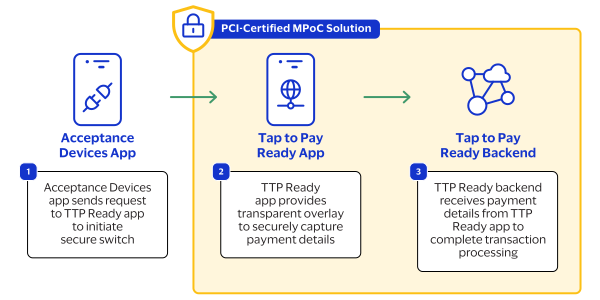
This diagram shows the transaction workflow for the PCI-Certified MPoC Solution in the
Tap to Pay on Android Acceptance Devices app.
Figure:
PCI-Certified MPoC Solution Transaction Workflow
The PCI-Certified MPoC Solution workflow typically includes this sequence of events:
The Acceptance Devices app sends a request to the Tap to Pay Ready app to initiate a
secure switch to the other app. This activity is invisible to the customer, which
ensures that the UI experience is seamless.
The PCI-Certified MPoC Solution uses the Tap to Pay Ready app to provide a
transparent overlay to securely capture payment details.
The Tap to Pay Ready backend receives payment details from the Tap to Pay Ready app
to complete transaction processing.