On This Page
Transaction-Specific Fields
To make an authorization request into a credentialed transaction, you must include
additional fields that inform
Cybersource
to either store the customer's
payment information for future use, or to use an already stored card-on-file for the
payment. This section describes the additional required fields that create an initial
and subsequent credentialed transaction.Initial Transactions
For an initial transaction, include these fields with a
standard authorization request:
- Set to one of these possible values:
- internet: online transaction.
- MOTO: mail order/telephone order transaction.
- A payer authentication value.
- Set the value tofalse.
- Set the value totrue.
- Some processors and card types require a reason code when storing payment credentials.
<ccAuthService run="true">
    <commerceIndicator>internet</commerceIndicator>
</ccAuthService>
<subsequentAuth>false</subsequentAuth>
<subsequentAuthFirst>true</subsequentAuthFirst>
<subsequentAuthReason>7</subsequentAuthReason>
When you receive the initial transaction response, save the transaction identifier,
which is located in the
request_id
field. You need the transaction identifier for subsequent
transactions. If you are using the Token Management Service
(TMS
),
Cybersource
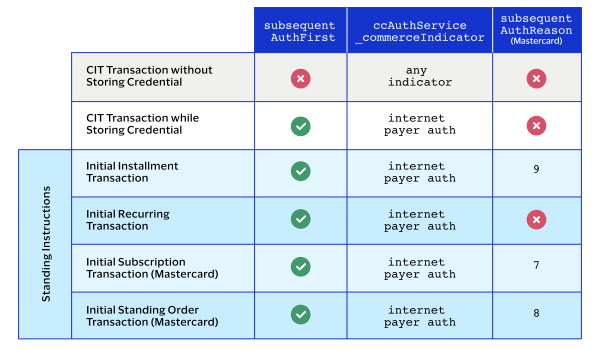
stores the transaction identifier for you.This table shows the fields required for each type of CIT and initial
transaction.
Subsequent Transactions
For a subsequent transaction, include these fields with a standard authorization
request:
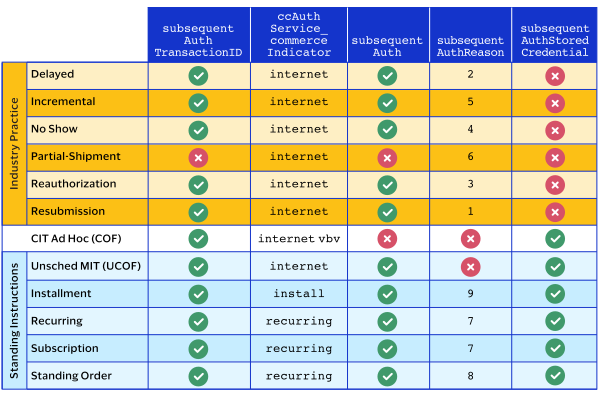
- Set to one of these possible values:
- internet: online transaction.
- MOTO: mail order/telephone order transaction.
- A payer authentication value.
- Set the value tofalse.
- Set the value totrue.
- Some processors and card types require a reason code when storing payment credentials.If required, set to one of these possible values:
- 1: Resubmission transaction.
- 2: Delayed transaction.
- 3: Reauthorization transaction.
- 4: No-show transaction.
- 5: Incremental transaction.
- 7: Recurring transaction.
- 8: Standing order transaction.
- 9: Installment transaction.
- 10: Unscheduled transaction.
- American Express: set to the transaction ID from the original transaction.
- Discover: set to the transaction ID from the original transaction.
- Visa: set to the last successful transaction ID.
<ccAuthService run="true">
    <commerceIndicator></commerceIndicator>
</ccAuthService>
<subsequentAuth>true</subsequentAuth>
<subsequentAuthReason>7</subsequentAuthReason>
<subsequentAuthTransactionID>123456789123</subsequentAuthTransactionID>
<subsequentAuthStoredCredential>true</subsequentAuthStoredCredential>