On This Page
Credentialed Transactions Developer Guide
This section describes how to use this developer guide and where to find further
information.
- Audience and Purpose
- This guide is written for application developers who want to use theSimple Order APIto integrate payment card processing using credentials into an order management system.Implementing theCybersourcepayment services requires software development skills. You must write code that uses the API request and response fields to integrate the credit card services into your existing order management system.Visit theCybersourcedocumentation hub to find additional processor-specific versions of this guide and additional technical documentation.
- Convention
- This statement appears in this document:AnImportantstatement contains information essential to successfully completing a task or learning a concept.
- Customer Support
- For support information about any service, visit the Support Center:
Recent Revisions to This Document
26.02.01
Added industry and use case information to the introduction topics. See
Industry Practice Transactions and Standing Instruction Transactions.
25.12.01
This revision contains only editorial changes and no technical
updates.
25.11.01
Removed Mastercard required field for retrieving customer credentials during a CIT request.
See Using Stored Customer Credentials During a CIT.
VISA Platform Connect: Specifications and Conditions for
Resellers/Partners
The following are specifications and conditions that apply to a Reseller/Partner enabling
its merchants through
Cybersource for
. Failure to meet any of the specifications and conditions below is
subject to the liability provisions and indemnification obligations under
Reseller/Partner’s contract with Visa/Cybersource.Visa Platform Connect
(“VPC”)
processing- Before boarding merchants for payment processing on a VPC acquirer’s connection, Reseller/Partner and the VPC acquirer must have a contract or other legal agreement that permits Reseller/Partner to enable its merchants to process payments with the acquirer through the dedicated VPC connection and/or traditional connection with such VPC acquirer.
- Reseller/Partner is responsible for boarding and enabling its merchants in accordance with the terms of the contract or other legal agreement with the relevant VPC acquirer.
- Reseller/Partner acknowledges and agrees that all considerations and fees associated with chargebacks, interchange downgrades, settlement issues, funding delays, and other processing related activities are strictly between Reseller and the relevant VPC acquirer.
- Reseller/Partner acknowledges and agrees that the relevant VPC acquirer is responsible for payment processing issues, including but not limited to, transaction declines by network/issuer, decline rates, and interchange qualification, as may be agreed to or outlined in the contract or other legal agreement between Reseller/Partner and such VPC acquirer.
DISCLAIMER: NEITHER VISA NOR CYBERSOURCE WILL BE RESPONSIBLE OR LIABLE FOR ANY ERRORS OR
OMISSIONS BY THE
Visa Platform Connect
ACQUIRER IN PROCESSING TRANSACTIONS. NEITHER VISA
NOR CYBERSOURCE WILL BE RESPONSIBLE OR LIABLE FOR RESELLER/PARTNER BOARDING MERCHANTS OR
ENABLING MERCHANT PROCESSING IN VIOLATION OF THE TERMS AND CONDITIONS IMPOSED BY THE
RELEVANT Visa Platform Connect
ACQUIRER. Introduction to Credentialed Transactions
Credentialed transactions, also known as credentials‑on‑file (COF) or card‑on‑file
transactions, are payments that either store a customer’s payment credentials for future
use or use previously stored credentials to complete a transaction. All COF transactions
begin with a customer-initiated transaction, in which the customer actively
participates, such as a card‑present purchase, online checkout, or use of a stored
credential.
Benefits of Credentialed Transactions
Merchants following the stored credentials framework experience these benefits:
- Better visibility into transaction risk.
- Improved authorization success rates.
- A smoother customer experience.
- Fewer disputes and customer complaints.
- Use of Real Time Visa Account Updater for fresher card details.
For more information on the stored credentials framework, see Improving Authorization Management for Transactions
with Stored Credentials.
Types of Credentialed Transactions
There are several types of credentialed transactions:
- Customer-initiated transaction (CIT):During a CIT, customers can elect to have their credentials stored for future CITs or for merchant‑initiated transactions (MITs).
- Merchant-initiated transaction (MIT):A MIT is processed without the customer’s active involvement and include these transactions:
- Industry practice transaction:This MIT is performed as a subsequent transaction to a CIT because the initial transaction could not be completed in one transaction. Not every industry practice transaction involves a stored credential. If a stored credential is used only for one transaction, that transaction is not considered a credentialed transaction.
- Standing instruction transactions:This MIT is performed to follow agreed-upon instructions from the customer for the provision of goods and services.
Industry Practice Transactions
Industry practice transactions are MITs performed as follow‑on actions to a previous CIT.
Although not all of them require stored credentials, repeated use of credentials
qualifies them as COF transactions.
These industry practice transactions and industry examples are available with your
processor:
- Delayed charges: Used to add charges after the initial transaction is complete. Examples: hotels (minibar, damages), car rentals (tolls), travel (post-trip charges), and health and wellness add-ons.
- Incremental charges: Used when an amount exceeds the original authorization. Examples: extending hotel stays, adding rental car insurance, restaurant gratuities, and event upgrades.
- Reauthorizations: Used when an authorization expires before fulfillment. Examples: long hotel stays, extended rental agreements, multi-week equipment rentals, and delayed subscription boxes.
- Resubmissions: Used when a previous authorization attempt fails. Examples: utility auto-pay retries, telecom billing, insurance premiums, and online membership renewals.
- No-shows: Used when a customer fails to appear for a reserved service for these industries: hotels, rentals, healthcare missed appointments, and restaurant reservation deposits.
Business Center Transactions
Business Center
TransactionsYou can create an industry practice transaction in the
Business Center
by
requesting a new authorization. Go to the Transaction Management section and confirm
that the new authorization is a MIT. Choose one of these reason types for the
authorization:- Account Top Up
- Delayed Charges
- No Show
- Reauthorization
- Resubmission
This process requires you to have already stored the customer's credentials from a
previous customer-initiated transaction. For more information on storing a
customer's credentials in the
Business Center
, see Customer-Initiated Transactions with Credentials on File.To create an incremental
transaction in the
Business Center
, choose one of these options: - Account Top Up
- No Show
Standing Instruction Transactions
Standing instruction transactions are MITs that rely on stored credentials and follow
agreed‑upon customer instructions for scheduled or ongoing payments. These transactions
must comply with the stored credentials framework, which ensures secure storage and use
of customer payment data. All standing instruction transactions begin with a CIT, when
customers elect to store their credentials.
These standing instruction transactions and industry examples are available with your
processor:
- Unscheduled COF: Occasional, non‑scheduled charges that are made under a customer authorization for these industries:
- Rideshare and transportation: cleaning fees, damage fees
- Home services: irregular invoice-based jobs, such as repairs
- Professional services: unplanned billable hours or fees
- E‑commerce: back-order fulfillment outside a schedule
- Installments: A fixed purchase that is split into multiple scheduled payments for these industries:
- Retail and electronics: installment plans for device purchases
- Furniture and home goods: multi‑month payment plans
- Education: tuition installment schedules
- Healthcare financing: payment plans for procedures
- Recurring: Repeated charges for ongoing services for these industries:
- Streaming services: video, music, gaming subscriptions
- Fitness and wellness: gym memberships, coaching subscriptions
- Insurance: monthly premiums
- Software and SaaS: business application licenses
- Subscription Transactions for Mastercard: Mastercard‑specific recurring billing for subscription‑based services for these industries:
- Digital media: news, magazines, premium content
- Subscription boxes: food kits, beauty boxes, hobby crates
- Online services: cloud storage, identity monitoring
- Educational platforms: e‑learning subscriptions
- Standing Order Transactions for Mastercard: Merchant‑initiated charges made at regular, agreed-upon intervals for these industries:
- Utilities: monthly electricity, water, gas payments
- Telecommunications: phone and internet service billing
- Loan and mortgage payments: fixed monthly obligations
- Charitable donations: recurring monthly contributions
Requirements for Standing Instruction Transactions
Merchants who offer stored credentials must:
- Disclose to cardholders how their credentials will be used.
- Obtain the customer's consent to store their credentials.
- Notify customers when the terms of use change.
- Inform the card issuer during an authorization that the credentials are stored on file.
- Identify all transactions that use stored credentials.
Recurring Billing for Recurring Payments
If you are using the Recurring Billing service, do not use this document.
Cybersource
saves and stores payment credentials for recurring transactions,
ensuring compliance with COF best practices. For more information on Recurring Billing, see .
Transaction-Specific Fields
To make an authorization request into a credentialed transaction, you must include
additional fields that inform
Cybersource
to either store the customer's
payment information for future use, or to use an already stored card-on-file for the
payment. This section describes the additional required fields that create an initial
and subsequent credentialed transaction.Initial Transactions
For an initial transaction, include these fields with a
standard authorization request:
- Set to one of these possible values:
- internet: online transaction.
- MOTO: mail order/telephone order transaction.
- A payer authentication value.
- Set the value tofalse.
- Set the value totrue.
- Some processors and card types require a reason code when storing payment credentials.
<ccAuthService run="true">
    <commerceIndicator>internet</commerceIndicator>
</ccAuthService>
<subsequentAuth>false</subsequentAuth>
<subsequentAuthFirst>true</subsequentAuthFirst>
<subsequentAuthReason>7</subsequentAuthReason>
When you receive the initial transaction response, save the transaction identifier,
which is located in the
request_id
field. You need the transaction identifier for subsequent
transactions. If you are using the Token Management Service
(TMS
),
Cybersource
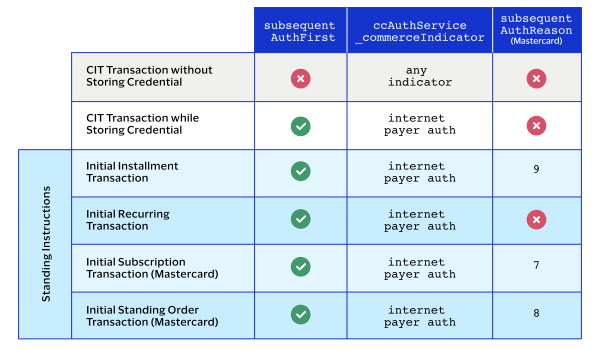
stores the transaction identifier for you.This table shows the fields required for each type of CIT and initial
transaction.
Subsequent Transactions
For a subsequent transaction, include these fields with a standard authorization
request:
- Set to one of these possible values:
- internet: online transaction.
- MOTO: mail order/telephone order transaction.
- A payer authentication value.
- Set the value tofalse.
- Set the value totrue.
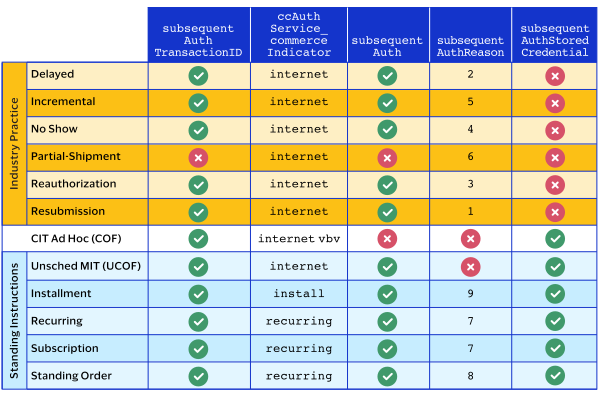
- Some processors and card types require a reason code when storing payment credentials.If required, set to one of these possible values:
- 1: Resubmission transaction.
- 2: Delayed transaction.
- 3: Reauthorization transaction.
- 4: No-show transaction.
- 5: Incremental transaction.
- 7: Recurring transaction.
- 8: Standing order transaction.
- 9: Installment transaction.
- 10: Unscheduled transaction.
- American Express: set to the transaction ID from the original transaction.
- Discover: set to the transaction ID from the original transaction.
- Visa: set to the last successful transaction ID.
<ccAuthService run="true">
    <commerceIndicator></commerceIndicator>
</ccAuthService>
<subsequentAuth>true</subsequentAuth>
<subsequentAuthReason>7</subsequentAuthReason>
<subsequentAuthTransactionID>123456789123</subsequentAuthTransactionID>
<subsequentAuthStoredCredential>true</subsequentAuthStoredCredential>
Customer-Initiated Transactions with Credentials on
File
A customer-initiated transaction (CIT) is a transaction initiated by the customer. There
are two types of CITs:
- Customer transactions during which the credentials are stored for futurecustomer-initiated transactions.
- Customer transactions during which the credentials are stored for futuremerchant-initiated transactions.
Customers can initiate a CIT at a merchant payment terminal, through an online purchase
transaction, or by making a purchase using a previously stored credential. When storing
cardholder data for a CIT, you must also include 3-D Secure authentication credentials
to ensure that the CIT can successfully process. Authentication credentials can be
stored for future use with the card credentials by doing a non-payment authentication
(NPA).
Business Center
Business Center
You can create a new customer-initiated transaction in the
Business Center
by
going to the One-Time Payments section and requesting a new authorization. When you
have entered the customer's information, you can store the customer's credentials
with the customer's permission in the Payment Information section. By doing so, you
can perform merchant-initiated transactions for payments that the customer has
pre-approved. For more information on how to perform a MIT in the
Business Center
,
see Merchant-Initiated No-Show Transactions with PAN.Storing Customer Credentials with a CIT and PAN
Before you can perform a merchant-initiated transaction (MIT) or a customer-initiated
transaction (CIT) with credentials-on-file (COF), you must store the customer's
credentials for later use. Further, before you can store the user's credentials, you
must get the customer's consent to store their private information. This is also known
as establishing a relationship with the customer.
Endpoint
Set the
ccAuthService_run
field to
true
.Send the request to
https://ics2ws.ic3.com/commerce/1.x/transactionProcessor
.Required Fields for Storing Customer Credentials During a CIT
When relaxed requirements for address data and the expiration date are being used, not all fields
in this list are required. It is your responsibility to determine whether your
account is enabled to use this feature and which fields are required. For details
about relaxed requirements, see Relaxed Requirements for Address Data and Expiration Date in Payment Transactions.
- Set the value totrue.
- Set the value totrue.
Simple Order Example: Storing Customer Credentials During a CIT
Request
billTo_city=Foster City billTo_country=USbillTo_email=null@cybersource.combillTo_firstname=John billTo_lastname=Smith billTo_state=CA billTo_postalCode=94404 billTo_street1=201 S. Division St. card_expirationMonth=12 card_expirationYear=2031 card_accountNumber=4111111111111111 ccAuthService_run=true merchantId=pa_ctv_sg101 merchantReferenceCode=33557799 purchaseTotals_currency=ABC purchaseTotals_grandTotalAmount=100.00 subsequentAuthFirst=True
Response to a Successful Request
additional_processor_response=e1cdcafc-cdbb-4ef7-8788-a1234e844805
request_id=6461515866500167772420
decision=ACCEPT
reasonCode=100
merchantReferenceCode=Merchant_REF
purchaseTotals_currency=ABC
cardCategory=FccAuthService_reconciliationID=ZUDCXJO8KZRFXQJJ
ccAuthReply_amount=100.00
ccAuthReply_avsCode=5
ccAuthReply_authorizationCode=570110
ccAuthReply_processorResponse=1
ccAuthReply_authorizedDateTime=2022-03-01T161947Z
ccAuthReply_paymentNetworkTransactionID=111222
Using Stored Customer Credentials During a CIT
After customers store their credentials on file, you can retrieve these credentials to
use with subsequent transactions when the customer is present.
Endpoint
Set the
ccAuthService_run
field to
true
.Send the request to
https://ics2ws.ic3.com/commerce/1.x/transactionProcessor
.Required Fields for Using Customer Credentials During a
CIT
When relaxed requirements for address data and the expiration date are being used, not all fields
in this list are required. It is your responsibility to determine whether your
account is enabled to use this feature and which fields are required. For details
about relaxed requirements, see Relaxed Requirements for Address Data and Expiration Date in Payment Transactions.
- Set the value totrue.
- Set the value totrue.
Card-Specific Required Field for Retrieving Customer
Credentials During a MIT
Discover
Discover requires the authorization amount from the original transaction in addition
to the above required fields.
- subsequentAuthOriginalAmount
Simple Order Example: Using Customer Credentials During a
CIT
Request
billTo_city=Foster City billTo_country=USbillTo_email=null@cybersource.combillTo_firstname=John billTo_lastname=Smith billTo_state=CA billTo_postalCode=94404 billTo_street1=201 S. Division St. card_expirationMonth=12 card_expirationYear=2031 card_accountNumber=4111111111111111 ccAuthService_run=true merchantId=pa_ctv_sg101 merchantReferenceCode=33557799 purchaseTotals_currency=ABC purchaseTotals_grandTotalAmount=100.00 subsequentAuthStoredCredential=True
Response to a Successful Request
additional_processor_response=e1cdcafc-cdbb-4ef7-8788-a1234e844805
request_id=6461515866500167772420
decision=ACCEPT
reasonCode=100
merchantReferenceCode=Merchant_REF
purchaseTotals_currency=ABC
cardCategory=FccAuthService_reconciliationID=ZUDCXJO8KZRFXQJJ
ccAuthReply_amount=100.00
ccAuthReply_avsCode=5
ccAuthReply_authorizationCode=570110
ccAuthReply_processorResponse=1
ccAuthReply_authorizedDateTime=2022-03-01T161947Z
ccAuthReply_paymentNetworkTransactionID=111222
Delayed Transaction
Delayed charge transaction is performed to process a supplemental
account charge after original services have been rendered and respective payment has
been processed.
This section describes how to process a merchant-initiated delayed transaction, also
known as a delayed charge, using these payment types:
Merchant-Initiated Delayed Transaction with PAN
Delayed charge transaction is performed to process a supplemental
account charge after original services have been rendered and respective payment has
been processed.
Supported Card Types
These are the supported card types for processing credentialed transactions:
- American Express
- Carta Si
- Cartes Bancaires
- Dankort
- Delta
- Eurocard
- JCB
- Maestro (UK Domestic)
- Mastercard
- Visa
- Visa Electron
Endpoint
Set the
ccAuthService_run
field to
true
.Send the request to
https://ics2ws.ic3.com/commerce/1.x/transactionProcessor
.Required Fields for Processing a Merchant-Initiated Delayed Transaction
Use these required fields to process a merchant-initiated delayed transaction.
When relaxed requirements for address data and the expiration date are being used, not all fields
in this list are required. It is your responsibility to determine whether your
account is enabled to use this feature and which fields are required. For details
about relaxed requirements, see Relaxed Requirements for Address Data and Expiration Date in Payment Transactions.
- Required only for token transactions with Discover or Diners Club. Set this field to theccAuthReply_cardReferenceDatafield that was in the response message when you obtained the customer's credentials.
- Set the value totrue.
- Required only for token transactions with Discover or Diners Club. Set this field to theccAuthReply_paymentNetworkTransactionIDfield that was in the response message when you obtained the customer's credentials.
- Set the value totrue.
- Set the value to2.
- Required only for Discover, Mastercard, and Visa.
- American Express: set to the transaction ID from the original transaction.
- Discover: set to the transaction ID from the original transaction.
- Visa: set to the last successful transaction ID.
Card-Specific Required Field for Processing a Merchant-Initiated Transactions
Discover
The listed card requires an additional field:
- subsequentAuthOriginalAmount
- Provide the original transaction amount.
Simple Order Example: Processing a Merchant-Initiated Delayed Authorization
Transaction
Request
billTo_city=Foster City billTo_country=USbillTo_email=null@cybersource.combillTo_firstname=John billTo_lastname=Smith billTo_state=CA billTo_postalCode=94404 billTo_street1=201 S. Division St. card_expirationMonth=12 card_expirationYear=2031 card_accountNumber=4111111111111111 ccAuthService_run=true ccAuthService_commerceIndicator=install merchantId=pa_ctv_sg101 merchantReferenceCode=33557799 purchaseTotals_currency=ABC purchaseTotals_grandTotalAmount=100.00 subsequentAuth=true subsequentAuthReason=2
Response to a Successful Request
additional_processor_response=e1cdcafc-cdbb-4ef7-8788-a1234e844805
request_id=6461515866500167772420
decision=ACCEPT
reasonCode=100
merchantReferenceCode=Merchant_REF
purchaseTotals_currency=ABC
cardCategory=FccAuthService_reconciliationID=ZUDCXJO8KZRFXQJJ
ccAuthReply_amount=100.00
ccAuthReply_avsCode=5
ccAuthReply_authorizationCode=570110
ccAuthReply_processorResponse=1
ccAuthReply_authorizedDateTime=2022-03-01T161947Z
ccAuthReply_paymentNetworkTransactionID=111222
Incremental Transaction
An incremental authorization is used to increase the total amount
authorized for a payment if the initial authorization does not cover the total cost of
goods and services. An incremental transaction is an additional amount to the original
authorization. The final authorized total includes amounts for both the initial and the
incremental authorizations. Incremental transactions are limited to certain merchant
categories, such as rental, lodging, transit, amusement parks, restaurants, and
bars.
This section describes how to process an incremental transaction using these payment
types:
Merchant-Initiated Incremental Transaction with PAN
An incremental authorization is used to increase the total amount
authorized for a payment if the initial authorization does not cover the total cost of
goods and services. An incremental transaction is an additional amount to the original
authorization. The final authorized total includes amounts for both the initial and the
incremental authorizations. Incremental transactions are limited to certain merchant
categories, such as rental, lodging, transit, amusement parks, restaurants, and
bars.
To create an incremental transaction
using the
Business Center
, choose one of these options: - Account Top Up
- No Show
Supported Card Types
These are the supported card types for processing credentialed transactions:
- American Express
- Carta Si
- Cartes Bancaires
- Dankort
- Delta
- Eurocard
- JCB
- Maestro (UK Domestic)
- Mastercard
- Visa
- Visa Electron
Limitations
You can request up to 100 incremental authorizations for each transaction, in
addition to the original authorization.
Interchange optimization and split shipments are not supported.
Endpoint
Set the
ccAuthService_run
field to
true
.Send the request to
https://ics2ws.ic3.com/commerce/1.x/transactionProcessor
.Required Fields for Processing Merchant-Initiated Incremental Transactions
Use these required fields to process merchant-initiated incremental transactions.
- Required only for token transactions with Discover or Diners Club. Set this field to theccAuthReply_cardReferenceDatafield that was in the response message when you obtained the customer's credentials.
- Set the value totrue.
- merchantId
- Required only for token transactions with Discover or Diners Club. Set this field to theccAuthReply_paymentNetworkTransactionIDfield that was in the response message when you obtained the customer's credentials.
- Set the value to5.
- Required only for Discover and Visa.
- Set the value totrue.
Simple Order Example: Processing Merchant-Initiated Incremental Transactions
Request
billTo_street1=201 S. Division St. billTo_city=Foster City billTo_country=US billTo_state=CA billTo_postalCode=94404 purchaseTotals_currency=ABC card_expirationMonth=12 card_expirationYear=2031 card_accountNumber=4111111111111111billTo_email=null@cybersource.combillTo_firstName=John billTo_lastName=Smith purchaseTotals_grandTotalAmount=100.00 ccIncrementalAuthService_run=true merchantID=pa_ctv_sg101 merchantReferenceCode=33557799 subsequentAuth=Y subsequentAuthTransactionID=016153570198200 ccIncrementalAuthService_authRequestID=6541079409780593413176
Response to a Successful Request
additional_processor_response=e1cdcafc-cdbb-4ef7-8788-a1234e844805
request_id=6461515866500167772420
decision=ACCEPT
reasonCode=100
merchantReferenceCode=Merchant_REF
purchaseTotals_currency=ABC
cardCategory=FccAuthService_reconciliationID=ZUDCXJO8KZRFXQJJ
ccAuthReply_amount=100.00
ccAuthReply_avsCode=5
ccAuthReply_authorizationCode=570110
ccAuthReply_processorResponse=1
ccAuthReply_authorizedDateTime=2022-03-01T161947Z
ccAuthReply_paymentNetworkTransactionID=111222
Reauthorization Transaction
A reauthorization occurs when the completion or fulfillment of the
original order or service extends beyond the authorized amount time limit. There are two
common reauthorization scenarios:
- Split or delayed shipments by a retailer
- Extended car rentals, hotel stays, or cruise line bookings
This section describes how to process a reauthorization transaction using these payment
methods:
Merchant-Initiated Reauthorization Transactions with PAN
A reauthorization occurs when the completion or fulfillment of the
original order or service extends beyond the authorized amount time limit. There are two
common reauthorization scenarios:
- Split or delayed shipments by a retailer
- Extended car rentals, hotel stays, or cruise line bookings
Supported Card Types
These are the supported card types for processing credentialed transactions:
- American Express
- Carta Si
- Cartes Bancaires
- Dankort
- Delta
- Eurocard
- JCB
- Maestro (UK Domestic)
- Mastercard
- Visa
- Visa Electron
Required Fields for Processing Merchant-Initiated Reauthorized Transactions
When relaxed requirements for address data and the expiration date are being used, not all fields
in this list are required. It is your responsibility to determine whether your
account is enabled to use this feature and which fields are required. For details
about relaxed requirements, see Relaxed Requirements for Address Data and Expiration Date in Payment Transactions.
- Set the value totrue.
- Set the value to3.
- Required only for Discover and Visa.
- Set the value totrue.
- American Express: set to the transaction ID from the original transaction.
- Discover: set to the transaction ID from the original transaction.
- Visa: set to the last successful transaction ID.
Simple Order Example: Processing a Merchant-Initiated Reauthorized Transaction
Request
billTo_city=Foster City billTo_country=USbillTo_email=null@cybersource.combillTo_firstname=John billTo_lastname=Smith billTo_state=CA billTo_postalCode=94404 billTo_street1=201 S. Division St. card_expirationMonth=12 card_expirationYear=2031 card_accountNumber=4111111111111111 ccAuthService_run=true ccAuthService_commerceIndicator=install merchantId=pa_ctv_sg101 merchantReferenceCode=33557799 purchaseTotals_currency=ABC purchaseTotals_grandTotalAmount=100.00 subsequentAuth=true subsequentAuthReason=3
Response to a Successful Request
additional_processor_response=e1cdcafc-cdbb-4ef7-8788-a1234e844805
request_id=6461515866500167772420
decision=ACCEPT
reasonCode=100
merchantReferenceCode=Merchant_REF
purchaseTotals_currency=ABC
cardCategory=FccAuthService_reconciliationID=ZUDCXJO8KZRFXQJJ
ccAuthReply_amount=100.00
ccAuthReply_avsCode=5
ccAuthReply_authorizationCode=570110
ccAuthReply_processorResponse=1
ccAuthReply_authorizedDateTime=2022-03-01T161947Z
ccAuthReply_paymentNetworkTransactionID=111222
Resubmission Transaction
A resubmission transaction is an authorization that you resubmit to recover an outstanding debt from the customer. A common scenario is when a card was initially declined due to insufficient funds, but the goods or services were already delivered to the customer.
You can request the resubmission transaction with a PAN or a TMS token.
Merchant-Initiated Resubmission Transaction with PAN
A resubmission transaction is an authorization that you resubmit to recover an outstanding debt from the customer. A common scenario is when a card was initially declined due to insufficient funds, but the goods or services were already delivered to the customer.
Supported Card Types
These are the supported card types for processing credentialed transactions:
- American Express
- Carta Si
- Cartes Bancaires
- Dankort
- Delta
- Eurocard
- JCB
- Maestro (UK Domestic)
- Mastercard
- Visa
- Visa Electron
Endpoint
Set the
ccAuthService_run
field to
true
.Send the request to
https://ics2ws.ic3.com/commerce/1.x/transactionProcessor
.Required Fields for Processing a Merchant-Initiated Resubmitted Transaction
- Set the value totrue.
- Set the value to1.
- Required only for Discover, Mastercard, and Visa.
- Set the value totrue.
- American Express: set to the transaction ID from the original transaction.
- Discover: set to the transaction ID from the original transaction.
- Visa: set to the last successful transaction ID.
Simple Order Example: Processing a Merchant-Initiated Resubmitted Transaction
Request
billTo_city=Foster City billTo_country=USbillTo_email=null@cybersource.combillTo_firstname=John billTo_lastname=Smith billTo_state=CA billTo_postalCode=94404 billTo_street1=201 S. Division St. card_expirationMonth=12 card_expirationYear=2031 card_accountNumber=4111111111111111 ccAuthService_run=true ccAuthService_commerceIndicator=install merchantId=pa_ctv_sg101 merchantReferenceCode=33557799 purchaseTotals_currency=ABC purchaseTotals_grandTotalAmount=100.00 subsequentAuth=true subsequentAuthReason=1
Response to a Successful Request
additional_processor_response=e1cdcafc-cdbb-4ef7-8788-a1234e844805
request_id=6461515866500167772420
decision=ACCEPT
reasonCode=100
merchantReferenceCode=Merchant_REF
purchaseTotals_currency=ABC
cardCategory=FccAuthService_reconciliationID=ZUDCXJO8KZRFXQJJ
ccAuthReply_amount=100.00
ccAuthReply_avsCode=5
ccAuthReply_authorizationCode=570110
ccAuthReply_processorResponse=1
ccAuthReply_authorizedDateTime=2022-03-01T161947Z
ccAuthReply_paymentNetworkTransactionID=111222
No-Show Transactions
A no-show authorization occurs when a merchant charges a customer after
the customer makes a reservation, and does not show up to claim the reservation. In this
situation, the customer is charged an agreed upon fee for not showing up as
expected.
This section describes how to process a merchant-initiated no-show transaction using
these payment types:
Merchant-Initiated No-Show Transactions with PAN
A no-show authorization occurs when a merchant charges a customer after
the customer makes a reservation, and does not show up to claim the reservation. In this
situation, the customer is charged an agreed upon fee for not showing up as
expected.
Supported Card Types
These are the supported card types for processing credentialed transactions:
- American Express
- Carta Si
- Cartes Bancaires
- Dankort
- Delta
- Eurocard
- JCB
- Maestro (UK Domestic)
- Mastercard
- Visa
- Visa Electron
Endpoint
Set the
ccAuthService_run
field to
true
.Send the request to
https://ics2ws.ic3.com/commerce/1.x/transactionProcessor
.Required Fields for Processing Merchant-Initiated No-Show Charges
- Required only for token transactions with Discover or Diners Club. Set this field to theccAuthReply_cardReferenceDatafield that was in the response message when you obtained the customer's credentials.
- Set the value totrue.
- Required only for token transactions with Discover or Diners Club. Set this field to theccAuthReply_paymentNetworkTransactionIDfield that was in the response message when you obtained the customer's credentials.
- Set the value to4.
- Required only for Discover, Mastercard, and Visa.
- Set the value totrue.
- American Express: set to the transaction ID from the original transaction.
- Discover: set to the transaction ID from the original transaction.
- Visa: set to the last successful transaction ID.
Optional Field for Processing Merchant-Initiated No-Show Charges
You can use these optional fields to include additional information when authorizing
a request for an MIT no-show charge:
- subsequentAuthStoredCredential
- If the payment information is COF information, set the value totrue.
Related Information
Simple Order Example: Processing Merchant-Initiated No-Show Transactions
Request
billTo_city=Foster City billTo_country=USbillTo_email=null@cybersource.combillTo_firstname=John billTo_lastname=Smith billTo_state=CA billTo_postalCode=94404 billTo_street1=201 S. Division St. card_expirationMonth=12 card_expirationYear=2031 card_accountNumber=4111111111111111 ccAuthService_run=true ccAuthService_commerceIndicator=install merchantId=pa_ctv_sg101 merchantReferenceCode=33557799 purchaseTotals_currency=ABC purchaseTotals_grandTotalAmount=100.00 subsequentAuth=true subsequentAuthReason=4
Response to a Successful Request
additional_processor_response=e1cdcafc-cdbb-4ef7-8788-a1234e844805
request_id=6461515866500167772420
decision=ACCEPT
reasonCode=100
merchantReferenceCode=Merchant_REF
purchaseTotals_currency=ABC
cardCategory=FccAuthService_reconciliationID=ZUDCXJO8KZRFXQJJ
ccAuthReply_amount=100.00
ccAuthReply_avsCode=5
ccAuthReply_authorizationCode=570110
ccAuthReply_processorResponse=1
ccAuthReply_authorizedDateTime=2022-03-01T161947Z
ccAuthReply_paymentNetworkTransactionID=111222
Installment Payments
An installment payment is a single purchase of goods or services billed to a customer in
multiple transactions over a period of time agreed to by you and the customer. The agreement
enables you to charge a specific amount at specified intervals.
Installments Service for Installment Payments
Do not use this document if you are using the Installments service. When
using the Installments service,
Cybersource
saves and stores payment
credentials for installment transactions, ensuring compliance with COF best practices. Customer-Initiated Installment Payments with PAN
An installment payment is a single purchase of goods or services
billed to a customer in multiple transactions over a period of time agreed to by you
and the customer, and sometimes, the issuing bank. The agreement enables you to
charge a specific amount at specified intervals. For customers, installment payments
provide greater purchasing power and lower impact on their monthly budget. For you,
offering installment payments at checkout can help increase the number of
successfully completed purchases.
Before you can accept installment payments, you and your
acquirer must agree on the maximum number of installments you can accept, which can
be different for each card type.
In Brazil, installment payments are also known
as
parcelados
and parcelas
.Do not use this document if you are using the
Installments service. When using the Installments service,
Cybersource
saves and stores payment credentials for installment transactions, ensuring
compliance with COF best practices. Installment Payment Types
Visa Platform Connect
enables you to process installment payments but does not have
a role in setting the terms for the installment plan.Visa Platform Connect
enables you to process these types of installments payments:- Issuer-Funded Installment Payments
- The customer pays for goods or services using an installment plan agreed upon by the customer and their issuing bank. The issuer controls how the customer's account is debited. Your account is credited for the entire amount in a single transaction. The issuer assumes the risk and establishes credit rates and fees that are charged to the customer. The customer pays the funding cost, which is a fee for paying in installments.In Brazil, aCrediariois a special type of issuer-funded installment payment plan that enables the customer to request information about the terms of the installment plan before approving the installment payments.
- Merchant-Funded Installment Payments
- The customer pays for goods or services using an installment plan agreed upon by you and the customer. The issuer controls how the customer's account is debited. Your account is credited periodically for partial amounts as the customer's account is debited. You assume the risk and establish the credit rate and fees that are charged to the customer.
- Co-Branded Merchant Financed Installment Payments—Brazil Only
- You and the issuer determine the terms for this kind of installment plan. The funding varies depending on the agreement between you, the issuer, and the customer. This funding method is available only for Mastercard installment payments in Brazil.
- Issuer Merchant Co-Financed Installment Payments—Brazil Only
- The issuer creates the installment plan. You and the issuer determine the service fees that the customer pays to you and the issuer. The acquirer is paid in full while the issuer is paid in installments by the customer. You or the customer pay the funding cost, which is a fee for paying in installments. This funding method is available only for Mastercard installment payments in Brazil.
Supported Card Types
These are the supported card types for processing credentialed transactions:
- American Express
- Mastercard
- Visa
Endpoint
Set the
ccAuthService_run
field to
true
.Send the request to
https://ics2ws.ic3.com/commerce/1.x/transactionProcessor
.Successful Response
You must store the
network transaction ID
from the successful response message
to include in subsequent MIT authorization requests in order to associate the CIT to
the MIT. The network transaction ID is the ccAuthReply_paymentNetworkTransactionID
field value.Store the
network transaction ID
, which is the ccAuthReply_paymentNetworkTransactionID
field value, from the
successful response message. You must include the network transaction ID in
subsequent MIT authorization requests in order to associate the CIT to the MIT.Required Fields for Initial Customer-Initiated Installment Payment with a PAN
- Set the value tointernet,MOTO, or a payer authentication value.
- Set the value totrue.
- Set the value totrue.
- Set the value tofalse.
Card-Specific Required Fields for Authorizing Initial Installment Payments
Use this required field if you are authorizing an initial installment payment using the
card type referenced below.
- Mastercard
- subsequentAuthReason
- Set the value to9.
Simple Order Example: Authorizing Initial Customer-Initiated Installment Payments with a
PAN
Request
billTo_city=Foster City billTo_country=USbillTo_email=null@cybersource.combillTo_firstname=John billTo_lastname=Smith billTo_state=CA billTo_postalCode=94404 billTo_street1=201 S. Division St. card_expirationMonth=12 card_expirationYear=2031 card_accountNumber=4111111111111111 ccAuthService_run=true ccAuthService_commerceIndicator=internet merchantId=pa_ctv_sg101 merchantReferenceCode=33557799 purchaseTotals_currency=ABC purchaseTotals_grandTotalAmount=100.00 subsequentAuth=false subsequentAuthFirst=true
Response to a Successful Request
additional_processor_response=e1cdcafc-cdbb-4ef7-8788-a1234e844805
request_id=6461515866500167772420
decision=ACCEPT
reasonCode=100
merchantReferenceCode=Merchant_REF
purchaseTotals_currency=ABC
cardCategory=FccAuthService_reconciliationID=ZUDCXJO8KZRFXQJJ
ccAuthReply_amount=100.00
ccAuthReply_avsCode=5
ccAuthReply_authorizationCode=570110
ccAuthReply_processorResponse=1
ccAuthReply_authorizedDateTime=2022-03-01T161947Z
ccAuthReply_paymentNetworkTransactionID=111222
Merchant-Initiated Installment Payments with PAN
After the initial CIT installment payment, subsequent installment payments are
merchant-initiated transactions (MITs).
Prerequisites
The first transaction in an installment payment is a
customer-initiated
transaction
(CIT). Before you can perform a subsequent merchant-initiated
transaction
(MIT), you must store the customer's credentials for later use.
Before you can store the user's credentials, you must get the customer's consent to
store their private information. This process is also known as establishing a
relationship with the customer.Installment Payment Types
Visa Platform Connect
enables you to process installment payments but does not have
a role in setting the terms for the installment plan.Visa Platform Connect
enables you to process these types of installments payments:- Issuer-Funded Installment Payments
- The customer pays for goods or services using an installment plan agreed upon by the customer and their issuing bank. The issuer controls how the customer's account is debited. Your account is credited for the entire amount in a single transaction. The issuer assumes the risk and establishes credit rates and fees that are charged to the customer. The customer pays the funding cost, which is a fee for paying in installments.In Brazil, aCrediariois a special type of issuer-funded installment payment plan that enables the customer to request information about the terms of the installment plan before approving the installment payments.
- Merchant-Funded Installment Payments
- The customer pays for goods or services using an installment plan agreed upon by you and the customer. The issuer controls how the customer's account is debited. Your account is credited periodically for partial amounts as the customer's account is debited. You assume the risk and establish the credit rate and fees that are charged to the customer.
- Co-Branded Merchant Financed Installment Payments—Brazil Only
- You and the issuer determine the terms for this kind of installment plan. The funding varies depending on the agreement between you, the issuer, and the customer. This funding method is available only for Mastercard installment payments in Brazil.
- Issuer Merchant Co-Financed Installment Payments—Brazil Only
- The issuer creates the installment plan. You and the issuer determine the service fees that the customer pays to you and the issuer. The acquirer is paid in full while the issuer is paid in installments by the customer. You or the customer pay the funding cost, which is a fee for paying in installments. This funding method is available only for Mastercard installment payments in Brazil.
Supported Card Types
These are the supported card types for processing credentialed transactions:
- American Express
- Carta Si
- Cartes Bancaires
- Dankort
- Delta
- Eurocard
- JCB
- Maestro (UK Domestic)
- Mastercard
- Visa
- Visa Electron
Endpoint
Set the
ccAuthService_run
field to
true
.Send the request to
https://ics2ws.ic3.com/commerce/1.x/transactionProcessor
.Required Fields for a Merchant-Initiated Subsequent Installment Payment
- Set the value toinstall.
- Set the value totrue.
- Set the value totrue.
- Set the value totrue.
- American Express: set to the transaction ID from the original transaction.
- Discover: set to the transaction ID from the original transaction.
- Visa: set to the last successful transaction ID.
Country-Specific Required Fields for Installment Payments with Mastercard or Visa
Card
Include these country-specific required fields for installment payments using a
Mastercard or Visa card, in addition to the required fields listed above.
Argentina
Include these required fields for payments using either a Mastercard or Visa card in
Argentina.
- Required only when the request includes payer authentication data.
Brazil
Include these required fields for payments using either a Mastercard or Visa card in
Brazil.
- Not required ifbillTo_personalIDis present.
- Not required ifbillTo_companyTaxIDis present.
Chile
Include these required fields for payments using either a Mastercard or Visa card in
Chile.
- Optional wheninstallment_planTypeis set to2.
Croatia
Include these required fields for payments using either a Mastercard or Visa card in
Croatia.
Georgia
Include these required fields for payments using either a Mastercard or Visa card in
Georgia.
Greece
Include these required fields for payments using either a Mastercard or Visa card in
Greece.
Mexico
Include these required fields for payments using either a Mastercard or Visa card in
Mexico with Banco Nacional de México (Banamex) or BBVA México (Bancomer).
- Set the value toinstall_internet.
Paraguay
Include this required field for payments using either a Mastercard or Visa card in
Paraguay.
Peru
Include this required field for payments using either a Mastercard or Visa card in
Peru.
India-Specific Required Fields for Installment Payments
This section shows the required fields for Diners Club, Mastercard, and Visa in India.
Diners Club and Mastercard
Use these fields for authorizing an MIT installment payment when processing payments
through
Visa Platform Connect
.- Required only for the first MIT installment payment.
- Required only with Diners Club and Mastercard in India or with an India-issued card. Required only for the first MIT installment payment, not for subsequent MIT installment payments.
Visa
Use this field for authorizing a MIT installment payment when processing payments through
Visa Platform Connect
.Simple Order Example: Authorizing Merchant-Initiated Subsequent Installment
Payments
Request
billTo_city=Foster City billTo_country=USbillTo_email=null@cybersource.combillTo_firstname=John billTo_lastname=Smith billTo_state=CA billTo_postalCode=94404 billTo_street1=201 S. Division St. card_expirationMonth=12 card_expirationYear=2031 card_accountNumber=4111111111111111 ccAuthService_commerceIndicator=install merchantId=pa_ctv_sg101 merchantReferenceCode=33557799 purchaseTotals_currency=ABC purchaseTotals_grandTotalAmount=100.00 subsequentAuth=true subsequentAuthOriginalAmount=100.00 //This field is for Discover only. subsequentAuthReason=9 subsequentAuthStoredCredential=true subsequentAuthTransactionID=23976974322
Response to a Successful Response
additional_processor_response=e1cdcafc-cdbb-4ef7-8788-a1234e844805
request_id=6461515866500167772420
decision=ACCEPT
reasonCode=100
merchantReferenceCode=Merchant_REF
purchaseTotals_currency=ABC
cardCategory=FccAuthService_reconciliationID=ZUDCXJO8KZRFXQJJ
ccAuthReply_amount=100.00
ccAuthReply_avsCode=5
ccAuthReply_authorizationCode=570110
ccAuthReply_processorResponse=1
ccAuthReply_authorizedDateTime=2022-03-01T161947Z
ccAuthReply_paymentNetworkTransactionID=111222
Recurring Payments
A recurring payment is a credentials-on-file (COF) transaction in a series of payments
that you bill to a customer for a fixed amount at regular intervals that do not exceed
one year between transactions. The series of recurring payments is the result of an
agreement between you and the customer for the purchase of goods or services that are
provided at regular intervals. Recurring payments are also known as
subscriptions
.Mastercard uses standing order and subscription payments instead of recurring payments. See Mastercard Standing Order Payments and Mastercard Subscription Payments.
Recurring Billing Service for Recurring Payments
Do not use this document for the Recurring Billing service.
Use the
Recurring Billing Developer
Guide
. When you use the Recurring Billing service,
Cybersource
saves and stores payment credentials for
recurring transactions, ensuring compliance with COF best practices.
Customer-Initiated Recurring Payment with PAN
A recurring payment is a credentials-on-file (COF) transaction in a
series of payments that you bill to a customer at a fixed amount, at regular
intervals that do not exceed one year between transactions. The series of recurring
payments is the result of an agreement between you and the customer for the purchase
of goods or services that are provided at regular intervals.
Supported Card Types
These are the supported card types for processing credentialed transactions:
- American Express
- Mastercard
- Visa
Mastercard uses standing order and subscription payments instead of recurring
payments. See Mastercard Standing Order Payments and
Mastercard Subscription Payments.
Recurring Billing Service for Recurring Payments
Do not use this document for the Recurring Billing service.
Use the
Recurring Billing Developer
Guide
. When you use the Recurring Billing service,
Cybersource
saves and stores payment credentials for
recurring transactions, ensuring compliance with COF best practices.
Address Verification Service for Recurring Payments
If your processor supports the Address Verification Service (AVS), then the AVS
should verify every authorization request.
Cybersource
recommends
checking the AVS's results for the first recurring payment to ensure that the
payment information is accurate and to reduce the risk of fraud.You must determine how to handle the AVS results for any subsequent recurring
payments that are not the same as the already-verified billing address information
from the first recurring payment.
Endpoint
Set the
ccAuthService_run
field to
true
.Send the request to
https://ics2ws.ic3.com/commerce/1.x/transactionProcessor
.Successful Response
You must store the
network transaction ID
from the successful response message
to include in subsequent MIT authorization requests in order to associate the CIT to
the MIT. The network transaction ID is the ccAuthReply_paymentNetworkTransactionID
field value.Store the
network transaction ID
, which is the ccAuthReply_paymentNetworkTransactionID
field value, from the
successful response message. You must include the network transaction ID in
subsequent MIT authorization requests in order to associate the CIT to the MIT.Required Fields for Authorizing a Customer-Initiated Recurring Payment with PAN
- Set the value tointernet, a payer authentication value, orMOTO.
- Set the value totrue.
- Set the value totrue.
- Set the value totrue.
- Set the value tofalse.
Simple Order Example: Authorizing a Customer-Initiated Recurring Payment with a
PAN
Request
billTo_city=Foster City billTo_country=USbillTo_email=null@cybersource.combillTo_firstname=John billTo_lastname=Smith billTo_state=CA billTo_postalCode=94404 billTo_street1=201 S. Division St. card_expirationMonth=12 card_expirationYear=2031 card_accountNumber=4111111111111111 ccAuthService_run=true ccAuthService_commerceIndicator=internet merchantId=pa_ctv_sg101 merchantReferenceCode=33557799 purchaseTotals_currency=ABC purchaseTotals_grandTotalAmount=100.00 subsequentAuth=false subsequentAuthFirst=true
Response to a Successful Request
additional_processor_response=e1cdcafc-cdbb-4ef7-8788-a1234e844805
request_id=6461515866500167772420
decision=ACCEPT
reasonCode=100
merchantReferenceCode=Merchant_REF
purchaseTotals_currency=ABC
cardCategory=FccAuthService_reconciliationID=ZUDCXJO8KZRFXQJJ
ccAuthReply_amount=100.00
ccAuthReply_avsCode=5
ccAuthReply_authorizationCode=570110
ccAuthReply_processorResponse=1
ccAuthReply_authorizedDateTime=2022-03-01T161947Z
ccAuthReply_paymentNetworkTransactionID=111222
Merchant-Initiated Recurring Payments with PAN
After the initial recurring payment (CIT), subsequent recurring payments are
merchant-initiated transactions (MITs).
Prerequisites
The first transaction in a recurring payment is a customer-initiated transaction
(CIT). Before you can perform a subsequent merchant-initiated transaction (MIT), you
must store the customer's credentials for later use. Before you can store the
customer's credentials, you must get their consent to store their private
information. This is also known as establishing a relationship with the
customer.
Supported Card Types
These are the supported card types for processing credentialed transactions:
- American Express
- Mastercard
- Visa
Mastercard uses standing order and subscription payments instead of recurring
payments. See Mastercard Standing Order Payments and
Mastercard Subscription Payments.
Address Verification Service for Recurring Payments
If your processor supports the Address Verification Service (AVS), then the AVS
should verify every authorization request.
Cybersource
recommends
checking the AVS's results for the first recurring payment to ensure that the
payment information is accurate and to reduce the risk of fraud.You must determine how to handle the AVS results for any subsequent recurring
payments that are not the same as the already-verified billing address information
from the first recurring payment.
Replacing Expiration Dates
If the customer's card-on-file is going to expire before a scheduled subsequent
recurring payment, your processor may allow you to replace the expiration date with
the date 12/2099.
Do not replace a card's expiration date if the card is not
expired.
Using this replacement expiration date does not guarantee a successful authorization
request. It is your responsibility to know if your processor supports this feature.
Not all issuing banks support the 12/2099 expiration date and may decline the
authorization request.
To include this date in the authorization request, use these fields and values.
- card_expirationMonth
- Set to12.
- card_expirationYear
- Set to2029.
Endpoint
Set the
ccAuthService_run
field to
true
.Send the request to
https://ics2ws.ic3.com/commerce/1.x/transactionProcessor
.Required Fields for Authorizing a Merchant-Initiated Recurring Payment
- Set the value torecurring.
- Set the value totrue.
- Set the value totrue.
- Set the value totrue.
- Card Specific Information
- Mastercard:subsequentAuthReason
- Set the value to7.
Card-Specific Required Fields for Authorizing Subsequent Recurring Payments
Some card companies require additional information when making authorizations with stored credentials.
Discover
Include the authorization amount from the original transaction in this field:
- subsequentAuthOriginalAmount
Mastercard
Mastercard supports subscription and standing order payments instead of recurring
payments.
Country-Specific Required Fields for Authorizing Subsequent Recurring Payments
Include these country-specific required fields for a successful merchant-initiated
authorization.
India
These fields are required only with Diners Club in India or with an India-issued
card, and you are processing payments through
Visa Platform Connect
.- Required only with Diners Club in India or with an India-issued card.
- Required only with Diners Club in India or with an India-issued card.
- Required only with Diners Club in India or with an India-issued card.
- Required only with Diners Club in India or with an India-issued card.
- Required only with Diners Club in India or with an India-issued card.
- Required only with Diners Club in India or with an India-issued card.
Saudi Arabia
These fields are required only if your business is located in Saudi Arabia and you
are processing payments through
Visa Platform Connect
.Simple Order Example: Authorizing a Merchant-Initiated Recurring Payment
Request
billTo_city=Foster City billTo_country=USbillTo_email=null@cybersource.combillTo_firstname=John billTo_lastname=Smith billTo_state=CA billTo_postalCode=94404 billTo_street1=201 S. Division St. card_expirationMonth=12 card_expirationYear=2031 card_accountNumber=4111111111111111 ccAuthService_commerceIndicator=recurring merchantId=pa_ctv_sg101 merchantReferenceCode=33557799 purchaseTotals_currency=ABC purchaseTotals_grandTotalAmount=100.00 subsequentAuth=true subsequentAuthOriginalAmount=100.00 //This field is for Discover only. subsequentAuthReason=7 subsequentAuthStoredCredential=true subsequentAuthTransactionID=23976974322
Response to a Successful Request
additional_processor_response=e1cdcafc-cdbb-4ef7-8788-a1234e844805
request_id=6461515866500167772420
decision=ACCEPT
reasonCode=100
merchantReferenceCode=Merchant_REF
purchaseTotals_currency=ABC
cardCategory=FccAuthService_reconciliationID=ZUDCXJO8KZRFXQJJ
ccAuthReply_amount=100.00
ccAuthReply_avsCode=5
ccAuthReply_authorizationCode=570110
ccAuthReply_processorResponse=1
ccAuthReply_authorizedDateTime=2022-03-01T161947Z
ccAuthReply_paymentNetworkTransactionID=111222
Mastercard Standing Order Payments
A standing order payment is a recurring COF transaction that is a variable amount at a
regular interval, such as a utility bill, not to exceed one year between transactions.
The series of recurring payments is the result of an agreement between you and the
customer for the purchase of goods or services that are provided at regular
intervals.
Mastercard Initial CIT Standing Order Payment
The first transaction in a standing order payment is a customer-initiated transaction
(CIT). Before you can perform a subsequent merchant-initiated transaction (MIT), you
must store the customer's credentials for later use. Before you can store the user's
credentials, you must get the customer's consent to store their private information.
This process is also known as establishing a relationship with the customer.
Endpoint
Set the
ccAuthService_run
field to
true
.Send the request to
https://ics2ws.ic3.com/commerce/1.x/transactionProcessor
.Successful Response
You must store the
network transaction ID
from the successful response message
to include in subsequent MIT authorization requests in order to associate the CIT to
the MIT. The network transaction ID is the ccAuthReply_paymentNetworkTransactionID
field value.Store the
network transaction ID
, which is the ccAuthReply_paymentNetworkTransactionID
field value, from the
successful response message. You must include the network transaction ID in
subsequent MIT authorization requests in order to associate the CIT to the MIT.Required Fields for Authorizing Initial CIT Standing Order Payments
Use these required fields to authorize initial customer-initated standing order
payments.
- Set the value tointernet.
- Set the value totrue.
- Set the value totrue.
- Set the value to8.
- Set the value tocustomer.
Simple Order Example: Authorizing Initial CIT Standing Order Payments
Request
billTo_city=Foster City billTo_country=USbillTo_email=null@cybersource.combillTo_firstname=John billTo_lastname=Smith billTo_state=CA billTo_postalCode=94404 billTo_street1=201 S. Division St. card_expirationMonth=12 card_expirationYear=2031 card_accountNumber=4111111111111111 ccAuthService_run=true ccAuthService_commerceIndicator=internet merchantId=pa_ctv_sg101 merchantReferenceCode=33557799 purchaseTotals_currency=ABC purchaseTotals_grandTotalAmount=100.00 subsequentAuthFirst=True subsequentAuthReason=8
Response to a Successful Request
additional_processor_response=e1cdcafc-cdbb-4ef7-8788-a1234e844805
request_id=6461515866500167772420
decision=ACCEPT
reasonCode=100
merchantReferenceCode=Merchant_REF
purchaseTotals_currency=ABC
cardCategory=FccAuthService_reconciliationID=ZUDCXJO8KZRFXQJJ
ccAuthReply_amount=100.00
ccAuthReply_avsCode=5
ccAuthReply_authorizationCode=570110
ccAuthReply_processorResponse=1
ccAuthReply_authorizedDateTime=2022-03-01T161947Z
ccAuthReply_paymentNetworkTransactionID=111222
Mastercard Subscription Payments
A subscription payment is a recurring COF transaction that is processed at a fixed amount at regular intervals not to exceed one year between transactions. The series of recurring payments is the result of an agreement between you and the customer for the purchase of goods or services that are provided at regular intervals.
Mastercard CIT Initial Subscription Payment
The first transaction in a subscription payment is a customer-initiated transaction
(CIT). Before you can perform a subsequent merchant-initiated transaction (MIT), you
must store the customer's credentials for later use. Before you can store the user's
credentials, you must get the customer's consent to store their private information.
This process is also known as establishing a relationship with the customer.
Endpoint
Set the
ccAuthService_run
field to
true
.Send the request to
https://ics2ws.ic3.com/commerce/1.x/transactionProcessor
.Successful Response
You must store the
network transaction ID
from the successful response message
to include in subsequent MIT authorization requests in order to associate the CIT to
the MIT. The network transaction ID is the ccAuthReply_paymentNetworkTransactionID
field value.Store the
network transaction ID
, which is the ccAuthReply_paymentNetworkTransactionID
field value, from the
successful response message. You must include the network transaction ID in
subsequent MIT authorization requests in order to associate the CIT to the MIT.Required Fields for Authorizing CIT Initial Subscription Payments
- Set the value torecurring.
- Set the value totrue.
- Set the value totrue.
- Set the value to7.
- Set the value tocustomer.
Simple Order Example: Authorizing Initial CIT Subscription Payments
Request
billTo_city=Foster City billTo_country=USbillTo_email=null@cybersource.combillTo_firstname=John billTo_lastname=Smith billTo_state=CA billTo_postalCode=94404 billTo_street1=201 S. Division St. card_expirationMonth=12 card_expirationYear=2031 card_accountNumber=4111111111111111 ccAuthService_run=true ccAuthService_commerceIndicator=internet merchantId=pa_ctv_sg101 merchantReferenceCode=33557799 purchaseTotals_currency=ABC purchaseTotals_grandTotalAmount=100.00 subsequentAuthFirst=true subsequentAuthReason=7
Response to a Successful Request
additional_processor_response=e1cdcafc-cdbb-4ef7-8788-a1234e844805
request_id=6461515866500167772420
decision=ACCEPT
reasonCode=100
merchantReferenceCode=Merchant_REF
purchaseTotals_currency=ABC
cardCategory=FccAuthService_reconciliationID=ZUDCXJO8KZRFXQJJ
ccAuthReply_amount=100.00
ccAuthReply_avsCode=5
ccAuthReply_authorizationCode=570110
ccAuthReply_processorResponse=1
ccAuthReply_authorizedDateTime=2022-03-01T161947Z
ccAuthReply_paymentNetworkTransactionID=111222
Unscheduled COF Payments
An unscheduled credentials-on-file (COF) transaction uses stored payment information for a
fixed or variable amount that does not occur regularly. An account top-up is one kind of
unscheduled COF.
Customer-Initiated Unscheduled COF Payment with PAN
An unscheduled credentials-on-file (COF) transaction uses stored
payment information for a fixed or variable amount that does not occur regularly. An
account top-up is one kind of unscheduled COF.
Supported Card Types
These are the supported card types for processing credentialed transactions:
- American Express
- Carta Si
- Cartes Bancaires
- Dankort
- Delta
- Eurocard
- JCB
- Maestro (UK Domestic)
- Mastercard
- Visa
- Visa Electron
Endpoint
Set the
ccAuthService_run
field to
true
.Send the request to
https://ics2ws.ic3.com/commerce/1.x/transactionProcessor
.Successful Response
You must store the
network transaction ID
from the successful response message
to include in subsequent MIT authorization requests in order to associate the CIT to
the MIT. The network transaction ID is the ccAuthReply_paymentNetworkTransactionID
field value.Store the
network transaction ID
, which is the ccAuthReply_paymentNetworkTransactionID
field value, from the
successful response message. You must include the network transaction ID in
subsequent MIT authorization requests in order to associate the CIT to the MIT.Required Fields for a Customer-Initiated Unscheduled COF Payment with PAN
- Set the value tointernet,MOTO, or a payer authentication value.
- Set the value totrue.
- Set the value totrue.
- Set the value tofalse.
Simple Order Example: Customer-Initiated Unscheduled COF
Payment with PAN
Request
billTo_city=Foster City billTo_country=USbillTo_email=null@cybersource.combillTo_firstname=John billTo_lastname=Smith billTo_state=CA billTo_postalCode=94404 billTo_street1=201 S. Division St. card_expirationMonth=12 card_expirationYear=2031 card_accountNumber=4111111111111111 ccAuthService_run=true ccAuthService_commerceIndicator=internet merchantId=pa_ctv_sg101 merchantReferenceCode=33557799 purchaseTotals_currency=ABC purchaseTotals_grandTotalAmount=100.00 subsequentAuth=false subsequentAuthFirst=True
Response to a Successful Request
additional_processor_response=e1cdcafc-cdbb-4ef7-8788-a1234e844805
request_id=6461515866500167772420
decision=ACCEPT
reasonCode=100
merchantReferenceCode=Merchant_REF
purchaseTotals_currency=ABC
cardCategory=FccAuthService_reconciliationID=ZUDCXJO8KZRFXQJJ
ccAuthReply_amount=100.00
ccAuthReply_avsCode=5
ccAuthReply_authorizationCode=570110
ccAuthReply_processorResponse=1
ccAuthReply_authorizedDateTime=2022-03-01T161947Z
ccAuthReply_paymentNetworkTransactionID=111222
Merchant-Initiated Unscheduled COF Payment with PAN
After the initial CIT unscheduled COF payment, subsequent unscheduled COF transactions are
merchant-initiated transactions (MITs).
Prerequisites
The first transaction in an unscheduled COF payment is a customer-initiated
transaction (CIT). Before you can perform a subsequent merchant-initiated
transaction (MIT), you must store the customer's credentials for later use. Before
you can store the user's credentials, you must get the customer's consent to store
their private information. This process is also known as establishing a relationship
with the customer.
Supported Card Types
These are the supported card types for processing credentialed transactions:
- American Express
- Carta Si
- Cartes Bancaires
- Dankort
- Delta
- Eurocard
- JCB
- Maestro (UK Domestic)
- Mastercard
- Visa
- Visa Electron
Endpoint
Set the
ccAuthService_run
field to
true
.Send the request to
https://ics2ws.ic3.com/commerce/1.x/transactionProcessor
.Required Fields for a Subsequent MIT Unscheduled COF Payment
- Set the value tointernet.
- Set the value totrue.
- Set the value to10.
- Required only forAmerican Express,Discover and Mastercard.
- Set the value totrue.
- Set the value totrue.
Simple Order Example: Authorizing Subsequent MIT Unscheduled COF Payments
Request
billTo_city=Foster City billTo_country=USbillTo_email=null@cybersource.combillTo_firstname=John billTo_lastname=Smith billTo_state=CA billTo_postalCode=94404 billTo_street1=201 S. Division St. card_expirationMonth=12 card_expirationYear=2031 card_accountNumber=4111111111111111 ccAuthService_commerceIndicator=internet merchantId=pa_ctv_sg101 merchantReferenceCode=33557799 purchaseTotals_currency=ABC purchaseTotals_grandTotalAmount=100.00 subsequentAuth=true subsequentAuthOriginalAmount=100.00 //This field is for Discover only. subsequentAuthStoredCredential=true subsequentAuthTransactionID=23976974322
Response to a Successful Request
additional_processor_response=e1cdcafc-cdbb-4ef7-8788-a1234e844805
request_id=6461515866500167772420
decision=ACCEPT
reasonCode=100
merchantReferenceCode=Merchant_REF
purchaseTotals_currency=ABC
cardCategory=FccAuthService_reconciliationID=ZUDCXJO8KZRFXQJJ
ccAuthReply_amount=100.00
ccAuthReply_avsCode=5
ccAuthReply_authorizationCode=570110
ccAuthReply_processorResponse=1
ccAuthReply_authorizedDateTime=2022-03-01T161947Z
ccAuthReply_paymentNetworkTransactionID=111222
Reference Information
This section contains this helpful reference information when processing credentialed
transactions.
Payer Authentication Values
This section describes the possible payer authentication values you can include in the
ccAuthService_commerceIndicator
request field.The level of security in payer authentication is indicated by the two-digit e-commerce indicator (ECI) that is assigned to the transaction. These values have text equivalents that are assigned to the
ccAuthService_commerceIndicator
field.The
American Express,
China UnionPay, Diners, Discover,
and Visa card brands use 05
, 06
, and
07
digit values to express the authentication level for a
3-D Secure
transaction.ECI Value | Meaning | Visa | Diners | Discover | China UnionPay | American Express |
|---|---|---|---|---|---|---|
05 | Authenticated | vbv | pb | dipb | up3ds | aesk |
06 | Attempted authentication with a cryptogram | vbv_attempted | pb_attempted | dipb_attempted | up3ds_attempted | aesk_attempted |
07 | Internet, not authenticated | vbv_failure/internet | internet | internet | up3ds_failure/internet | internet |
Mastercard and Maestro cards use 00, 01, 02, 06, and 07 digit values to indicate the
authentication level of the transaction.
ECI Value | Meaning | Mastercard/Maestro |
|---|---|---|
00 | Internet, not authenticated | spa/internet |
01 | Attempted authentication | spa |
02 | Authenticated | spa |
06 | Exemption from authentication or
network token without 3‑D Secure | spa |
07 | Authenticated merchant-initiated
transaction | spa |
Relaxed Requirements for Address Data and Expiration Date in Payment Transactions
With relaxed requirements for address data and the expiration date, not all standard payment request fields are required. It is your responsibility to determine whether your account is enabled to use this feature and which fields are required.
Requirements
You must contact customer support in order to enable relaxed requirements for address data and expiration date.
Services
Relaxed requirements for address data and expiration date are supported for these services:
- Authorization
- Capture
- Stand-alone credit
- Subscription create
- Subscription update
Relaxed Fields
When relaxed requirements for address data and expiration date are enabled for your
Cybersource
account, and your service request does not include one or more of the fields in the following list, you increase the risk of declined transactions and fraud depending on your location, your processor, and the cardholder's issuing bank.It is your responsibility to determine whether a field is required for the transaction you are requesting. For example, an issuing bank can decline an authorization request for a recurring transaction with a Visa Europe card if the expiration date is incorrect, invalid, or missing. If you do not provide the correct expiration date for a recurring transaction the authorization request may be declined.
- When you include this field in your request, you must also includecard_expirationYear.
- You can submit an expiration date that has expired. This exception does not apply when you combine any of the services listed above with any other service.
- This field is required for payment network token transactions and subscription creation requests.
- When you include this field in your request, you must also includecard_expirationMonth.
- You can submit an expiration date that has expired. This exception does not apply when you combine any of the services listed above with any other service.
- This field is required for payment network token transactions and subscription creation requests.