On This Page
How to Set Up REST
This overview lists the tasks you must complete in order to set up your
Cybersource
account for sending and receiving REST API messages using JSON Web Token (JWT)
messaging. You can choose from these set up methods:
- JWT messaging using aP12 certificate.
- JWT messaging using ashared secret key pair.
- JWT messaging using theREST Client SDK.
Figure:
Set Up Your
Cybersource
Account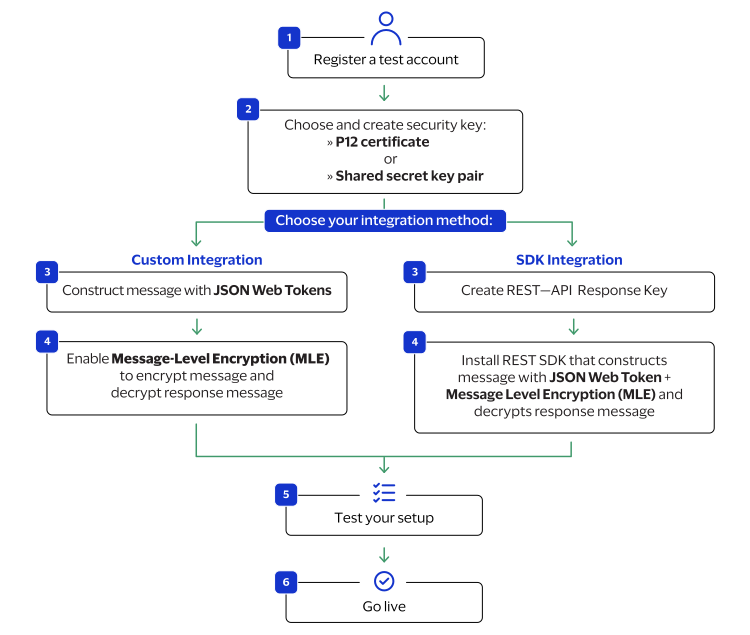
To set up JSON web token messaging using
P12 certificates
, see Set Up a JSON Web Token Message Using P12 Certificates.To set up JSON web token messaging using
shared secret key pairs
, see Set Up a JSON Web Token Message Using Shared Secret Key Pairs.To set up JSON web token messaging using the
REST Client SDK
, see Set Up a JSON Web Token Message Using the REST SDK.HTTP Signature Security

You also have the option to set up your
Cybersource
account for sending
and receiving messages using HTTP signature security.
WARNING
By
March 2027
, all merchants using HTTP signature messaging must
migrate to JSON Web Token (JWT) messaging in order to support message-level
encryption (MLE). You risk transaction failures if you do not implement this
update. If you are setting up your system to be REST-compliant for the first
time, Cybersource
recommends using JWT messaging.To set up HTTP signature messaging, see Set Up an HTTP Signature Message.