On This Page
Introduction to Acceptance Devices | Tap to Pay on iPhone Solution
The Acceptance Devices | Tap to Pay on iPhone Solution enables you to use any compatible
iPhone as a payment acceptance device. You can integrate the Tap to Pay on iPhone
software development kit (SDK) into your iOS POS app to easily manage the payment
flow.
For information about the current version of the Tap to Pay on iPhone SDK, see the Release Notes for Tap to Pay on iPhone Solution.
Compatibility Requirements for iPhones
To accept contactless payments, your iPhone must be compatible with the Tap to Pay on
iPhone Solution. These are the requirements for a compatible iPhone:
- iPhone model XS or later
- iOS version that is less than 1 year old (recommendation is to use the latest iOS version available)
Transaction Workflow for the Tap to Pay on iPhone Solution
This diagram shows the transaction workflow for the Tap to Pay on iPhone Solution.
Figure:
Tap to Pay on iPhone Solution Transaction Workflow
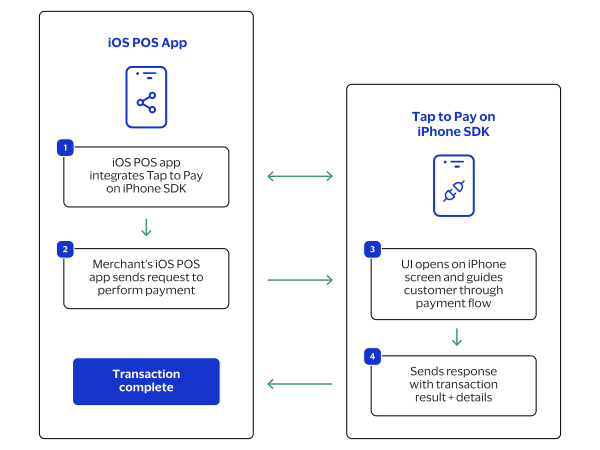
- The iOS point-of-sale (POS) app integrates to the Tap to Pay on iPhone SDK.
- The merchant's iOS POS app sends a request to the Tap to Pay on iPhone SDK to process a payment.
- The Tap to Pay on iPhone SDK user interface (UI) opens on the iPhone screen and guides the customer through the payment flow.
- The Tap to Pay on iPhone SDK sends a response with the transaction result and details to the iOS POS app.