On This Page
Payments Developer Guide
This section describes how to use this guide and where to find further
information.
- Audience and Purpose
- This guide is written for application developers who want to use theSimple Order APIto integrate payment card processing into an order management system.Implementing theCybersourcepayment services requires software development skills. You must write code that uses the API request and response fields to integrate the payment card services into your existing order management system.
- Conventions
- These statements appear in this document:AnImportantstatement contains information essential to successfully completing a task or learning a concept.AWarningcontains information or instructions, which, if not heeded, can result in a security risk, irreversible loss of data, or significant cost in time or revenue or both.
- Related Documentation
- Visit theCybersourcedocumentation hub to find additional processor-specific versions of this guide and additional technical documentation.
- Customer Support
- For support information about any service, visit the Support Center:
Recent Revisions to This Document
26.04.01
Added related reference information (Related to this Page) to applicable topics.
Added Void a Payment.
26.02.01
- Pre-Authorization
- Added an important note about using strong customer authentication. See Pre-Authorization.
- Updated required fields and examples. See Required Fields for a Pre-Authorization.
26.01.02
This revision
contains only editorial changes and no technical updates.
26.01.01
This revision contains only editorial changes and no technical
updates.
25.09.02
This revision contains only editorial changes and no technical
updates.
25.09.01
This revision contains only editorial changes and no technical
updates.
25.08.01
This revision contains only editorial changes and no technical updates.
25.07.01
This revision contains only editorial changes and no technical updates.
25.05.01
- Pre-Authorizations
- Added information about releasing the hold on authorized amounts after 30 days. See Pre-Authorization.
Introduction to Payments
This introduction provides the basic information that you need to successfully
process payment transactions. It also provides an overview of the payments industry
and provides workflows for each process.
With
Cybersource
payment services, you can process payment cards
(tokenized or non-tokenized), digital payments such as Apple Pay and Google Pay, and
customer ID transactions. You can process payments across the globe and across
multiple channels with scalability and security. Cybersource
supports a large number of payment cards and offers a wide choice of gateways and
financial institutions, all through one connection.Visit the
Cybersource
documentation hub to find additional processor-specific versions
of this guide and additional technical documentation.Financial Institutions and Payment Networks
Financial institutions and payment networks enable payment services to function. These
entities work together to complete the full payment cycle.
The
China UnionPay
payment processor is a direct connection to the
UnionPay ISO endpoint. China UnionPay
is for financial institutions that are located
outside of China to process transactions directly with UnionPay. Merchant Financial Institutions (Acquirers)
A merchant financial institution, also known as an
acquirer
, offers accounts to
businesses that accept payments. Before you can accept payments, you must have a merchant
account from an acquirer. Your merchant account must be configured to process card-not-present
or mail-order/telephone-order (MOTO) transactions.Each acquirer has connections to a limited number of payment processors. You
must choose a payment processor that your acquirer supports.
You can expect to pay these fees:
- Discount rates: your acquirer charges a fee and collects a percentage of every transaction. The combination of the fee and the percentage is called thediscount rate. These charges can bebundled(combined into a single charge) orunbundled(charged separately).
- Interchange fees: payment networks, such as Visa or Mastercard, each have a base fee, called theinterchange fee, for each type of transaction. Your acquirer and processor can show you ways to reduce this fee.
- Chargebacks: when cardholders dispute charges, you can incurchargebacks. A chargeback occurs when a charge on a customer’s account is reversed. Your acquirer removes the money from your account and could charge you a fee for processing the chargeback.
Take these precautions to prevent chargebacks:
- Use accurate merchant descriptors so that customers can recognize the transactions on their statements.
- Provide good customer support.
- Ensure rapid problem resolution.
- Maintain a high level of customer satisfaction.
- Minimize fraudulent transactions.
If excessive chargebacks or fraudulent changes occur, these actions might be taken:
- You might be required to change your business processes to reduce the number chargebacks, fraud, or both.
- Your acquiring institution might increase your discount rate.
- Your acquiring institution might revoke your merchant account.
Contact your sales representative for information about products that can help prevent
fraud.
Customer Financial Institutions (Issuers)
A customer financial institution, also known as an
issuer
, provides payment cards to
and underwrites lines of credit for their customers. The issuer provides monthly statements
and collects payments. The issuer must follow the rules of the payment card companies to which
they belong. Payment Networks
Payment networks manage communications between acquirers and issuing banks. They also develop
industry standards, support their brands, and establish fees for acquiring institutions.
Some payment networks, such as Visa and Mastercard, are trade associations that do not issue
cards. Issuers are members of these associations, and they issue cards under license from the
association.
Payment Processors
Payment processors connect with acquirers. Before you can accept payments, you must
register with
a payment processor
. An acquirer might
require you to use a payment processor with an existing relationship with the
acquirer.
Your payment processor
assigns one or more merchant IDs (MIDs) to your
business. These unique codes identify your business during payment transactions.Card Types
You can process payments with these kinds of cards:
- Domestic debit cards
- Domestic credit cards
- International debit cards
- International credit cards
For
China UnionPay
, domestic cards are payment cards that are
issued within China and international cards are payment cards that are issued outside
China.For a list of supported card types, see Payment Processors.
Co-Badged Cards
Co-badged cards are credit and debit cards that integrate two or more payment networks.
China UnionPay
supports cards co-badged with other payment
networks, such as Visa, Mastercard, and Discover. Co-Branded Cards
Co-branded cards are credit cards that are branded with a merchant's logo, brand, or other identifier as well as the payment network logo. These cards are not limited for use at the branded merchant and can be used at any merchant that accepts credit cards.
China UnionPay card
transactions are processed through the
China UnionPay
gateway. Visa and Mastercard
transactions are processed through the Visa Platform Connect
gateway. For co-branded cards,
the routing is determined by the value set for the card type field card_cardType
in the
transaction request. When the card type value is 001
for a Visa card, the
transaction is routed through the Visa Platform Connect
gateway. When the card type value is
062
for a China UnionPay card, the transaction is routed through the
China UnionPay
gateway. When you do not include the card type field, the system
defaults to the primary card brand for the card's bank identification number (BIN). Cybersource
automatically manages the system default process, eliminating the need
for additional integration by resellers or merchants.Credit Cards
Cardholders use credit cards to borrow money from issuing banks to pay for goods and services offered by merchants that accept credit cards.
Debit Cards
A debit card is linked to a cardholder's bank account. The funds are taken out of
the customer's bank account, and the transaction is included on the customer's bank account
statement. The customer does not receive a credit card bill as with a regular credit
card.
China UnionPay
China UnionPay
Process debit cards using the credit card services. See Standard Payment Processing.
Most domestic debit cards issued before 2016 do not have a card verification number (CVN)
and expiration date. The
China UnionPay
processor does not support payment
processing for cards that do not have a CVN and expiration date.Transaction Types
This topic provides information about transaction types that are supported by your processor.
Card-Not-Present Transactions
When a customer provides a card number, but the card and the customer are not physically
present at the merchant's location, the purchase is known as a
card-not-present
transaction
. Typical card-not-present transactions are internet and phone transactions.
Card-not-present transactions pose an additional level of risk to your business because the
customer’s identification cannot be verified. You can reduce that risk by using features such
as the Address Verification System (AVS) and Card Verification Numbers (CVNs). The AVS and
CVNs provide additional protection from fraud by verifying the validity of the customer’s
information and notifying you when discrepancies occur.Payment Services
Various services are involved in processing payments.
These services enable customers to purchase goods and services. They also enable merchants to
receive payments from customer accounts, to provide refunds, and to void transactions.
Contact your acquirer to confirm the specific capabilities they support.
Authorization
An authorization confirms that a payment card account holds enough funds to pay
for a purchase. Authorizations can be made online or offline.
Online Authorization
Online authorizations provide immediate confirmation of funds availability. The customer's
financial institution also reduces the amount of credit available in the customer's account,
setting aside the authorized funds for the merchant to capture at a later time. Authorizations
for most payment cards are processed online. Typically, it is safe to start fulfilling the
order when you receive an authorization confirmation.
An
An online authorization confirmation
and the subsequent hold on funds expire after a specific length of time. Therefore it is
important to capture funds in a timely manner. The issuing bank sets the expiration time
interval, but most authorizations expire within 5 to
7 days.The issuing bank does not inform
Cybersource
when an authorization
confirmation expires. By default, the authorization information for each transaction remains
in the Cybersource
database for 180 days after the authorization date. To
capture an authorization that expired with the issuing bank, you can resubmit the
authorization request.Pre-Authorization
A pre-authorization enables you to authorize a payment when the final amount is unknown. The system places the funds on hold until you request a follow-up transaction. Pre-authorizations are typically used for lodging, auto rental, e-commerce, and restaurant transactions.
Payment Services Directive 2 (PSD2) rules in the European Union (EU) and European Economic Area (EEA) require the initial pre-authorization to use strong customer authentication for merchants or customers in PSD2-applicable countries.
When you have a specific merchant category code (MCC) assigned to your account, you
are allowed to capture up to 20% more than the cumulatively authorized amount on
Visa, Diners Club, Discover, and JCB cards. Contact your account manager to have your
account enabled for this option.
For a pre-authorization:
- The authorization amount is greater than zero.
- Submit the authorization for capture within 30 calendar days of its request.
- After 30 calendar days, the customer bank (issuer) releases the hold on the authorized amount.
- Send a new authorization request to claim the amount.
Authorization Workflow
This image and description show the authorization workflow:

- The customer purchases goods or services from the merchant using a payment card.
- You send an authorization request over secure internet connection toCybersource. When the customer buys a digitally delivered product or service, you can request both the authorization and the capture at the same time. When the customer buys a physically fulfilled product, do not request the capture until you ship the product.
- Cybersourcevalidates the order information then contacts your payment processor and requests authorization.
- The processor sends the transaction to the payment card company, which routes it to the issuing bank for the customer's payment card. Some card companies, including Discover, act as their own issuing banks.
- The issuing bank approves or declines the request.
- If funds are available, the issuing bank reserves the amount of the authorization request and returns an authorization approval toCybersource.
- If the issuing bank denies the request, it returns an authorization denial toCybersource.
- Cybersourceruns its own tests then tells you whether the authorization succeeded.
Sale
A sale is a bundled authorization and capture. Some processors and acquirers require a sale
transaction instead of using separate authorization and capture requests. For other processors
and acquirers, you can request a sale instead of a separate authorization and capture when you
provide the goods or services immediately after taking an order.
There are two types of sale processing: dual-message processing and single-message
processing.
Authorization Reversal
The authorization reversal service releases the hold that an authorization placed on a
customer’s payment card funds.
Each card-issuing financial institution has its own rules for deciding whether an
authorization reversal succeeds or fails. When a reversal fails, contact the card-issuing
financial institution to learn whether there is a different way to reverse the
authorization.
An authorization reversal is a follow-on transaction that uses the request ID returned from
an authorization. The main purpose of a follow-on transaction is to link two transactions. The
request ID links the follow-on transaction to the original transaction. The authorization
request ID is used to look up the customer’s billing and account information in the
Cybersource
database. You are not required to include those fields in the full
authorization reversal request. The original transaction and follow-on transaction are linked
in the database and in the
Business Center
.For processors that support debit cards and prepaid cards, the full
authorization reversal service works for debit cards and prepaid cards in addition to credit
cards.
You cannot perform an authorization reversal if a transaction is in a
review state, which can occur if you use a fraud management service. You must reject the
transaction prior to authorization reversal. For more information, see the fraud management
documentation in
the
Business Center
.Capture
A capture is a follow-on transaction to an authorization. It is used to transfer the
authorized funds from the customer's account to the merchant account. To link the
authorization transaction to the capture transaction, you include a request ID in your capture
request. This request ID is returned to you in the authorization response.
When fulfilling only part of a customer’s order, do not capture the full amount of the authorization. Capture only the cost of the delivered items. When you deliver the remaining items, request a new authorization, and then capture the new authorization.
It is not possible to perform a capture if a transaction is in a review state, which can
occur if you use a fraud management service. You must accept the transaction prior to capture.
For more information, see the fraud management documentation in
the
Business Center
.Capture Workflow
The capture workflow begins when you send a request for a capture.
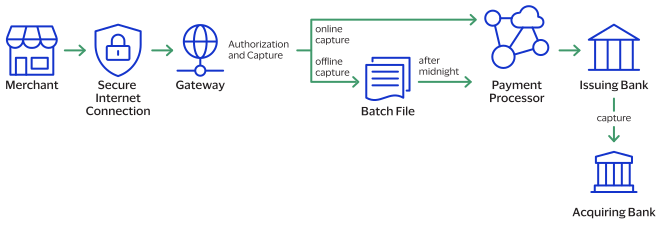
- The merchant sends a request for a capture to theCybersourcegateway.
- For online captures,Cybersourcevalidates the order information then sends an online capture to the payment processor.
- The processor validates the request and forwards it to the issuing bank.
- The issuing bank transfers funds to the acquiring bank.
The payment processor does not notify
Cybersource
that the money has been transferred. To ensure that all captures are
processed correctly, you should reconcile your capture requests with the capture reports from
your processor.Credit
Credit
Credits are payment refunds from a merchant to the cardholder after a cardholder pays for a
product or service and that payment is captured by the merchant. When a credit request is
successful, the issuer transfers funds from the merchant bank (acquirer) account to the
customer's account. It typically takes 2 to 4 days for the acquirer to transfer funds from
your merchant account.
There are two types of credits: a
follow-on credit
that is linked to an
original capture or sale, and a stand-alone credit
that is not linked to an original
capture or sale.Follow-on
Credit
Follow-on
Credit
Refund and Credit Workflow
This workflow applies to follow-on credits, also known as refunds, and stand-alone credits.
It begins when you send a request for a refund or credit.
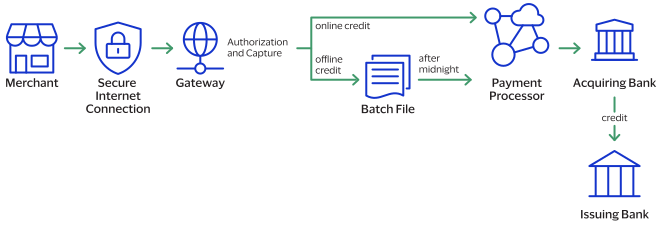
- The merchant sends the refund or credit request toCybersource.
- For online refunds and credits,Cybersourcevalidates the order information then sends the request to the payment processor.
- The processor validates the request and forwards it to the acquiring bank.
- The acquiring bank transfers funds to the issuing bank.
Not all processors support stand-alone credits.
Void
A void cancels a capture or credit request that you submitted to
Cybersource
but has not already been submitted to your processor. Capture and credit requests are usually
submitted to your processor once a day, so your window for successfully voiding a capture or
credit request is small. A void request is declined when the capture or credit request has
already been sent to the processor.After a void is processed, you cannot credit or capture the funds. You must perform a new
transaction to capture or credit the funds. Further, when you void a capture, a hold remains
on the authorized funds. If you are not going to re-capture the authorization,
and if your processor supports authorization reversal after void
(ARAV),
you should request an authorization reversal to release the hold on the unused
funds.A void uses the capture or credit request ID to link the transactions. The authorization
request ID is used to look up the customer’s billing and account information, so there is no
need to include those fields in the void request. You cannot perform a follow-on credit
against a capture that has been voided.
Testing the Payment Services
To ensure that requests are processed correctly, you must test the basic success and error
conditions for each service you plan to use.
Requirements for Testing
Before you can test, contact customer support to activate the credit
card services and configure your account for testing. You must also contact your processor
to set up your processor account.
When building your connection to the
Cybersource
payment gateway, ensure that you have implemented controls to prevent card testing or card
enumeration attacks on your platform. For more information, see the best practices guide.
When we detect suspicious
transaction activity associated with your merchant ID, including a card testing or card
enumeration attack, Cybersource
reserves the right to enable fraud
management tools on your behalf in order to mitigate the attack. The fraud team might also
implement internal controls to mitigate attack activity. These controls block traffic that
is perceived as fraudulent. Additionally, if you are using one of our fraud tools and
experience a significant attack, our internal team might modify or add rules to your
configuration to help prevent the attack and minimize the threat to our infrastructure.
However, any actions taken by Cybersource
would not replace the need for you
to follow industry standard best practices to protect your systems, servers, and
platforms.Follow these requirements when you test your system:
- Use your regular merchant ID.
- Use a real combination for the city, state, and postal code.
- Use a real combination for the area code and telephone number.
- Use a nonexistent account and domain name for the customer’s email address.
- Simple Order API test server:https://ics2wstesta.ic3.com/commerce/1.x/transactionProcessor
Test Card Numbers
Use these payment card numbers to test the authorization, capture, and credit services.
Remove the spaces from the test card numbers when sending them to the test system. Do not use
real payment card numbers. To test card types that are not included in the list, use an
account number that is in the card’s BIN range. For best results, try each test with a
different service request and with different test payment card numbers.
The test card numbers that are provided are
formatted with Xs for zeroes in the card number. When testing with these card numbers, remove the spaces and replace each X with a 0 (zero).
- American Express—3782 8224 631X XX5
- Discover—6X11 1111 1111 1117
- JCB—3566 1111 1111 1113
- Maestro (International)
- 5X33 9619 89X9 17
- 5868 2416 0825 5333 38
- Maestro (UK Domestic)—the issue number is not required for Maestro (UK Domestic) transactions.
- 6759 4111 XXXX XXX8
- 6759 56XX 45XX 5727 054
- 5641 8211 1116 6669
- Mastercard
- 2222 42XX XXXX 1113
- 2222 63XX XXXX 1125
- 5555 5555 5555 4444
- Visa—4111 1111 1111 1111
Using Amounts to Simulate Errors
You can simulate error messages by requesting authorization, capture, or credit services with specific amounts that trigger the error messages. These triggers work only on the test server, not on the production server.
Each payment processor uses its own error messages.
For more
information, see:
Simple Order API Testing Information
China UnionPay Test Cards
China UnionPay
Test CardsUse these
China UnionPay
cards to test services. Replace each X with a 0 (zero).
before using the card numbers.- Card-not-present 3-D Secure enabled card
- Card:625X947XXXXXXX14
- Expiration date (YYMM):3312
- CVV2:123
- Card-not-present 3-D Secure 2.2 enabled card
- Frictionless:
- 81XXX1XXXXXXX142
- 621XX3823532713X
- Challenge:
- 81XXX1XXXXXXX688
- 621XX3257857442
- Domestic China-issued card
- Card:6222X4XXXXX3XX12
- Expiration date (YYMM):4912
- CVV2:123
- International-issued card
- Card:625X94X5XXXXXXX6
- Expiration date (YYMM):4912
- CVV2:123
- UnionPay International and Visa co-branded card
- Card:44278X2641XX4797
- Expiration date (YYMM):4912
- CVV2:123
- UnionPay International and Mastercard co-branded card
- Card:552XX123456789X3
- Expiration date (YYMM):4912
- CVV2:123
Test American Express Card Verification
Before using CVN with American Express, it is strongly recommended that you follow these
steps:
- Contact customer support to have your account configured for CVN. Until you do this, you will receive a1in theccAuthReply_cvCoderesponse field.
- Test your system in production using a small currency amount, such as one currency unit. Instead of using the test account numbers, use a real payment card account number, and send an incorrect CVN in the request for authorization. The card should be refused and the request declined.
Standard Payment Processing
This section shows you how to process various authorization, capture, credit, and sales
transactions.
Pre-Authorization
This section provides the information you need in order to process a pre-authorization.
A pre-authorization enables you to authorize a payment when the final amount is unknown. The system places the funds on hold until you request a follow-up transaction. Pre-authorizations are typically used for lodging, auto rental, e-commerce, and restaurant transactions.
Payment Services Directive 2 (PSD2) rules in the European Union (EU) and European Economic Area (EEA) require the initial pre-authorization to use strong customer authentication for merchants or customers in PSD2-applicable countries.
When you have a specific merchant category code (MCC) assigned to your account, you
are allowed to capture up to 20% more than the cumulatively authorized amount on
Visa, Diners Club, Discover, and JCB cards. Contact your account manager to have your
account enabled for this option.
For a pre-authorization:
- The authorization amount is greater than zero.
- Submit the authorization for capture within 30 calendar days of its request.
- After 30 calendar days, the customer bank (issuer) releases the hold on the authorized amount.
- Send a new authorization request to claim the amount.
For
China UnionPay
, use these services to manage
pre-authorizations: - Capture service to process a pre-authorization completion. See Capture.
- Authorization reversal service to reverse a pre-authorization. See Authorization Reversal.
- Follow-on creditservice to reverse a pre-authorization completion or sale. See Follow-On Credit.
Endpoint
Set the
ccAuthService_run
field to
true
.Send the request to
https://ics2ws.ic3.com/commerce/1.x/transactionProcessor
.Required Fields for a Pre-Authorization
Use these required fields for processing a pre-authorization.
- authIndicator
- Set the value to0.
- billTo_city
- billTo_country
- billTo_email
- billTo_firstName
- billTo_lastName
- billTo_postalCode
- billTo_state
- billTo_street1
- card_accountNumber
- card_cardType
- card_expirationMonth
- card_expirationYear
- ccAuthService_cavv
- Required for 3-D Secure transactions.
- ccAuthService_commerceIndicator
- Required for3-D Securetransactions.
- ccAuthService_run
- Set the value totrue.
- merchantID
- merchantReferenceCode
- purchaseTotals_currency
- purchaseTotals_grandTotalAmount
Simple Order Example: Processing a Pre-Authorization
Request
billTo_city=Ann Arbor billTo_country=USbillTo_email=null@cybersource.combillTo_firstname=John billTo_lastname=Smith billTo_postalCode=48104-2201 billTo_state=MI billTo_street1=201 S. Division St. card_accountNumber=62509470XXXXXXXX card_expirationMonth=12 card_expirationYear=2025 card_cardType=062 ccAuthService_run=true ccAuthService_commerceIndicator=internet merchant_id=npr_paymentech merchant_referenceCode=TC42703-1 purchaseTotals_currency=CNY purchaseTotals_grandTotalAmount=100
Response to a Successful Request
requestID=6629977932421985593067
decision=ACCEPT
reasonCode=100
merchantReferenceCode=TC42703-1
purchaseTotals_currency=CNY
ccAuthService_reconciliationID=57953165A7YFPS77
ccAuthReply_amount=100.00
ccAuthReply_avsCode=5
ccAuthReply_authorizationCode=570110
ccAuthReply_processorResponse=1
ccAuthReply_authorizedDateTime=2022-09-12T154953Z
ccAuthReply_paymentNetworkTransactionID=123456789619999
Response to a Declined Request
requestID=6629977932421985593067 merchantReferenceCode=Merchant_REF decision=REJECT ccAuthReply_avsCode=Y ccAuthReply_avsCodeRaw=Y ccAuthReply_paymentNetworkTransactionID=111222 ccAuthReply_transactionID=111222ccAuthReply_paymentInsightsInformation_responseInsightsCategory= ISSUER_CANNOT_APPROVE_WITH_THESE_DETAILS ccAuthReply_paymentInsightsInformation_responseInsightsCategoryCode=03ccAuthReply_processorResponse=183 ccAuthReply_reasonCode=233
Authorization Reversal
This section provides the information about how to process an authorization reversal.
Reversing an authorization releases the hold on the customer’s payment card funds that the
issuing bank placed when processing the authorization.
For a debit card or prepaid card in which only a partial amount was approved, the amount of
the reversal must be the amount that was authorized, not the amount that was requested.
For
China UnionPay
, use the authorization reversal service to
reverse pre-authorizations.All supported card types can process authorization reversals.
Endpoint
Set the
ccAuthReversalService_run
field to
true
.Send the request to
https://ics2ws.ic3.com/commerce/1.x/transactionProcessor
.Required Fields for Processing an Authorization Reversal
- ccAuthReversalService_authRequestID
- Set the value to the request ID included in the authorization response message.
- ccAuthReversalService_run
- Set the value totrue.
- merchantID
- merchantReferenceCode
- purchaseTotals_currency
- purchaseTotals_grandTotalAmount
- The amount of the reversal must be the same as the authorization amount that was included in the authorization response message. Do not use the amount that was requested in the authorization request message.
Simple Order Example: Processing an Authorization Reversal
Request
ccAuthReversalService_authRequestID=6522033834410167772169
ccAuthReversalService_run=true
merchantReferenceCode=482046C3A7E94F5BD1FE3C66C
merchantID=Napa Valley Vacations
purchaseTotals_currency=USD
purchaseTotals_grandTotalAmount=49.95
Response to a Successful Request
requestID=1019827520348290570293
merchantReferenceCode=482046C3A7E94F5BD1FE3C66C
decision=ACCEPT
reasonCode=100
ccAuthReversalReply_amount=49.95
purchaseTotals_currency=USD
ccAuthReversalReply_reasonCode=100
ccAuthReversalReply_reconciliationID=1094820975023470
Sale
This section provides the information you need in order to process a sale
transaction.
A sale combines an authorization and a capture into a single transaction.
For
China UnionPay
, use the follow-on credit
service to reverse a sale.Endpoint
Set the
ccAuthService_run
field to
true
, and the ccCaptureService_run
field
to true
.Send the request to
https://ics2ws.ic3.com/commerce/1.x/transactionProcessor
.Required Fields for a Sale
- billTo_city
- billTo_country
- billTo_email
- billTo_firstName
- billTo_lastName
- billTo_postalCode
- billTo_state
- billTo_street1
- card_accountNumber
- card_cardType
- card_expirationMonth
- card_expirationYear
- ccAuthService_cavv
- Required for 3-D Secure transactions.
- ccAuthService_commerceIndicator
- ccAuthService_run
- Set the value totrue.
- ccCaptureService_run
- Set the value totrue.
- merchantID
- purchaseTotals_currency
- purchaseTotals_grandTotalAmount
Simple Order Example: Sale
Request
ccAuthService_run=true
ccCaptureService_run=true
ccAuthService_commerceIndicator=internet
merchantID=Napa Valley Vacations
merchantReferenceCode=482046C3A7E94F5
billTo_firstName=John
billTo_lastName=Doe
billTo_street1=1295 Charleston Rd.
billTo_city=Mountain View
billTo_state=CA
billTo_postalCode=94043
billTo_country=US
billTo_phoneNumber=650-965-6000
billTo_email=jdoe@example.com
item_0_unitPrice=49.95
item_0_quantity=1
purchaseTotals_currency=USD
card_expirationMonth=12
card_expirationYear=2025
card_accountNumber=62509470XXXXXXXX
card_cardType=062
Response to a Successful Request
requestID=0305782650000167905080
decision=ACCEPT
reasonCode=100
merchantReferenceCode=482046C3A7E94F5
purchaseTotals_currency=USD
ccAuthReply_reconciliationID=ABCDE12345FGHIJ67890
ccAuthReply_cardCategory=F^
ccAuthReply_cardGroup=0
ccAuthReply_reasonCode=100
ccAuthReply_amount=49.95
ccAuthReply_accountBalance=50.05
ccAuthReply_authorizationCode=123456
ccAuthReply_avsCode=Y
ccAuthReply_avsCodeRaw=YYY
ccAuthReply_processorResponse=A
ccAuthReply_paymentNetworkTransactionID=3312345
ccCaptureReply_amount=49.95
ccCaptureReply_reasonCode=100
ccCaptureReply_reconciliationID=1094820975023470
Capture
This section describes how to capture an authorized transaction.
For
China UnionPay
, use the capture service to process pre-authorization completions.Endpoint
Set the
ccCaptureService_run
field to
true
.Send the request to
https://ics2ws.ic3.com/commerce/1.x/transactionProcessor
.Required Fields for Capturing an Authorization
- ccCaptureService_authRequestID
- ccCaptureService_run
- merchantID
- merchantReferenceCode
- Set the value tomerchant_ref_numbervalue used in corresponding authorization request.
- purchaseTotals_currency
- purchaseTotals_grandTotalAmount
Simple Order Example: Capturing an Authorization
Request
ccCaptureService_authRequestID=6629978499572480812782
ccCaptureService_run=true
merchantID=npr_paymentech
merchantReferenceCode=TC42703-1
purchaseTotals_grandTotalAmount=100.00
Response to a Successful Request
ccCaptureReply_amount=100.00
ccCaptureReply_requestDateTime=2022-09-12T173947Z
decision=ACCEPT
merchantReferenceCode=TC42703-1
purchaseTotals_currency=USD
requestID=6630043878211258349460
Follow-On Credit
Credit
This section provides the information you need in order to process a follow-on
credit
, which is linked to a capture or sale. You must request a follow-on credit
within 180 days of the authorization or sale.For
China UnionPay
, use the follow-on credit
service to reverse pre-authorization completions, also known as captures, and sales.When your account is enabled for credit authorizations, also known as purchase return
authorizations,
Cybersource
authenticates the card and customer
during a follow-on refund or stand-alone credit request. Every credit request is
automatically authorized.Credit authorization results are returned in these response fields:
- ccCreditReply_authorizationCode
- ccCreditReply_paymentNetworkTransactionID
- ccCreditReply_processorResponse
When you request a void for a refund or credit before settlement, the refund or credit is voided. If your account is enabled for credit authorizations, the credit authorization is also reversed.
Endpoint
Set the
ccCreditService_run
field to
true
.Send the request to
https://ics2ws.ic3.com/commerce/1.x/transactionProcessor
.Required Fields for Processing a Follow-On Credit
Follow-On Credit
- ccCreditService_captureRequestID
- ccCreditService_run
- Set the value totrue.
- merchantID
- merchantReferenceCode
- Set the valuemerchantReferenceCodevalue used in corresponding capture or sale request.
- purchaseTotals_currency
- purchaseTotals_grandTotalAmount
Simple Order Example: Processing a Follow-On Credit
Request
<requestMessage xmlns="urn:schemas-cybersource-com:transaction-data-1.86">
  <merchantID>merchantID</merchantID>
  <merchantReferenceCode>merchantRefCode</merchantReferenceCode>
  <purchaseTotals>
    <currency>USD</currency>
    <grandTotalAmount>1.01</grandTotalAmount>
  </purchaseTotals>
  <ccCreditService run="true">
    <captureRequestID>captureRequestID</captureRequestID>
  </ccCreditService>
</requestMessage>
Response to a Successful
Request
<c:replyMessage xmlns:c="urn:schemas-cybersource-com:transaction-data-1.86">
  <c:merchantReferenceCode>Postman-1666641056</c:merchantReferenceCode>
  <c:requestID>6666410568976150003010</c:requestID>
  <c:decision>ACCEPT</c:decision>
  <c:reasonCode>100</c:reasonCode>
  <c:purchaseTotals>
    <c:currency>USD</c:currency>
  </c:purchaseTotals>
  <c:ccCreditReply>
    <c:reasonCode>100</c:reasonCode>
    <c:requestDateTime>2022-10-24T19:50:57Z</c:requestDateTime>
    <c:amount>1.01</c:amount>
    <c:reconciliationID>6691571329CM5P99</c:reconciliationID>
    <c:authorizationCode>831111</c:authorizationCode>
    <c:processorResponse>00</c:processorResponse>
    <c:paymentNetworkTransactionID>222222222222222</c:paymentNetwork>
  </c:ccCreditReply>
</c:replyMessage>
Void a Payment
This section describes how to void a payment that was submitted but not yet processed by the
processor. A payment is also known as a sale, which is an authorization and capture in one API
request. Include the payment ID in the void request endpoint to cancel the payment.
Endpoint
Required Fields for Voiding a Payment
- merchantID
- merchantReferenceCode
- voidService_voidRequestID
- Set this field to the request ID that was included in the sale response message.
- voidService_run
- Set the value totrue.
Simple Order Example: Void a Payment
Request
<requestMessage>
    <merchantID>Napa Valley Vacations</merchantID>
    <merchantReferenceCode>482046C3A7E94F5</merchantReferenceCode>
    <voidService run="true">
        <voidRequestID>098123456789</voidRequestID>
    </voidService>
</requestMessage>
Response to a Successful Request
<c:replyMessage>
    <c:requestID>0305782650000167905080</c:requestID>
    <c:decision>ACCEPT</c:decision>
    <c:reasonCode>100</c:reasonCode>
    <c:merchantReferenceCode>482046C3A7E94F5</c:merchantReferenceCode>
    <c:voidReply>
        <c:reconciliationID>ABCDE12345FGHIJ67890</c:reconciliationID>
        <c:reasonCode>100</c:reasonCode>
        <c:amount>100.00</c:amount>
        <c:currency>USD</c:currency>
    </c:voidReply>
</c:replyMessage>
Void for a Capture or Credit
This section describes how to void a capture or credit that was submitted but not yet
processed by the processor.
Endpoints
Void a Capture
Void a Credit
Set the
VoidService_run
field to
true
.Send the request to
https://ics2ws.ic3.com/commerce/1.x/transactionProcessor
.Required Fields for Voiding a Capture or Credit
- merchantID
- merchantReferenceCode
- voidService_voidRequestID
- Set the value to the request ID included in the authorization response message.
- voidService_run
- Set the value totrue.
Simple Order API Example: Voiding a Capture or Credit
Request
merchantID=Napa Valley Vacations
merchantReferenceCode=482046C3A7E94F5
voidService_run
voidService_voidRequestID=6522033834410167772169
Response to a Successful Request
requestID=0305782650000167905080
decision=ACCEPT
reasonCode=100
merchantReferenceCode=482046C3A7E94F5
voidReply_reconciliationID=ABCDE12345FGHIJ67890
voidReply_reasonCode=100
voidReply_amount=49.95
voidReply_currency=USD
Pre-Authorizations
A pre-authorization enables you to authorize a payment when the final amount is unknown. The system places the funds on hold until you request a follow-up transaction. Pre-authorizations are typically used for lodging, auto rental, e-commerce, and restaurant transactions.
Payment Services Directive 2 (PSD2) rules in the European Union (EU) and European Economic Area (EEA) require the initial pre-authorization to use strong customer authentication for merchants or customers in PSD2-applicable countries.
When you have a specific merchant category code (MCC) assigned to your account, you
are allowed to capture up to 20% more than the cumulatively authorized amount on
Visa, Diners Club, Discover, and JCB cards. Contact your account manager to have your
account enabled for this option.
For a pre-authorization:
- The authorization amount is greater than zero.
- Submit the authorization for capture within 30 calendar days of its request.
- After 30 calendar days, the customer bank (issuer) releases the hold on the authorized amount.
- Send a new authorization request to claim the amount.