On This Page
How to Process a Payment
This workflow illustrates a successful payment using PayTo Pay by Bank.
Figure:
Processing a Payment
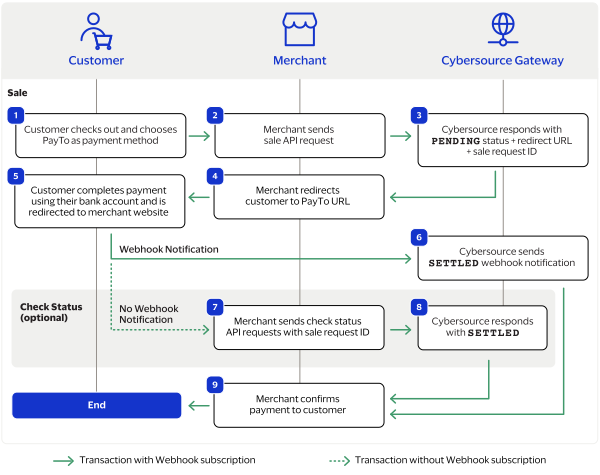
- The customer begins to check out on your website and chooses the PayTo Pay by Bank payment option. This option enables the customer to choose their bank from a list of available partner banks.
- You send a sale request toCybersource. For more information, see Process a Sale.
- Cybersourceresponds with aPENDINGstatus, sale request ID, and the PayTo redirect URL.
- You redirect the customer to the PayTo URL.
- The customer uses their bank account or PayID to approve the payment and is redirected to your website.
- Cybersourcesends you an automatic SETTLED or FUNDED webhook notification when the sale is complete. For more information, see Introduction to Webhooks.
- If you do not receive a webhook notification or have not enabled webhook notifications, you send periodic check status requests with the sale request ID toCybersourceuntil you receive an updated status. For more information, see Check a Status.
- Cybersourceresponds to your check status request with a SETTLED or FUNDED status. This status confirms that the payment is complete.
- You confirm the payment.