Configuring an Ethernet Proxy IP Connection on the PAX Terminal
Use the information in this section to configure a Ethernet proxy IP connection on the
PAX terminal.
If your business hides its Wi-Fi network from the public, you are using a proxy server.
In this instance, you must use the Proxy IP configuration option to connect the PAX
terminal to your network.
IMPORTANT
Before starting this configuration, consult your IT department to
obtain the information required to configure this type of network connection.
Enable an Ethernet Proxy IP Connection on the PAX Terminal
To enable an Ethernet IP connection, use an Ethernet cable to connect your PAX A35
terminal to your point-of-sale (POS) system. For more information, see Connect the Ethernet Cable to the PAX Terminal.
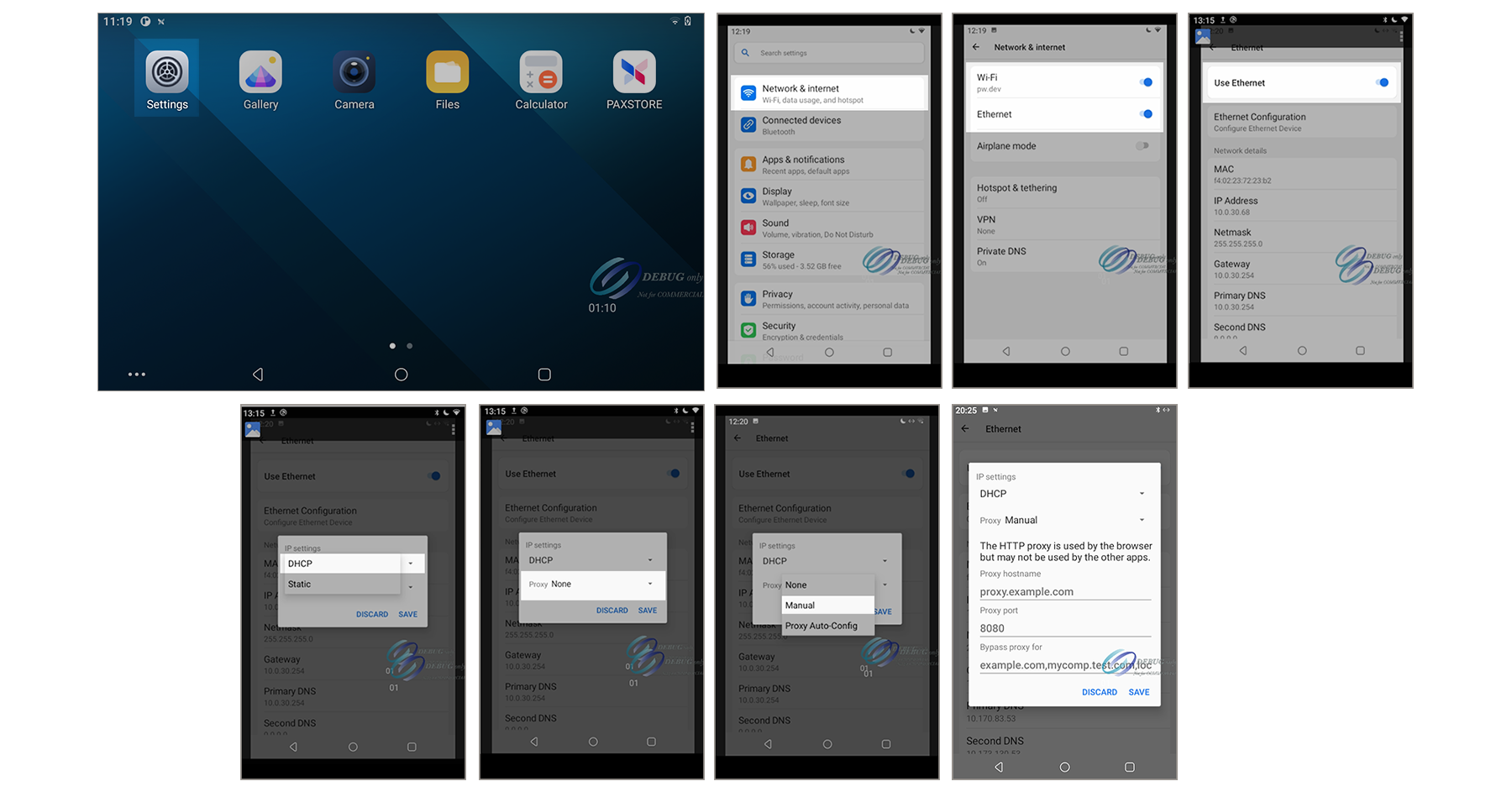
Figure:
Settings Menu Screens Used to Enable an Ethernet Proxy IP Connection on PAX
Terminal
Follow these steps to enable the Ethernet proxy IP connection on the PAX
terminal.