On This Page
Detailed Integration Steps
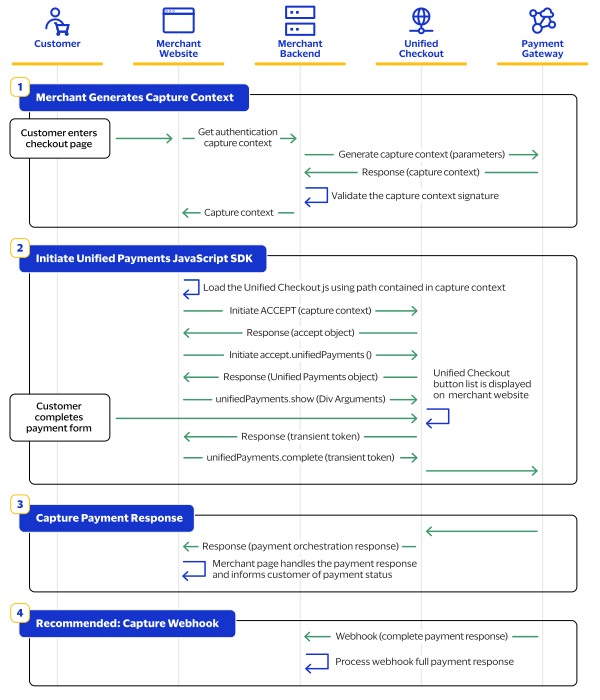
- Create a Capture Context API Call:
- This call replaces yourSecure Acceptancehash value.
- Refer to the Capture Context API Documentation for detailed instructions and examples.
- InitiateUnified Checkoutin Your Web Page:
- Unified Checkoutis initiated using a JavaScript-based application instead of the POST method used inSecure Acceptance.
- Implement theUnified CheckoutSDK on your webpage. See theUnified CheckoutSDK Guide for more information.
- Capture the Response on Your Web Page:
- Ensure your frontend captures the response from theUnified Checkoutprocess.
- Handle the response appropriately to update the user interface and communicate transaction status.
- Refer to the Response Handling Guide for best practices.
- Optional: Webhook implementation:
- Subscribe to theUnified Checkoutwebhook to receive the full payment details
Information that is captured by
Unified Checkout
, including the billing
and shipping address, can be retrieved using the payment details API.This figure shows the
Unified Checkout
payment flow.Figure:
Unified Checkout
Payment Flow