On This Page
Insert a SIM Card into the PAX Terminal
To set up a cellular connection, you must use a SIM card that provides access to 4G or 3G
networks.
Follow these steps to insert a SIM card into the PAX A3700 terminal.
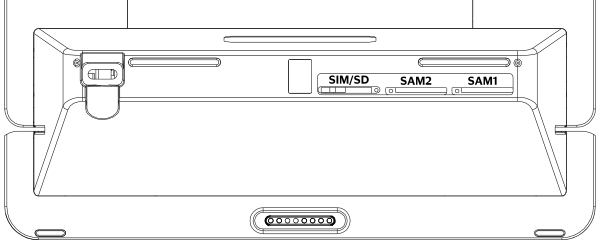
Figure:
PAX A3700 Terminal Rear View Showing SIM/SD/SAM Card Slots
- Turn off the power to the terminal.
- On the back of the terminal, slide the SIM/SD/SAM card slot compartment cover to the left, then remove it.
- Insert the SIM card into the labeled SIM/SD card slot with the contacts facing down to match the contacts on the terminal.
- Replace the SIM/SD/SAM card slot compartment cover, then slide it to the right to close it.
- Power on the terminal.