On This Page
pilot
How to Set Up OAuth 2.0
This overview describes the steps that you and the merchant must complete to implement
OAuth.
Figure:
OAuth 2.0 Implementation
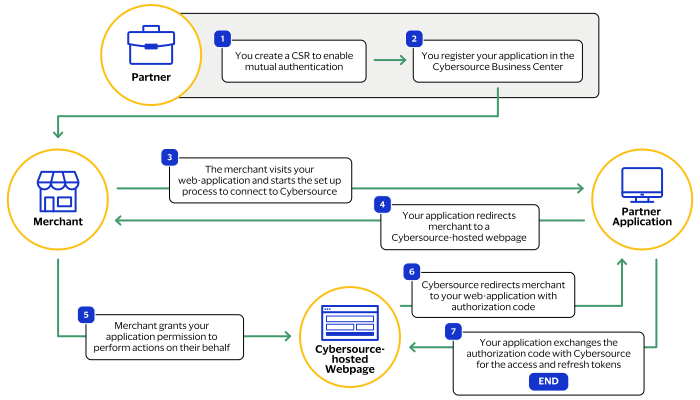
- You enable mutual authentication by obtaining a Certificate Signing Request (CSR) from a supported certificate authority (CA). After obtaining a CSR, you provide your common name details toCybersource. For more information, see Enable Mutual Authentication.
- You register your web-application in theBusiness Centerand set a scope of permissions and a redirect URL to your web-application. For more information, see Register Your Application.
- The merchant accesses your web-application, logs into their account using their credentials, and clicks a button or link to set up theirCybersourceaccount.
- Your application redirects the merchant to aCybersource-hosted webpage. For more information, see Redirect the Merchant.
- The merchant logs in to theirCybersourceaccount and approves your request. This authorizes your web-application to perform specific actions on their behalf which are set by the permissions scope that the merchant approved. Notify the merchant that their account must have access to grant OAuth permissions to complete this requirement.
- Cybersourceredirects the merchant to your application using the redirect URL you registered. An authentication code is appended to the redirect URL. For more information, see Interpreting the Redirect Response.
- Your application exchanges the authorization code withCybersourcefor these two tokens:
- Access token: A token to authenticate transactions usingCybersource. For more information about how to authenticateCybersourcetransactions using this token, see Submit API Requests Using OAuth.
- Refresh token: A token that you can use to request additional access tokens.
For more information about requesting tokens, see Request the Access and Refresh Tokens.For more information about refreshing your existing tokens, see Refresh the Access Token and Refresh the Refresh Token.
To change the permissions the merchant grants you, you must repeat steps 2–7.
You can view examples of these steps in the demo
application.
You must obtain test merchant credentials to emulate the access delegation. Your test account
must contain at least one card-based transaction from within the past 7 days. To sign up for a
sandbox test account to create your test credentials, see: