On This Page
Authorizing a Sale for a Product Not Yet Available
When the customer purchases a product that is not yet available, you can request an
authorization and a sale. First request an authorization to ensure that funds are
available. After the product becomes available, ship the product and request a sale.
Barclays
then links the follow-on authorization to the first
authorization, and then links to the capture request.Figure:
Authorizing a Sale for a Product not yet Available
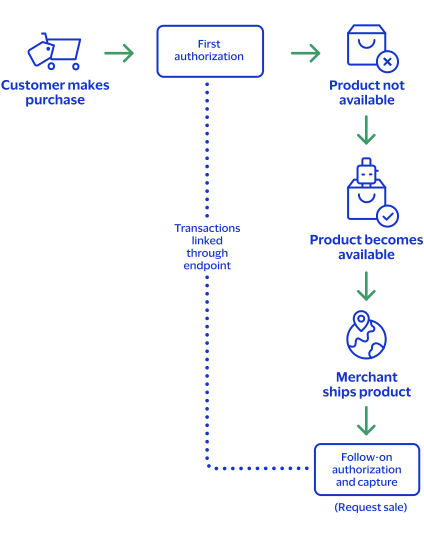
Step 1: Requesting an authorization
Request an authorization to ensure that funds are available before the product is
available for immediate shipment. The authorization request requires no additional
fields or requirements than a basic authorization.
Step 2: Processing a sale
When the product becomes available, ship the product and request a sale. The follow-on
authorization requires you to submit a sale request that includes the
processingInformation.linkId
field in addition to the
basic fields required for every sale request. The
processingInformation.linkId
field in an
authorization request triggers the split-shipment functionality. Set the
processingInformation.linkId
field to the
{id}
value from the endpoint. Field Specific to authorizing a sale for a product not yet available:
First Authorization Response: The
{id}
value is
returned in the endpoint.Follow-on Authorization Request:
processingInformation.linkId=SWVdPS5IM
Step 3:
Barclays
attempts to link the follow-on authorization
request to the first authorization- If theprocessingInformation.linkIdvalue is valid, the follow-on authorization is linked to the original authorization in theSmartpay Fuse Portaland in reports.
- If theprocessingInformation.linkIdvalue is not valid, the follow-on authorization is not linked to the original authorization in theSmartpay Fuse Portaland in reports.
Step 4:
Barclays
links the capture request- If theprocessingInformation.linkIdvalue for the follow-on authorization was valid, all three transactions (first authorization, follow-on authorization, capture) are linked together in theSmartpay Fuse Portaland in reports.
- If theprocessingInformation.linkIdvalue for the follow-on authorization was not valid, the second authorization and capture are linked to each other in theSmartpay Fuse Portaland in reports, but they are not linked to the first authorization.
Related Information
- See Basic Authorization for information on how to process a basic authorization.
- See Sale for information on how to process a sale.