![[CyberSource logo]](images/cybslogo.gif)
Search documentation:


|
|
Search documentation: |
| Help Advanced | |
| Published 08/07/2002 |
|
Chapter 2
Adding Payer Authentication To a Strategy
This chapter explains how to use the Payer Authentication Plug-In as part of a Risk Manager business strategy.
Running the Plug-Ins
To use payer authentication, the Decision Server must run the ProcessPA and ValidatePA plug-ins at some point while it processes a strategy.
You can configure these plug-ins to run as pre-process plug-ins, meaning that they run at the beginning of every transaction. It does not matter which plug-in runs first.
You can also run the ProcessPA and ValidatePA plug-ins based on the outcome of a rule in your strategy, just as you can run any other plug-in. This enables you to perform other tests, such as checking your negative hotlist, before you attempt to authenticate the customer.
Creating a Payer Authentication Module
You can create a module that requests the ProcessPA and ValidatePA plug-ins and interprets their results. After you create the module, you can use it in any of your business strategies.
This section provides an example of a module that interprets the results of payer authentication. You are not required to use this example in your own strategies. The Payer Authentication Plug-In gives you the flexibility to interpret and process the payer authentication results differently.
Important Before you use this module in your own strategies, verify that it meets your business needs.
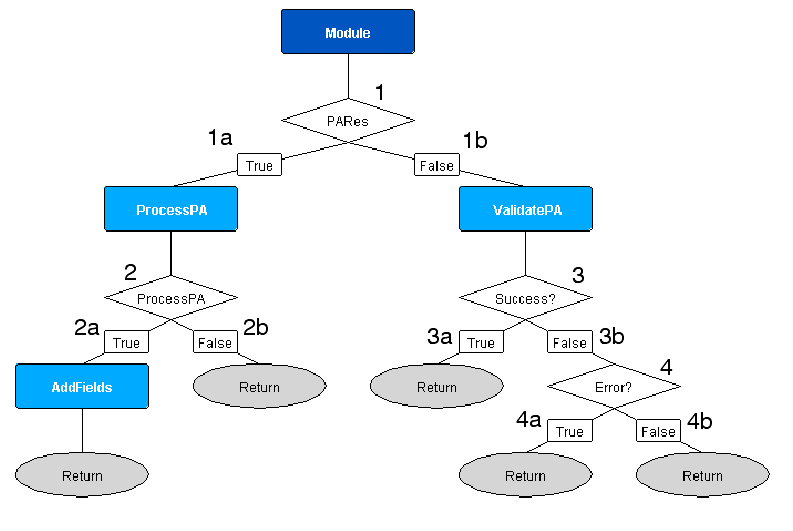
- The PARes rule checks whether the request included a signed payer authentication result:
validatepa_signedpares == ""
- If validatepa_signedpares is equal to an empty string, the request did not include a payer authentication result. This indicates that the customer has not been authenticated.
- The module runs the ProcessPA plug-in, then branches to the ProcessPA rule (Step 2).
- If validatepa_signedpares is not equal to an empty string, the request included a payer authentication result. This indicates that the customer has already been authenticated.
- The ProcessPA rule checks whether the customer is enrolled in a payer authentication program:
processpa_enrolled == "true"
- If processpa_enrolled is equal to
true, the customer is enrolled in a payer authentication program and should be authenticated.
- The module runs the AddFields plug-in, which sets a custom field, rule_code, to the value
authenticate. Your order management system (OMS) can check for this value; if is is present, the OMS can use the payer authentication request (PAReq) to authenticate the customer.- The module then branches to a return point, which sets a custom field, pa_module_result, to the value
review. This value indicates that the strategy should mark the transaction for review.- If processpa_enrolled is not equal to
true, the customer is not enrolled in a payer authentication program.
- The module branches to a return point.
- The Success? rule checks whether the customer's authentication was validated successfully:
validatepa_status_code == "0"
- If validatepa_status_code is equal to
0, the customer's authentication was validated successfully.
- The module branches to a return point, which sets a custom field, pa_module_result, to the value
accept. This value indicates that the strategy should accept the transaction.- If validatepa_status_code is not equal to
0, the customer may not have been authenticated, or a system error may have occurred at the issuing bank.
- The module branches to the Error? rule (Step 4) to further evaluate the results of validation.
- The Error? rule checks whether a system error occurred at the issuing bank:
validatepa_status_code == "6"
- If validatepa_status_code is equal to
6, a system error occurred at the issuing bank during authentication. You should process the order as if the customer is not enrolled in payer authentication.
- The module branches to a return point.
- If validatepa_status_code is not equal to
6, the customer did not complete authentication, or Arcot TransFort was unable to validate the results of authentication.
- The module branches to a return point, which sets a custom field, pa_module_result, to the value
review. This value indicates that the strategy should mark the transaction for review.Using the Module in a Strategy
This section shows how to use the sample payer authentication module, described in Creating a Payer Authentication Module, as part of a strategy.
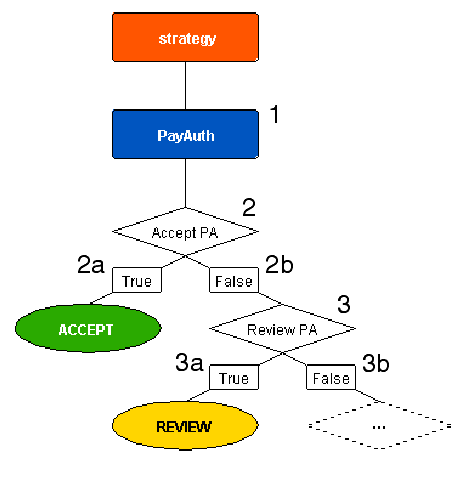
- The strategy calls the PayAuth module, described in Creating a Payer Authentication Module.
- The Accept PA rule checks whether the transaction should be accepted:
pa_module_result == "accept"
- If pa_module_result is equal to
accept, the strategy accepts the transaction.- If pa_module_result is not equal to
accept, the strategy branches to the Review? rule (Step 3) to further evaluate the results of the module.- The Review PA rule checks whether the transaction should be marked for review:
pa_module_result == "review"
| Copyright © 2002 CyberSource Corporation. |
| |
|
|
|